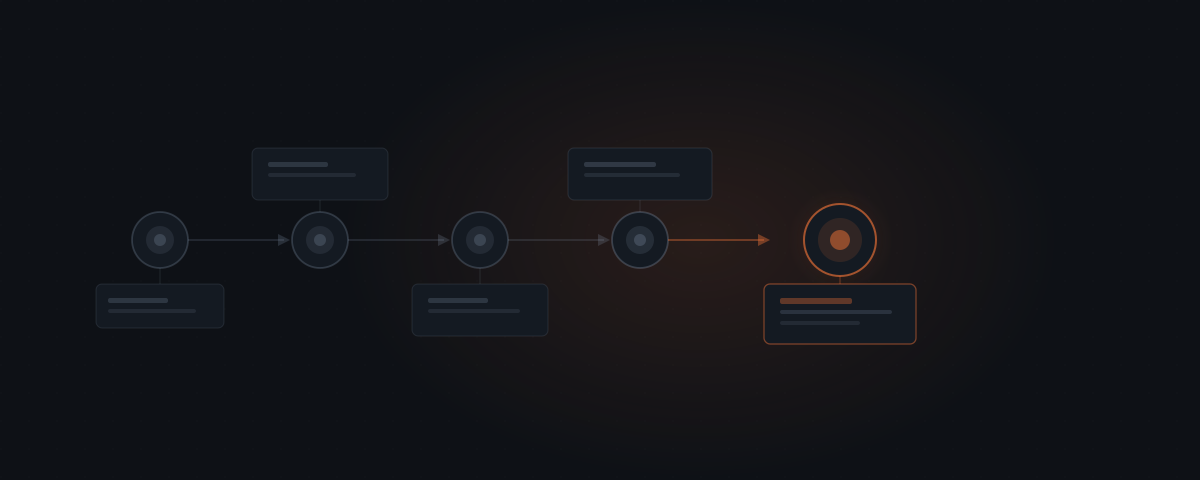
Installing Hermes takes under a day. The step that determines performance over the next six months is not deployment — it is context definition: telling the agent what your tasks actually look like, who handles exceptions, and what a correct output means. Get that right and Hermes starts improving from task one. Get it wrong and the first month of skills encodes the wrong patterns.
Deploy
Connect platforms
Define context
Test with real tasks
Go live
How do you deploy the Hermes instance?
Hermes runs via Docker and deploys on any standard VPS. A 2-vCPU, 4 GB RAM instance is sufficient for teams handling up to a few hundred tasks daily. Three things are required before starting the container: Docker and Docker Compose installed on the server, API access to the language model Hermes will use (compatible with OpenAI and Anthropic model APIs), and the Hermes repository cloned from Nous Research's GitHub.[¹]
Core configuration lives in a .env file: model API key, server port, and the agentskills.io connection token for skill storage. Running docker compose up starts the instance. The first run initialises the model connection and registers the deployment with agentskills.io.
Hermes is released under the MIT licence and runs entirely on team infrastructure. No task data leaves your server — all processing happens locally through the configured model API. Nous Research describes the deployment model as "an intelligent personal assistant that gets more capable the longer it runs" — it operates on your servers, with no data sent to a third-party agent service.[¹]
The most common issues at this stage: invalid API key format, port conflicts with existing services, and firewall rules blocking the webhooks Hermes needs to receive incoming platform messages. Most resolve within the first hour of setup.
Before starting the container, confirming two things saves the most time: verify the API key has the correct permission scopes for the model provider (Anthropic requires separate API key creation from the console; OpenAI requires billing enabled on the account), and confirm the server's firewall allows inbound webhook traffic on the configured port. Both are one-time checks that prevent the most common first-run errors.
How do you connect your platforms?
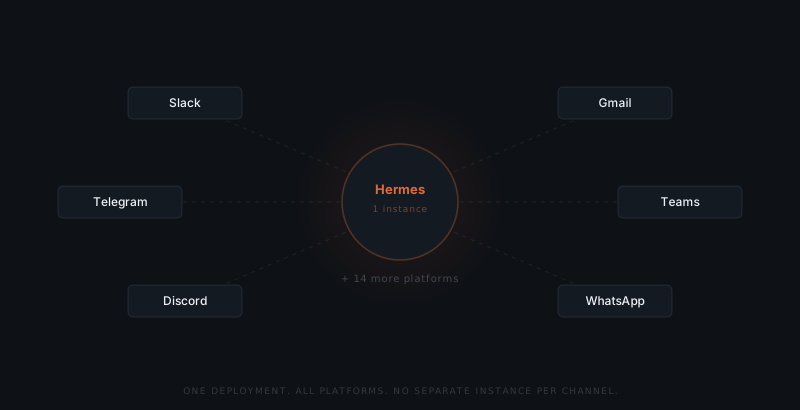
A single Hermes deployment handles all connected platforms simultaneously — no separate agent instance per channel. Each platform requires a token or OAuth credential. The Hermes admin interface provides step-by-step instructions for each connection:
- Slack: Create a Slack App, add bot scopes (channels:read, chat:write, messages:read), install to the workspace, and add the Bot User OAuth Token to the Hermes config
- Gmail: Create a Google Cloud project, enable the Gmail API, generate OAuth2 credentials, and complete the consent flow
- Telegram: Create a bot via @BotFather and add the bot token
- Microsoft Teams, Discord, WhatsApp: Follow equivalent OAuth or token flows documented in the Hermes platform guide
Each new platform takes 15–30 minutes to connect. After connecting, the Hermes admin interface confirms status and shows incoming message activity for each channel.
| Platform | Connection type | Setup time | Primary use case |
|---|---|---|---|
| Slack | Bot OAuth token | 15–20 min | Internal task routing, team communication, approval queues |
| Gmail | OAuth2 credentials | 20–30 min | Email-based workflows, client communication sequences |
| Telegram | Bot token via @BotFather | 10–15 min | High-volume messaging, candidate follow-up |
| Microsoft Teams | OAuth | 20–30 min | Enterprise team communication, internal notifications |
| Discord | Bot token | 10–15 min | Community management, support ticket routing |
| Business API | 30–60 min | Client messaging (requires Meta Business verification) | |
| Signal | Signal CLI or gateway | 45–90 min | Secure messaging, requires additional setup on server |
Most service business implementations use two to three platforms. Connecting more platforms does not create more agents — Hermes handles all connected platforms from a single deployment instance. Adding a platform after the initial setup follows the same OAuth or token flow.
Most Hermes setups stall not at deployment — but at context definition.
What does context definition involve?
Context definition is where most Hermes setups underperform. Hermes begins building Skill objects from the first completed task — structured records of how to handle each task category. The skills built in the first month reflect the inputs received and the outputs produced. Poor context definition in week one propagates into every skill built from those tasks.
The inverse is also true. A team that spends an extra day on context definition — pulling real examples from the last 30 days, annotating what made each output correct, and naming a specific escalation handler — will see noticeably lower correction rates in the first two weeks. The context definition work is not configuration overhead. It is the quality investment that determines whether month-three Hermes handles your specific workflows reliably or keeps producing outputs the team has to correct.
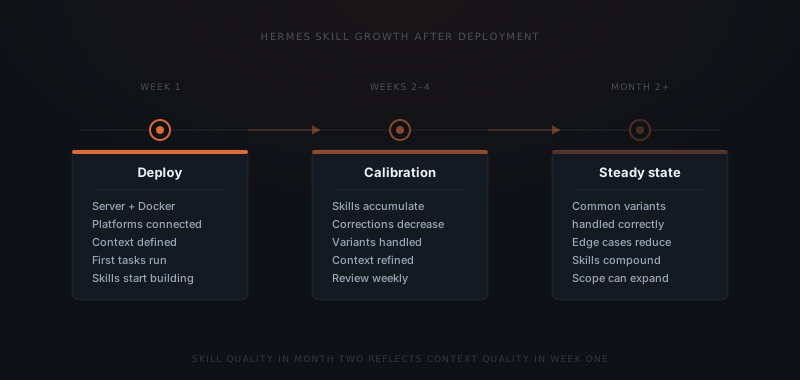
Hermes starts encoding skills from the first completed task. If the first 50 tasks are poorly framed or corrected constantly, those corrections become the encoded approach. The quality of skills in month three reflects the quality of context definition in week one.
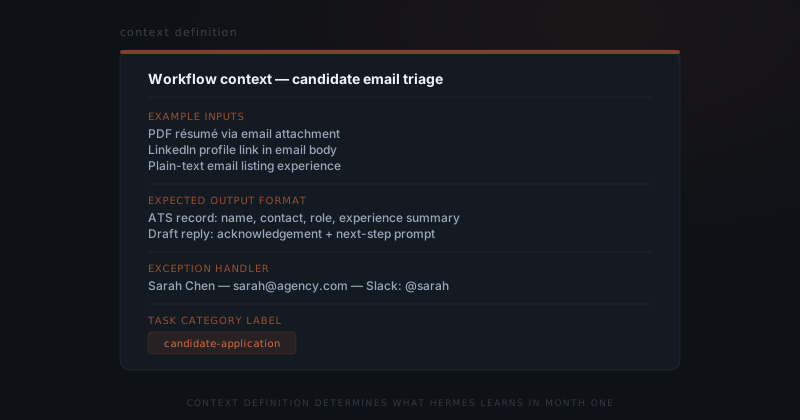
Context definition requires four inputs for each workflow Hermes will handle:
- Example inputs — 5–10 real examples of tasks the workflow will receive (actual emails, messages, or requests, not invented ones)
- Expected output format — what a correct output looks like, with annotated examples showing what made each output right
- Exception handler — the name and contact of the person Hermes escalates to when it is uncertain
- Task category label — how Hermes should name and group this task type in its skill library
This step typically takes 1–3 business days per workflow — not because it is technically complex, but because determining what "correct" looks like requires input from the people doing the work today.
| Context element | What to include | Common mistake |
|---|---|---|
| Example inputs | 5–10 real tasks pulled from the last 30 days of actual work | Using invented examples that don't reflect real input variation |
| Expected output format | Annotated examples showing what made each output correct | Describing the format in prose without showing actual examples |
| Exception handler | One named person and their contact method | "The team" or "anyone available" — escalation needs a specific name |
| Task category label | Unique descriptive name matching how this workflow is discussed | Generic labels like "email" that don't differentiate task types |
The example inputs are the highest-leverage element. Real examples capture the variation in how actual tasks arrive — different email formats, partial information, forwarded messages. Invented examples produce skills that work on the invented format and fail on the real one. Pull examples from the inbox, message history, or CRM rather than writing them from memory.
How do you test Hermes before going live?
Before enabling action permissions, run a test phase of 20–50 real tasks in review-only mode. Hermes processes incoming tasks and produces outputs, but takes no action in connected systems — no emails sent, no records created — until a human approves each output.
Review each output against the context definition. A correct output matches the expected format and uses the information from the input accurately. Flag outputs that miss the mark and add the correct version as an example pair to the context definition. After 20 consecutive correct outputs on a workflow, that workflow is ready for live operation.
The review-only testing phase is not just a quality gate — it is the fastest way to complete the context definition. Outputs that miss during testing reveal gaps in the examples or ambiguities in the output format that were not visible when the context was written. Each correction made during testing updates the context definition and improves the skill quality for every subsequent real task. Teams that skip the testing phase typically encounter the same corrections as week-one failures in production — with the difference that those failures have already reached clients.
A review-only testing window of 20–30 tasks is the minimum. For high-volume workflows or those involving client-facing output, 50 tasks is more appropriate. The signal that testing is complete is not the passage of time — it is 20 consecutive outputs that required no correction.
At go-live, enable action permissions per platform. Set a weekly review cadence for the first month: check a sample of recent outputs, note any recurring error patterns, and update context definitions where needed. Skill accumulation accelerates in weeks 2–4 as Hermes handles more task variants — by the end of month one, common task types are typically handled correctly.
The first-month review cadence is not optional. Skill quality depends on the corrections made during this period — every corrected output improves the relevant skill. A team that reviews weekly in month one and addresses patterns as they emerge will have noticeably better skill quality by month two than a team that goes live and checks back only when something obviously goes wrong. The weekly investment is 20–30 minutes; the compounding benefit runs for the lifetime of the deployment. For a full explanation of how skills build and compound over time, see how Hermes learns.
What common setup mistakes affect skill quality?
Most Hermes setups that underperform in month two trace to one of five mistakes made during setup — all of which are visible in the context definition stage and fixable before go-live.
| Mistake | Why it happens | What it produces | How to prevent it |
|---|---|---|---|
| Invented example inputs | Real examples require locating actual messages | Skills encode patterns that don't appear in real tasks; high correction rate in week two | Pull all examples from real task history; never write them from memory |
| Generic exception handler | "The team" seems sufficient | Escalations have nowhere to go; tasks queue without resolution | Name one person per workflow; include a specific contact method |
| No output annotation | The correct format seems obvious to the writer | Hermes builds skills from unannotated outputs; ambiguous approaches encoded | Add 2–3 sentences per example explaining what made it correct |
| Actions enabled before review testing | Eager to go live | First real errors reach clients before the pattern is caught | Always run 20–50 tasks in review-only mode before enabling actions |
| Single context block for multiple workflows | Seems simpler to set up | Skills for different task types encode each other's patterns | Separate context per workflow; one category label per task type |
The correction rate in week one is the fastest diagnostic. A correction rate above 30% in the first week means the context definition does not match the actual inputs Hermes is receiving. Updating the example inputs to reflect what is actually arriving usually resolves it within another week of operation.
Frequently asked questions
What server does Hermes run on? Hermes runs on any standard VPS via Docker. A 2-vCPU, 4 GB RAM instance handles hundreds of daily tasks for a small team. Nous Research recommends a minimum of 2 GB RAM; 4 GB provides headroom for concurrent platform connections and skill processing.
How long does Hermes setup take? Deployment and platform connections take less than a day for a team on modern infrastructure. Context definition — the step that determines skill quality — takes 1–3 days per workflow, depending on how many workflows are being configured and how readily the team can provide real task examples and output standards. The testing phase adds another two to five days before go-live, depending on task volume and how many corrections are needed to stabilise outputs.
What platforms does Hermes support? Hermes connects to 20+ platforms from a single deployment, including Slack, Gmail, Telegram, Discord, WhatsApp, Microsoft Teams, and Signal. Each platform requires a separate token or OAuth credential. The Hermes admin interface documents the connection steps for each.
What happens if Hermes is uncertain about a task? Hermes escalates to the exception handler defined in the context definition for that workflow. The exception handler receives the task and Hermes's best attempt at an output, reviews it, and either approves or corrects it. Corrections are fed back into the skill for that task category.
How many workflows can a single Hermes instance handle? A single Hermes instance handles multiple workflows simultaneously, each with its own context definition and skill library. Most small service businesses run two to five workflows from a single deployment. Performance scales with task volume, not workflow count — a 2-vCPU, 4 GB instance handles hundreds of daily tasks across multiple workflow types without degradation.
Notes
- Nous Research, Hermes documentation. https://hermes-agent.nousresearch.com/docs/
- Microsoft. "Will AI Fix Work?" Work Trend Index Annual Report 2023. Microsoft, 2023. https://www.microsoft.com/en-us/worklab/work-trend-index/will-ai-fix-work — Found that knowledge workers spend 57% of their time on communication tasks; the proportion the Hermes setup is designed to address.
For a complete explanation of how Hermes builds and compounds skills over time, see how Hermes learns. For an overview of what Hermes can do for a service business, see what is Hermes.