How long an OpenClaw setup takes
Five to seven business days from scoping call to live setup. That is the standard timeline for a two-to-three workflow implementation.
One workflow set up quickly can be done in three to four days. Five or more workflows with custom integrations takes ten to fourteen days. Scope determines time.
How OpenClaw setup time splits between ClawBuilt and the founder
The five-to-seven-day window is mostly not your time. Here is how it splits:
| Part of the process | Whose time |
|---|---|
| Scoping call (Day 1) | Yours — 60 min |
| Configuration and integration (Days 2–4) | Ours |
| Review session (Day 5) | Yours — 60 min |
| Revisions if needed (Days 5–6) | Ours |
| Final sign-off (Day 6–7) | Yours — 30 min |
Your total time investment: roughly three hours. The rest of the calendar window is ClawBuilt doing configuration work.
Five to seven business days on the calendar. About three hours of your time.
What determines the OpenClaw setup timeline
Setup time scales with the number of workflows in scope — not the size of your business. A five-person agency and a twenty-person consultancy take the same time if they are configuring the same workflows. Complexity comes from scope, not headcount.
The main factors:
- Number of workflows — Each workflow adds roughly half a day of configuration and testing
- Number of integrations — Each new tool connection adds setup and permission verification time
- Access readiness — If credentials and admin access are available when needed, nothing stalls
- Scope stability — Changes to agreed scope mid-implementation extend the timeline
What a standard OpenClaw setup week looks like
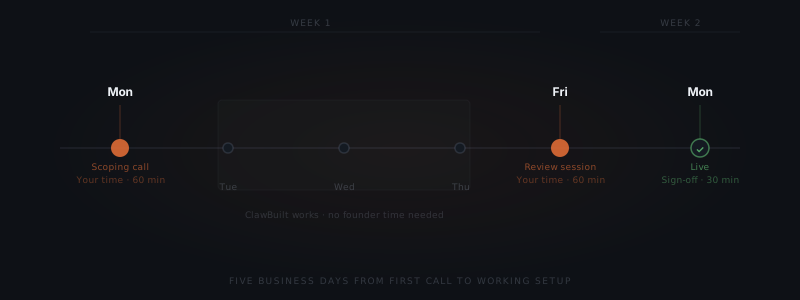
A standard engagement runs like this:
- Monday: Scoping call. Scope agreed, access requests sent.
- Tuesday–Thursday: Configuration, integration, and testing. No founder time required.
- Friday: Review session. You see the working setup for the first time and raise any changes.
- Following Monday: Live. Revisions from the Friday review are applied over the weekend.
Most setups follow this pattern. Exceptions happen when integration access is delayed or when scope changes after the Monday call.
What can extend the OpenClaw setup timeline
Two things extend the OpenClaw setup timeline more than anything else.
The first is access delays. Waiting on credentials, admin permissions, or IT approvals to connect a tool stalls configuration. Getting access sorted immediately after the scoping call keeps the timeline on track.
The second is scope changes mid-implementation. What is agreed on Monday is what gets built. Deciding to add a workflow on Wednesday shifts the Friday review. Changes are welcome — they restart the clock on that workflow.