What an OpenClaw approval template is
An approval template is the pattern the agent follows every time a specific trigger fires. It is not a prompt you write hoping the model interprets it correctly. It is a structural definition — here is what the output looks like, here is where the context goes, here is the tone.
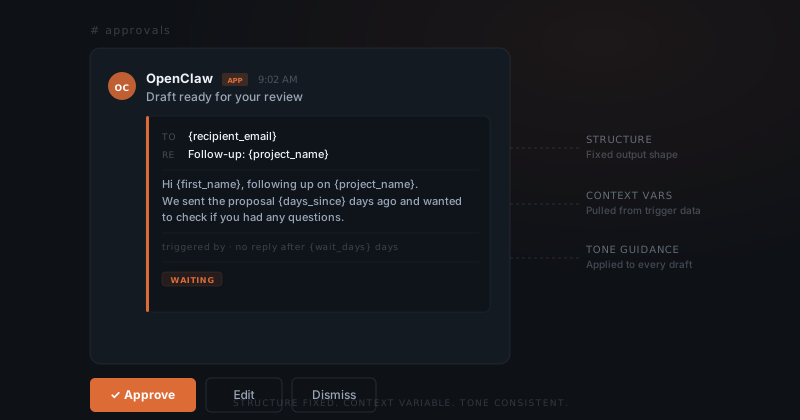
An approval template is not a prompt the agent interprets. It is a structure the agent fills. The output shape is fixed. What changes is the variable content pulled from each trigger.
When a trigger fires, the agent fills the template. The structure does not change. The tone guidance does not change. What changes is the variable content pulled from the trigger context: the sender's name, the order total, the project status.
What goes inside an OpenClaw approval template
Every approval template has three components.
Structure defines the shape of the output. For an email: subject line format, opening line, body paragraphs, closing. For a Notion record: which fields to populate and in what order. Structure tells the agent what a complete output looks like.
Tone guidance defines the register. Not "be professional" — that is too vague. Specific guidance: match the tone of the incoming message, keep responses under 120 words, never use first names in the greeting. The agent applies this to every draft using this template.
Context variables are the placeholders the agent fills from the trigger data. {sender_name}, {project_name}, {outstanding_amount}. Each variable points to a specific data source. A variable pointing to a stale source produces stale drafts — which is why source mapping matters as much as the variable itself.
How OpenClaw approval templates connect to triggers
Each trigger maps to exactly one template. A trigger that fires when a new lead emails maps to the lead acknowledgement template. A trigger that fires when an invoice is 14 days overdue maps to the overdue notice template. One trigger, one template, one predictable output shape.
The quality of every draft is decided before any trigger fires.
Multiple triggers can share one template when the output shape is identical. A follow-up email template might serve four trigger conditions — new lead, inbound reply, no reply after 3 days, no reply after 7 days. Same structure, different variables populated from different points.
Consistent template shapes are what make the approval queue readable at a glance. Each draft in Slack carries the shape defined by its template. You know what a draft is before you read it.
How to edit and improve OpenClaw approval templates
The right time to edit a template is when you see a pattern in your dismissed drafts. Three dismissals of the same template in a week signals that something in the structure, tone, or context mapping is off.
| What you notice | What to change |
|---|---|
| Draft tone is too formal | Tighten tone guidance with a concrete example |
| Draft includes outdated information | Update the context variable source |
| Draft structure doesn't fit the trigger | Restructure the body section |
| Draft is consistently too long | Add a word count constraint to the structure definition |
You flag the pattern. ClawBuilt makes the change and shows you the revised template before it goes live. The next drafts from that trigger reflect the update immediately.