
A business owner has three workflows they'd like to hand to an AI agent. All three seem automatable. One of them is. Two require human judgment that nobody has ever written down — and until someone does, no agent will handle them reliably. The question most teams ask is whether AI can do this. The better question is whether the business has ever specified it clearly enough that a new person could do it on day one.
The question most teams ask is: "Can an AI agent do this?" — and answering it well starts with a shared understanding of what an AI agent is and what it actually needs to run. That question returns an answer for almost every workflow. The better question is different.
Which readiness question do most businesses ask wrong?
"Can an AI agent handle this workflow?" is almost always answered yes. AI agents can handle pattern-matching, drafting, routing, triggering, and data entry. For most business workflows, the technology is not the constraint.
The real constraint is specification. An agent cannot run a workflow that hasn't been written down precisely enough to follow. The readiness question is not about AI capability. It is about whether the business has ever made this process explicit.
Most businesses haven't. The workflows that seem most automatable are often the ones where the team knows exactly what to do — and has never needed to write it down, because everyone doing the task already knows it. That implicit knowledge is invisible when assessing automation potential. It becomes visible the moment someone tries to write the brief.
There are three types of implicit knowledge that block automation readiness. Threshold knowledge — the team knows when a situation is unusual enough to handle differently, but the threshold is never written down. Relationship context — the right response to an email depends on who sent it and what the history is, and neither is in the CRM record the agent can access. Operational workarounds — the official process has three steps, but in practice there is always a fourth that nobody included in the documentation because "everyone knows to do it."
Identifying which type of implicit knowledge is missing narrows the documentation work considerably. Threshold knowledge becomes a named exception rule. Relationship context points to a data field that does not yet exist. Operational workarounds get written into the step sequence. The readiness assessment is the exercise that surfaces which type applies.
How does the new-employee test measure workflow readiness?
Handing a workflow to an AI agent requires a written procedure. Most businesses discover, at this point, that no such procedure exists.
The most reliable readiness test is simple: could a new employee do this correctly on day one, given only a written procedure?
Not a new employee who has been trained for a week. Not one who has watched someone else do it twice. A new employee with a document, no prior context, and a task to complete.
If the answer is yes, the workflow is specifiable. A specifiable workflow is automatable.
If the answer involves "they'd need to know a bit about how we handle X" or "they'd need to check with someone first" — that knowledge is the gap. The agent hits the same gap, produces a wrong output, and the team calls the agent unreliable. The agent was not unreliable. The specification was incomplete.
The new-employee test is a useful forcing function because it eliminates institutional knowledge as a crutch. A new employee does not know the relationship history, the usual exceptions, or the team's unwritten conventions. Neither does the agent. If the procedure works for the new employee, it works for the agent. If it doesn't, the process work needs to happen before the build does.
What does a ready workflow look like?
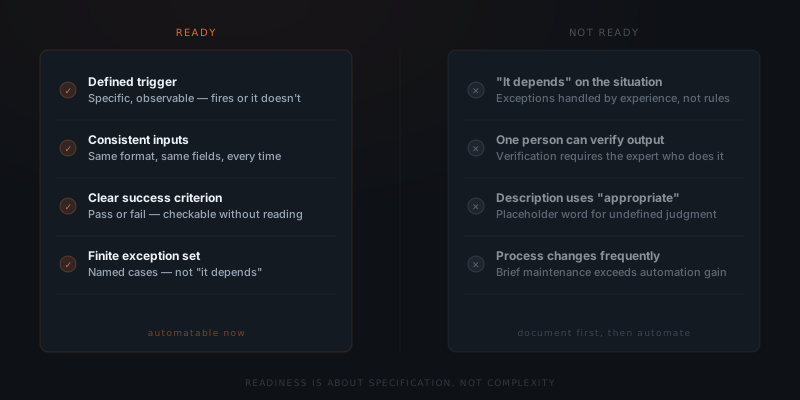
A workflow is ready for an AI agent when it has four properties.
A defined trigger — something specific and observable starts the workflow. Not "when a lead needs following up" — that requires judgment to evaluate. "When a lead has not replied within five business days and their status is Proposal Sent" is observable and testable.
A consistent input format — the agent receives the same type of information every time it runs. The CRM record has the same fields filled in. The email arrives from the same channel. The form submission contains the same structure. Variation in input format is a readiness problem, not a technology problem.
A clear success criterion — it is possible to evaluate whether the agent completed the task correctly without reading the output in detail. "The email was sent" is checkable. "The response was appropriate" requires reading and judgment.
A finite exception set — the cases where the workflow behaves differently are enumerable. Not "it depends on the situation" — a named list of specific situations and what happens in each. A workflow with eight named exceptions and an escalation path for everything else is ready. A workflow with two named exceptions and "use judgment for the rest" is not.
The table below maps each readiness criterion to a concrete example of what it looks like when met versus unmet — and why the unmet version fails in production.
| Criterion | Ready example | Not-ready example | Why the not-ready version fails |
|---|---|---|---|
| Trigger | "Status = Proposal Sent AND last activity > 5 business days" | "When the lead needs following up" | "Needs following up" requires judgment to evaluate; the agent has no observable condition to test |
| Input format | Contact record with the same fields always populated in every run | "The CRM information about this contact" | Variable field availability means the agent fails on any record that doesn't match the assumed structure |
| Success criterion | "Follow-up email sent with subject line [format] and under 150 words" | "An appropriate follow-up was sent" | "Appropriate" cannot be verified without reading the output and making a judgment call each time |
| Exception set | Named list: skip if "Do Not Contact" tag; escalate if value > $50k | "Handle exceptions as needed" | Every unnamed exception produces an output that looks correct but isn't |
What does an unready workflow look like?
Unready workflows share recognizable patterns.
The task description contains the word "appropriate." As in: the agent should send an appropriate response. Appropriate is not a specification. It is a placeholder for judgment that hasn't been defined.
The team says "it depends" when asked how an exception is handled. Every workflow has exceptions. Unready workflows handle them through experience and intuition — knowledge that lives in someone's head and has never been made explicit.
The person who does the task is the only one who can review the agent's output. If the only way to verify the agent's work is to ask whoever normally does it, the task has not been fully specified. The verification criteria are implicit.
The process changes frequently. A workflow that shifts based on client preferences, seasonal variation, or team decisions requires constant brief updates. That maintenance cost often exceeds the benefit of automation until the process stabilizes.
The distinction between an unready workflow and an unautomatable workflow is important. Every signal above is fixable. A workflow with implicit exception handling can have those exceptions documented. A workflow with vague success criteria can have them made explicit. A workflow that only one person can verify can have the verification criteria written down. The investment is process-documentation work — typically four to eight hours — not a different technology.
The mistake teams make is treating unready as a verdict rather than a starting point. A readiness assessment is a scoping exercise. The output is not "ready" or "not ready" — it is a list of what needs to be done before the build starts.
Which workflows seem ready but are not?
Several workflow types score high on first impression — repeating, structured, template-based — but fail the readiness test when assessed against actual inputs. The gap between "seems automatable" and "is automatable" is almost always the unwritten exception layer.
| Workflow | Why it seems ready | Why it usually isn't |
|---|---|---|
| Client email response | Repeating task with a clear trigger | "Appropriate" response depends on relationship context the agent cannot read from the CRM record |
| Sales proposal customisation | Template-based, structured inputs | Proposal content depends on deal history and client preferences that live in the account manager's head, not in a data field |
| Meeting follow-up summary | Structured output, regular cadence | What to include depends on what was decided — implicit context the agent does not have |
| New client onboarding checklist | Defined steps, clear output | Exceptions (unusual client type, special terms negotiated) are handled by whoever knows the client — undocumented |
| Support ticket triage | Observable trigger, defined categories | "Priority" assessment depends on account value and relationship history — not in the ticket fields |
| Candidate screening | Repeating inputs, checklist-based | Fit judgment depends on role-specific criteria that vary by hiring manager and are rarely written down |
None of these workflows is unautomatable. Each of them requires a scoping conversation to identify what is implicit and make it explicit before the brief can be written. The ones that fail in production are the ones where that conversation happened briefly or not at all.
How do you make an unready workflow ready?
If you can't write the procedure, you can't brief the agent.
An unready workflow does not mean automation is off the table. It means the process work comes first.
Narrow the scope. "Handle customer communication" is not a workflow. "Respond to refund requests submitted via the contact form with a confirmation and next-steps email" is. Every workflow that is too broad to specify can be narrowed into one that is.
Document the exception cases. Sit with the person who currently does the task and walk through the last twenty instances together. For each one handled differently from the others, write down why. Those reasons become the exception rules. A workflow with fifteen documented exceptions is specifiable. A workflow with "it depends" is not.
Add an explicit escalation path. Every brief needs a named action for inputs the agent wasn't designed to handle. Not "the agent will figure it out" — a specific step. Flag for review, route to a queue, reply with a holding message. The escalation path keeps the agent from producing wrong outputs on edge cases.
A workflow that fails the new-employee test today can pass it in a week if someone sits down and writes the procedure. That document is not preparation for automation. It is the brief. The agent runs from it directly.
Write a first-draft procedure
Start with what you know: trigger, typical inputs, expected output. Write it as a numbered step sequence. Do not worry about completeness — the gaps will surface in the next steps.
Run the new-employee test
Hand the procedure to someone with no knowledge of the workflow. Ask them to describe what they would do for a specific real input. Every question they ask is a missing line. Every wrong description they give is an ambiguity.
Walk through 20 real instances
Sit with whoever currently does the workflow and observe it run on 20 actual inputs. Record the trigger, inputs available, decision made, output produced, and any exception handled for each instance. The first draft rarely survives contact with real instances.
Document every exception rule
For each instance handled differently from the standard path, write a named rule: when condition X is true, do Y instead. A workflow with 12 documented exception rules is specifiable. A workflow with "use judgment" is not.
Write the escalation path
Define the specific action for inputs that match no named rule: flag for review, route to a queue, reply with a holding message. The escalation path turns an undefined edge case into a handled one. Without it, every undefined case produces a confident-looking wrong output.
Test against five new inputs
Find five real inputs from the last 30 days not used in the step 3 session. Run each through the procedure. Any gap that appears is a missing line. Fix it before the build starts.
Frequently asked questions
How do you know if a workflow is ready for an AI agent?
Use the new-employee test: could a new employee do this correctly on day one, given only a written procedure and no other context? If yes, the workflow is specifiable and automatable. If the answer requires prior knowledge, judgment about exceptions, or checking with someone first, the specification is incomplete — and the agent will fail on the same gaps.
What does a workflow ready for an AI agent look like?
A ready workflow has four properties: a defined trigger that is observable and testable, a consistent input format the agent receives every time, a clear success criterion that does not require judgment to evaluate, and a finite set of named exceptions where all edge cases are explicitly defined.
What makes a workflow unready for automation?
Four signals: the task description contains the word "appropriate" without a definition, the team says "it depends" when asked how exceptions are handled, the only person who can verify the agent's output is the person who normally does the task, and the process changes frequently enough to require constant brief updates.
How do you make an unready workflow ready for an AI agent?
Three steps: narrow the scope until the workflow can be fully specified, document exception cases by walking through the last twenty instances with whoever currently does the task, and add an explicit escalation path for inputs the agent was not designed to handle. A workflow that fails the new-employee test today can pass it in a week if someone writes the procedure.