
Staying in control of an AI agent is not a monitoring habit — it is a design decision made before the agent runs. Defining permission scope and approval gates before the first task runs means the agent cannot take high-stakes actions without a human decision. That structure is what control actually looks like.
A new agent is live. It is handling follow-up emails, logging meeting notes, tagging contacts in the CRM. Everything looks fine — until a client replies to a message you did not write and did not approve. The agent sent it. The message was reasonable. But the decision was not yours to skip.
That gap is not a bug. It is a design problem. An agent system without defined limits does not fail dramatically — it quietly takes actions you did not sanction, at the moments you are not watching.
Staying in control of an AI agent is not about watching what it does. It is about designing what it is allowed to do before it starts.
The monitoring trap
Most founders who worry about losing control of an agent reach for the same fix: check what it is doing. Review the logs. Watch the outputs. Step in when something looks wrong.
This is the monitoring model of control. It assumes the risk lives in the outputs — that you catch the problem after the agent acts. The problem with monitoring is volume. An agent handling 40 interactions a day produces 40 things to review. At that scale, monitoring is a second job.
The monitoring model also arrives late. By the time you spot a problem in the logs, the action has already run. A message was sent. A record was updated. A deal was moved. Monitoring tells you what happened. It does not prevent it.
The alternative is not no oversight — it is oversight built into the design. Permission scoping and approval gates mean the actions worth catching never run in the first place. The remaining oversight is a quick scan of the approval queue: a few items per day, each already assembled by the agent and waiting for a decision, not a review of raw output logs searching for problems.
Permissions define what the agent can reach
Before the agent runs a single task, its connections to external systems get scoped. Permission scoping is not a security exercise — it is a control decision.
The agent needs access to the inbox to draft replies. It does not need access to send. The agent needs to read the CRM to look up contacts. It does not need to delete records. Each connection gets the minimum access the workflow requires, and nothing beyond that.
This is not a restriction the agent works around. It is a structural limit on what the agent can attempt. A permission that does not exist cannot be violated — the action is blocked at the system level, not by a prompt instruction the agent is trying to follow.
The table below shows the minimum-access principle applied to common business systems. The "access to avoid" column is where most control failures originate.
| System | Minimum access required | Access to avoid | Risk of over-permissioning |
|---|---|---|---|
| Email inbox | Read messages, create draft replies | Send on behalf of | Agent sends unsanctioned messages to clients without approval |
| CRM | Read contact records, update specific defined fields | Delete records, bulk-update all fields | Irreversible data changes; wrong record updated without visibility |
| Calendar | Read availability, create draft invites | Confirm and send invites, delete events | Appointments set with clients without a human decision |
| Slack | Post to specific review-queue channel | Post to all channels, direct-message contacts | Unvetted content reaching clients or wrong channels |
| Invoicing | Read invoice status, generate draft invoices | Send invoices, process payments | Financial actions executed without approval |
Approval gates define what requires a human decision
A well-designed agent system does not require constant supervision — not because the agent is trustworthy, but because its permissions and approval gates make supervision unnecessary. The design is the control.
Approval gates sit inside the workflow, between the agent's decision and the action being executed. When the agent reaches a gated action, it stops. It prepares a draft, places the action in a review queue, and waits. The action does not run until a human approves or dismisses it.
The gate is enforced at the infrastructure level. The agent cannot route around it, retry with different inputs, or find an alternative path. It waits.
The approval queue is where control shows up in day-to-day operation. A queue that contains the right actions — consequential, client-facing, or irreversible — takes two to five minutes to clear. A queue that contains everything the agent did takes twenty minutes and trains the reviewer to skim, which is functionally the same as having no gate at all. Queue design is as important as gate placement.
Control is not a monitoring habit. It is a design decision.
Designing the boundary between automatic and reviewed
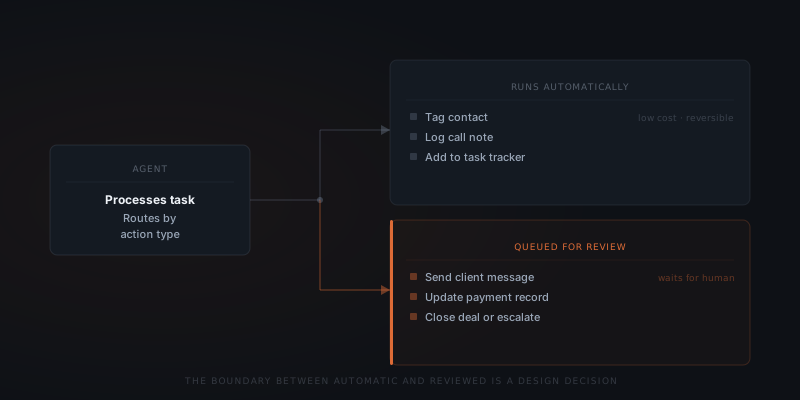
The boundary between what runs automatically and what goes into the queue is a deliberate design decision. For each action type the agent can take, someone needs to answer: what is the cost of getting this wrong?
Low-stakes actions run automatically. Tagging a contact, logging a call note, adding a row to a tracker — these are low-cost, reversible, or both. Reviewing each one defeats the purpose of having an agent.
High-stakes actions go into the queue. Sending a message to a client, updating a payment record, closing a deal, escalating a support ticket — these have real consequences if the agent reads the context wrong. Each review takes seconds. The cost of skipping it is higher.
A well-designed boundary does not put everything in the queue. It puts the right things there. That requires mapping the agent's action space before the system is built — not adjusting after the first mistake.
| Action type | Runs automatically | Goes to review queue | Why |
|---|---|---|---|
| Tag a CRM contact | ✓ | Low-stakes, easily reversible, reviewing defeats the purpose | |
| Log a call note | ✓ | Internal, reversible, visible to the owner at any time | |
| Send a message to a client | ✓ | Irreversible; wrong message damages the relationship | |
| Update a payment record | ✓ | Financial action; wrong update has downstream consequences | |
| Close a deal in the CRM | ✓ | Irreversible; signals to other systems and people | |
| Add a row to a reporting tracker | ✓ | Low-consequence; easily corrected | |
| Escalate a support ticket | ✓ | Routes work to a human; wrong routing creates confusion |
Control in practice looks like near-invisibility
A business running an agent system with proper control design does not feel like it is managing the agent. The agent handles low-stakes work without interruption. A queue appears when something needs a decision.
Reviewing the draft client message takes fifteen seconds. Dismissing the follow-up that went to the wrong contact takes five. Approving the record update before it saves takes ten. Each decision is fast because the agent has already done the assembly work. You are deciding, not composing.
The goal is not zero involvement. The goal is involvement only where judgment adds something the agent cannot supply. Every other action runs inside the boundaries set before the first task ran.
How control design evolves as the agent earns trust
Control design is not fixed at deployment. It changes as the agent demonstrates reliable performance over time. The initial design is conservative — more items gated, narrower permissions. As the agent shows consistent outputs across a range of inputs, the boundary shifts: some gated actions move to automatic, some permissions expand, the approval queue shrinks.
| Stage | Queue depth | Permission scope | Review intensity |
|---|---|---|---|
| First 30 days | High — most consequential actions gated | Minimum access only; no send permissions | Close — all queue items read before approving |
| Month 2–3 | Reduced — actions performing consistently move to automatic | Send access added for email categories with 90%+ approval rate | Standard — queue reviewed, not every output |
| Month 4–6 | Lean — only high-stakes or novel actions gated | Full working scope; no unused permissions held | Light — queue cleared quickly; unusual items flagged |
| Ongoing | Stable — gate list reviewed quarterly | Scope reviewed quarterly; updated when workflow changes | Maintained — queue never left unchecked for more than 2 days |
The trust evolution is deliberate, not automatic. An action moves from gated to automatic when the owner makes that decision explicitly — not when the agent performs well for a while and the queue items start getting approved without being read. That pattern — approval without reading — is the signal that low-stakes items are clogging the queue and the real control is degrading.
What happens when control design fails
Control failures are almost never dramatic. They are quiet — the agent taking an action it was not intended to take, repeatedly, until someone notices. Four failure patterns account for most of them.
| Failure type | How it appears | Root cause | Prevention |
|---|---|---|---|
| Over-permissioned access | Agent sends emails or updates records without approval | Send or write access granted at setup without minimum-access review | Audit every permission connection before go-live; grant read access only until send/write access is explicitly justified |
| Missing approval gate | Agent closes a deal or sends a message without human review | High-stakes action not identified as gated during design | Map action stakes during scoping; gate all irreversible actions before deployment |
| Scope drift | Agent handles tasks outside original brief without a decision | No scope log or monthly review | Maintain a written scope document; review monthly |
| Queue neglect | Human approves every item in the queue without reading | Queue too long; low-stakes items mixed with high-stakes | Move low-stakes items to automatic; keep the queue to items that warrant reading |
How to set up control design before the agent runs
Control design is not a post-launch activity. The permission map and approval gate list must exist before the first task runs — not after the first unwanted action prompts a retrospective.
List every system the agent will connect to
For each connection, specify what the agent needs to read and what it needs to write. Do not grant write access by default — justify each write connection explicitly.
Apply the minimum-access rule to every connection
Draft access instead of send. Read access instead of write. Specific field write instead of full record write. Every connection gets the minimum the workflow requires.
Map every action the agent can take
Write out the complete list of things the agent will do: draft a reply, update a field, log a note, tag a record, route a ticket. Include the indirect actions — what does each direct action trigger in downstream systems?
Assign each action to automatic or gated
For each action: what is the cost of this running wrong? Low-cost and reversible — automatic. High-cost or irreversible — gated. Decisions that involve a client, a financial record, or a status change visible to others are gated by default.
Write the scope in a document before go-live
The permission map and the action list become the scope document. This document is what the monthly review checks against — what has changed, what has been added without a decision, what needs to be updated.
Frequently asked questions
How do you stay in control of an AI agent?
Control over an AI agent is a design decision made before the agent runs — not a monitoring habit applied after, and not something that can be retrofitted once the agent has been operating for weeks without defined limits. The two mechanisms are permission scoping — defining what systems the agent can access and with what level of access — and approval gates — requiring a human decision before the agent executes high-stakes actions. Both are set before the agent handles its first task.
What is permission scoping for an AI agent?
Permission scoping defines what external systems the agent can access and what it can do within each. The agent gets the minimum access the workflow requires and nothing beyond. If the agent drafts replies, it gets read access to the inbox but not send access. A permission that does not exist cannot be violated — the limit is enforced at the system level, not by a prompt instruction the agent is trying to follow.
What is an approval gate in an agent system?
An approval gate is a point in the workflow where the agent stops, prepares a draft, and places the action in a review queue. The action does not execute until a human approves or dismisses it. The gate is enforced at the infrastructure level — the agent cannot retry, reroute, or find an alternative path. It waits.
What actions should run automatically versus go to the approval queue?
Low-stakes, reversible actions — tagging contacts, logging notes, scheduling drafts — run automatically. High-stakes or irreversible actions — sending client messages, updating payment records, closing deals — go to the queue. Putting low-stakes items in the queue trains reviewers to skim, which creates conditions where high-stakes approvals get dismissed without being read.