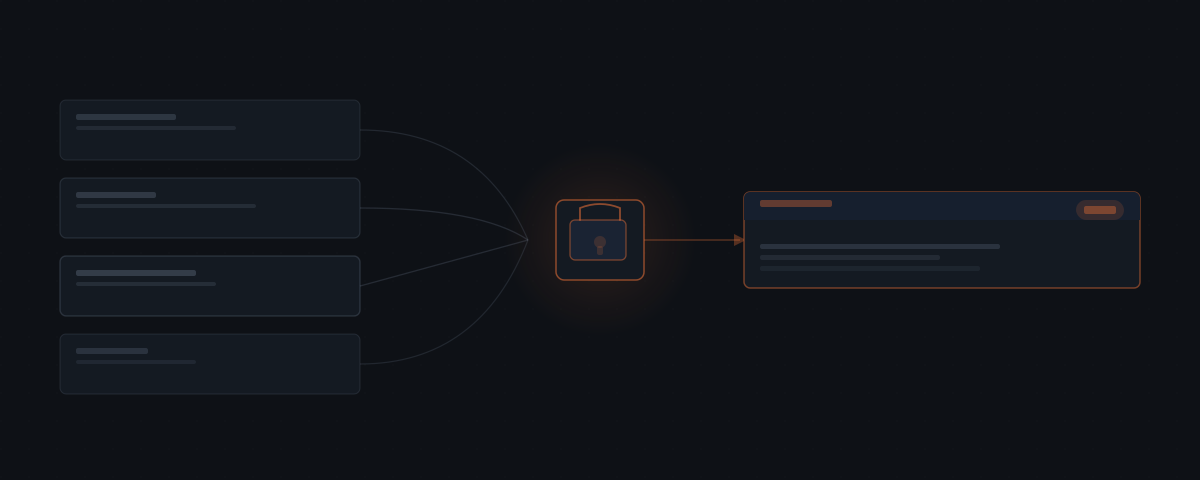
OpenClaw connects to Shopify and brings your store's data to Slack, WhatsApp, or Telegram — orders, inventory, returns, and revenue — so ecommerce operators can monitor and act from a single channel. OpenClaw drafts customer support responses, flags inventory at risk, and processes return requests with your approval at each step.
Running an ecommerce operation means managing a high volume of routine tasks — support tickets, inventory checks, revenue tracking, return processing — while staying focused on the decisions that actually grow the business. The routine volume is the problem. It does not require expertise; it requires attention, and it competes for attention with everything that does require expertise.
OpenClaw connects to Shopify and handles the operational layer: answers store data questions, drafts support responses, monitors inventory against real sales velocity, processes returns, and delivers daily revenue summaries. If you're not sure what OpenClaw is or how it fits into a store's stack, that's the place to start. Every action that reaches a customer waits for your approval first.
| Workflow | What triggers it | What OpenClaw does | Your role |
|---|---|---|---|
| Store data queries | Your question in Slack/WhatsApp | Pulls live data from Shopify and answers | Ask anything |
| Daily summary | Configured morning time | Compiles orders, revenue, returns, low-stock flags | Read and act on flags |
| Customer support | Incoming email or ticket | Classifies issue, drafts reply | Approve or edit before it sends |
| Inventory alert | Stock crossing reorder threshold | Flags product, drafts supplier reorder | Approve the reorder message |
| Return processing | Return request received | Categorizes reason, drafts response | Approve or escalate edge cases |
| Product descriptions | New product added | Generates description in store tone | Edit if needed, then publish |
How OpenClaw surfaces store data without the dashboard
OpenClaw connects to Shopify and answers questions about your store from whichever channel you use. Ask for today's orders, a customer's order history, current stock levels, or yesterday's revenue — it retrieves it without you logging in.
Set up a daily summary. Orders placed, revenue, returns initiated, low-stock flags — all pushed to Slack or WhatsApp at a time you set. You start the day knowing what happened overnight instead of opening four tabs to find out.
The queries work conversationally. "Did we get any orders over £200 yesterday?" returns the list. "What is the current stock on the grey hoodie in size M?" returns the count. "Which products have sold more than fifty units this week?" returns the filtered list. You are querying your store data without being in your store.
For operational decisions, the data also feeds into what OpenClaw drafts. When a support ticket comes in about a delayed order, OpenClaw has already pulled the order status, shipping information, and last tracking update. The draft reply includes the actual information, not a placeholder asking you to look it up. This is what makes the approval step fast — the draft is already substantive when it arrives in Slack.
How OpenClaw handles customer support volume
Support tickets follow predictable patterns. Order status questions, shipping delays, return requests, wrong items — most have the same shape. The average Shopify store handles over 1,000 customer support conversations per month, roughly 33 per day.[¹] OpenClaw pulls the relevant order data, drafts a response, and surfaces it for your approval before anything goes to the customer. You review and send, or edit and send.
For higher-risk actions — issuing a refund, applying a discount, modifying an order — the approval step is enforced at the infrastructure level. The agent cannot take those actions without your explicit sign-off.
One wrong refund on a high-volume day is expensive. The approval layer is not a setting you can accidentally leave off — it is a structural constraint. The action is blocked until you release it.
The triage logic classifies incoming support by type before it drafts anything. Order status queries get the current tracking information. Damaged or wrong item claims get a resolution draft and the option to trigger a replacement or refund in the same approval card. Vague complaints or complex situations get flagged for direct handling rather than a draft that might miss context.
Over time, the draft quality matches your approval patterns. If you consistently edit certain phrase patterns in support replies, OpenClaw stops using them. If you approve certain framings unchanged across dozens of tickets, that framing becomes the default. The calibration happens through use rather than explicit configuration.
Support tickets that involve multiple emails — a customer who has written three times about the same issue — get summarized before the draft appears. You see the full history in one view rather than reading back through the thread.
How OpenClaw alerts on inventory before stock runs out
Static low-stock thresholds miss the point. A product with fifty units in stock is fine if it sells two a week and critical if it sells thirty. OpenClaw monitors inventory against actual sales velocity and alerts when stock is genuinely at risk.
| Alert level | When it triggers | What surfaces |
|---|---|---|
| Heads-up | Approaching reorder point | Product name, current stock, sales rate |
| Flag | Crossed reorder point | Supplier details + draft reorder message |
| Urgent | Out of stock | Immediate notification + draft customer comms |
At each stage, the agent surfaces the relevant supplier details and drafts a reorder message for your review. You approve, and the reorder message sends.
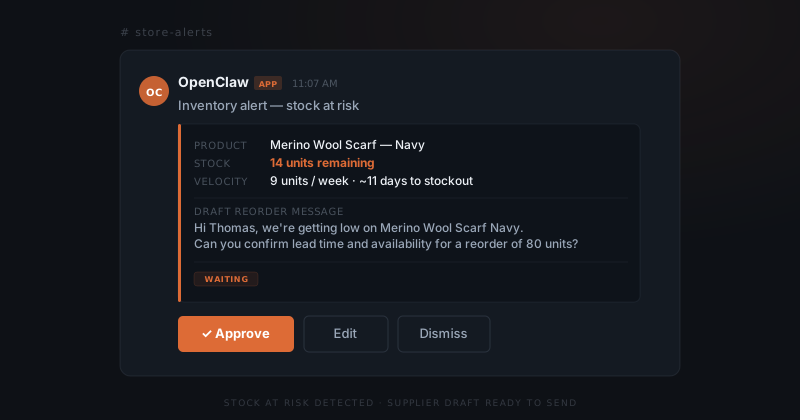
The velocity-based alerting also surfaces seasonal patterns you might otherwise miss. A product that sells steadily at fifteen units per month might spike to sixty during a promotional period or seasonal peak. OpenClaw catches the spike in the data and adjusts the alert timing accordingly. You are not caught out by demand you did not anticipate; you are warned while there is still time to act.
Reorder messages go to the supplier contact you have stored against the product. For products with multiple suppliers, you can configure which to prefer and at what cost thresholds. The reorder draft includes the product name, SKU, quantity you typically order, and a suggested lead time reference. You review and approve rather than compose from memory.
How OpenClaw processes returns without letting them pile up
Returns are inevitable. What matters is how quickly you process them and whether you spot the patterns. OpenClaw triages incoming return requests, categorizes them by reason — sizing, quality, not as described, change of mind — and drafts the response. Standard cases get handled fast. Edge cases get flagged for you.
Over time, the categorization produces a picture of where returns are concentrated. If a specific product is generating repeated quality complaints, that surfaces as a pattern before it becomes a reviews problem. The data was always there — consistent review was all that was missing.
The return draft includes the categorized reason, the proposed resolution, and the tone appropriate to the situation. A quality defect gets a more proactive resolution than a change-of-mind return. A high-value customer gets acknowledged differently than a first-time buyer. These parameters are configurable at setup; the defaults cover most situations without feeling generic.
For products that generate recurring return reasons — a size that consistently runs small, a material that gets described inaccurately on the product page — the pattern data feeds into improvement decisions. You do not need to build a returns analysis spreadsheet. The signal emerges from the categorization OpenClaw is already doing.
How OpenClaw delivers daily revenue summaries
A daily revenue summary does not sound like much until you stop doing it manually.
OpenClaw pulls gross sales, net sales, orders, discounts, returns, and margin by channel — delivering a formatted summary to Slack or WhatsApp every morning. No dashboard, no export, no spreadsheet.
For multi-channel operations — your own store plus marketplaces — the summary aggregates across sources. You see what is happening across the business in one place, every day, without building a reporting workflow.
The format is consistent, which matters more than it sounds. A daily summary you can scan in thirty seconds because you know exactly where each number is becomes part of your operating rhythm. A summary that looks different every day requires you to re-read it fully each time. OpenClaw delivers the same structure each morning; you scan the deltas from the day before rather than reading the whole thing from scratch.
Week-over-week and month-over-month comparisons appear automatically in the summary. You see not just today's numbers but how they compare to the same period last week and last month. When numbers look different, you notice immediately rather than doing the comparison manually.
How OpenClaw generates product descriptions
Writing product descriptions takes more time than it should. OpenClaw generates them from basic product data — name, category, attributes, materials — in your store's tone and format. You review, edit if needed, and publish.
For new product launches or catalog expansions, this removes most of the writing overhead. The agent produces a first draft; you make it yours. The time saved on a catalog of fifty new SKUs is significant.
The tone calibration is per-store. If your brand writes in a direct, technical voice, that becomes the reference point. If it is warmer and more lifestyle-oriented, the drafts reflect that. The calibration is done at setup using your existing product descriptions as examples; subsequent drafts land within the established range without requiring per-product configuration.
OpenClaw also handles SEO considerations at the description level. Meta descriptions, keyword density, and character limits for different platforms are factored into the draft. You are not writing for the customer experience and then separately optimizing for search — the first draft handles both.
For product updates — reformulations, new materials, changed specifications — OpenClaw updates the existing description rather than rewriting from scratch. You provide the delta and it integrates the change while maintaining consistency with the rest of the product copy.
How OpenClaw handles multi-channel operations
Stores that sell across their own Shopify store plus one or more marketplaces — Amazon, Etsy, eBay, or regional equivalents — face a coordination problem. Inventory moves across channels but each channel has its own interface, notification format, and response requirement. OpenClaw aggregates across channels and surfaces everything through the single interface you already use.
Inventory alerts account for total stock across all channels rather than per-channel figures. If you have fifty units and they are selling across three channels simultaneously, the velocity calculation reflects the combined draw. You are not separately monitoring each channel's stock level — you are watching the aggregate.
Revenue summaries aggregate by channel and in total. You see what each channel contributed and what the business did overall. When one channel significantly outperforms or underperforms, that is visible without building a cross-channel spreadsheet.
Support handling is channel-aware. A return request from an Amazon order gets handled with Amazon's return policy parameters. A support inquiry from your own store website gets your own resolution options. The draft reflects the channel context; you are not correcting for the wrong terms.
What OpenClaw does not handle
OpenClaw handles the operational layer that follows predictable patterns. It does not replace decisions that require judgment about the business as a whole.
Pricing decisions — whether to run a promotion, how to respond to a competitor's price change, what discount level to offer for a specific situation — require you. OpenClaw can draft a discount message for a specific customer once you have decided on the terms, but it does not make the pricing decision.
Product strategy, supplier negotiations, platform fee disputes, and decisions about which channels to invest in are not things OpenClaw handles. These require context about the business, the market, and your goals that goes beyond what the agent manages.
Similarly, OpenClaw does not handle customer interactions that are clearly heading toward escalation — a customer who is publicly threatening a chargeback dispute, a situation that involves legal or regulatory exposure. Those get flagged to you immediately rather than drafted.
Frequently asked questions
How does OpenClaw connect to a Shopify store?
OpenClaw connects directly to Shopify and answers questions about your store from any connected channel — orders, customer history, current inventory, or yesterday's revenue — without you logging into a dashboard. Daily summaries push to Slack or WhatsApp at a configured time.
Can OpenClaw handle customer support for an online store?
OpenClaw reads incoming support emails, classifies the issue type, and drafts a reply for your approval before anything goes to the customer. For high-risk actions — refunds, discounts, order modifications — approval is enforced at the infrastructure level. The agent cannot execute these actions without your explicit sign-off.
How does OpenClaw monitor inventory without static thresholds?
OpenClaw tracks stock against actual sales velocity, not a fixed number. A product with fifty units is fine at two sales per week and critical at thirty. When stock is genuinely at risk, OpenClaw flags it and drafts a reorder message to the relevant supplier for your approval.
How does OpenClaw help with product descriptions?
OpenClaw generates product descriptions from basic data — name, category, attributes, materials — in your store's tone and format. You review, edit if needed, and publish. For catalog expansions or new launches, this removes most of the writing overhead while keeping editorial judgment with you.
Does OpenClaw work with marketplaces beyond Shopify?
OpenClaw's primary store connection is Shopify. For marketplace channels, it aggregates order and revenue data where APIs are available and surfaces it alongside your Shopify data. The level of integration varies by marketplace — ask during the scoping call which of your specific channels are covered.
How does OpenClaw handle the return pattern data over time?
Each return that OpenClaw processes is categorized by reason and stored against the product. Over time, you can query the return history for any product: which reasons are most common, what the return rate is relative to units sold, and whether the rate has changed after a product update. This data is available conversationally — you do not need to export it or build a report.
What happens if OpenClaw misclassifies a support ticket?
If the draft that appears in your approval queue is based on a misread of the ticket, you edit the draft before approving. The edit is noted and the misclassification pattern is used to improve future classifications. If a ticket is categorized as standard when it is actually an escalation, you can flag it directly from the approval card and it will be marked as requiring direct handling.
How long does it take to set up OpenClaw for an online store, and what does it cost?
Initial setup takes one to two weeks, starting with support ticket triage and the highest-volume return reason. OpenClaw is open-source with no licence fee — running costs include infrastructure ($20–60/month), AI model API usage ($30–200/month depending on volume), and initial setup ($2,000–6,000 one-time). Year 1 total typically runs $2,400–9,000 including setup; year 2 onwards runs $600–3,000/year in infrastructure and API costs alone.
Notes
- Gorgias, Ecommerce Customer Service Benchmark Report, 2023. https://www.gorgias.com/blog/ecommerce-customer-service-benchmark