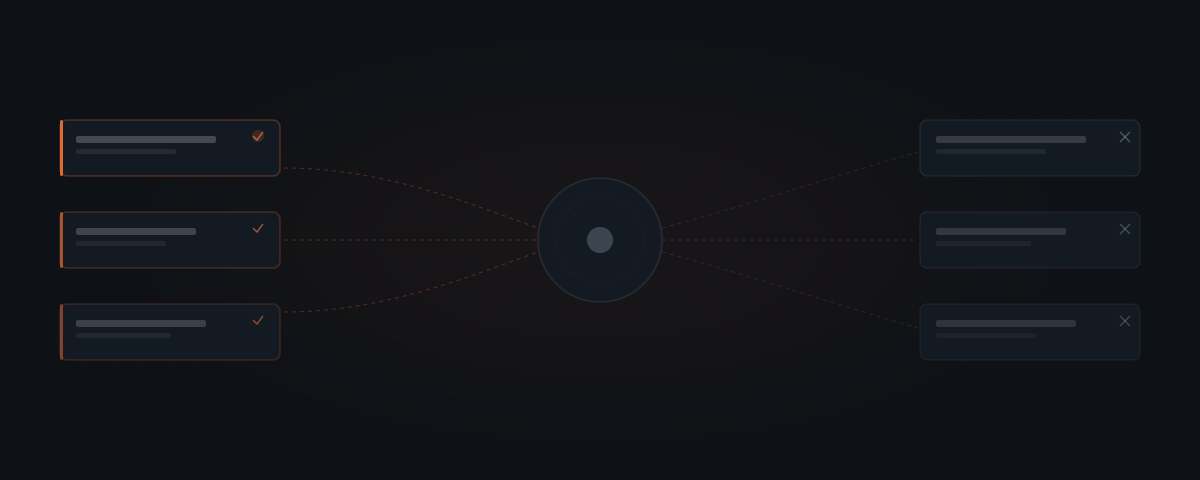
An AI agent goes live. The demo worked. The workflow looked clean. Three days in, the agent produces outputs that seem right but aren't — responding to every inquiry the same way, missing context any human on the team would have caught. The assumption was that AI agents struggle with complexity. The actual failure mode is different: agents fail on vague tasks, not difficult ones. That distinction changes which workflows are safe to automate.
The assumption was that complexity would be the problem — that hard workflows would break and simple ones would run. That assumption is wrong. Complexity is not what breaks AI agents in production. Vagueness is.
Why do AI agents fail at vague tasks, not difficult ones?
A difficult task can be automated if every decision point inside it is defined. A simple task breaks the moment it requires the agent to know something nobody specified.
"Send a follow-up email to any lead who hasn't replied in five business days" is difficult enough to feel like it requires judgment. It runs reliably because the trigger is defined, the input is a CRM record, the output is one email, and the conditions are explicit. The agent makes no decisions that weren't already made in the brief.
"Handle customer communication" is simple enough to feel like it should be straightforward. It fails in production because "handle customer communication" is not a task. It is a category containing hundreds of tasks — each with its own inputs, outputs, and edge cases — none of which were specified.
The failure mode is underspecification. The agent delivers exactly what it was given. When what it was given is incomplete, the output reflects that.
What are the four failure patterns in production?
Four patterns account for most agent failures after the first week in production.
Ambiguous inputs — The agent receives something it wasn't designed for. A customer writes in a language the agent wasn't briefed for. An order arrives with two line items instead of one. A form is submitted with a required field blank. The input isn't wrong — it just wasn't anticipated. The agent produces output that looks correct but isn't, because the case it encountered was never defined.
Context-dependent judgment — The task requires knowing something the agent was never given. "Follow up with this lead" sounds defined. But the right tone depends on how the lead arrived, how long they've been in the pipeline, and whether they had a difficult exchange last quarter. A person who has worked in the business for six months navigates this automatically. An agent with no access to that history cannot.
Moving scope — The task definition drifts because the business changes. The agent was briefed for how the workflow worked in February. By April, the team added a step, changed a field name, or started routing a new case type. Nobody updated the brief. The agent continues running the old version of the workflow.
Multi-party coordination — The task involves waiting on another person or system, then acting based on the response. "Send a proposal, then follow up if no response" seems simple. But what if the prospect replies with a question instead of a decision? What if they respond to the wrong thread? The agent was briefed for one path. Production contains several.
The four patterns with their detection signals:
| Failure mode | Root cause | Detection question | Production symptom |
|---|---|---|---|
| Ambiguous inputs | Input space was never fully defined | Can every input this agent will receive be described in one paragraph? | Anticipated messages handled well; unusual inputs produce outputs that look correct but miss context |
| Context-dependent judgment | Required context was never given to the agent | Does the right response depend on something not stored in the agent's data sources? | Outputs are technically correct but tone, priority, or framing is wrong for the specific case |
| Moving scope | Brief was not updated when the workflow changed | Has any step, field, or case type changed since the brief was written? | Agent runs the old workflow on new inputs; errors appear random because they depend on which new case type arrived |
| Multi-party coordination | Workflow branches based on external party responses | Does any step require waiting for a reply and acting differently based on its content? | Works in the demo (single path); fails in production when replies deviate from the expected path |

Which tasks look automatable but regularly break?
Agents don't fail on hard tasks. They fail on vague ones.
An agent is not bad at customer communication. It is bad at "handle customer communication" — a phrase that contains fifty tasks it was never given.
Some workflow categories appear on nearly every business owner's automation list. They consistently underperform because their apparent simplicity hides structural problems.
"Manage the inbox" — Every message is different. An agent can handle a specific message type — refund requests, delivery questions, account changes — when that type is isolated and specified. The whole inbox is not a task. It is a category.
"Schedule meetings" — Looks mechanical. Contains preference logic. What if two time slots are available but one falls right before a client call the agent has no visibility into? What if the other party prefers mornings and is in a different time zone? A person applies these rules without being asked. An agent applies none of them unless they are written down.
"Summarize this week's activity" — What counts as this week? Which activities matter? For which audience? A founder summarizing for themselves includes different items than a summary going to an investor. The agent needs a defined scope and a fixed template — not a general instruction.
"Monitor and respond to leads" — Monitoring is automatable. The response depends on how the lead arrived, what they said, and what stage they are at. Combining both in one instruction produces an agent that responds to every lead with the same logic.
What are the workarounds for each failure pattern?
Each failure pattern has a specific fix. Most are not technical — they are specification problems, which means the solutions are in the brief, not the code.
For ambiguous inputs: Enumerate every case type the agent will handle and every case type it will not. Write an explicit rule for "unrecognised input" — what the agent does when it receives something outside its defined cases. In production, unrecognised inputs arrive in the first week. The agent needs a defined action for them before go-live, not a discovered one after. The most effective workaround is a hybrid scope: the agent handles the defined subset precisely, and unrecognised inputs route to a human queue. A 90% automated workflow with a clean 10% exception path outperforms a 100% automated workflow with unpredictable exceptions.
For context-dependent judgment: Extract the context the agent needs as structured data and give the agent read access to it. If the right follow-up depends on how long a lead has been in the pipeline, store that as a CRM field. If tone depends on a previous interaction outcome, log it as a deal note. The agent applies context it can read — it cannot infer history it was never given. For relationship-sensitive communication, a human approval step on the agent's draft preserves the relationship layer while keeping the drafting benefit. That is the OpenClaw model: agent drafts, human approves before send.
For moving scope: Schedule a brief review cadence before the agent goes live. Monthly is the right interval for most service business workflows. When a step is added, a tool changes, or a new case type is introduced, the agent owner updates the brief before the change reaches production. Workflow changes that skip this step appear in the agent's outputs as unexplained errors — because the agent is running instructions for a workflow that no longer matches production.
For multi-party coordination: Split the workflow at the reply boundary. The agent handles the outbound action: sending the proposal, the follow-up, the confirmation. A separate rule monitors for replies and routes them. Expected replies — acceptance, booking, approval — continue the workflow. Unexpected replies — questions, objections, out-of-scope requests — go to a human queue. The agent never has to decide what an ambiguous reply means.
Why does "too complex for an agent" usually mean undocumented?
There is one failure that looks like a capability limit and is not. Ask a founder to walk through a process in a scoping call and the answer is usually a ten-minute explanation full of branches, exceptions, and "it depends on the client." The process is not written down anywhere. It lives in one person's head and runs differently every time someone else attempts it.
That is a documentation problem wearing a complexity costume. McKinsey's 2024 State of AI survey found that organizations citing AI implementation as "too complex" were more likely to lack defined process ownership than to face genuine technical barriers — the complexity described was organizational and documentation-related, not algorithmic.[²]
The threshold is the same one that applies to people: any process an employee could follow from a detailed one-page description can be handed to an agent. A process that exists only as institutional knowledge cannot be delegated to anyone, human or agent, without being written down first.
| What it looks like | Undocumented process | Complex but documented process |
|---|---|---|
| Can a new hire run it from a written description? | No — requires explanation or shadowing | Yes — all branching rules are described |
| Is the trigger consistent? | "It depends" is the trigger | One specific, observable event starts the process |
| How are edge cases handled? | Case by case, by whoever handles it | Named and assigned to specific response paths |
| What does implementation require? | Documentation first, then build | Build can start immediately |
| How long does the build take? | Timeline extends until documentation is done | Timeline starts from documentation on hand |
The fastest implementations are not the ones with the simplest processes. A twelve-step process with six documented edge cases builds faster than a three-step process with three undocumented ones.
An agent does not need a flowchart or a specification document. It needs the process in five components on one page: the trigger (one sentence on what starts it), the steps (a numbered list where each line is one action), the decision points (where the process branches and on what condition), the output (what one completed run produces, specifically), and the edge cases (five to ten common exceptions, not an exhaustive list).
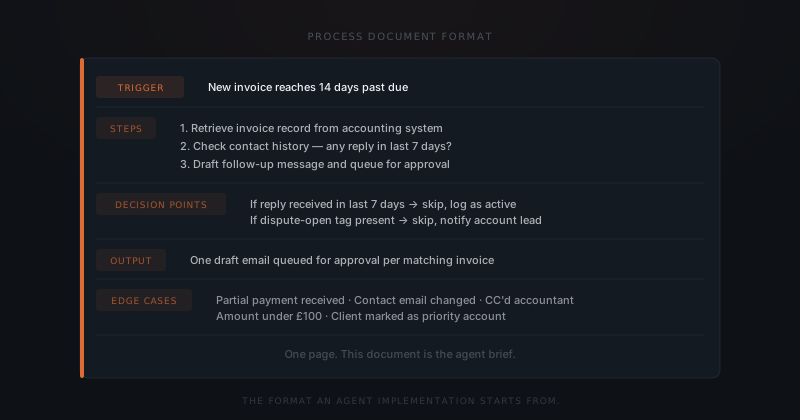
The test is a single question. Write the process on one page in that format, then ask whether a new hire could run it correctly on their first day using only that document. If yes, it is ready for an agent brief. If no, the missing piece is documentation rather than technology — and the work is to identify what that new hire would need to learn and write it down.
How do you use these limits before you commit?
The four failure patterns above are detectable before a single line of agent code is written. For any workflow under consideration, four questions reveal where the gaps are.
Can every input this agent will receive be described in a single paragraph? If the answer involves "it depends on who's writing in," the input space is undefined.
Can success be evaluated without reading the output? If a person would need to check whether the agent got it right, the task needs more specification before an agent can handle it reliably.
How often does an exception occur, and what happens when it does? If exceptions surface more than once a week and each one is handled differently, the workflow has undefined behavior at the edges. Those edges appear in production.
What does the agent do when it can't decide? Every brief needs an explicit escalation path — a named action for inputs that don't match the expected pattern. Not "the agent will handle it." A specific step: flag for review, route to a queue, send a holding message.
These questions don't rule out automation. They identify what needs to be defined first. A workflow that fails all four can still be automated — after the inputs are bounded, success is measurable, exceptions are capped, and the escalation path is named.
What should you use when an agent is not the right tool?
Not every workflow that fails the screening questions should be abandoned. Some belong with a different tool or a narrower scope.
| Scenario | Why the agent fails | What to use instead |
|---|---|---|
| Variable inputs with no definable pattern | Scope cannot be bounded — every message is different | Human reviewer + narrow agent for a defined message subset |
| Judgment that requires undocumented context | Context not available as structured data | Human with agent-drafted content for review and approval |
| Workflow that changes more than monthly | Brief cannot stay current with the pace of change | Rule-based automation or human-led checklist |
| Multi-party workflow with branching replies | Agent cannot handle reply variation without explicit routing | Agent for outbound + human escalation protocol for unexpected replies |
| Relationship-sensitive communication | Tone risk exceeds the drafting benefit | Agent drafts, human approves before send |
| Regulatory or contractual decisions | Liability cannot be delegated to an automated system | Human — no agent configuration changes this |
The right frame is not "agent or no automation." The right frame is: what is the smallest, most precisely defined scope where the agent produces reliable output? Gartner's analysis of the generative AI projects abandoned after proof of concept in 2024 found that the most common reason was not technical failure but scope creep — projects that started as narrow automations and expanded to cover category-level tasks the implementation was never designed to handle.[¹] Most workflows that fail broadly contain a core of defined tasks that run well. Isolating that core and building the agent around it — rather than trying to automate the full category at once — is how implementations that start narrow become systems that scale.
Frequently asked questions
What are AI agents actually bad at?
AI agents fail on vague tasks, not difficult ones. Workflows where inputs vary unpredictably, context is required but was never provided, scope shifts without the brief being updated, or multiple parties are involved — these are the categories that produce unreliable outputs. A complex workflow with defined decision points runs reliably. A simple task with undefined scope fails.
What is underspecification in an AI agent?
Underspecification is when the task brief leaves out input boundaries, exception handling, or escalation paths. The agent delivers exactly what it was given — when the brief is incomplete, the output reflects that. The agent is not making an error; it is operating on the definition it received.
Why can't AI agents handle "manage the inbox"?
"Manage the inbox" is not a task — it is a category containing hundreds of tasks, each with different inputs, outputs, and edge cases. An agent can handle a specific, defined message type reliably. Combining all inbox management in one instruction produces an agent that applies the same logic to every message, regardless of content.
What should every AI agent brief include?
Every brief needs four elements: the full range of inputs the agent will receive, a way to evaluate output quality without reading each result, the maximum acceptable exception rate and what happens when exceptions occur, and an explicit escalation path for inputs that fall outside the expected pattern.
Notes
- Gartner. "Gartner Predicts 30% of Generative AI Projects Will Be Abandoned After Proof of Concept Through 2025." Gartner Press Release, July 2024. https://www.gartner.com/en/newsroom/press-releases/2024-07-29-gartner-predicts-30-percent-of-generative-ai-projects-will-be-abandoned-after-proof-of-concept-through-2025
- McKinsey & Company, "The State of AI in 2024: GenAI Adoption Spikes and Starts to Generate Value," McKinsey Global Survey, 2024.