What the OpenClaw setup call covers
The setup call is a 90-minute working session. We cover three things: your current workflows, your connected tools, and your approval preferences.
Current workflows means the recurring tasks the agent should handle — follow-up emails, CRM updates, client reports, invoice reminders. We ask what you spend time on that feels mechanical. That list becomes the build scope.
Connected tools means Gmail, Slack, Notion, Shopify — whatever is relevant to those workflows. We confirm access and agree on what the agent can read and what actions require your approval.
Approval preferences covers who approves what, whether any workflows need double confirmation, and whether time-sensitive drafts should have expiry windows.
Your side of the setup call: show up, answer questions, describe your workflows in plain terms. No preparation required. No configuration on your end.
What OpenClaw's first live drafts look like
The first live drafts typically appear within five business days of the setup call. We turn on workflows in a controlled order — one at a time, starting with the lowest-risk, highest-frequency one.
You will see the first draft appear in your Slack approval channel. Read it. If the structure is right and the content is accurate, approve it. If the tone is off or a variable pulled incorrectly, dismiss it and send us a note — in Slack, or a quick message. That feedback is the input for calibration.
You do not configure OpenClaw. ClawBuilt builds the configuration based on your workflows. Your role in setup is to answer questions on the call and flag bad drafts in the first two weeks. That is the full scope of your setup work.
The first week of live drafts is a data collection phase. You are not expected to approve everything. You are expected to tell us what is wrong.
How the OpenClaw calibration window works
Weeks two and three are where the configuration tightens. Triggers that were too broad get narrowed. Templates that did not match your tone get rewritten. Context sources pulling stale data get updated.
By day 30, you are reviewing drafts — not thinking about the agent.
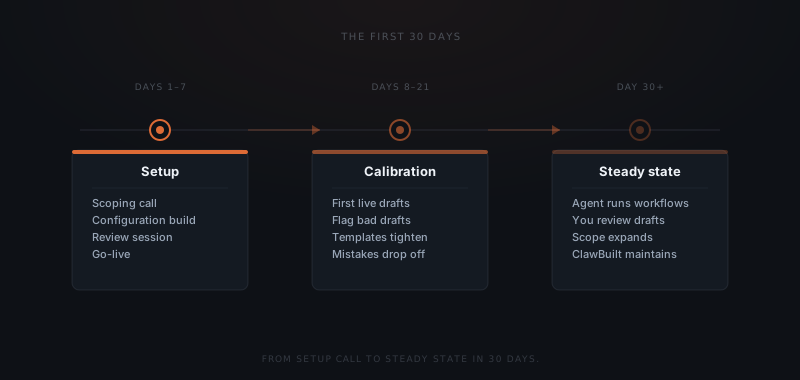
Most calibration cycles follow the same pattern: you flag three bad drafts in a week, we identify what they have in common, we fix the template or trigger, you see cleaner drafts the following week. By the end of week three, the pattern of dismissed drafts drops. Not to zero — the agent will occasionally produce a draft that does not fit — but the repeating mistakes are gone.
What OpenClaw looks like at day 30
At day 30, the agent runs the workflows we configured. New drafts appear in Slack. You review and approve. ClawBuilt handles the maintenance.
What changes after day 30: scope expands. Once the first workflows run cleanly, most founders want to add more. We handle each addition the same way — scope the workflow, build and test it, turn it on.
What does not change: the approval structure. Every external action still waits for your sign-off. The audit log still records everything. That does not change regardless of how many workflows are running.