Integration is where most AI agent implementations stall. Connecting an agent to real systems involves permissions, data mapping, and authentication complexity that demos never show. And the work does not end at launch — every connected system changes on its own schedule, and an integration that is not actively maintained gradually stops working.
The demo showed the agent reading from a CRM and drafting replies from an inbox. It worked smoothly. The connection looked like a configuration step — grant access, point the agent at the data, let it run.
That expectation shapes how teams plan integrations. It also explains why most AI agent implementations stall in the integration phase, weeks or months into a project that was supposed to be straightforward. MuleSoft's 2024 Connectivity Benchmark Report — based on surveys of more than 1,050 IT decision-makers globally — found that 88% of organizations cite integration complexity as a primary barrier to digital transformation, with API management and data inconsistency the most commonly cited technical blockers.[¹]
What does a demo make integration look like?
In a demo, an agent connects to a single clean system with a single clean dataset. The inputs are selected to demonstrate the capability. The connection works because the environment was set up to make it work.
Nothing in the demo represents the conditions of a live business. The data is clean. The authentication is pre-configured. The edge cases — missing fields, duplicate records, inputs that fall outside the expected pattern — are absent because they were not included.
That picture shapes the expectation. Integration looks like pointing the agent at a tool, granting access, and watching it run. A few hours of setup. Done.
What does integration involve?
Connecting an agent to a live system involves several layers of work that a demo skips entirely.
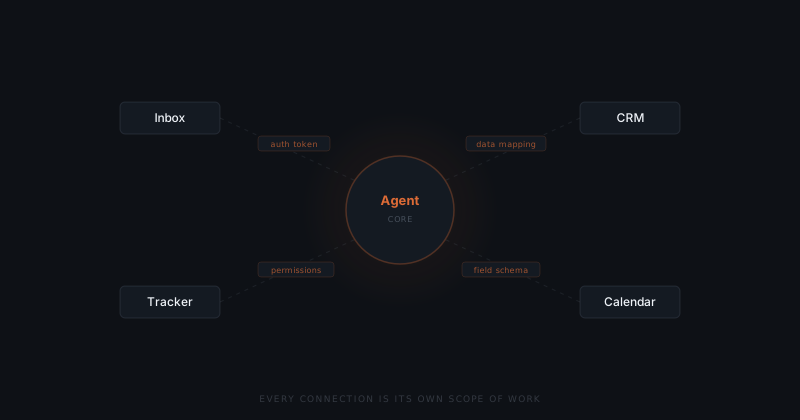
Authentication is the first layer. API credentials need to be configured, stored securely, and refreshed on whatever schedule the connected system requires. Tokens expire. Scopes get reset when team members change. Each system has its own authentication model — and each model has its own failure modes.
Data mapping is the second. Systems that were not designed to talk to each other rarely share a data format. The inbox uses one identifier for contacts; the CRM uses another. The agent needs a translation layer that keeps those identifiers consistent — and that layer needs to handle missing fields, duplicate records, and inputs that arrive in formats neither system anticipated.
Permission scoping is the third. The agent should read and write only what the workflow requires. Configuring that scope — and maintaining it when the connected tools update their permission models — is ongoing work, not a one-time step.
Where do integrations reliably break?
Most integrations do not fail at the connection. They fail at the edges — the conditions that never appeared in testing.
The table below maps the most common integration failure types to their detection signals and resolution steps.
| Failure type | What triggers it | How it appears | Resolution |
|---|---|---|---|
| Field rename or removal | Connected system updates its schema | Agent reads null or writes to a deprecated field; outputs reference missing data | Map the new field name; test write call against updated schema |
| Token expiry | Authentication token expires on an undocumented schedule | Agent requests silently fail for specific action types; workflow appears to run but drops that action | Document token TTL at setup; build automated refresh; monitor for auth failures |
| Duplicate record conflict | Lookup returns two matching records; agent cannot resolve | Task stops without output; exception logged but no escalation | Define a resolution rule (most recent, primary contact, manual flag); implement before build |
| Permission scope reset | Team member changes trigger permission reset on connected tool | Agent loses write access; reads continue, writes silently fail | Assign integration permissions to a service account or role, not a user account |
| Rate limiting | High-volume workflow hits API rate limits | Agent outputs queued or dropped during peak periods; no error notification | Implement exponential backoff; monitor for rate limit responses; batch requests where possible |
| Data format drift | Business updates naming conventions or field types after launch | Agent writes data in old format; records inconsistent across time | Monthly spot-check on a sample of records; update field mapping after each naming convention change |
A connected CRM updates its field schema. The agent was reading a field that no longer exists under the same name. The integration does not throw an error — it reads a null value and acts on it. The first sign of the problem is an agent output that makes no sense.
An authentication token expires on a schedule the implementation team did not document. The agent's requests start failing — not for every action, only for the specific action type that required that token. The workflow appears to run, but that action drops silently.
A contact record has a duplicate. The agent finds two records matching the lookup and cannot resolve which to use. The implementation's error handling did not anticipate this case. The task stops without output.
None of these are unusual. They are the normal surface area of connecting software to live data.
The integration that took a week to build can take an hour to break.
Why does the maintenance burden start on launch day?
A working integration on launch day is not a complete integration. Every API change, permission reset, or schema update in the connected tools can silently alter the agent's behaviour. That is the normal lifecycle — not an edge case.
The tools the agent connects to change on their own schedules. API versions get deprecated. Authentication models update. Permission scopes reset after team changes. Data formats drift as the business adds fields, changes naming conventions, or migrates between platforms.
An integration that is not actively maintained becomes one that gradually stops working. Sometimes the failure is visible — the agent throws an error and halts. More often it is silent — the agent keeps running, but on stale or incomplete data, producing outputs that look correct until someone compares them against the source of truth.
Maintaining an integration means monitoring it, catching degradation before it affects outputs, and adjusting the connection as the underlying systems evolve. That is not a separate project. It is part of the implementation.
How do you audit integration requirements before the build?
Integration complexity does not have to be discovered during the build. Most of the failure modes in the table above are predictable if the connected systems are audited before the first line of build work begins.
The audit covers four areas. First, authentication requirements: what is each system's authentication model, what is the token TTL, and what triggers a permission reset? Second, data schema: what fields does the workflow depend on, and what is the history of schema changes in each connected system? Third, permission boundaries: what does the agent need to read and what does it need to write, and can those permissions be scoped to a service account rather than a user? Fourth, edge case inventory: what happens when a lookup returns zero results, two results, or results in an unexpected format?
Running this audit before the build takes two to four hours per connected system. Finding these answers after the build — when they surface as failures in a live workflow — takes significantly longer and affects real records in the process.
Map authentication requirements for each connection
For every system the agent will connect to: what is the authentication method (OAuth, API key, service account), what is the token expiry schedule, and what happens to existing integrations when team members with administrative access leave. Document these before the build starts.
Audit the data schema for each connected system
Pull the current schema for every field the workflow depends on. Check when that schema was last changed. Check whether the system has a public changelog for API updates. If the system does not have a public changelog, plan for a monthly manual check.
Define error handling rules for each integration edge case
For each connection, define what the agent does when: a lookup returns no results, a lookup returns multiple results, a required field is missing, and the system is temporarily unavailable. These rules should be in the brief before the build begins — not discovered during testing.
Assign permissions to a role, not a person
Configure integration permissions through a service account or role with the specific scopes the workflow requires. Permissions tied to a user account reset when that user leaves or changes roles. Service account permissions are stable across team changes.
What does this mean for how you plan an implementation?
Integration complexity does not make AI agent systems impractical. It makes planning essential.
An implementation that accounts for integration from the start looks different from one that treats it as a setup step. The connected systems are audited before the build: what does each system expose, what does it restrict, what is the authentication model, what breaks when the connection fails.
The control layer is designed with integration edge cases in mind — what does the agent do when a required field is missing, when a lookup returns two records, when a connected system is temporarily unavailable.
A maintenance owner is assigned before launch. Not to respond to failures, but to monitor the integration's health as the connected systems evolve. Because they will.
The integration is not a phase that ends. It is a condition you maintain.
Frequently asked questions
Why is connecting AI agents to real business systems harder than it looks? Most integrations involve three layers none of which appear in demos: authentication (API credentials, token expiry, permission resets), data mapping (translation between systems that use different identifier formats), and permission scoping (restricting what the agent reads and writes). Each layer has its own failure modes.
What causes AI agent integrations to fail after launch? Most integrations break at the edges, not the connection. A CRM field gets renamed and the agent reads null. An authentication token expires on an undocumented schedule. A contact record has a duplicate the agent cannot resolve. None of these throw visible errors — the agent keeps running on bad data.
How much ongoing maintenance does an AI agent integration require? Active maintenance from day one. Every connected system changes on its own schedule — API versions get deprecated, authentication models update, data formats drift. An integration without an assigned maintenance owner will gradually stop working, usually silently.
What is data mapping in an AI agent integration? Data mapping is the translation layer that keeps identifiers consistent between systems that were not designed to talk to each other. A CRM and an inbox typically use different contact identifiers. The agent needs a translation layer to reconcile them — and that layer must handle missing fields and duplicate records.
How do you prevent integration permissions from breaking when team members leave? Configure integration permissions through a service account or role-based access rather than a named user account. Permissions tied to a user account reset when that user leaves or changes roles. Service account permissions are stable across team changes and can be scoped to exactly the read and write access the workflow requires — no more.
What should be in the brief before building an integration? The brief should document the authentication model and token schedule for each connected system, the specific fields the workflow reads and writes (with field names as they appear in the live system, not as they appear in the demo), the error handling rules for missing fields and duplicate records, and the permission scope required. An integration built without these specifics will discover them as failures during testing.
How do you know when an integration is silently failing? The clearest signal is inconsistency in the records the agent writes over time. If records written in January look different from records written in March — different fields populated, different formats, different values — the integration changed between those dates. The second signal is exception rate: if the agent is flagging more inputs than usual as unhandled, and the input volume has not changed, the integration is producing inconsistent data the agent cannot act on. Monthly spot-checks on a sample of agent-written records catch silent failures before they compound.
Notes
- MuleSoft (Salesforce). "Connectivity Benchmark Report 2024." MuleSoft, 2024. https://www.mulesoft.com/lp/reports/connectivity-benchmark