A business owner plans their first AI agent implementation and has three workflows to choose from: one small and repetitive, one medium, and one ambitious. The ambitious one gets chosen. This is the most common mistake in AI agent implementations. The goal of the first implementation is not impact. It is proof that the system works — and boring workflows are the only ones that produce that proof reliably.
The instinct to start with the impressive workflow
Most business owners enter their first AI agent project with a list of workflows they want to automate. The one chosen first is rarely the simplest. It is the most exciting — the one whose success would visibly change how the business operates.
That instinct makes sense. The ROI looks larger. The motivation is higher. The result would be easier to justify to a team.
But impressive workflows are impressive because they are complex. Complex workflows have wide input variation, frequent exceptions, and outputs that require judgment. An AI agent built on a complex workflow encounters edge cases in the first week that nobody anticipated during scoping. The team spends the following months patching behavior instead of expanding capability.
What "boring" means as a technical requirement
A boring workflow is not a trivial one. It is a workflow with a specific set of structural properties: inputs that arrive in a consistent format, outputs that can be evaluated as correct or incorrect without interpretation, and a low rate of exceptions outside the defined parameters.
Boring workflows succeed because every input looks like the last one. An agent built on predictable inputs handles nothing unexpected — and a system that handles nothing unexpected earns trust.
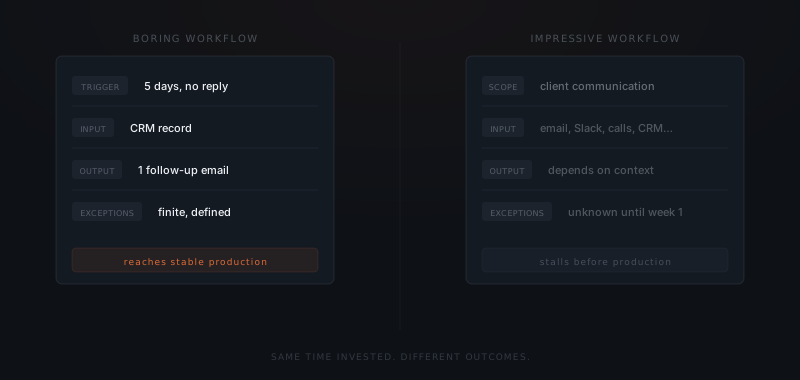
"Send a follow-up email to any lead who hasn't replied in five business days" is boring. The trigger is defined. The input is a CRM record. The output is one email. There are no judgment calls. The agent either sends the email or it does not.
"Manage client communication" is not boring. That phrase contains a hundred sub-workflows. The agent will encounter inputs it was not designed for before the first week is over.
Why boring implementations compound
The goal of the first implementation is not impact. It is proof that the system works.
A boring workflow that runs reliably for sixty days produces something more valuable than time savings: confidence. The team sees the agent make the right call, repeatedly, without intervention. That confidence is the precondition for every subsequent workflow.
Businesses that start with complex workflows rarely add a second one. The first implementation consumed all the goodwill in the room. By the time it was working adequately — not reliably, not confidently — the appetite for another round had gone.
Businesses that start boring add a second workflow within ninety days. They have proof the system works. They know what reliable looks like. They understand what to scope.
What boring looks like across common workflow areas
The boring vs impressive distinction is easier to apply with concrete examples. The table below shows what the boring version of a workflow looks like in six common small business workflow areas — and what the impressive version looks like that teams should not start with.
| Workflow area | Boring version (start here) | Impressive version (after the boring one works) |
|---|---|---|
| Client communication | Follow-up after a proposal goes unread for 5 business days | All client email handling |
| Lead management | Categorize inbound leads by service type from a contact form | Qualify and route all leads through the full pipeline |
| Reporting | Weekly pipeline status summary from CRM data | Real-time business intelligence across all systems |
| Scheduling | Send booking link after a discovery call is logged | Manage all calendar coordination across team and clients |
| Invoicing | Send payment reminders at 7, 14, and 30 days overdue | Full accounts receivable management |
| Recruiting | Screen applications against defined criteria and flag qualified candidates | Manage the full candidate pipeline and all communications |
Every impressive version in that table contains the boring version inside it. The right order is to get the boring version running reliably, then expand scope — not to try to build the full system from the start.
How to choose the first workflow
| Criterion | Boring (start here) | Impressive (next, once trust is built) |
|---|---|---|
| Input format | Always the same | Varies by sender, context, or channel |
| Output judgment | Pass/fail is clear | Requires human evaluation to judge |
| Exception rate | Rare and defined | Frequent and unpredictable |
| Stakes if wrong | Low — easy to catch and correct | High — damages a client or deal |
| Volume | High enough to see patterns quickly | Low — takes months to accumulate signal |
For each workflow on your list, ask: could a new employee handle this correctly on day one, given only a written procedure? If yes, an agent can handle it reliably. If the answer involves "it depends" or "you'd need to see a few examples first," the workflow is not ready.
The right first workflow is not the one that would impress anyone. It is the one that runs correctly so many times that nobody thinks about it anymore. That is the foundation every expansion gets built on.
How to scope the first workflow correctly
The scoping discipline that makes boring workflows succeed is the same discipline that distinguishes implementations that reach production from implementations that stall. The work is in the definition — not the technology.
Name the specific trigger
A boring workflow starts with one specific trigger. Not "when a client needs a follow-up" — that is a category. "When a proposal has been sent and no reply received in five business days" — that is a trigger. The trigger should be describable as a single sentence that a new employee could evaluate without asking for clarification.
Define the input as a specific record type
The agent needs to read from somewhere. Name the exact source — a CRM record, an email, a form submission — and the specific fields required. If the agent needs the contact's name, email, and the proposal sent date, list those three fields. If any are missing, define what the agent does: skip the input, flag it for manual handling, or escalate.
Define the output as a specific artifact
The agent needs to produce one thing. Name it. "Draft one email" — not "handle the communication." Define the template structure and which fields from the input are inserted into the output. If the output needs human approval before sending, define that in the control layer now, not after the agent sends its first draft.
List the exceptions explicitly
Before the build begins, list every input the agent should not handle: VIP clients who receive personal follow-up, deals over a certain value that require account manager review, contacts who have asked to be removed from automated communication. These are the control layer decisions. Making them before the build is the work that separates implementations that trust from ones that supervise.
Test the definition before building
Take the last 20 real inputs the workflow would have applied to, and manually apply the scope definition to each. How many would the agent handle correctly? How many fall into the exceptions? How many reveal an input pattern the definition did not anticipate? Answer those questions before a single line of build work begins.
Frequently asked questions
Why should the first workflow you automate be boring?
Boring workflows have consistent inputs, pass/fail outputs, and rare exceptions — the conditions that let an agent reach stable production quickly. A reliable first implementation builds the team confidence and operational knowledge needed to expand to more complex workflows.
What makes a workflow suitable for an AI agent?
Three structural properties: inputs that arrive in a consistent format, outputs that can be evaluated as correct or incorrect without interpretation, and a low rate of exceptions outside defined parameters. If any of these are absent, the workflow needs more definition before automation is viable.
What goes wrong when you start with a complex workflow?
Complex workflows have wide input variation, frequent exceptions, and outputs that require judgment. The agent encounters edge cases in the first week that nobody anticipated during scoping. The team spends the following months patching behavior instead of expanding capability — and the appetite for a second implementation disappears.
How do I choose the right first workflow to automate?
Ask one question: could a new employee handle this correctly on day one, given only a written procedure? If the answer is yes, the workflow has the definition an agent needs to run reliably. If the answer involves "it depends" or "you'd need to see a few examples first," the workflow is not ready.
What is the right order when a business has multiple workflows to automate?
Start with the workflow that has the highest predictability and lowest stakes — not the highest impact. Predictability means consistent inputs and clear outputs. Low stakes means errors are easy to catch before they affect a client. After the boring workflow has been running reliably for sixty days, scope the next one using the operational knowledge the first one produced. Businesses that follow this sequence add a second workflow within ninety days. Businesses that start with the highest-impact workflow rarely get to the second one at all.
What does "scoping" the first workflow actually mean?
Scoping means defining the trigger (exactly what event starts the agent), the input (exactly what data the agent reads), the output (exactly what the agent produces), and the exceptions (exactly which inputs the agent should not handle). Each of these requires a specific, testable answer — not a general description. A scope is complete when you can take the last 20 real inputs and predict what the agent would do with each one. If you cannot do that, the scope is not done.
How long should a boring first implementation run before expanding?
Sixty days is the minimum threshold. In sixty days, the agent will have processed enough real inputs to surface any patterns the scoping phase missed. It will have been running long enough for the integration health to be verifiable. The team will have seen enough correct outputs to have genuine confidence in the system — not launch-day optimism, but the quieter confidence that comes from watching a system work without intervention. Expanding before that threshold is met risks scaling the problems of the first implementation alongside the scope.