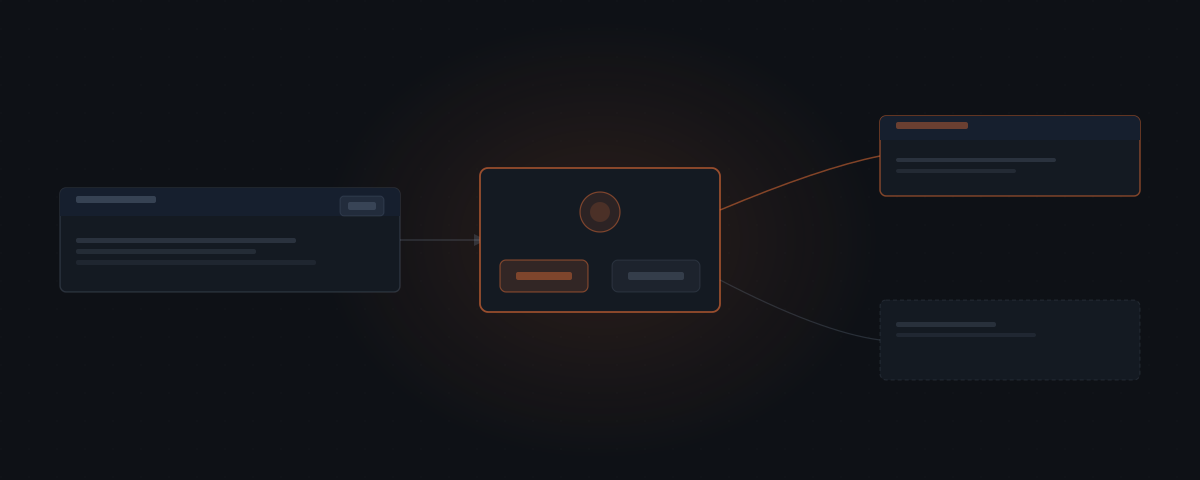
Approval workflows in an AI agent system are not safety nets that catch mistakes after they happen. They are a design layer that defines, before anything runs, which actions the agent can take on its own and which require a human decision first. That distinction is what separates a trustworthy agent system from one you are simply hoping works.
An approval workflow is not the last line of defence against a bad AI output. If you think of it that way, you have already designed it wrong.
Approval workflows do not monitor what the agent does and intervene when something goes off-track. The line gets drawn ahead of time — what the agent is cleared to do on its own, and what needs you first — not redrawn after something has already gone out. That is a different mechanism entirely, and understanding the difference changes how you build an agent system you can trust.
Most of the risk in an AI agent system does not come from the agent producing incorrect outputs in the wrong direction — it comes from the agent taking the correct action at the wrong time, in the wrong context, or to the wrong recipient. Approval workflows address that class of risk. Prompt instructions, however carefully written, do not.
What do most people assume approval workflows do?
The common assumption is that approval workflows are reactive. The agent acts. Something goes wrong. The approval catches it.
This model puts the approval after the action. The damage is already done — a message sent, a record updated, a deal moved. The approval is reviewing an outcome, not preventing one.
An approval workflow built this way is not a control layer. It is an audit log with extra steps.
The reactive model is understandable because it mirrors how human review works in many organizations. A manager reviews what an employee has already done, catches errors after the fact, and corrects them. This works when errors are recoverable — you can correct a misfiled document or undo an internal note. It fails when actions are irreversible. An email sent to a client cannot be unsent. A payment processed cannot always be recovered cleanly. A record updated in a customer-facing system may have already been seen.
The reactive model also fails because it does not change the agent's behavior — it only adds a review step after the fact. The agent that just sent a message to the wrong recipient will do the same thing again tomorrow unless the system is redesigned.
How do approval workflows actually work?
An approval workflow is a gate, not a monitor. It is built into the system before the agent runs, and it determines which actions the agent is allowed to take on its own.
When the agent reaches a defined action — sending a message, updating a record, escalating a request — it does not attempt the action. It prepares a draft, places the action in a review queue, and waits. The action does not run until a human releases it.
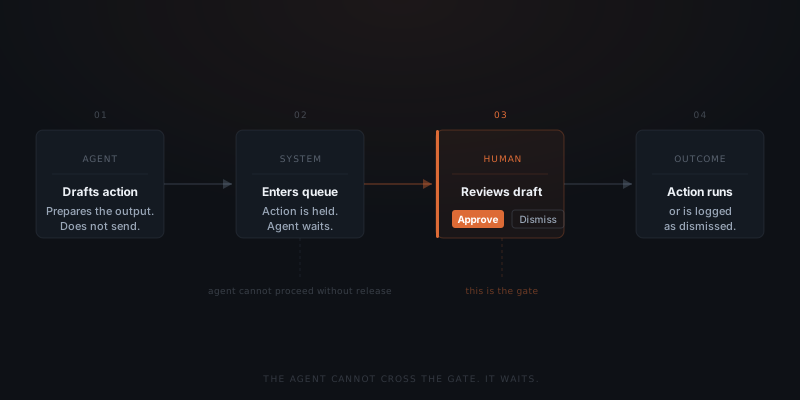
The agent cannot cross that line. It does not retry. It does not find a workaround. It waits until a human approves, edits, or dismisses the queued action. This is enforced at the system level — not by a prompt instruction the model is trying to follow.
An approval workflow is not a safety net. It is the line that defines what the agent can do without you.
The distinction matters because the guarantees are different. A system that relies on a well-written prompt to prevent an action from running is a system where the guarantee depends on the model interpreting the instruction correctly — every time, in every input context, including edge cases the author did not anticipate. A system with a structural approval gate is a system where the guarantee is mechanical. The action cannot run. No interpretation required.
What are you deciding when you design an approval layer?
Designing an approval layer is deciding where you trust the agent and where you do not — yet.
Some actions are low-stakes: tagging a contact, logging a note, adding an item to a task list. Getting these wrong costs little. Reviewing each one defeats the purpose of having an agent. These run automatically.
Other actions carry real weight: sending a message to a client, updating a payment record, closing a deal, escalating a ticket. The cost of getting these wrong — and the value of a human check — justifies the review step. These go into the queue.
A well-designed approval layer does not put everything in the queue. It puts the right things there. That boundary is a deliberate design decision, not a default setting.
The decision framework has three variables: reversibility, visibility, and consequence. An action that is easily reversed, not visible to anyone outside the system, and has low consequence if done incorrectly should run automatically. An action that is irreversible, externally visible, or carries high consequence if done incorrectly should go into the queue. Most actions fall somewhere in between — and placing them correctly is what makes the approval layer useful rather than burdensome.
| Action type | Reversible | External | Consequence | Placement |
|---|---|---|---|---|
| Tag a contact | Yes | No | Low | Automatic |
| Log a call note | Yes | No | Low | Automatic |
| Draft internal summary | Yes | No | Low | Automatic |
| Schedule an internal task | Yes | No | Low | Automatic |
| Send a client email | No | Yes | High | Review queue |
| Update a payment record | Partial | Depends | High | Review queue |
| Close a deal or change stage | No | Depends | High | Review queue |
| Issue a refund or credit | No | Yes | High | Review queue |
| Escalate a ticket externally | No | Yes | Medium–High | Review queue |
| Add a record in internal CRM | Yes | No | Low–Medium | Automatic or review |
What do systems without approval layers depend on?
Without an approval layer, the only thing preventing an agent from taking a high-impact action is a prompt instruction — which the model is trying to follow, not enforced to obey. A prompt is guidance. An approval layer is a gate.
Prompt instructions can be misread. They fail on edge cases the author did not anticipate. Conflicting context in the input can override them. None of this is the agent misbehaving — it is the natural behaviour of a system built on instruction-following rather than enforced constraint.
An approval workflow does not rely on the model interpreting the instruction correctly. The action is structurally blocked until a human releases it. Those are different guarantees.
A system that relies on prompt instructions for safety is also fragile in a specific way: it is fully dependent on the quality of the prompt. If the prompt was written with one set of workflows in mind and a new workflow is added later, the new workflow may not be covered. An approval layer is not prompt-dependent — it applies to any action of the configured type, regardless of how the agent arrived at it or what the input contained.
This matters for edge cases specifically. Prompt instructions tend to work well on the expected cases and fail on the unexpected ones — exactly the cases where the consequences of failure are highest. An agent that handles two hundred standard support tickets correctly may still send an inappropriate response to the unusual ticket that arrived outside normal business hours with an ambiguous request. The approval gate catches that ticket before anything goes out, regardless of how the agent classified it.
How do you decide what belongs in the review queue?
The review queue is not a one-size-fits-all setting. The right boundary depends on the workflow, the stakes, and the volume of actions the agent is taking.
A review queue that is too full defeats its purpose. If every action — including low-stakes internal ones — goes into the queue, reviewers learn to approve without reading. The queue becomes a formality rather than a control point. When the genuinely consequential item arrives in the list, it looks like everything else and gets the same cursory approval. This is one of the most common failure modes in human-in-the-loop designs.
A review queue that is too empty creates a different problem: the sense of control without the reality. If only the most extreme actions go into the queue, the agent is running autonomously across a wide range of actions that may have meaningful consequences. The founder who believes their agent "cannot take any action without approval" may discover that "approval" only covers three specific action types they defined at setup.
The right configuration starts conservative and loosens over time. In the first weeks of an agent deployment, put more actions into the queue. Review them. Notice which ones consistently look exactly right and which ones require edits or judgment. Move the consistently-correct ones to automatic after a period of reliable performance. Keep the ones that require real judgment in the queue.
This is how trust is calibrated — not by deciding at the start which actions are safe, but by observing the agent's actual performance and adjusting the boundary based on evidence.
What does a well-designed approval layer look like in practice?
In practice, a well-designed approval layer is invisible most of the time. The agent handles low-stakes actions automatically — logging, tagging, scheduling, drafting internal notes. The things that need a decision appear in a queue.
You review the draft client message. You dismiss the follow-up that went to the wrong contact. You approve the record update before it saves. Each decision takes seconds. The agent handles everything around those decisions.
The goal is not to review everything. The goal is to review the right things — and to know, without checking, that nothing else ran without you.
A well-designed queue also has good ergonomics. Each item in the queue shows the full context needed to make the decision: the draft action, the trigger that caused it, the relevant history, and the options available — approve, edit, dismiss. You do not need to navigate to another system to understand what you are approving. The information is there.
The volume of items in the queue should be manageable. If you are reviewing forty items per day and most require no edits, the agent is probably configured too conservatively — some of those forty should be running automatically. If you are reviewing three items per day and they consistently require significant edits, something in the agent's configuration or context needs adjustment. The target is a queue that carries genuine decisions, not administrative confirmation.
How do approval layers evolve over time?
An approval layer that was right at deployment may not be right six months later. As the agent runs more actions and you review more outputs, the data on what the agent handles reliably accumulates. The boundary should adjust based on that data.
Actions that the agent consistently gets right — the same draft appearing for the same input, requiring no edits, approved immediately — are candidates for automation. The approval layer over those actions is not adding control; it is adding friction. Moving them to automatic does not reduce safety — it acknowledges that the agent has demonstrated reliability for those specific actions.
Actions that consistently require edits — the draft is close but always needs adjustment in a particular direction — are worth examining more carefully. Is the configuration feeding the agent enough context? Is the agent's model of the expected output calibrated correctly? Or is the judgment involved genuinely variable, making human review always appropriate? Distinguishing between a configuration problem and an inherent judgment requirement is what determines whether the action should be improved and automated or remain in the queue indefinitely.
The goal over time is not to review fewer things because you have given up reviewing them — it is to review fewer things because the agent has proven it handles them correctly, and you have moved the boundary accordingly.
Frequently asked questions
What do approval workflows do in an AI agent system?
An approval workflow sets the boundary in advance: which actions the agent can execute without you, and which ones need a person to sign off first. It does not review what already happened — it holds the action back until someone approves it, so the outcome is controlled before it exists.
What is the difference between an approval gate and post-action review?
An approval gate blocks an action before it executes. Post-action review informs a human after the action has already run. Pre-action gates prevent mistakes. Post-action review documents them. Only pre-action placement gives you control over actions that cannot be undone.
What should go in the review queue?
Actions that are external, high-visibility, or irreversible — outbound client messages, payment record updates, deal status changes — belong in the review queue. Internal, reversible, low-stakes actions — logging, tagging, scheduling drafts — should run automatically. A queue filled with low-stakes items trains reviewers to skim, which is where consequential decisions get approved without being read.
How is an approval workflow different from a prompt instruction?
A prompt instruction asks the agent to behave a certain way — the model tries to follow it, but it can be misread or overridden by conflicting input. An approval workflow structurally blocks the action until a human releases it. These are different guarantees, and only one is enforced.
How do you decide which actions should run automatically versus go into the queue?
Start with three questions: is the action reversible, is it externally visible, and what is the consequence if it is wrong? Actions that are easily reversed, not visible outside the system, and low-consequence if wrong should run automatically. Actions that are irreversible, externally visible, or high-consequence if wrong should go into the queue. When in doubt, start with the queue and move to automatic after observing reliable performance.
What happens if a review queue gets too full to manage effectively?
A queue that is too full is a misconfigured queue. If you are reviewing dozens of items per day and most require no edits, too many actions are gated that should be running automatically. Identify which action types consistently require no changes after a period of observation and move them to automatic. The queue should carry genuine decisions, not administrative confirmations.
Can approval workflows be adjusted after initial setup?
Yes. The approval layer is not fixed at configuration. As you observe the agent's performance over time, you can tighten or loosen the boundary. Actions that prove consistently reliable can be moved to automatic. Actions that consistently require judgment — or that prove more consequential than expected — can be moved into the queue. The boundary should reflect what the agent has actually demonstrated, not what you assumed it would do at the start.