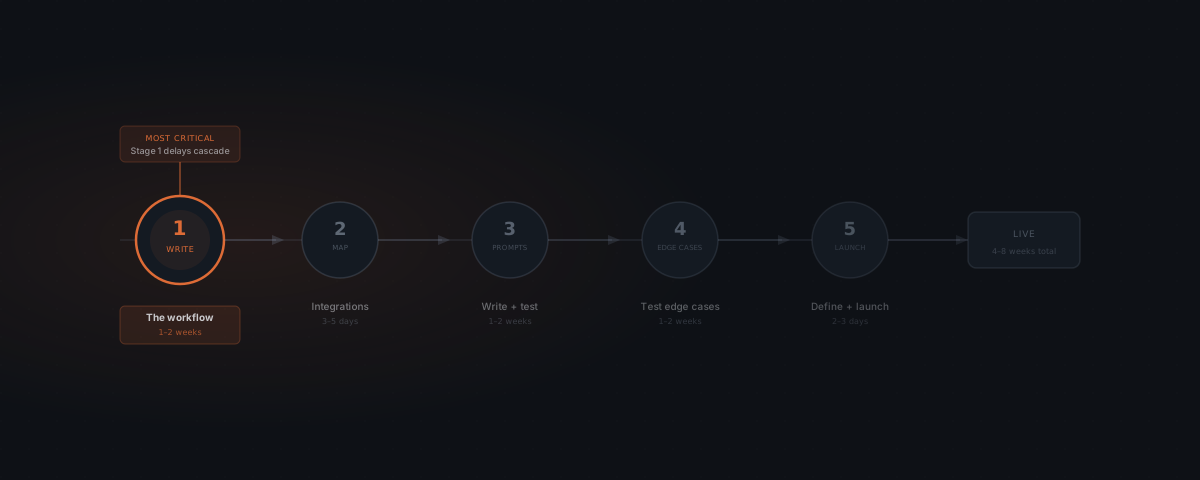
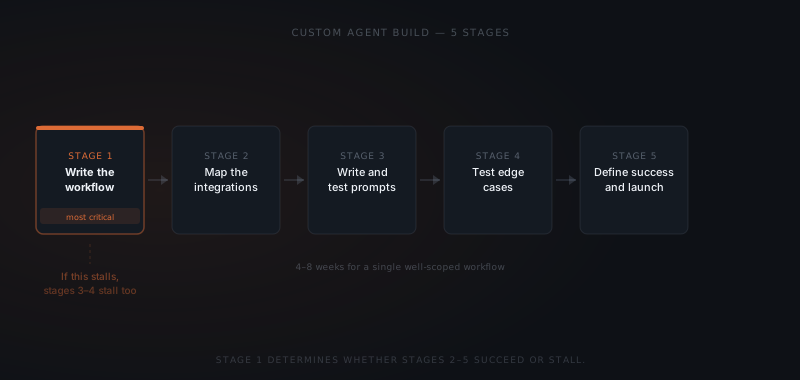
Building a custom agent is a process documentation exercise before it is a technical one. The five stages — write the workflow, map integrations, write prompts, test edge cases, launch with success criteria — are sequential and dependent. Stage 1 determines whether every other stage succeeds or stalls. Most build delays trace back to a process that was described in outline but never written down in full.
A professional services firm wanted an agent to handle client intake emails. The brief was clear enough: read incoming emails, check the CRM for existing client status, draft a response, and surface the draft for review. The build started. Three weeks in, the prompt-testing phase stalled. The agent couldn't reliably determine which emails counted as new client intake versus existing client questions. Nobody had defined the difference in writing. The build resumed after two additional weeks spent writing what should have been written before any code ran.
Write the workflow
Map the integrations
Write and test the prompts
Test against edge cases
Launch with defined success criteria
Most service business workflows complete in 4–8 weeks. The table below shows what extends each stage.
| Stage | Typical duration | What extends it |
|---|---|---|
| Stage 1: Write the workflow | 1–2 weeks | Process is undocumented, contested, or changes mid-stage |
| Stage 2: Map integrations | 3–5 days | Non-standard, legacy, or API-restricted tools |
| Stage 3: Write and test prompts | 1–2 weeks | Ambiguous process document, wide input variation |
| Stage 4: Test edge cases | 1–2 weeks | Complex workflow, high edge-case surface area |
| Stage 5: Launch preparation | 2–3 days | Approval cycles, stakeholder sign-off |
| Total | 4–8 weeks | Stage 1 delays cascade through every later stage |
Stage 1: Write the workflow before building anything
A custom agent is not a technology project. It is a process definition project that requires technology to execute. The process document is the specification the entire build runs against. If the process isn't written, the build doesn't have a specification.
Stage 1 is not a preliminary step — it is the build. The technical implementation follows the process document. If the process is not clear enough to hand to a new employee with no context, it is not clear enough to implement as an agent.
A complete workflow document answers five questions for every step in the process:
- What triggers this step? The specific input or event that starts the action — an email arriving, a form submission, a database record updating.
- What data does the agent need? The specific fields, from which systems, at which point in the workflow.
- What decision does the agent make? The logic: if input X matches condition Y, do Z. If it doesn't match, do W or escalate.
- What is the output? The exact format and destination — a drafted email in Gmail, a Slack message, a record update in HubSpot.
- When does a human need to review? Every point where a human approval or override is required before the agent proceeds.
The depth required is not a summary — it is the level of detail that allows someone unfamiliar with the process to execute it correctly on their first attempt. Anything less produces ambiguities that surface as bugs in stage 3.
Stage 2: Map integrations to the exact permissions each connection needs
Each tool the agent connects to has a different permission model. A Gmail integration that reads all mail and a Gmail integration that reads only labeled mail are not the same integration — the second is safer, more maintainable, and less likely to produce unexpected access to unrelated data.
For each connected tool, the integration map specifies: which system it is, what data the agent reads from it, what data the agent writes to it, the minimum permission level required for those operations, and who owns the credential. Credential ownership matters because when a team member who set up the integration leaves, the integration breaks silently.
Anthropic's guidance on building effective agents identifies scoped access as a key reliability factor: agents with minimum necessary permissions fail more predictably and produce narrower blast radii when something goes wrong.[¹] "Read all" access feels simpler to configure and creates larger, harder-to-diagnose failure modes.
The integration map also captures what happens when a connected tool is unavailable. If the CRM is down when an intake email arrives, does the agent queue the email for retry, escalate to a human, or draft a holding response? Each dependency needs a defined fallback.
Stage 3: Write prompts against real inputs, not hypothetical ones
A prompt written against a hypothetical input will succeed on that input. The same prompt will fail on the real inputs it was not written against. Writing prompts against hypothetical scenarios optimises for the test, not for the workflow.
Effective prompt development starts with a sample of 20–30 real inputs from the actual process — emails, form submissions, CRM records — representative of the full range of inputs the agent will receive. The first prompt draft is tested against this sample. The failure cases reveal ambiguities in the instructions.
The process document is the build. Everything after that is implementation.
For each failure, the question is: is this a prompt failure or a process documentation failure? If the prompt failed because the instructions were ambiguous — the agent didn't know which of two valid paths to take — the process document needs updating before the prompt is revised. Fixing prompts against an under-specified process produces prompts that are locally correct and globally unreliable.
A well-tested prompt set handles the 20–30 sample inputs correctly. Stage 4 is for everything outside that sample.
Stage 4: Test against inputs the agent was not designed for
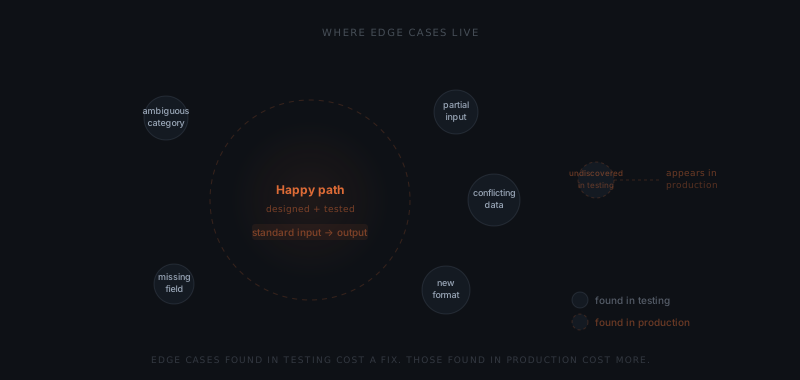
Stage 4 is not a continuation of stage 3. It is a different exercise: deliberately sending inputs the agent was not designed to handle, to find where the instructions break.
A structured edge case test covers four categories. Partial inputs — remove a field the prompt assumes is present, and test what the agent does. Ambiguous inputs — send an input that could reasonably be classified two different ways, and test which path the agent takes. Conflicting inputs — send data from two connected systems that disagree, and test which source the agent trusts. Volume and timing inputs — send inputs at a rate or frequency outside the normal distribution, and test for degraded performance.
Each failure found in stage 4 is a bug caught before go-live. Each failure not found becomes a support ticket, a bad output sent to a client, or a silent degradation in agent reliability. Stage 4 should not be compressed to meet a launch date. A two-week stage 4 that surfaces twelve edge cases prevents twelve production incidents.
Stage 5: Define success criteria before the first deployment
An agent launched without defined success criteria cannot be evaluated. The team knows it is running. The team does not know whether it is running correctly, improving, or degrading.
Success criteria are defined before any real inputs run — not after the first week, not when something breaks. Three metrics apply to most custom agent builds:
Task completion rate — the percentage of inputs the agent handles to a complete output without escalation. A new deployment in a well-documented workflow should reach 70–80% completion rate within the first two weeks. If the rate is lower, stage 1 or stage 3 needs revisiting.
Escalation rate — the percentage of inputs the agent routes to a human because the instructions didn't cover the case. High escalation in the first month is expected and useful: it surfaces real-world edge cases that stage 4 didn't find. An escalation rate that stays above 20% after month two indicates the prompt coverage is too narrow.
Error rate — the percentage of outputs that a reviewing human edits before approving. A declining error rate over three months is the primary indicator that the agent is improving. A flat or rising error rate indicates prompt drift or an integration problem.
Defining these thresholds before launch means the team knows on day one what "working" looks like — and knows on day thirty whether they have it. For context on what maintaining these thresholds costs after launch, see what a custom agent actually costs. For an overview of what custom agents are and when they fit, see what is a custom agent.
What actually gets customized in a custom AI agent
The model is the commodity part. Every custom agent built this year runs on a foundation model any competitor can also call, so nothing about the model is what makes the agent yours.
Four layers carry the customization, and each maps to a stage above:
- The integration surface. Which systems the agent reads from and writes to, and the exact permission scope on each connection — stage 2.
- The decision rules. The conditions under which the agent acts, escalates, or stops, expressed against your process rather than a generic template — stages 1 and 3.
- The approval logic. Which actions execute automatically and which wait for a person, decided per action rather than per agent — stage 2.
- The output contract. The format, tone, and destination the result has to match to be usable without rework — stage 3.
This is why customization effort tracks the number of connected systems and approval boundaries, not the sophistication of the task. An agent doing something conceptually simple across four systems with three approval gates is a larger build than one doing something clever inside a single tool.
What to do when the agent produces wrong outputs after launch
Post-launch failures fall into three categories. Diagnosing the category determines the fix.
Prompt drift. The agent's instructions were written for how the business operated at launch. Business language, process steps, or output requirements have shifted since. Symptom: the error rate on reviewed outputs is rising, but the integration connections are all working. Fix: pull a fresh sample of 20–30 real inputs from the past two weeks, test the existing prompts against them, and update the prompts to cover the new patterns.
Integration drift. A connected tool updated its API, changed a field name, or modified authentication requirements. Symptom: the agent is producing empty outputs, returning stale data, or failing silently on tasks that used to complete. Fix: check the API changelogs for every connected tool. Most changes are announced in advance. Monitor connected tool changelogs as a standard maintenance task, not a reactive one.
Scope creep. The agent is being asked to handle inputs outside its original brief — new request types, new clients with different formats, new workflows added to the same channel. Symptom: escalation rate rising on a specific input category that was stable before. Fix: review the escalation queue for patterns. If a specific input type is escalating repeatedly, either extend the brief to cover it explicitly, or add it to the exclusion list and route those inputs to a human directly.
All three failure types are easier to address early. A rising error rate ignored for a month produces harder-to-diagnose compound failures than one addressed at first signal.
For ongoing maintenance cost and what it covers, see custom agent cost. For the decision of whether to build custom or use an off-the-shelf platform, see custom vs. off-the-shelf.
Frequently asked questions
How long does it take to build a custom agent? A single well-scoped workflow takes 4–8 weeks from start to launch. The timeline depends on how complete the process documentation is at the start of stage 1, integration complexity, the number of edge cases surfaced in stage 4, and the approval process for prompt changes. Builds that stall most often stall at stage 1 — the workflow was described but not documented in full.
What is the most common reason custom agent builds fail? Ambiguous process documentation. The agent doesn't fail because the model can't do the task — it fails because the instructions don't specify what to do in enough cases. The failure mode is consistent: the agent performs well on common inputs and fails on edge cases that were never explicitly addressed in the workflow document.
How many integrations should a first custom agent build have? One to two. Each additional integration adds build time, maintenance overhead, and a new point of failure. A first build that connects to one or two tools and handles one workflow reliably is more valuable than a build that connects to five tools and handles three workflows inconsistently.
What does "test against edge cases" mean in practice? Send inputs the agent was not designed for — partial inputs with missing fields, ambiguous inputs that could be classified two ways, inputs from two systems that disagree — and test what the agent does with each one. The goal is to find gaps in the instructions before the business finds them. Every edge case found in testing is one fewer production incident.
Notes
- Anthropic, Building effective agents, 2024. https://www.anthropic.com/research/building-effective-agents