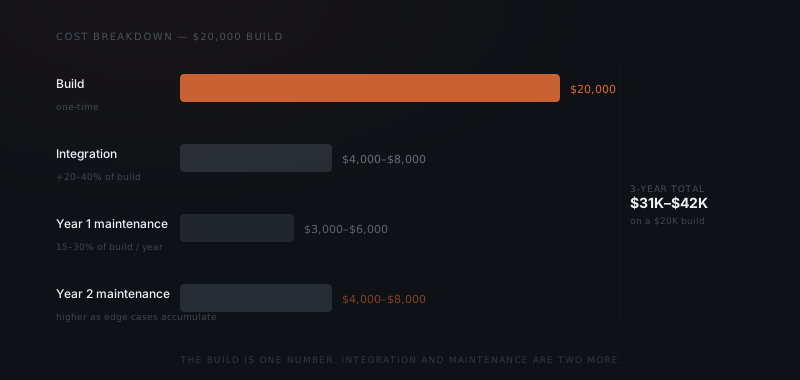
Most custom agent quotes name the build price and stop there. Integration work adds 20–40% on top, and ongoing maintenance runs 15–30% of the build cost every year — with year two costing more than year one as edge cases accumulate. A $20,000 build costs $31,000–$42,000 over three years. The businesses that budget correctly know all three numbers before signing.
The quote came back at $12,000. The second quote for the same workflow came back at $58,000. Both numbers were honest. The $12,000 quote covered the build. The $58,000 quote included integration work, a three-month support period, and ongoing maintenance. These are not the same product.
Most businesses budget for the build. They rarely budget for integration work and almost never budget for the ongoing cost of keeping an agent running correctly after launch. Understanding what AI agent implementation actually costs before signing prevents the largest source of implementation regret: the agent that worked at launch and degraded quietly over the following months.
What a custom agent build actually costs
Build cost is determined by two factors: workflow complexity and number of integrations.
Workflow complexity measures how much logic must be designed before any code is written. A workflow with two consistent inputs, one decision, and one output is a straightforward build. A workflow with conditional branching, multiple escalation paths, and edge cases requiring separate handling multiplies design time considerably. Complex workflows require more prompt iterations, more testing against real inputs from the specific business, and more time before the output is reliable at production volume.
Number of integrations matters because each connected tool adds setup, permissioning, data mapping, and error handling. Connecting a custom agent to a single CRM is a task. Connecting it to a CRM, an inbox, a project tracker, and a billing tool is a project with four separate integration dependencies — each of which can break independently after launch.
For a single well-scoped workflow with one or two integrations, build cost typically runs $8,000–$25,000. For multi-integration systems with conditional logic and a full control layer, $30,000–$80,000 is realistic. The build is the only cost with a defined endpoint.
| Cost component | Range | When it occurs | Notes |
|---|---|---|---|
| Build — single workflow, 1–2 integrations | $8,000–$25,000 | One-time, pre-launch | Fixed deliverable: a working agent |
| Build — multi-integration, conditional logic | $30,000–$80,000 | One-time, pre-launch | Scales with integration count and branching complexity |
| Integration setup per connected tool | $1,500–$4,000 | One-time, pre-launch | Legacy systems and undocumented APIs cost more |
| Year 1 maintenance | 15–25% of build | Annual, ongoing | Prompt drift, first API updates, initial edge cases |
| Year 2 maintenance | 20–30% of build | Annual, ongoing | Higher due to accumulated edge cases |
| Infrastructure and model API usage | $50–$500/month | Monthly | Varies by task volume and model provider |
The integration line items are part of build cost in most quotes — but understanding which tools require which level of integration work is what separates a realistic quote from a surprising invoice.
What ongoing maintenance actually involves
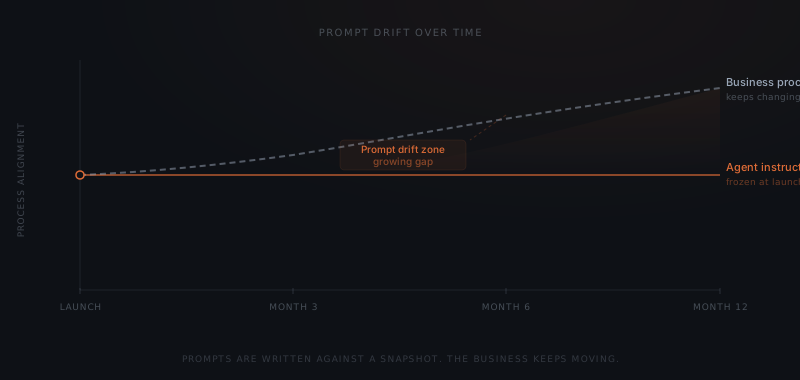
Prompt drift is the most expensive and hardest-to-detect maintenance cost. When business language or process logic shifts — new escalation paths, changed output formats, updated team responsibilities — the agent keeps operating against instructions that no longer reflect how the business works. The agent does not fail visibly. It produces outputs that are slightly wrong in ways that accumulate.
Maintenance has three categories, each with a different cost profile.
Prompt drift occurs when business processes change and agent instructions are not updated to match. A custom agent built for a recruiting firm in January reflects the firm's intake process, candidate categories, and client communication style as they existed in January. By October, two of those three things have changed. The agent is still running. It is running against a snapshot of the business from nine months ago. Correcting prompt drift requires reviewing all affected instructions, testing updates against real inputs, and redeploying — often two to three days of work per drift event.
Integration drift occurs when connected tools update their APIs or change their data formats. Shopify, HubSpot, Notion, and Gmail each update their APIs at least annually. When an API changes, the integration either breaks visibly — the agent stops working — or breaks invisibly, processing data against a field mapping that no longer matches. Invisible breaks are more expensive because they produce bad outputs before anyone notices.
Edge case accumulation is the maintenance cost most businesses least expect. Every workflow has inputs it was not designed to handle — partial inputs, ambiguous categories, conflicting data from two connected systems. These cases accumulate as the agent processes more real-world data. Each unhandled edge case either produces a bad output or surfaces for manual review. Over time, the volume of unhandled cases grows unless someone is actively managing it.
Why year two costs more than the build year
Year one maintenance is primarily prompt drift and integration maintenance — the expected cost of keeping the agent aligned with the business as it changes. Year two adds accumulated edge cases to that baseline.
Budget the build. Then budget 30% of it every year after.
In year one, most edge cases are caught during the first few months of operation and handled as they appear. By year two, the edge cases that were not caught in year one have accumulated. New process changes have introduced new drift. Integration updates have required two or three maintenance cycles. The year-two maintenance cost for a $20,000 build typically runs $4,000–$8,000 — compared to $3,000–$6,000 in year one.
Over three years, a $20,000 build costs $31,000–$42,000 in total, accounting for integration work and maintenance. That number is not exceptional — it is the expected cost of running an agent that actually matches how the business operates. The businesses that budget for it treat it as infrastructure. The businesses that don't treat it as a problem.
The 3-year TCO varies significantly with scope. The table below compares narrow, standard, and broad build scopes.
| Scope | Build cost | Year 1 maintenance | Year 2 maintenance | 3-year total |
|---|---|---|---|---|
| Narrow (1 workflow, 1–2 integrations) | $12,000 | $2,000–$3,000 | $2,500–$4,000 | $16,500–$19,000 |
| Standard (2–3 workflows, 3–4 integrations) | $25,000 | $4,000–$6,000 | $5,000–$8,000 | $34,000–$39,000 |
| Broad (multi-workflow, complex logic) | $55,000 | $9,000–$14,000 | $11,000–$18,000 | $75,000–$87,000 |
The ratio holds regardless of scope: the build is roughly 65–70% of the three-year total. Maintenance accounts for the remaining 30–35%. The absolute gap between scope tiers is the reason that scope decisions at the brief stage are the most cost-effective lever available.
How scope decisions determine total cost
The most effective way to reduce total custom agent cost is to reduce scope at the brief stage. A narrow, well-documented workflow costs less to build, less to integrate, and less to maintain. A broad workflow with multiple sub-processes costs more in all three categories.
The most important scope decision is documentation depth. A workflow described as "handle client onboarding emails" is a broad scope with undefined edge cases, ambiguous escalation logic, and no specified output format. A workflow described as "draft a response to incoming onboarding emails from new clients, referencing their specific plan tier from HubSpot, and surface the draft in Slack for review" is a narrow scope with clear inputs, a defined output, and one integration dependency.
Narrow scopes produce faster builds, more reliable prompts, and fewer edge cases in production. They also cost less to maintain — because the domain of possible inputs is smaller and the logic is simpler to update when processes change. Building narrow and expanding deliberately is cheaper than building broad and debugging continuously.
A useful test at the scoping stage: can the workflow be described in one sentence that includes a trigger, an input, and a specific output? "When a lead has not replied within five days and their status is Proposal Sent, draft a follow-up email referencing their specific proposal and surface it in Slack for review" is a narrow scope. "Handle prospect communication" is not. If the description requires multiple clauses and conditional phrases to capture what the agent does, the scope needs narrowing before the build starts.
For context on what makes a workflow worth automating first, see how to know if a business process is ready to hand to an agent. For the full build process, see how to build a custom agent.
What the first year of maintenance actually looks like
Budgeting for maintenance is one thing; understanding what it involves is another. For most custom agents, the first year of maintenance covers three distinct activities.
Prompt reviews on process change. When the business changes its escalation path, adds a new client tier, or updates its output format, the agent instructions need to be updated to match. This is not optional — an agent running against outdated instructions produces subtly wrong outputs, which the team then corrects manually, which is the same cost as prompt drift without the budget line to pay for fixing it. A well-managed custom agent has a named owner responsible for flagging when the process has changed significantly enough to warrant a prompt review.
API maintenance after tool updates. Every connected tool updates its API. When an API changes a field name, removes a parameter, or changes its authentication method, the integration either breaks visibly or starts pulling incorrect data. Invisible breaks — where the integration still runs but the data mapping is no longer accurate — are more expensive to diagnose than visible ones. Most API changes are documented in advance; monitoring those release notes is part of the ongoing maintenance cost.
Edge case handling. Real-world inputs are more varied than test data. Over the first year, the agent encounters inputs it was not explicitly designed for. Each one either produces a bad output or surfaces for manual review. The pattern of unhandled edge cases points directly to which parts of the brief are incomplete — and updating the brief to cover them is the work that reduces the review burden over time.
Understanding these three activities changes how the maintenance cost is perceived. It is not a recurring fee for keeping the lights on — it is the cost of keeping the agent aligned with a business that is changing. A business that does not change does not need maintenance. Every other business does.
Frequently asked questions
How much does a custom agent cost? Build cost runs $8,000–$25,000 for a single well-scoped workflow with one or two integrations. Multi-integration systems with conditional logic run $30,000–$80,000. Integration work adds 20–40% on top. Ongoing maintenance runs 15–30% of build cost per year, with year two typically higher than year one. Budget all three costs before signing.
What does custom agent maintenance cost per year? Plan for 15–30% of the initial build cost per year. A $20,000 build costs $3,000–$6,000 in year one and $4,000–$8,000 in year two as edge cases accumulate and additional drift events occur. These numbers assume the agent is actively maintained — an agent left without maintenance degrades over time.
What is prompt drift? Prompt drift occurs when business processes change but agent instructions are not updated to match. The agent continues operating against instructions written for an earlier version of the workflow. It does not fail visibly — it produces outputs that are subtly wrong in ways that compound. Correcting a drift event typically takes two to three days of work.
How can I reduce the total cost of a custom agent? Narrow scope at the brief stage. A well-documented, single-process workflow costs less to build, integrate, and maintain than a broad scope covering multiple sub-processes. The total three-year cost of a narrow build is typically 40–60% lower than a broad build handling the same underlying domain.
What questions should I ask a builder before signing? Four questions separate complete quotes from incomplete ones: What is the ongoing maintenance rate, and what does it cover? What happens when an integrated tool updates its API — is that included in maintenance? Are integration setup costs included in the build price or billed separately? What is the support period after launch — when does paid maintenance begin?
A builder who answers all four clearly is pricing a complete engagement. A builder who defers on any of them is pricing the build and leaving the rest for later.
What is the difference between a custom agent and an off-the-shelf AI agent? A custom agent is built with integrations specific to the business's tool stack, report formats, and process logic. Off-the-shelf agents work with common tool combinations and handle generic workflow patterns. Custom agents cost more to build but produce outputs aligned to the specific business from day one — without requiring the workarounds and manual corrections that generic agents typically produce on specialist workflows.
Does maintenance include performance improvements or just keeping the agent running? Maintenance covers keeping the agent aligned with the current business — updating prompts when processes change, maintaining integrations when APIs update, and handling accumulated edge cases. Performance improvements — expanding scope, adding new workflows, improving output quality beyond the original specification — are typically scoped and billed separately as enhancement work, not maintenance.
Notes
- Anthropic, Building effective agents, 2024. https://www.anthropic.com/research/building-effective-agents
Cost ranges in this post reflect observed patterns across YardWork custom agent builds. Specific numbers depend on workflow complexity, integration count, and maintenance requirements for individual implementations.