A Zapier workflow runs 2,000 times a month without issue. Then a vendor changes their email format and the workflow silently skips every record for three weeks. Automation handles the expected input precisely — and fails when the input deviates. AI agents read context, reason about what the input means, and decide what action fits even when no rule covers the case.
What is the difference between automation and an AI agent?
The core difference is what each tool does when an input doesn't match what it was built for.
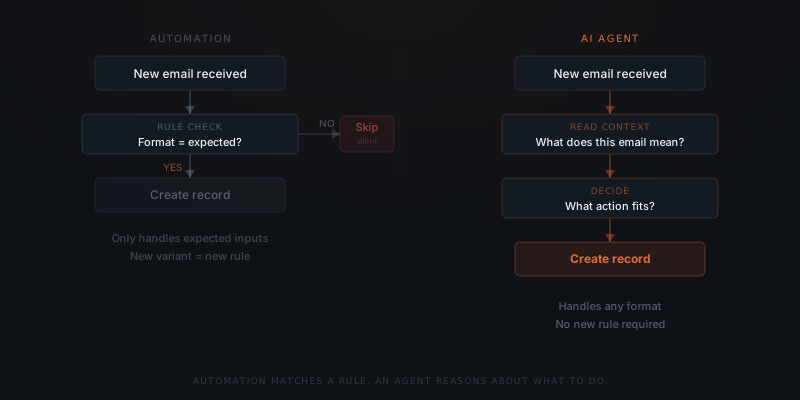
Tools like Zapier, Make, and n8n execute a fixed rule. A trigger arrives, a condition is checked, an action runs. If the input matches the condition, the workflow completes. If the input doesn't match, the workflow errors out or skips the record. Automation has no mechanism for reasoning about what the input means.
An AI agent reads the input, determines what it represents, and decides what action is appropriate. When an unexpected input arrives, the agent doesn't require a pre-written rule for that variant. The agent reasons from context and acts — even when no rule covers the case. This is the property that makes agents suited for workflows where the input environment is outside the business's direct control.
This is an architectural difference, not a capability ranking. Automation is not a weaker version of an AI agent. Both are the right tool for different conditions.
The two approaches compared across the dimensions that matter for a service business:
| Dimension | Automation (Zapier / Make / n8n) | AI Agent |
|---|---|---|
| Input handling | Fixed format required — skips or errors on variants | Reads context — handles variation without pre-written rules |
| Decision logic | Rule-based — branches on field values | Reasoning-based — acts on the meaning of content |
| Error handling | Errors out or skips silently when input doesn't match | Routes unexpected inputs to human review |
| Maintenance burden | Requires rule updates for every new input variant | Adapts to variation within scope — fewer rule rewrites |
| Cost at scale | Lower — subscription plus task volume pricing | Higher — setup cost plus API usage per task |
| Setup time | Hours to days (self-service) | Days to weeks (requires integration and logic design) |
| Best for | High-volume, fixed-format, predictable processes | Variable inputs, content-based decisions, multi-step workflows |
| Right example | New contact → send welcome email | Application email (any format) → parse, create ATS record, draft reply |
Where does automation work well — and where does it break?
Automation excels at high-volume, fixed-format processes. A new contact in HubSpot triggers a welcome email. An invoice marked paid in Xero updates the deal stage in Salesforce. A form submission creates a task in Asana. These workflows run thousands of times without variation — automation handles them reliably and at low cost.
The failure mode is a variant input. A contact added with a duplicate field. An invoice in an unexpected currency format. A form submission with a required field blank. Zapier's own documentation notes that every input variant a workflow might encounter requires a manually configured filter.[¹] Every variant not anticipated becomes a gap.
Automation does not fail loudly. A Zapier workflow that skips a record due to an unexpected input produces no visible error unless monitoring is configured explicitly. Silent failures accumulate over days or weeks before the gap is noticed.
The deeper problem: as businesses grow, input variability grows. More clients produce more edge cases. More integrations produce more ways for upstream data to arrive in an unexpected format. Automation built for a stable, predictable process becomes a maintenance burden when that process starts to vary.
Three specific scenarios where automation fails silently, and what an agent does instead:
Vendor changes their email format. A Zapier workflow monitors an inbox for supplier invoices, extracting amounts by matching a specific subject line pattern. The supplier changes their subject line format with no notice. The workflow matches nothing, skips every invoice for three weeks, and produces no error until a human notices the aging report looks wrong. An agent reads the email content, identifies it as an invoice regardless of subject line format, and extracts the amount correctly.
New client type introduces unexpected field values. An automation routes new CRM contacts based on a "company size" field with values the rule expects: "1–10," "11–50," "51–200." A new batch of leads arrives from a different source where the field contains raw numbers: "7," "23," "140." The condition matching fails. Contacts are not routed. An agent reads the field, interprets 7 as a small business, and routes correctly.
Integration update changes a field name upstream. A connected tool renames "invoice_amount" to "amount_due" in their API. The Zapier workflow reading "invoice_amount" now reads null and produces zero-value records for every new invoice. The workflow does not error — it runs and produces wrong data. An agent using a language model to interpret the response structure identifies the relevant field by context, not by fixed name, and extracts correctly.
All three examples share the same root cause: the automation was built for a fixed input pattern, and the input changed. The fix is a rule update — which is repeating work that grows with the business.
What do AI agents do when inputs vary?
An AI agent doesn't require a pre-written rule for each input variant. The agent reads the input, identifies what it represents, and decides what action fits.
Automation executes the rule. An agent decides whether the rule applies.
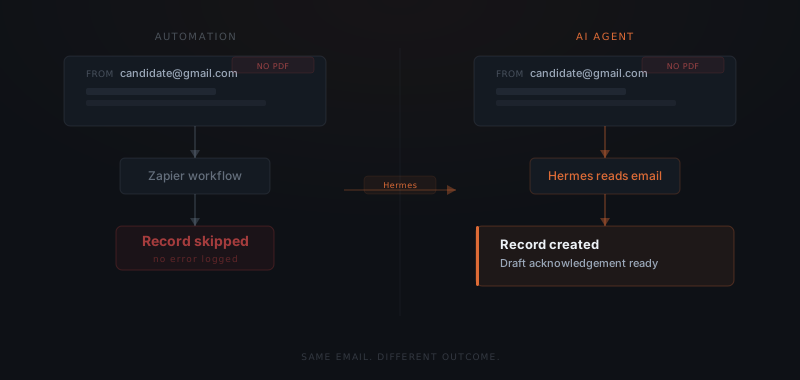
A recruiting agency receives candidate applications via email. The expected format is a PDF résumé. In practice: some applicants send LinkedIn profile links, some send Google Docs, some send plain-text emails with no attachment. A Zapier workflow configured to extract a PDF attachment stops on every variant. An agent using Hermes — built by Nous Research — reads each email, identifies it as a candidate application, extracts the relevant information, creates the candidate record in the applicant tracking system, and drafts an acknowledgement reply. The recruiting team sees a completed record and a draft — not an error log.
The agent doesn't need the recruiter to write a new rule for Google Docs. The agent reads the input, recognises the context, and acts. For a full breakdown of how AI agents reason and act across systems, see what is an AI agent.
How do you decide which one a workflow needs?
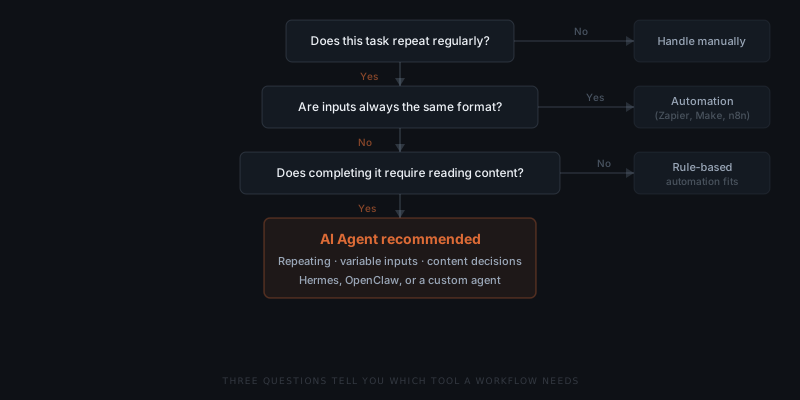
Three questions determine the right tool:
1. Are inputs always in the same format? If inputs arrive in the same structure every time — same field names, same data types, same source — automation is the lower-cost option. If inputs vary in format, source, or content, an agent handles what automation cannot.
2. Does completing the task require a decision based on content? Automation branches on field values. An agent reasons about meaning. If the next action depends on what the input says rather than just whether it arrived, an agent is required.
3. Does the task repeat at volume with occasional exceptions? Automation handles volume at lower cost. An agent is worth the additional cost when variation means automation errors out or requires constant rule updates to stay current.
Service businesses that run both in parallel get the most from each. Automations handle predictable, fixed-format, high-volume tasks. Agents handle workflows where variation is the norm.
Running both simultaneously is not complexity for its own sake — it is matching the tool to the requirement. A business might use Zapier to trigger a new CRM contact every time a form is submitted (fixed format, high volume, no reasoning required), while using an agent to handle inbound inquiry emails that arrive in varying formats with different questions and urgency levels (variable, requires reading and acting on content). The automation never fails on the form submission because the form format never changes. The agent never misses an unusual email because it reads the content, not just the format.
The practical division for most service businesses: use automation as the foundation for any process where inputs are controlled and predictable — internal triggers, connected system syncs, structured form data. Introduce an agent where the process hits external inputs — client emails, vendor messages, candidate applications, inbound inquiries — where variation is the default, not the exception. The two tools do not compete for the same workflows; they cover different layers of the same business operation. Hermes handles workflows that span multiple platforms and improve over time. OpenClaw routes agent-handled communication from messaging platforms. For workflows with unusual integration requirements, a custom agent is the appropriate path.
When to migrate from automation to an agent
Most service businesses start with automation — it is faster to deploy, cheaper per task, and easier to reason about when processes are new and inputs are predictable. The right time to consider an agent is when automation maintenance starts costing more than the automation saves.
Five signs an automation workflow is ready for a migration:
Rule maintenance exceeds 2 hours per month per workflow. When a team member spends significant time updating conditions, adding filters, or debugging skipped records, the automation's maintenance cost is real and recurring. An agent handles variation without rule rewrites.
More than 5% of records are skipped or erroring each week. Any failure rate above trivial means the automation is regularly missing work that needs to be done. Downstream work accumulates. Someone catches up manually. The automation is saving less than it appears to.
The business is growing and input sources are diversifying. A company that started with one invoice format now receives invoices from 15 suppliers in 8 formats. Each new format required a new rule. The trajectory is unsustainable.
The action required depends on what the input says. An automation can branch on whether a field equals a value. An agent can branch on whether an email from a client sounds frustrated, satisfied, or confused — and respond differently in each case. If the right response depends on meaning, not value, automation cannot handle it.
Output requires manual review before it is trusted. When a team member checks every automation output before acting on it, the workflow is not actually automated — it is generating a draft that a human verifies. An agent with an approval queue makes that verification explicit, structured, and bounded by a defined response window rather than depending on a team member remembering to check.
Cost comparison: automation vs. agent
| Cost element | Automation | AI Agent |
|---|---|---|
| Setup cost | $0–$2,000 (self-service to configured) | $2,000–$8,000 (implementation service) |
| Monthly subscription | $20–$100 (Zapier/Make/n8n plan) | $0 (API costs only) |
| Per-task cost | $0.001–$0.01 depending on plan | $0.005–$0.015 (API token cost) |
| Maintenance (stable inputs) | Low — rules run unchanged | Low — agent operates within defined scope |
| Maintenance (variable inputs) | High — each variant needs a rule update | Low — agent handles variation without rule rewrites |
| Break-even vs. automation | N/A — automation is the baseline | When automation maintenance exceeds ~$300/month or error rate creates downstream business cost |
At high volume with stable inputs, automation is almost always the right economic choice. The agent setup cost pays for itself when the alternative is ongoing manual work to handle what automation cannot.
The hidden cost in the automation column is not the subscription fee — it is the time spent maintaining rules as inputs evolve. A business paying $50/month for Zapier might spend 3–4 hours per month updating workflows to handle new input variants. At $50/hour, that is $150–$200/month in maintenance cost that does not appear in the Zapier bill. An agent absorbs that variation automatically, which is why the economic comparison needs to include maintenance time, not just subscription and API costs.
Frequently asked questions
What is the difference between automation and an AI agent? Automation executes a fixed rule when inputs match the expected pattern — it cannot handle variants the rule did not anticipate. An AI agent reads context, reasons about what an input means, and decides what action fits even when no pre-written rule covers the case. The difference is not power. It is the ability to handle variation.
When should I use automation instead of an AI agent? Use automation for high-volume, fixed-format processes where inputs are predictable and the action is always the same — new CRM entries, invoice triggers, form submissions in Zapier or Make. Automation is faster to set up and lower cost at scale when inputs don't vary.
Why does automation fail on unexpected inputs? Automation tools like Zapier, Make, and n8n execute a rule. When an input doesn't match the rule's expected format or conditions, the workflow either errors out or skips the record silently. There is no reasoning step — automation cannot determine what an unexpected input represents or what to do with it.
Can automation and AI agents work together in the same workflow? Yes. Many service businesses run both in parallel. Automations handle predictable, high-volume tasks with fixed inputs. Agents handle workflows where inputs vary, decisions depend on content, or multiple systems need to respond differently based on what the input contains.
Notes
- Zapier, Add conditions to your Zap with filters. https://help.zapier.com/hc/en-us/articles/8496288655629-Add-conditions-to-your-Zap-with-filters