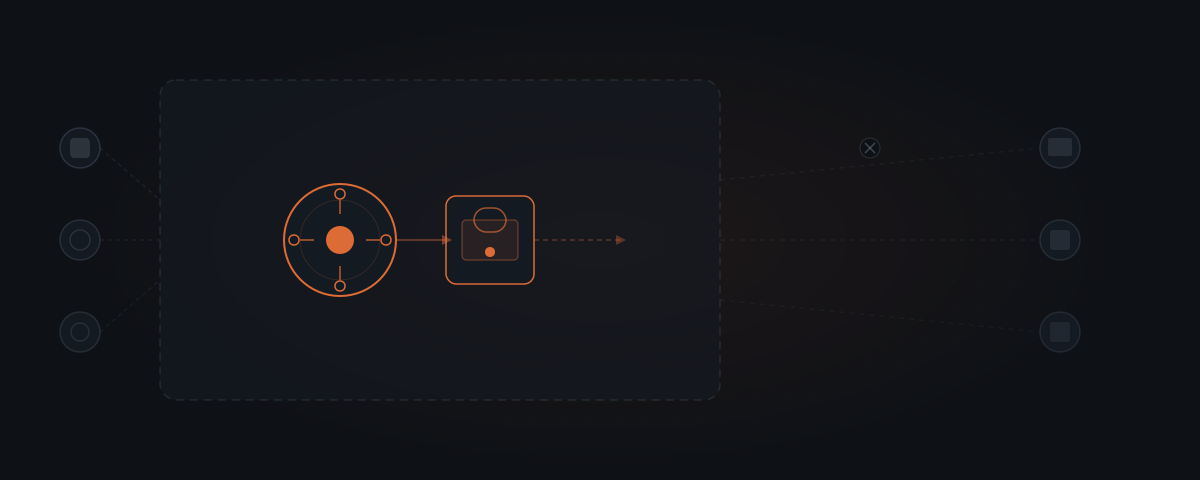
OpenClaw is an open-source AI agent framework that runs inside Slack, WhatsApp, Telegram, and 20+ other messaging platforms. OpenClaw connects to your existing tools, handles recurring work on a schedule, and is built to hold external actions — emails, messages, file edits — for human approval once that gating is configured; it ships with approval prompts off. Your data stays on your own server, not a vendor's. You own the system.
You install OpenClaw on your own server. You connect it to your Slack, your CRM, your email. You define what it should draft and when. Turn on approval gating, and every draft it produces waits in a queue until you approve it — nothing goes out until you say so. That gate is a setting, not a default: OpenClaw ships with it off, so building the constraint in is the step that makes the agent do only what you release. That is the core of what OpenClaw is built for.
Infrastructure you own, not a product you rent
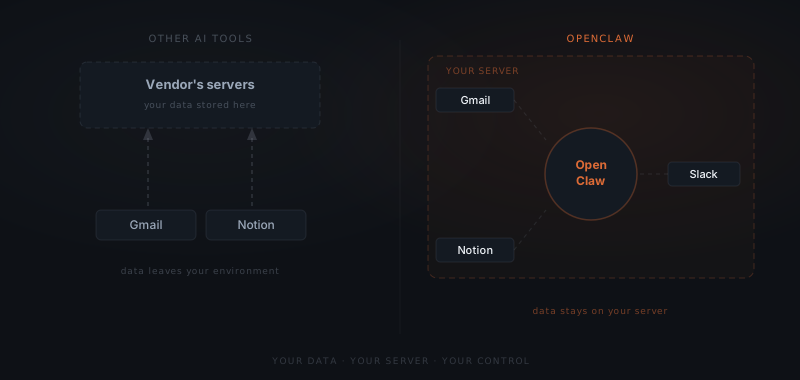
With most AI tools, you are renting access to someone else's system. You trust the vendor to keep it running, keep it private, and keep it priced the same next year. With OpenClaw, the system is yours — deployed on your hardware, under your control, with no dependency on a vendor staying in business or keeping their terms stable.
| Other AI tools | OpenClaw | |
|---|---|---|
| Hosting | Vendor's servers | Your own server |
| Ownership | You rent access | You own the system |
| Data location | Vendor's database | Your hardware |
| Pricing | Subscription, can change | Infrastructure + API costs only |
| Portability | Locked to vendor | Fully portable |
| Multiple agents | Varies | Supported on one installation |
Your credentials, your message history, your workflow configurations — none of it sits in a vendor's database. OpenClaw is open-source. You can inspect the code, modify it, and run it without asking anyone's permission.
What OpenClaw handles
OpenClaw handles any task that involves reading from a connected source, producing a draft, and waiting for approval before taking action. The specific tasks depend on what you configure, but the categories follow consistent patterns across service businesses.
| Task category | What OpenClaw does | Approval required once gating is on |
|---|---|---|
| Email drafting | Writes responses in your voice from context | Yes — before sending |
| CRM updates | Updates records from conversations or meeting notes | Yes — before writing |
| Client reports | Pulls data from connected sources, assembles draft | Yes — before sharing |
| Follow-up sequences | Drafts follow-up messages at configured intervals | Yes — before sending |
| Meeting summaries | Reads transcript or notes, produces structured summary | Yes — before distributing |
| Scheduled briefings | Compiles daily or weekly digest from connected data | Yes — before sending |
| Flag and alert | Identifies items requiring attention, surfaces to human | No action taken — advisory only |
The pattern is consistent once approval gating is turned on: OpenClaw produces the draft, the human controls the release. Configured that way, no output reaches a client, a colleague, or an external system without a human having read and approved it.
These task categories translate differently depending on the business type, though the approval model stays identical across all of them once it is configured. An agency runs email drafting, proposals, and client reporting through the queue. A consultancy uses the same queue for research formatting, invoice follow-up, and meeting prep between engagements. An ecommerce operator routes support tickets and inventory alerts through it; an early-stage SaaS founder routes support triage, feature tracking, and changelogs. The workflows differ; what does not differ, once the gate is on, is that nothing leaves the queue without a person releasing it. For how agent fit varies across industries generally, see which industries use AI agents.
How the approval model works
The approval layer is the defining feature OpenClaw is built for. It is a documented setting — ask, which ships as "off" on gateway and node hosts alongside security: "full" — not a behavior the framework runs by default.[1] Turn ask on, and the block sits below the model's own decisions: the agent cannot talk its way past a gate it never controls.
OpenClaw ships with approval prompts off. Once ask is turned on, the block is not a prompt instruction the model is trying to follow — it is a constraint enforced below the model, at the execution layer, and the agent has no way to bypass it. But that protection starts at configuration, not at installation.
With approval gating turned on, a workflow runs through five stages:
Trigger
An inbound message arrives, or a scheduled job fires. OpenClaw reads the context — the message, the thread history, the relevant CRM data, any connected files.
Draft
The agent produces the output: an email draft, a CRM entry, a report section, a follow-up message. The draft includes what it intends to do and why.
Queue
The draft goes to the approval queue — a Slack message, an email, or a dedicated review interface depending on your setup. Nothing is sent to any external system at this point.
Review
You read the draft. You approve it, edit it, or reject it. If you edit, the agent uses the correction to improve future outputs in that context.
Execute
Only after approval does the action execute — the email sends, the CRM updates, the report goes out. The agent logs what was approved, edited, or rejected.
For client-facing work, this model removes a specific category of risk: the wrong email sent to the wrong person at the wrong time. The approval layer handles that without removing the value the agent creates.
OpenClaw is not a product you subscribe to. It is infrastructure you own — and data that never leaves your server.
What OpenClaw connects to
OpenClaw connects to 23 messaging platforms and integrates with the tools most service businesses already use.
| Category | Supported tools |
|---|---|
| Messaging | Slack, WhatsApp, Telegram, Discord, Microsoft Teams, Google Chat, iMessage, Signal, IRC |
| Gmail, Outlook | |
| CRM | HubSpot, Salesforce, Pipedrive, Airtable |
| Calendar | Google Calendar, Outlook Calendar |
| Project management | Notion, Linear, Asana, Jira, ClickUp |
| File storage | Google Drive, Dropbox, OneDrive |
| AI model providers | Anthropic, OpenAI, Google, Mistral, and 35+ others |
The AI model connection is configurable. OpenClaw supports 40+ model providers — you choose which model handles which task, and you can switch providers without changing your workflow configuration. The model runs in the cloud; the gateway and your business data stay on your server.
For most teams, setup starts with the one or two channels where work actually happens and the tools the agent needs to read from. Additional channels and integrations add later without re-deploying.
Your data stays on your server
Everything that runs through OpenClaw — message history, credentials, tool access, session data — stays on your hardware. The AI model API calls go out to the cloud provider you choose, but the content of what passes through the gateway, and all the connected business data, never leave your server.
For teams handling client information, operating under NDA, or working in regulated industries, self-hosting is not a preference. It is the only architecture that meets the baseline requirement.
Multiple agents, each scoped to one job
OpenClaw supports multiple agents on the same installation, each with its own configuration, tool access, and context. A client-facing agent handles inbound messages. A separate one runs internal reporting. Another monitors a specific inbox for a specific trigger. Each is isolated — they do not share memory or session history.
Scoped tool access is how you keep the system predictable. The client-facing agent gets access to the CRM and email. The reporting agent gets access to the project management tool and the data sources it needs. Neither agent has access to the other's connected tools. Give each agent exactly what it needs and nothing more.
How to set up OpenClaw
OpenClaw setup involves five stages. The timeline from first deployment to a fully operating workflow is typically 1–3 weeks depending on integration complexity. For the full walkthrough of scoping, permissions, and rollout for a real business, see how to set up OpenClaw for your business.
Deploy the server
Provision a VPS or use your existing infrastructure. OpenClaw runs on Linux and requires standard dependencies. The installation process takes under an hour for a team comfortable with server administration.
Connect your messaging channels
Link OpenClaw to the platforms where it will be accessible — typically starting with Slack or the channel where most work happens. Each channel connection requires OAuth credentials or API keys.
Connect your tools
Integrate the tools the agent will read from and write to: CRM, email, calendar, project management. Each integration requires API credentials. Permission scoping happens at this stage — define exactly what each agent can access.
Define your first workflow
Write out what the agent should handle: what triggers it, what it should produce, and what a good output looks like. The clearer the initial workflow definition, the faster the agent produces approvable outputs from day one.
Run a review period
Turn approval gating on and run every output through the queue for the first 1–2 weeks. This is not the default — OpenClaw ships with approval prompts off — so it is a deliberate first configuration step, not a free grace period. Use it to refine the workflow based on what the agent gets right and wrong. Most workflows stabilise within two weeks of regular use.
Teams without in-house server administration experience typically use an implementation service. YardWork handles the full setup — server, channels, integrations, first workflows — and provides ongoing support. For the implementation scope and what that involves, see what an AI agent implementation actually involves.
How much does OpenClaw cost?
OpenClaw is open-source with no licence fee. The cost of running it has three components: infrastructure, AI model API usage, and setup.
| Cost component | Typical range | Notes |
|---|---|---|
| Infrastructure (self-hosted VPS) | $20–60/month | Scales with task volume, not platform count |
| AI model API usage | $30–200/month | Depends on model tier and task volume |
| Initial setup and integration | $2,000–6,000 one-time | Varies with tool count and workflow complexity |
| Ongoing support (optional) | $150–400/month | If using an implementation service |
| Total cost — year 1 | $2,400–9,000 | Setup + 12 months infrastructure and API |
| Total cost — year 2+ | $600–3,000/year | Infrastructure + API only |
The infrastructure cost is low because a single OpenClaw installation handles all connected channels and multiple agents. Adding a third or fourth messaging channel does not increase infrastructure cost — only task volume affects the API bill.
Cost is one side of the equation — tracking what OpenClaw actually returns is the other. For where the real return shows up and how to measure it in the first 30 days, see how to measure AI agent ROI.
When OpenClaw is not the right choice
OpenClaw is the right tool for teams that need human oversight on every outbound action and want data sovereignty. It is not always the right tool.
You need an agent that improves autonomously. OpenClaw does not build skills from experience the way Hermes does. If you need an agent that gets better at a workflow over time without manual tuning, Hermes is the better fit. For a direct comparison, see OpenClaw vs. Hermes.
You need a fully custom data model. If your workflow depends on proprietary data structures or internal systems that require bespoke integration, a custom agent built specifically for your data is more efficient than adapting OpenClaw's framework.
Your team cannot manage a server. OpenClaw requires server administration — either in-house or through a service. Teams that want a fully managed, zero-infrastructure solution are better served by a different architecture, or by using YardWork to own the infrastructure layer on their behalf.
You want to test before committing. OpenClaw's setup complexity means it is not a good fit for a one-week pilot. The setup cost does not amortise well at low task volume or short time horizons. Confirm the workflow is worth automating before deploying OpenClaw to handle it.
Frequently asked questions
What is OpenClaw? OpenClaw is an open-source, self-hosted AI agent framework. It runs inside messaging apps — Slack, WhatsApp, Telegram, and 20+ others — plugs into the tools you already use, and works through recurring tasks on a schedule. It is built to hold every outbound action — an email, a message, a file edit — for human approval once that gating is configured; it ships with approval prompts off. Your business data never leaves your own server.
Does OpenClaw send business data to a vendor? No. OpenClaw is self-hosted on your own server. Message history, credentials, and business data never leave your infrastructure. Cloud AI models can still be used — you choose the provider — but the gateway, connected tools, and all business data stay on your own server.
How does the OpenClaw approval model work? Before any external action — an email, a message, a CRM update — OpenClaw can draft the action and route it to a human for review via Slack, email, or a review interface. That gate is a documented setting (ask, which ships as "off" on gateway and node hosts, alongside security: "full") — not a framework behavior that runs regardless of configuration. Once ask is turned on, nothing executes until a human releases it.
How much does OpenClaw cost to run? OpenClaw is open-source with no licence fee. Running costs include infrastructure ($20–60/month), AI model API usage ($30–200/month), and initial setup ($2,000–6,000 one-time). Year 1 total typically runs $2,400–9,000 including setup. Year 2 onwards costs $600–3,000/year.
What is the difference between OpenClaw and Hermes? OpenClaw is a messaging gateway built for approval-gated outbound — every outbound action can require human sign-off, once that gating is turned on (it ships off by default). Hermes is a self-improving agent that builds skills from experience and operates with minimal supervision across 20+ platforms. OpenClaw suits workflows requiring human oversight on every action. Hermes suits high-volume workflows that benefit from autonomous execution and continuous improvement.
Can OpenClaw run multiple agents simultaneously? Yes. OpenClaw supports multiple agents on a single installation, each with its own configuration, tool access, and context. A client-facing agent and an internal reporting agent run in parallel without sharing memory or session history.
Notes
- OpenClaw, Exec Approvals. Documents the
asksetting values, thesecurity: "full"/ask: "off"default for gateway and node hosts, the sandboxdenydefault, allowlist glob andargPatternmatching, and the allow once / allow always / deny resolutions. https://docs.openclaw.ai/tools/exec-approvals — retrieved 1 Sep 2026.