Hermes is a self-improving AI agent built by Nous Research that runs across 20+ platforms — Slack, Telegram, Gmail, Discord, WhatsApp — from a single deployment. Unlike static agents that stay fixed after launch, Hermes builds reusable skills from every task it completes and becomes more capable the longer it operates. One instance handles the entire communication stack, learns from every interaction, and shares skills across all connected platforms.
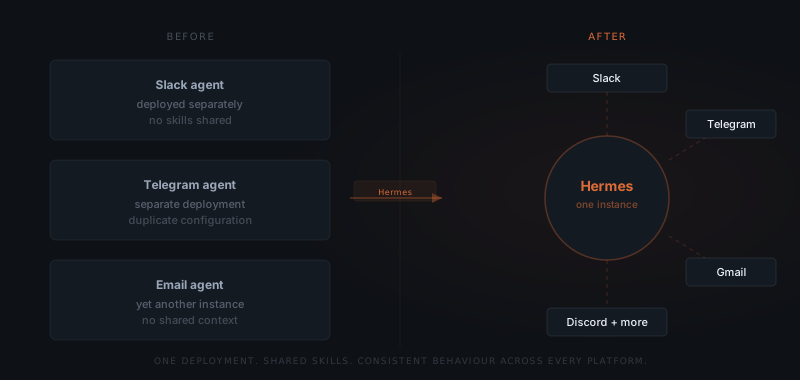
A team managing client communication across Slack, Telegram, and email runs three separate agent setups. Each has its own configuration. Skills learned on Slack do not carry to Telegram. An update to one does not affect the others. Three deployments, three maintenance burdens, no shared memory. Hermes solves exactly this: one agent instance that runs across all connected platforms, builds skills from every task it completes, and gets more capable over time — not just on one platform, but across all of them.
What is Hermes?
Hermes is a self-improving AI agent built by Nous Research, the AI research organisation focused on open-weight foundation models and agent architectures.[¹] Hermes runs across 20+ messaging and collaboration platforms — including Slack, Telegram, Discord, WhatsApp, Microsoft Teams, and Gmail — from a single deployment.
The core distinction from other agents is how Hermes handles experience. Nous Research describes Hermes as "an intelligent personal assistant that gets more capable the longer it runs" — not through manual retraining, but by creating reusable skills from tasks it completes.[²]
Hermes is not a coding copilot, not a chatbot wrapper around a single API, and not a platform-specific tool. Hermes is a general-purpose agent that runs everywhere your team communicates and improves as it works.
How does Hermes learn?
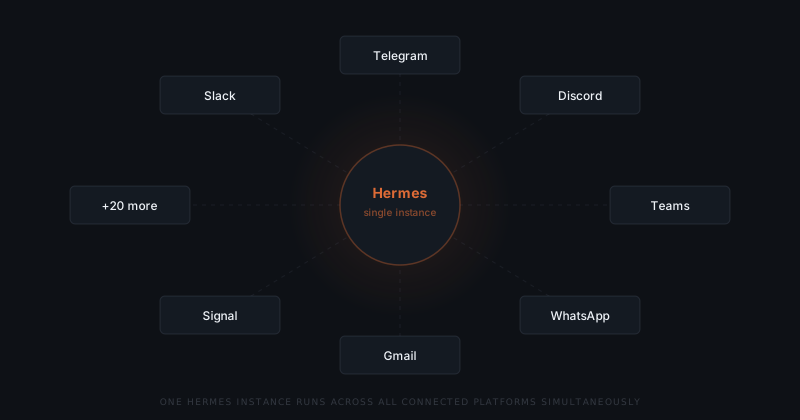
Hermes creates skills from completed tasks. When Hermes finishes a task — drafting a client update, triaging a support queue, pulling a weekly report — it stores the approach as a Skill object: code, tests, and examples that define how to handle that task category in the future.[³]
Skills are stored at agentskills.io, an open standard for agent skill exchange. Skills can be reused across instances, shared between teams, and improved through use. The registry is compatible with other agent systems, including Cursor, GitHub Copilot, and Claude Code. For the full mechanism — including how skills compound and how to diagnose drift — see how Hermes learns.
Hermes does not require manual retraining when workflows change. Skills update from experience — each completed task is an opportunity for the agent to encode a better approach for the next time.
The practical effect: a Hermes instance handling client follow-up for a recruiting agency in month three handles more edge cases correctly than it did in month one — because it has accumulated skills from every follow-up task it has completed.
How fast does improvement happen? Hermes improves in proportion to task volume. A high-frequency task — 50+ executions per month — produces a well-refined skill within 4–6 weeks. A low-frequency task improves more slowly. Teams see the most noticeable improvement in the first 90 days on their highest-volume workflows.
What platforms does Hermes run on?
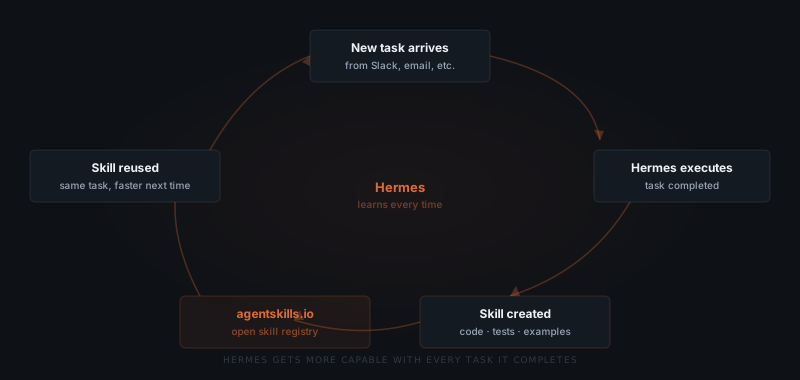
Hermes runs across 20+ platforms from a single instance. The platform coverage spans messaging, collaboration, email, and developer tools.
| Category | Platforms |
|---|---|
| Messaging | Slack, Telegram, Discord, WhatsApp, Signal, IRC |
| Gmail, Outlook | |
| Collaboration | Microsoft Teams, Notion, Confluence |
| Developer tools | GitHub, Linear, Asana, Jira |
| Other | Twitter/X DMs, LinkedIn messaging, and additional platforms via API |
A single Hermes deployment covers the entire communication stack. When a client sends a message on Telegram and the internal team responds on Slack, Hermes maintains context across both channels — no separate instances, no duplicated configuration.
Hermes integrates with 70+ tools beyond messaging: task managers (Linear, Asana, Jira), knowledge bases (Notion, Confluence), development tools (GitHub), and calendar and email systems. The agent reads from and writes to these tools as part of its task execution.
Hermes is self-hosted under an MIT licence. Teams deploy it on their own infrastructure — no data is sent to a third-party agent service. The same instance handles all platforms once deployed.
What tasks does Hermes handle?
Hermes handles any task that involves reading from and responding to messages, coordinating between platforms, or pulling from connected tools. The specific tasks it executes depend on how it is configured, but common patterns across service businesses follow consistent categories.
| Task category | What Hermes does | Platforms typically involved |
|---|---|---|
| Client communication | Drafts responses, routes requests, sends updates | Gmail, Slack, Telegram |
| Lead follow-up | Monitors pipeline, sends follow-up sequences, logs to CRM | Gmail, Slack, HubSpot |
| Internal coordination | Routes requests to the right person, sends summaries | Slack, Teams, Notion |
| Reporting | Pulls data from connected tools, generates weekly digests | Notion, Linear, Gmail |
| Support triage | Classifies incoming requests, routes to queue, sends acknowledgements | Slack, email, Telegram |
| Scheduling | Identifies scheduling requests, proposes times, confirms bookings | Gmail, Calendar, Slack |
These task categories play out differently depending on the industry, and the difference is in what the skill accumulates rather than in the category itself. A consultancy's client communication centers on research output and report formatting, so the skills that build up are about structuring findings. A marketing agency's centers on assembling campaign data — reading Meta Ads, Google Ads, and GA4 into a monthly report a client will actually read — so the skills that build up are about which numbers matter to which account. An insurance broker drafting renewal submissions across multiple carriers accumulates something different again: what phrasing worked with which underwriter last cycle. For how agent fit varies across industries generally, see which industries use AI agents.
Most agents stay fixed after deployment. Hermes gets more capable every time it works.
How does Hermes compare to a single AI agent?
A single AI agent is configured for one platform and one workflow. It executes the same task the same way every time it runs — no improvement, no cross-platform context. Hermes is designed for teams whose work spans multiple platforms and whose workflows evolve over time.
| Single agent | Hermes | |
|---|---|---|
| Platform coverage | One platform per deployment | 20+ platforms, one instance |
| Learning | Static after deployment | Builds skills from every completed task |
| Skill sharing across platforms | Not possible | Skills apply across all channels |
| Maintenance overhead | One instance per platform | One instance for all platforms |
| Setup complexity | Lower — narrow scope | Higher initial setup, lower ongoing cost |
| Improvement over time | None without manual changes | Continuous — proportional to task volume |
| Self-hosting | Varies | Required — MIT licence, own infrastructure |
| Best for | Single-channel, fixed workflow | Multi-platform, evolving workflows |
The tradeoff is setup complexity. A single agent for one defined workflow requires less initial configuration than a full Hermes deployment. For teams that need cross-platform coordination and want the agent to improve without ongoing manual work, Hermes is the right architecture. For a team that has one defined workflow on one platform, a simpler agent may be sufficient.
For a direct comparison of Hermes and OpenClaw — the other agent product Yardwork deploys — see OpenClaw vs. Hermes.
How much does Hermes cost?
Hermes is open-source under the MIT licence — there is no licence fee. The cost of running Hermes has three components: infrastructure, API usage, and setup.
| Cost component | Typical range | Notes |
|---|---|---|
| Infrastructure (self-hosted VPS) | $20–80/month | Depends on task volume and platform count |
| AI model API (e.g. GPT-5, Claude) | $50–300/month | Depends on task volume and model tier |
| Initial setup and integration | $3,000–8,000 one-time | Varies with platform count and workflow complexity |
| Ongoing support and maintenance | $200–600/month | Optional — if using an implementation service |
| Estimated year 1 total | $4,000–11,000 | Setup + 12 months infrastructure and API |
| Estimated year 2+ total | $840–4,560/year | Infrastructure + API only, after setup amortises |
The infrastructure cost is low because Hermes runs as a single instance regardless of how many platforms it covers. Teams adding a fifth or sixth platform do not pay more in infrastructure — the cost scales with task volume, not platform count.
Teams that self-manage the deployment keep costs at the infrastructure and API level. Teams that use an implementation service like Yardwork pay a setup and support cost in exchange for not managing the deployment themselves.
When is Hermes not the right choice?
Hermes is the right tool for multi-platform, high-volume, evolving workflows. It is not always the right tool.
Single-platform, fixed workflow. If all communication happens on one platform and the workflow does not change, a simpler agent or automation tool is sufficient. Hermes's multi-platform architecture and skill-building mechanism add overhead that a single-platform workflow does not need.
Highly regulated communication. Workflows where every outgoing message requires human review and approval before sending need a different approval model. Hermes can be configured with approval steps, but it is not designed as an approval-gated messaging tool — OpenClaw handles approval-gated workflows directly.
Very low task volume. Hermes's skill-building mechanism improves with repetition. A workflow with fewer than 10–15 executions per month will see minimal improvement. The skill library builds slowly at low volume, and the setup cost does not amortise well.
Teams that need a custom data model. If the workflow depends on proprietary data structures, internal databases, or industry-specific formats that Hermes does not support out of the box, a custom agent built specifically for those requirements is a better fit than adapting Hermes.
How do you get Hermes running?
Deploying Hermes requires connecting it to your platforms, defining its initial workflows, and giving it enough task volume to start building skills. The setup process has five stages. For the full walkthrough, see the Hermes setup guide.
Choose your platforms
Define initial workflows
Connect integrations
Run a supervised period
Move to autonomous operation
Most service businesses reach autonomous operation on their core workflows within 4–6 weeks of deployment. Lower-volume workflows take longer to stabilise.
What does a Hermes deployment look like for a solo founder?
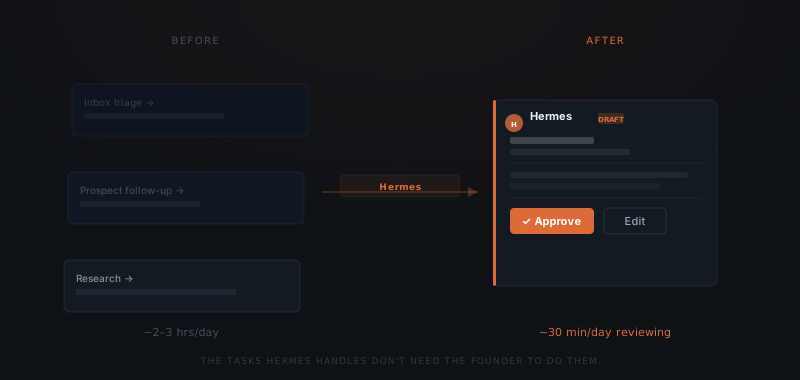
A solo founder with no support staff carries the communication and research load alone. A founder running 8 active clients and 5–10 active prospects spends roughly 4–5 hours a week on status updates, prospect follow-ups, research, and inbox triage before any client work starts. A Hermes deployment reduces that to 30–40 minutes of draft review for the same output — the founder gets back most of a working day.
The deployment mirrors the five stages above, scaled to one person. A founder's instance typically starts with three connections: the inbox (Gmail), the primary communication channel (Slack), and the project or knowledge tool where client work lives (Notion or equivalent). On day one, drafts are structurally correct but need tone and detail added. By month three, skills built from completed follow-ups, updates, and research briefs read closer to how the founder would have written them — the same 25-minute follow-up becomes a two-minute review.
Context definition determines that skill quality from the first week — and it's the step founders skip most often. For a solo founder with no ops team to delegate it to, context definition means supplying:
- Real emails actually sent to clients — not templates or descriptions
- Real prospect follow-ups that show the founder's specific tone and structure
- Research outputs the founder has produced and found useful
- An escalation path — for a solo founder, this is always themselves, with a defined line between what Hermes drafts and what needs original composition
A founder who pulls 5–10 real examples of each task type from their sent mail has a noticeably better skill library by week three than one who writes examples from memory or hands over a generic template.
That context definition is also why skill reuse cuts repeated briefing, not just typing time. A virtual assistant relearns preferences through conversation every time the founder explains a task again. A general AI writing tool like ChatGPT or Claude starts fresh each session — the founder briefs it on the client, the tone, and the history before it can draft anything, which moves the overhead rather than removing it. Hermes writes that context into a skill once, then reuses it on every matching task without a fresh briefing. The management overhead most tools require becomes a review step instead.
Who built Hermes?
Hermes was built by Nous Research, an AI research organisation focused on open-weight foundation models and agentic architectures. Nous Research publishes models including Hermes series language models (a separate product from the Hermes agent) and contributes to open-weight model development.[¹]
Hermes the agent is released under an MIT licence, meaning it can be deployed, modified, and extended without licence restrictions. The skill registry at agentskills.io operates as an open standard — skills contributed by any team are available to all.
Yardwork deploys and configures Hermes for service businesses. For a broader understanding of what AI agents do and when they apply, see what is an AI agent.
Frequently asked questions
What is Hermes AI? Hermes AI is Nous Research's self-improving agent. One deployment covers 20+ platforms — Slack, Telegram, Discord, WhatsApp, Teams, and Gmail among them — and every completed task adds a reusable skill, so the agent gets better with use instead of needing manual retraining.
How does Hermes learn new skills? Hermes creates a Skill object after completing each task — code, tests, and examples that define how to handle that task category in the future. Skills are stored at agentskills.io and reused automatically the next time a similar task appears. Skills improve with repetition: a high-frequency task produces a well-refined skill within 4–6 weeks of regular execution.
What platforms does Hermes run on? Hermes runs on 20+ platforms including Slack, Telegram, Discord, WhatsApp, Microsoft Teams, Gmail, Outlook, and Signal. A single deployment handles all connected platforms simultaneously with shared skills and context across channels. Additional platforms connect via API.
How much does Hermes cost to run? Hermes is open-source with no licence fee. Running costs include infrastructure ($20–80/month for self-hosted VPS), AI model API usage ($50–300/month depending on volume and model), and initial setup ($3,000–8,000 one-time). Year 1 total typically runs $4,000–11,000 including setup. Year 2 onwards is $840–4,560/year in infrastructure and API costs.
What is the difference between Hermes and a single AI agent? A single AI agent handles one platform and one workflow, stays fixed after deployment, and requires manual updates when workflows change. Hermes handles 20+ platforms from one instance, builds skills from every completed task, and improves without manual intervention. Single agents suit narrow, fixed, single-channel workflows. Hermes suits multi-platform workflows that evolve over time.
Who built Hermes? Hermes was built by Nous Research, an AI research organisation focused on open-weight models and agent architectures. It is released under an MIT licence and is self-hosted — no data is sent to a third-party service. Yardwork deploys and supports Hermes for service businesses that do not want to manage the infrastructure themselves.
Does Hermes work for a solo founder with no support staff? Yes. A solo founder deployment follows the same setup as a team deployment, scaled to one person — typically three connections: inbox, primary communication channel, and a knowledge tool. The founder handles context definition alone, supplying real examples of emails, follow-ups, and research output. A founder running 8 active clients and 5–10 prospects typically cuts the 4–5 hours a week spent on this work to 30–40 minutes of draft review by month three.