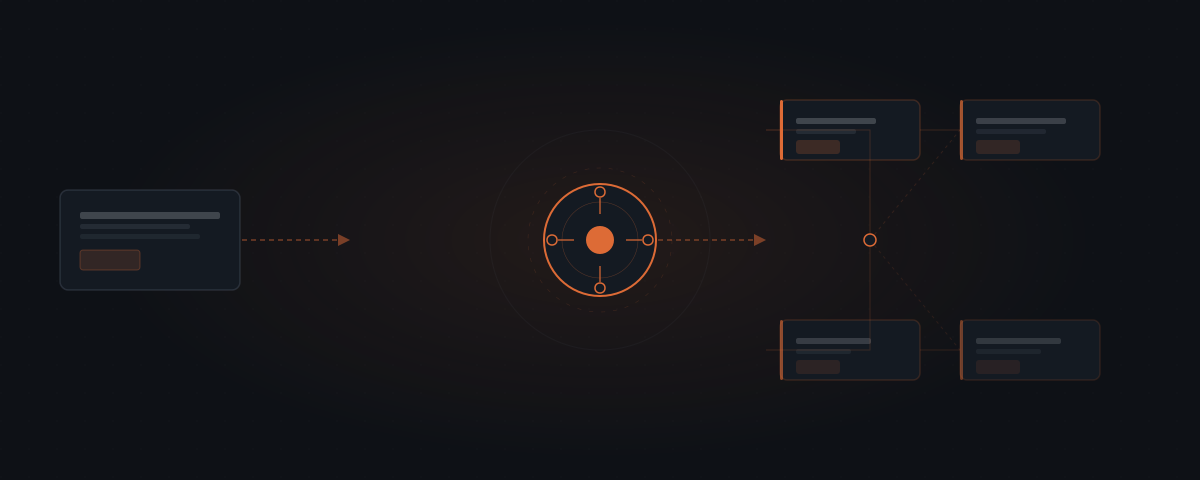
An AI agent is software that takes actions autonomously on your behalf. It reads inputs, decides what action is required, and executes that action in external systems — updating records, sending messages, scheduling calls — without a human assembling each step. Unlike chatbots that generate text responses inside a conversation, AI agents produce work in the tools your business already uses.
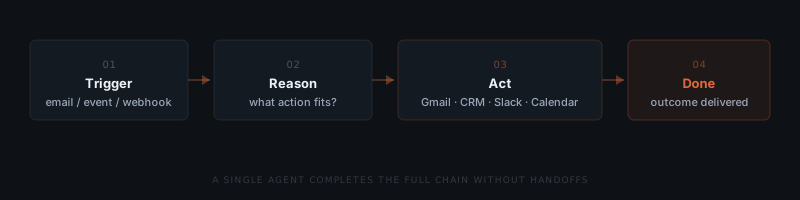
A client emails about a contract renewal. The message needs to be logged, the contract pulled, a draft response prepared, and a follow-up scheduled if there is no reply in 48 hours. A chatbot generates a response — you still do the rest. An AI agent handles the chain: reading the email, reasoning about what needs to happen, and taking the required actions across Gmail, your CRM, and your calendar. That chain — from trigger to completed outcome — is what makes it an agent rather than a tool.
What is an AI agent?
An AI agent is software that takes actions autonomously on your behalf. It is not a chatbot — it does not just generate text responses. It is not a rigid workflow automation — it does not just follow fixed rules. It turns a trigger into a completed action inside the tools you already run, with no person carrying each step by hand.
Anthropic, the AI safety company behind Claude, defines the distinction precisely: agents "dynamically direct their own processes and tool usage, maintaining control over how they accomplish tasks" — unlike traditional workflows, which follow predefined code paths.[¹]
AI agents act. They read inputs, decide what to do next, and execute tasks in external systems. They can write emails, update records in Salesforce or HubSpot, schedule calls in Google Calendar, and trigger downstream actions in Slack or Notion — not just generate text about those things.
How does an AI agent differ from a chatbot?
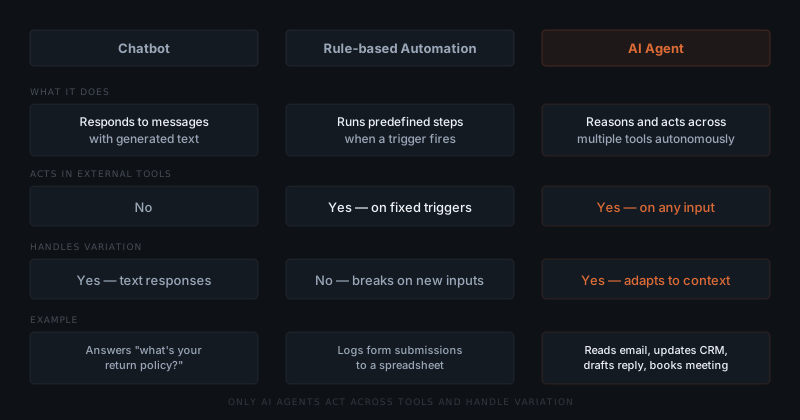
A chatbot produces text. An AI agent produces work.
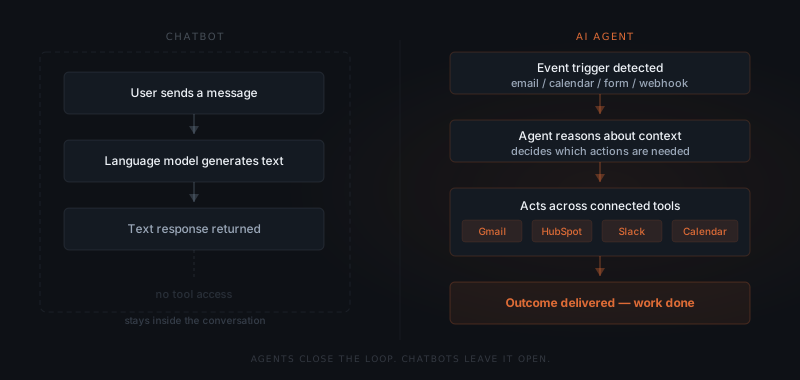
A chatbot is a conversational interface. It receives a message and returns a response. That response stays inside the conversation window. A chatbot cannot update your CRM, send an email, schedule a meeting, or log a record in Notion — unless a separate system is built on top of it.
The defining feature of an AI agent is not that it uses a language model. It is that it takes actions in external systems. A tool that cannot write to your tools is not an agent — it is a sophisticated search box.
An AI agent has connections to external tools and the authority to use them. When a lead emails in, an agent does not just draft a reply — it logs the lead in HubSpot, creates a follow-up task in Asana, and queues the draft in Gmail. All of it, in sequence, without a human assembling each step.
The clearest signal for which one a task needs: if completing it requires opening several tools and doing things in them, a chatbot will not close that loop — you will. The second signal is repetition. If the task happens once, a chatbot is efficient. If it repeats daily or weekly, the manual steps accumulate fast.
| Task | Right tool | Why |
|---|---|---|
| Draft one email | Chatbot | Starts and ends with text; human copies and sends |
| Send follow-ups when deals go inactive | Agent | Requires CRM monitoring, draft generation, and email send |
| Answer a one-off customer question | Chatbot | No external action needed |
| Handle 50 inquiry responses per week | Agent | Volume, repetition, and action in email system |
| Summarise a meeting transcript | Chatbot | Text in, text out |
| Log meeting outcomes to CRM and schedule next steps | Agent | Requires CRM write and calendar action |
| Generate one report draft | Chatbot | Output is text for the human to send |
| Send weekly status reports to 8 clients automatically | Agent | Requires data retrieval, draft generation, and email send |
The two are not mutually exclusive. A large share of real workflows use both — the chatbot for the thinking layer, the agent for the doing layer. A founder works through the scope and framing of a proposal in Claude or ChatGPT, then the agent pulls the agreed scope into the template, adds standard terms, and creates a tracked draft in Proposify. A consultant writes the narrative analysis by hand; the agent sends the formatted report to eight clients at the right time and logs the send date. The practical question for any workflow is not "chatbot or agent?" but "where does the thinking end and where does the doing begin?"
How does an AI agent differ from rule-based automation?
Rule-based automations — Zapier, Make, n8n — also take actions in external tools. The difference is how they decide what to do.
A chatbot produces text. An AI agent produces work.
A Zapier automation follows fixed rules: if trigger A matches exactly, execute workflow B. If the input changes — a different email format, a missing field, an ambiguous request — the automation either breaks or skips the record. Zapier has no way to interpret what the situation requires.
AI agents handle variation. They read context, interpret ambiguous inputs, and decide which action fits the situation. A lead email with an unusual subject line gets handled differently from a standard inbound inquiry — because the agent reasons about the content rather than pattern-matching against a fixed template.
| Dimension | Automation (Zapier / Make / n8n) | AI Agent |
|---|---|---|
| Input handling | Fixed format required — skips or errors on variants | Reads context — handles variation without pre-written rules |
| Decision logic | Rule-based — branches on field values | Reasoning-based — acts on the meaning of content |
| Error handling | Errors out or skips silently when input doesn't match | Routes unexpected inputs to human review |
| Maintenance burden | Requires rule updates for every new input variant | Adapts to variation within scope — fewer rule rewrites |
| Cost at scale | Lower — subscription plus task volume pricing | Higher — setup cost plus API usage per task |
| Setup time | Hours to days (self-service) | Days to weeks (requires integration and logic design) |
| Best for | High-volume, fixed-format, predictable processes | Variable inputs, content-based decisions, multi-step workflows |
Three questions settle which one a workflow needs. Are inputs always in the same format? If they arrive with the same fields from the same source every time, automation is the lower-cost option. Does the next action depend on what the input says, rather than just whether it arrived? Automation branches on field values; an agent reasons about meaning. Does the task repeat at volume with occasional exceptions? Automation handles volume more cheaply; an agent earns its cost when variation means the rules need constant updating.
Most service businesses should run both. Use automation as the foundation wherever inputs are controlled and predictable — internal triggers, system syncs, structured form data. Introduce an agent where the process meets external inputs — client emails, vendor messages, candidate applications — where variation is the default rather than the exception.
When to migrate an automation to an agent
The right time to consider an agent is when automation maintenance starts costing more than the automation saves. Five signs:
Rule maintenance exceeds two hours per month per workflow. Time spent updating conditions, adding filters, and debugging skipped records is a real recurring cost.
More than 5% of records are skipped or erroring each week. Any failure rate above trivial means work is regularly being missed and someone is catching up by hand.
Input sources are diversifying as the business grows. A company that started with one invoice format now receives invoices from fifteen suppliers in eight formats, and each one needed a new rule.
The required action depends on what the input says. An automation branches on whether a field equals a value. An agent can branch on whether a client sounds frustrated, satisfied, or confused.
Output requires manual review before it is trusted. If someone checks every output before acting on it, the workflow is not automated — it is generating drafts a human verifies. An agent with an approval queue makes that review explicit and bounded.
The hidden cost in the automation column is not the subscription — it is the time spent maintaining rules as inputs evolve. A business paying $50/month for Zapier might spend three to four hours a month updating workflows to handle new input variants. At $50/hour that is $150–$200/month that never appears on the Zapier bill.
How does an AI agent differ from ChatGPT or Claude?
A general-purpose tool and an agent system do different jobs, and the difference is architectural rather than a matter of model quality.
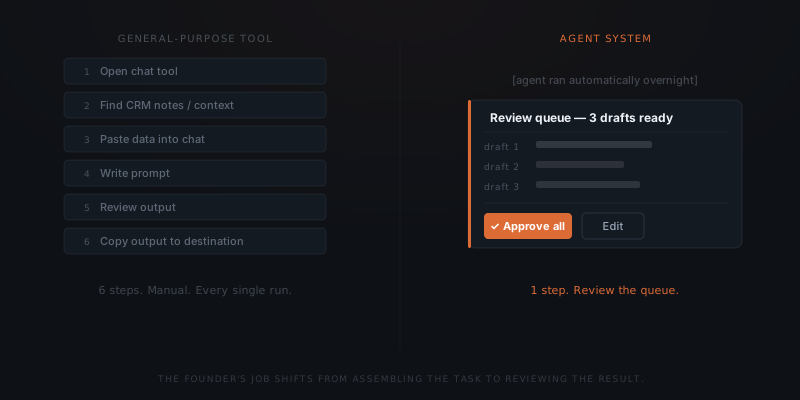
The failure pattern is consistent. A founder pastes CRM notes into a chat window and asks for a client status email. The output is good. Next session the context is gone, so they paste it again. Two weeks later the workflow runs only on days when someone remembers to open the tool.
| Dimension | General-purpose tool (ChatGPT, Claude, Copilot) | Purpose-built agent system |
|---|---|---|
| Execution model | On-demand — user initiates each run manually | Triggered — runs when a condition is met, or on schedule |
| Memory and state | None — context starts fresh each session | Reads from and writes to connected business systems |
| Data access | Whatever the user pastes in that session | Live data from CRM, inbox, ATS, calendar |
| Output consistency | Varies with how context is provided each session | Defined output format — same structure every run |
| Actions in external systems | None without manual copy-paste | Approval-gated execution in connected tools |
| Setup time | None | Days to weeks |
| Cost | $20–$200/month subscription | $2,000–$8,000 setup + $100–$400/year API |
Take one workflow — a weekly status update across eight clients — through all three approaches. Manually, the founder opens each client file, reads the notes, writes the update, and sends: four to six hours a week. With a general-purpose tool, they paste notes per client, generate a draft, copy it to the email client, and send: two to three hours a week, with quality depending on what context they remembered to paste that day. With an agent system, the agent runs at 7am Monday, pulls current project status from the CRM, drafts all eight, and routes them to an approval queue the founder clears in twenty minutes.
The inconsistency founders experience with general-purpose tools is not an AI capability problem. It is an architecture problem. General-purpose tools were not built to run workflows — they were built to respond to prompts.
This matters for a practical reason: a bad result with ChatGPT tells you almost nothing about whether a purpose-built system would work on the same task. The variable that changed is not the model. It is whether the workflow had live data, a defined output format, and a trigger that did not depend on someone remembering.
How does an AI agent differ from a virtual assistant?
Both take work off the founder's plate. They take different work, and assigning the wrong category to each is the most common way the comparison goes wrong.
McKinsey Global Institute estimates that 60–70% of the time knowledge workers spend on activities such as data collection, scheduling, and routine communication has the technical potential to be automated.[²] In a service business with a part-time VA, a meaningful share of the VA's week sits in that category.
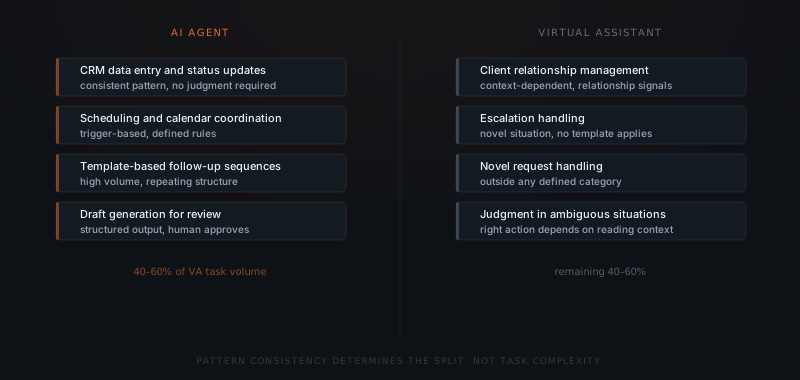
| Task | Agent | VA |
|---|---|---|
| CRM data entry and status updates | ✓ | |
| Scheduling and calendar coordination | ✓ | |
| Template-based follow-up sequences | ✓ | |
| Draft generation for approval | ✓ | |
| Responding to unusual or escalated requests | ✓ | |
| Client relationship management | ✓ | |
| Novel task handling | ✓ | |
| Judgment calls in ambiguous situations | ✓ |
Most service businesses with a part-time VA find 40–60% of the VA's current tasks fall in the agent column. The VA's remaining hours shift toward the judgment-dependent work the agent cannot touch — often the work they were best suited for but had no time to do. For the equivalent comparison against a full hire, see AI agent vs. hiring cost.
The mistake worth naming is assigning judgment-dependent tasks to an agent because they look structured from the outside. Client status emails follow a format and go out on a schedule, so an agent can produce them — but they carry relationship signals the agent cannot read. A client who has been frustrated for a month reads a templated status update as evidence that nobody is paying attention. The message is technically correct and contextually wrong.
The agent fails silently. The VA fails visibly. That difference determines which tasks you can hand off.
A VA's failures — the late reply, the missed scheduling update — are easy to spot and correct within hours. An agent's failures — the tone-deaf follow-up sent the morning after a difficult call — often go unnoticed until the relationship has already moved.
What types of AI agents exist?
Not all AI agents work the same way. The type matters because it determines how the agent is deployed, how it improves, and what oversight it requires.
| Type | How it works | Best for |
|---|---|---|
| Single agent | One agent handles one defined workflow from a single deployment | A specific, high-volume task with consistent inputs |
| Multi-agent system | Multiple agents coordinate across different tasks or platforms | Complex workflows spanning several functions or teams |
| Self-improving agent | Builds skills from completed tasks and improves over time | High-volume workflows that evolve and benefit from learning |
| Approval-gated agent | Drafts every action and waits for human sign-off before executing | Client-facing work where errors have real consequences |
| Custom agent | Built to a specific data model, workflow, or output format | Businesses with proprietary processes that off-the-shelf tools cannot match |
OpenClaw is an approval-gated framework — every action waits for human sign-off. Hermes is a self-improving agent that builds skills from experience. When neither fits, a custom-built agent is the right path.
What tasks do AI agents handle for service businesses?
The workflows that suit AI agents share three properties: they repeat at volume, they span more than one tool, and the inputs vary enough that fixed rules break.
| Workflow | Trigger | Tools involved | Human judgment needed |
|---|---|---|---|
| Lead follow-up | New inbound email or form | Gmail, HubSpot, Calendar | Low |
| Client reporting | Weekly schedule | Notion, Linear, Gmail | Low |
| Invoice chasing | Overdue invoice flag | Xero/QuickBooks, Gmail | Low |
| Proposal drafting | New brief or scope request | Past proposals, CRM, Gmail | Medium |
| CRM updates | Meeting notes or call transcript | CRM, Calendar, Notion | Medium |
| Client onboarding sequence | Contract signed | Gmail, Notion, Calendar | Low |
| Support triage | Inbound support message | Slack, email, ticketing tool | Low–medium |
The "human judgment needed" column is the key variable. Low-judgment, high-volume tasks are the clearest fit for agents. Medium-judgment tasks can be handled with an approval layer — the agent drafts, a human reviews. High-judgment tasks belong with a person.
Which industries use AI agents?
PwC's 2025 AI Agent Survey asked 308 US business executives which functions had the highest agent deployment rates. The two leaders were customer support (49%) and operations (47%).[³] Those are function categories rather than industries, but they point directly at the sectors where those functions are most concentrated.
McKinsey's State of AI 2024 confirms the pattern at industry level: high-tech, financial services, and professional services organizations consistently report higher rates of both AI adoption and value creation than organizations elsewhere, a ranking that has held across three consecutive annual surveys.[⁴] NVIDIA's State of AI 2026 names financial services, telecommunications, and retail/CPG as the strongest combined adoption-and-ROI sectors, with telecommunications leading agentic adoption at 48% of companies deploying or assessing agents — though that survey draws on NVIDIA's own opted-in, AI-engaged audience rather than a random sample, so it likely skews toward more AI-mature organizations.[⁵]
The industries leading AI agent adoption share one structural characteristic: a high proportion of the most expensive staff time goes to structured, repeatable coordination tasks — follow-up, document collection, status updates, intake processing. These are where agents produce consistent, measurable returns.
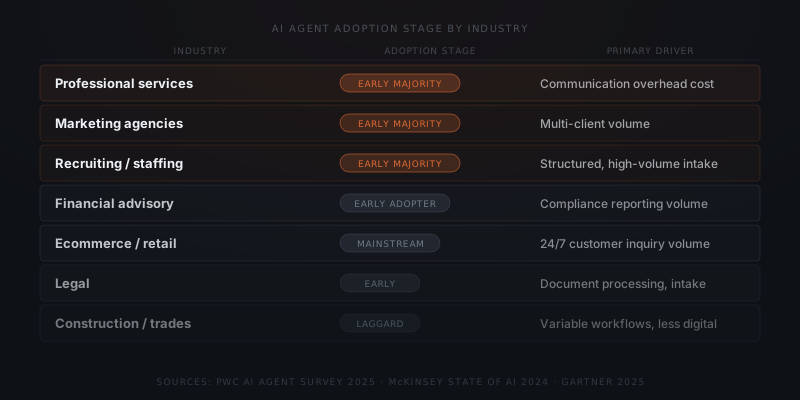
| Industry | Adoption stage | Primary agent use cases | Primary driver |
|---|---|---|---|
| Professional services | Early majority | Client communication, document coordination, status updates | Senior time cost on low-judgment tasks |
| Marketing agencies | Early majority | Campaign reporting, brief follow-up, client coordination | Multi-client volume across accounts |
| Recruiting / staffing | Early majority | Candidate intake, interview scheduling, pipeline updates | Process-heavy workflows at consistent volume |
| Financial advisory | Early adopter | Client onboarding, compliance reporting, renewal reminders | Compliance volume and audit trail requirements |
| Ecommerce / retail | Mainstream | Customer support, order status, return coordination | 24/7 inquiry volume across channels |
| Real estate | Early majority | Lead follow-up, showing coordination, CRM updates | Response-time competitive pressure |
| Legal | Early stage | Document review, intake processing, scheduling | Document volume and intake standardization |
| Construction / trades | Laggard | Scheduling, supplier coordination, quoting | Irregular workflows, lower digital baseline |
The adoption-stage labels are this post's own editorial classification, synthesized across the PwC, McKinsey, and NVIDIA sources above — none of those studies publishes a Rogers-style diffusion category by industry. Treat them as a way of ordering the findings relative to each other, not as a statistic drawn from any one study.
The lagging industries are lagging for structural reasons, not cultural ones. Construction project coordination involves quotes, change orders, subcontractor availability, and site conditions that vary enough between jobs that no template applies reliably. Many trades and small retail businesses run with minimal CRM tooling, so there is nothing for an agent to integrate with. Healthcare and legal are slower because professional accountability requires documented human judgment — though the administrative workflows around them, like scheduling and intake, are well suited to agents and are beginning to move.
What does an agent need to know about your customers?
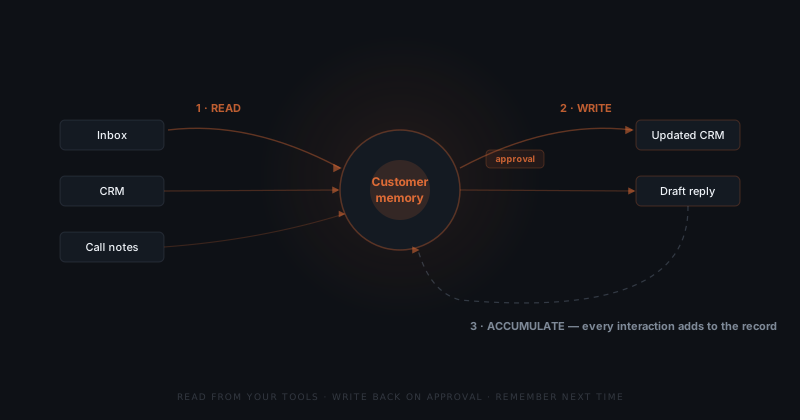
An agent that is useful on client work is defined by memory, not by conversation. A chatbot answers what you ask and forgets the exchange when the window closes. An agent with memory carries a persistent record of each customer across every interaction, and that record survives the session.
Practitioners split agent memory into two working types, and both matter. Episodic memory holds specific events: the call on the 12th, the complaint in March, the invoice paid late twice. Semantic memory holds durable facts: this account bills monthly, the decision-maker is the COO rather than the founder, they care about response time over price.[⁶]
Customer context lives in five places at once, and no single one holds the whole story.
| Source | What it holds in isolation | What memory adds |
|---|---|---|
| Gmail thread | "Can we push the renewal?" | Reason the timeline slipped |
| Call note | Wants monthly billing | Commitment made, not yet in CRM |
| CRM field | Stage: blank | Filled from the call outcome |
| Invoice history | Two payments late | Payment-risk signal on the account |
| Slack message | "Who owns this account?" | Internal ownership gap flagged |
No single row tells you this is a late-paying account that wants to renegotiate terms and has no clear internal owner. The joined record does. This is also where the messy-data objection dissolves: the agent does not need a pristine CRM to start, because it reconstructs the account from email and call history — the sources people trust more than CRM fields anyway.
Memory is also the thing most stalled AI projects lacked. MIT's NANDA initiative studied 300-plus enterprise AI deployments and found only about 5% reached meaningful financial impact; the pilots that failed shared a trait, in that the tools could not retain feedback, adapt to context, or improve over time.[⁷]
What makes a workflow right for a small team?
The workflows that suit a small business are not defined by industry — they are defined by structure. Evaluate any candidate workflow against six criteria.
| Criterion | Good fit for a small team | Poor fit for a small team |
|---|---|---|
| Trigger consistency | Trigger fires automatically from a system event (CRM field update, invoice date, form submission) | Trigger requires a human to initiate or judge when conditions are met |
| Input format | Every input arrives in the same format from the same source | Inputs vary by sender, channel, or internal context |
| Output judgment | Output can be evaluated as correct without interpretation (sent / not sent, correct amount / wrong amount) | Output requires professional judgment to evaluate quality |
| Exception rate | Edge cases are rare and predictable; the exception path is defined | Exceptions are frequent, unpredictable, or require case-by-case decisions |
| Maintenance surface | One system connected, one output type, one defined scope | Multiple systems, variable outputs, scope that expands over time |
| Consequence of error | Errors are visible and correctable before they reach a client | Errors may reach clients before the team catches them |
A workflow that clears all six does not require ongoing management — which is what "sustainable for a small team" actually means. A workflow that fails two or more is a platform project, not a small-business workflow.
Two agents you don't manage save time. A platform that needs managing creates a role.
In practice this means the second workflow is added only after the first has run reliably for thirty days, and the third follows the same pattern. At three workflows, most small B2B service firms have covered their highest-volume, lowest-judgment tasks and recovered five to eight hours a week of founder time. The distinction that matters is between a founder who uses an agent system and one who manages one — the difference between five hours saved each week and five hours redirected into keeping the system running.
What are AI agents bad at?
AI agents handle defined, repeatable, structured work well. They struggle with everything else.
Variable judgment. Negotiations, client escalations, pricing decisions, and relationship-sensitive communications require reading a person's state and history. Agents cannot do this reliably. A client who has been a problem for three months needs a different response than a new prospect — context that is rarely captured cleanly enough for an agent to act on.
Undocumented processes. If a workflow cannot be described in writing, an agent cannot run it. Agents execute what they are instructed to do. The quality of the output is determined by the quality of the process definition — not the agent's intelligence.
Low-volume, one-off tasks. The setup cost for an agent workflow does not amortise at low volume. A task that happens twice a month is rarely worth the configuration overhead.
High-consequence errors. If the cost of a mistake is disproportionately high — a legal filing, a regulated financial action, a binding commitment — the approval model needs to be tight. An agent can still run the workflow, but the human oversight requirement effectively reduces the time saving.
For a full breakdown of what agents cannot do, see what AI agents are actually bad at.
How do you get started with an AI agent?
Start with one workflow, not a platform. The businesses that get the most out of agent implementation choose a specific, high-volume process — lead follow-up, invoice chasing, weekly reporting — and deploy the agent on that process first. They confirm it works before expanding scope.
Pick one workflow
Document the process
Choose your implementation path
Run a supervised period
How much does an AI agent cost?
Cost depends on whether you use an off-the-shelf product, a custom build, or a combination. The ranges below are a modelled illustration, not a survey of client invoices — each linked post sets out its own method.
| Implementation path | Year 1 cost | Year 2+ annual cost | Best for |
|---|---|---|---|
| Off-the-shelf (OpenClaw) | $2,400–9,000 | $600–3,000 | Standard workflows, approval-gated actions, data sovereignty |
| Off-the-shelf (Hermes) | $4,000–11,000 | $840–4,560 | Multi-platform, self-improving, high-volume communication |
| Custom-built agent | $8,000–25,000 | $1,500–6,000 | Proprietary data models, bespoke integrations, specific output formats |
| DIY / in-house (existing staff time) | 80–200 hrs setup | Ongoing maintenance time | Teams with internal engineering capacity configuring an off-the-shelf product — not the same as hiring a dedicated specialist, which runs far higher |
Setup cost is largely fixed regardless of task volume. The variable component is API usage — which scales with how much the agent actually processes. For the modelled cost structure behind these ranges, see what an AI agent implementation actually costs for a small business; for a published, country-specific European labour-cost floor instead of a modelled US-style range, see what an AI agent implementation costs in Europe.
When does a business need an AI agent?
An AI agent fits a workflow with three properties: it repeats at volume, it spans multiple tools, and the inputs vary enough that fixed automation breaks.
If a task happens once, an agent is not worth the setup. If a task runs in a single tool, a simpler automation handles it. AI agents earn their cost when a workflow repeats regularly, crosses system boundaries, and includes variation that fixed rules cannot handle.
For a 10–25-person service business — a recruiting agency, a fractional CFO practice, a marketing consultancy — that typically means: lead follow-up, client onboarding sequences, invoice chasing, or weekly reporting. For a structured method to evaluate which workflows are ready, see how to know if a business process is ready to hand to an AI agent.
Where to go from here
Everything above covers what an AI agent is and where one fits. The next questions are sequencing, cost, and what happens after launch.
Choosing the first workflow. Which workflows to automate first is the sequencing framework, and how to know if a business process is ready to hand to an AI agent is the readiness test to run against a specific candidate. For worked examples of the two most common starting points, see client onboarding, lead generation, and client reporting.
Deciding what to build it on. OpenClaw and Hermes cover most standard workflows; openclaw vs. hermes is the framework-selection decision. When neither fits, a custom agent is the path, and what building your own AI agents in-house actually takes covers the DIY option honestly. How to choose an AI implementation partner applies if you are not building it yourself.
The numbers. What an AI agent implementation actually costs and AI agent vs. hiring cost cover the spend side; AI agent ROI and AI agent ROI statistics cover the return. For market context, see adoption statistics, market size, spending statistics, and small business AI adoption.
After launch. How reliable AI agents actually are, how to onboard an AI agent, what to do when your agent makes a mistake, and the difference between an agent that saves time and one that creates work. Once the first workflow is stable, your second AI agent covers how to pick the next one.
Frequently asked questions
What is an AI agent? An AI agent works without someone at the keyboard. Given an input and a goal, it acts inside your actual tools — updating a record, sending an email, booking a call — instead of just producing a text reply the way a chatbot does.
What is the difference between an AI agent and a chatbot? A chatbot generates text responses inside a conversation and cannot act in external systems. An AI agent takes actions in tools like Gmail, Slack, HubSpot, or Salesforce. The defining difference is whether the software can write to your tools — or only produce text about them.
What is the difference between an AI agent and a Zapier automation? Zapier automations follow fixed rules — if trigger A matches exactly, run workflow B. AI agents handle variation: they read context, interpret ambiguous inputs, and decide which action fits. Agents suit workflows where inputs change; automations suit workflows that are always identical.
How much does an AI agent cost for a small business? As a modelled illustration, not a survey figure: off-the-shelf AI agents (OpenClaw, Hermes) cost $2,400–11,000 in year 1 including setup, then $600–5,000/year ongoing. Custom-built agents cost $8,000–25,000 to build and $1,500–6,000/year to maintain. The right choice depends on whether your workflow maps to an off-the-shelf product or requires bespoke integration.
What kinds of businesses use AI agents? Recruiting agencies, HR consultancies, fractional CFO practices, boutique marketing firms, and compliance consultancies are early adopters. These businesses run high-volume repeating workflows across a small toolstack — the profile where agent implementation delivers the clearest return.
What are AI agents bad at? AI agents struggle with tasks that require judgment, relationship context, or professional discretion — complex negotiations, client escalations, coverage advice, strategic decisions. They also underperform on one-off tasks, undocumented processes, and workflows where the consequences of an error are disproportionately high.
What is the difference between an AI agent and ChatGPT? ChatGPT is a general-purpose tool: you initiate every run, it starts each session with no memory, and it works only on context you paste in. An agent system runs on a trigger, pulls live data from your CRM and inbox, produces the same output format every time, and takes approval-gated actions in your tools. A poor result with ChatGPT says little about whether a purpose-built system would work on the same task.
Should an AI agent replace a virtual assistant? No — they cover different task categories. Roughly 40–60% of a typical part-time VA's load is structured work an agent handles better: CRM updates, scheduling, template-based follow-up, draft generation. The judgment-dependent remainder — escalations, relationship management, novel requests — stays with the VA. The common mistake is handing an agent tasks that look structured but carry relationship signals it cannot read.
Which industries use AI agents most? PwC's 2025 survey found the highest deployment in customer support (49%) and operations (47%) — functions concentrated in professional services, marketing agencies, recruiting firms, and financial advisory. McKinsey identifies high-tech, financial services, and professional services as the highest-adoption industries. Construction, education, and government remain the slowest, mostly because their workflows vary more and their digital baseline is lower.
Notes
- Anthropic, "Building effective agents," Anthropic Research, 2024.
- McKinsey Global Institute, "The economic potential of generative AI: The next productivity frontier," McKinsey & Company, June 2023.
- PwC, "AI Agent Survey," PwC US, 2025.
- McKinsey & Company, "The State of AI in 2024: GenAI Adoption Spikes and Starts to Generate Value," McKinsey Global Survey, 2024.
- NVIDIA, "State of AI 2026," NVIDIA, 2026. Survey of 3,200+ respondents drawn from NVIDIA's own opted-in, AI-engaged audience — a self-selected sample likely skewed toward more AI-mature organizations than the general business population.
- IBM, "What Is AI Agent Memory?," IBM Think, 2025. — reference for the definition of agent memory and the episodic/semantic distinction.
- MIT NANDA, "The GenAI Divide: State of AI in Business 2025," MIT Project NANDA, 2025. — source for the finding that only ~5% of enterprise AI pilots reached meaningful financial impact and that failed tools could not retain feedback, adapt to context, or improve over time.