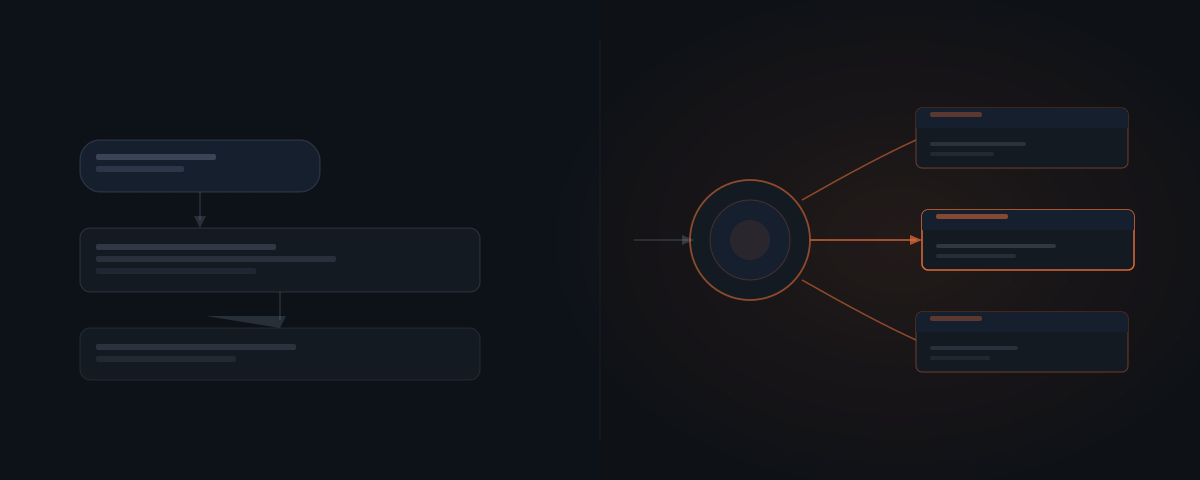
The two tools look similar in demos. Both use a language model. Both respond to natural language. The distinction becomes visible when something needs to actually happen — a record logged, an email sent, a follow-up scheduled. A chatbot produces text. An AI agent produces work.
The two tools look similar in a demo. Both receive a prompt. Both generate a coherent response. A founder who has tried ChatGPT for drafting emails might reasonably assume that an AI agent is just a more capable version of the same thing. That assumption leads to the wrong tool for the wrong problem — and to the frustration of discovering that a chatbot does not update your CRM, does not send emails, and does not log anything anywhere.
What is the core difference between an AI agent and a chatbot?
The core difference is not intelligence. It is scope.
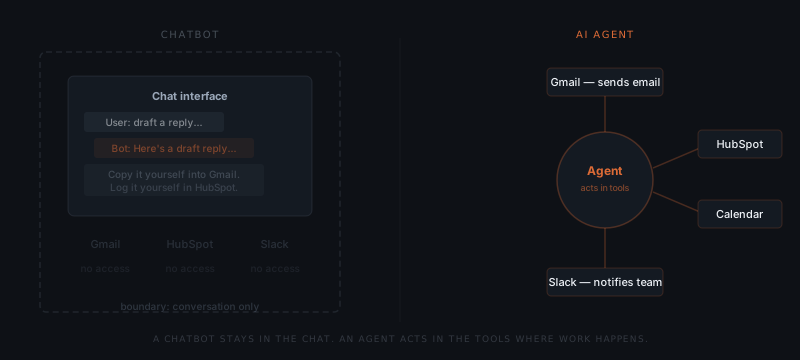
A chatbot operates inside a conversation. It receives a message, generates a response, and returns that response to the same window. Nothing leaves the conversation. Nothing gets written to any external system. The output is always text — a draft, a summary, an answer.
An AI agent operates across systems. It receives a trigger — an email, a calendar event, a form submission — reasons about what action is required, and executes that action in one or more connected tools. The output is not text. The output is work done: a record updated in HubSpot, an email sent from Gmail, a task created in Asana, a notification sent in Slack.
Anthropic defines the distinction at the architecture level: AI agents "dynamically direct their own processes and tool usage" — unlike tools that produce text in response to a prompt.¹
The two tools compared across the dimensions that matter for a service business:
| Dimension | Chatbot | AI Agent |
|---|---|---|
| Output type | Text — draft, summary, answer | Actions in external systems — emails sent, records updated, tasks created |
| Tool access | None — operates inside the conversation only | Connected to CRM, email, calendar, Slack, ATS, and other tools |
| Trigger model | Human inputs a prompt each time | Monitors for events — form submission, email, CRM change, calendar event |
| Memory | Within the conversation only — no persistent state | Reads from and writes to connected systems — state persists in those systems |
| Repetition handling | Manual — human must re-prompt for every new instance | Autonomous — runs on the same trigger every time without re-prompting |
| Approval layer | Not applicable — output is text for human use | Optional — output can be queued for human review before execution |
| Setup complexity | Low — no integration required | Medium to high — requires tool connections and workflow logic |
| Best for | Drafting, answering, summarising | Logging, sending, scheduling, updating, triggering |
What can a chatbot do — and what can it not do?
A chatbot excels at tasks that live entirely inside a conversation: drafting text, answering questions, summarising documents, explaining concepts. These are valuable tasks. ChatGPT, Claude, and Gemini handle them well.
A chatbot cannot take actions in external systems. It cannot log a lead in Salesforce, send an email from Gmail, update a record in Notion, or schedule a meeting in Google Calendar — regardless of how capable the underlying language model is. The limitation is architectural, not intelligence-based.
The boundary is not about how smart the model is. GPT-4 and Claude 3 Opus are among the most capable language models available — but when used as a plain chatbot, neither can write to your tools. The model operates inside the conversation. External action requires an agent architecture: connections to tools, permission to use them, and logic for deciding when to act.
A chatbot generates answers. An AI agent gets things done.
For tasks like drafting a response, generating a summary, or answering a question — a chatbot is the right tool. For tasks that involve updating a record, sending a message, scheduling a call, or triggering a workflow in another system — an agent is required.
Where chatbots fall short in service business workflows
The limitation of a chatbot is not immediately obvious until someone tries to use it for the wrong job. The three patterns below appear consistently when service business owners try to use a chatbot for work that requires an agent.
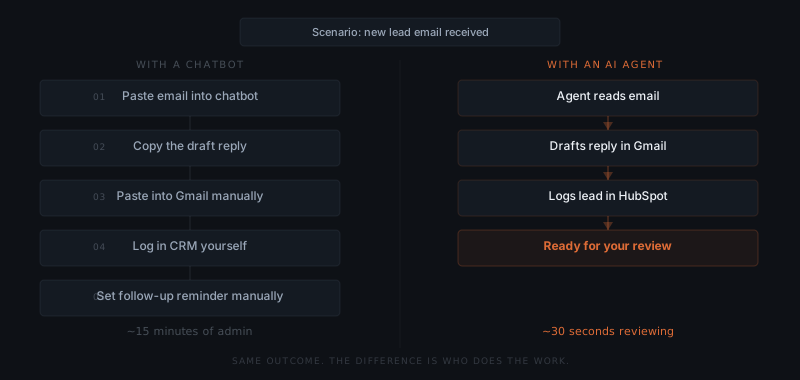
"I use ChatGPT to write follow-ups." A founder pastes the lead's details into ChatGPT, generates a follow-up draft, copies it to Gmail, and sends. This takes 4–6 minutes per lead. Across 15 active leads, that is an hour of weekly capacity — not spent on judgment, just on assembly. An agent would watch the pipeline, identify which leads need a follow-up, generate the draft, and queue it for approval. The founder reviews instead of assembles.
"I summarise my CRM updates in Claude." A consultant copies contact records into Claude, asks for a status summary, and manually updates the CRM with notes. Claude's output is useful — but it lives in the chat window. The CRM update still requires the human to open the tool, find the record, and type. An agent reads the CRM, generates the update, and writes it back — without the human as the transfer mechanism.
"I generate client reports in ChatGPT and then send them." A consultant produces a useful report in ChatGPT but then spends another 15 minutes formatting, attaching, and sending to each client. An agent would take the output, format it against the firm's template, and send to the distribution list. The generation happened in the chatbot; the delivery required a human.
All three examples share the same structure: the chatbot handles the thinking, and then a human handles everything between the thinking and the outcome — the copy-paste, the tool-switching, the manual data entry. An agent closes that gap by connecting the output directly to the system where it needs to land.
What does an AI agent do differently?
An AI agent monitors for triggers, reasons about context, and takes multi-step actions across connected systems — without a human assembling each step.
A concrete example: a recruiting agency using Hermes, an AI agent built by Nous Research, to handle candidate follow-up. When a candidate completes an interview, Hermes detects the calendar event closing, pulls the interviewer's notes from Notion, drafts a personalised follow-up email in Gmail, and logs the stage change in their ATS — before the recruiter checks their inbox.
The same task with a chatbot: the recruiter opens ChatGPT, pastes in the notes, generates a draft, copies the draft into Gmail, switches to the ATS, updates the stage, sets a reminder in their calendar. The chatbot produced the draft. The recruiter did everything else. For a full breakdown of what AI agents are and how this architecture works, see what is an AI agent.
How do you know which one your workflow needs?
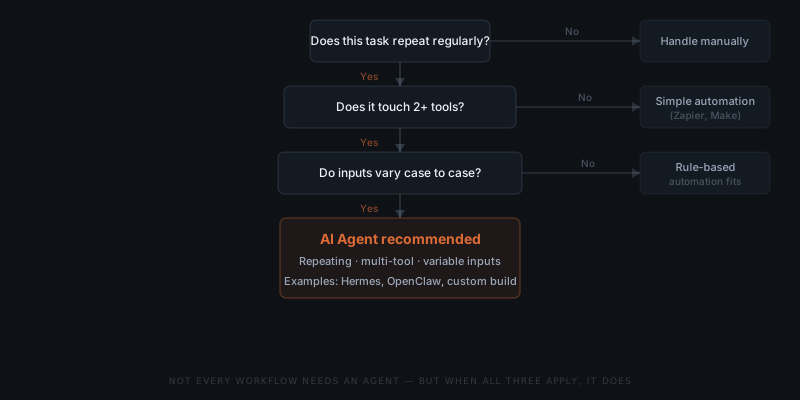
A chatbot fits a task that starts and ends with text. An AI agent fits a task that requires action in external systems.
The clearest signal: if completing the task requires opening multiple tools and doing things in them, a chatbot will not close that loop — you will. An agent closes it for you.
A second signal: repetition. If the task happens once, a chatbot is efficient. If the task repeats daily or weekly — follow-up emails, status updates, client reports, invoice chasers — the manual steps accumulate fast.
Use case by task type:
| Task | Right tool | Why |
|---|---|---|
| Draft one email | Chatbot | Starts and ends with text; human copies and sends |
| Send follow-ups when deals go inactive | Agent | Requires CRM monitoring, draft generation, and email send |
| Answer a one-off customer question | Chatbot | No external action needed |
| Handle 50 inquiry responses per week | Agent | Volume, repetition, and action in email system |
| Summarise a meeting transcript | Chatbot | Text in, text out |
| Log meeting outcomes to CRM and schedule next steps | Agent | Requires CRM write and calendar action |
| Generate one report draft | Chatbot | Output is text for the human to send |
| Send weekly status reports to 8 clients automatically | Agent | Requires data retrieval, draft generation, and email send |
OpenClaw and Hermes are purpose-built agents for different parts of this range. When the workflow has specific requirements that off-the-shelf agents don't cover, a custom agent is the appropriate path.
Where chatbots and agents work together
The two tools are not mutually exclusive. A significant share of complex workflows use both — the chatbot for the thinking layer, the agent for the doing layer.
Proposal drafting. A founder opens Claude or ChatGPT and works through the scope and framing of a new proposal — a judgment-dependent, context-heavy task best done in conversation. Once the structure and content is decided, the agent takes over: it pulls the final scope into the proposal template, adds standard terms from the firm's library, and creates a tracked draft in Proposify or PandaDoc. The founder did the thinking; the agent did the assembly and logistics.
Weekly reporting. A consultant uses ChatGPT to analyse a dataset and write the narrative summary — the reasoning and interpretation require human input. The agent then pulls the formatted report, sends it to the eight clients on the distribution list at the right time, and logs the send date in the CRM. The chatbot wrote the analysis; the agent handled delivery and tracking.
Candidate screening. A recruiter uses Claude to review resumes and draft shortlist notes — judgment-intensive work that benefits from the recruiter's guidance. The agent then schedules screening calls, sends invitations, and updates the ATS with the shortlist decisions. The chatbot supported the evaluation; the agent handled the coordination.
The pattern across all three: when the output of a chatbot interaction needs to become an action in an external system — sent, logged, scheduled, updated — an agent picks up where the chatbot ends. The two tools complement each other at that boundary. Treating them as competing alternatives misses the structure of where each fits. The practical question for any workflow is not "chatbot or agent?" but "where does the thinking end and where does the doing begin?" — because the answer tells you which tool belongs where.
Frequently asked questions
What is the difference between an AI agent and a chatbot? A chatbot generates text responses inside a conversation and cannot act in external systems. An AI agent takes actions in tools like Gmail, HubSpot, Slack, or Salesforce — updating records, sending messages, scheduling meetings. The difference is architectural, not about intelligence.
Can a chatbot be turned into an AI agent? Not directly. An agent requires connections to external tools and logic for deciding when to use them — this is a different architecture from a conversational chatbot. Some products (like ChatGPT with plugins, or Claude with tools) add limited agent capabilities, but a purpose-built agent system handles real business workflows more reliably.
When should I use a chatbot instead of an AI agent? Use a chatbot for tasks that start and end with text: drafting, summarising, answering questions. Use an AI agent for tasks that require action across external tools — logging records, sending emails, updating pipelines — especially when those tasks repeat at volume.
What is an example of an AI agent taking action? A recruiting agency's Hermes deployment detects a completed interview on Google Calendar, pulls notes from Notion, drafts a follow-up email in Gmail, and updates the candidate stage in the ATS — all before the recruiter opens their inbox. No chatbot can do this without a human assembling each step manually.
Notes
- Anthropic, Building effective agents, 2024. "In agentic contexts, LLMs can dynamically direct their own processes and tool usage, maintaining control over how they accomplish tasks." https://www.anthropic.com/research/building-effective-agents