OpenClaw for marketing agencies handles the communication layer between agency team and clients — routing inbound requests, coordinating status updates, and holding every outbound message in an approval queue. OpenClaw does not generate content or replace creative work. OpenClaw eliminates the account overhead that pulls senior people out of billable work and into communication management.
An eight-person agency with six retainer clients runs a hidden overhead: the daily volume of client messages that need to be read, triaged, routed, and replied to before any actual work gets done. A status update request from Client A, a revision inquiry from Client B, and a check-in from Client C all arrive Monday morning before 10 AM. The senior account lead reads all three, decides which need a same-day response, drafts a holding reply for Client B, and routes the revision question to the creative team. By the time the account lead finishes that triage, two hours of a Monday are gone. OpenClaw runs the communication layer so the account lead reviews decisions instead of making them one message at a time.
Senior agency time disappears into account coordination, not account work
The bottleneck in most agencies isn't creative capacity — it's account overhead.
The articles about AI for marketing agencies focus on content generation: AI tools that write social posts, draft copy, or produce briefs. The actual overhead in a retainer agency is not creative — it is coordination. Every client relationship produces a continuous stream of requests, status questions, and check-ins that need a response from someone senior enough to represent the agency accurately.
A mid-size agency with five to ten retainer clients generates between 30 and 60 client-facing messages per week that require triage, response, or routing. At 10–15 minutes per message — reading the context, deciding who handles it, drafting the response, reviewing it — the coordination load reaches 8–10 hours per week. That time comes from the account lead or the most senior available person, because junior staff are not trusted to handle client-facing communication alone.
The result is a structural capacity problem. The senior person who should be planning campaigns and managing client relationships spends Monday mornings managing an inbox. The creative team waits for routing decisions that stack up behind the account lead's triage backlog.
OpenClaw runs the communication layer between agency and clients
OpenClaw is not a content generation tool and does not write client deliverables. OpenClaw handles the communication layer between client requests and agency execution: routing inbound messages to the right team member, drafting status responses from project data, and holding every outbound message in an approval queue before any team member sends a word.
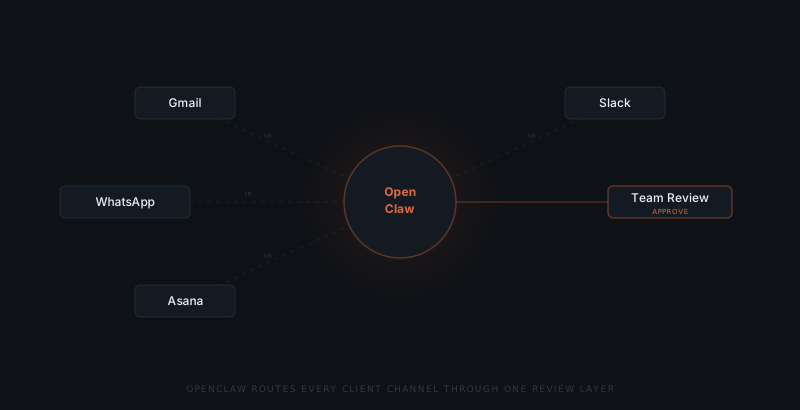
OpenClaw connects to the channels where client communication already arrives — email, Slack, WhatsApp Business — and routes each incoming message based on rules defined during setup. A revision request routes to the creative team lead with the brief context attached. A status update request triggers a draft status summary for the account manager to review and approve. A billing inquiry routes to operations.
No message leaves the agency without a named team member releasing it from the approval queue. OpenClaw drafts the response and holds it. The account manager reviews, edits if needed, and approves. The response sends from the same channel the client used — from the account manager's address, as if written manually.
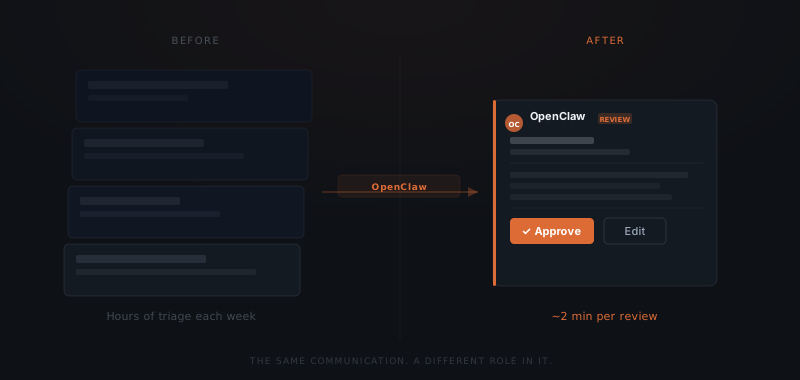
The account manager's role shifts from drafter to reviewer. The senior hours shift from composing holding replies to approving them in two minutes and returning to strategy.
How OpenClaw handles retainer client workflows
Three workflow types dominate retainer account management. OpenClaw handles all three.
Status update requests. When a client asks "where are we on the project?", OpenClaw reads the project management system, pulls the current task status, and drafts a status update in the account manager's voice. The account manager reviews the draft — adds context, adjusts tone, confirms accuracy — and approves. The client receives a same-hour reply instead of an end-of-day one.
Revision and feedback routing. When a client sends revision notes on a deliverable, OpenClaw reads the message, identifies the deliverable being referenced, and routes the note to the team member responsible — with context from the brief and any prior revision threads. The creative team receives a routed request with context, not a raw email chain to interpret.
Check-in and relationship maintenance. Retainer clients expect regular proactive contact. OpenClaw tracks the last outbound contact date for each client and flags when a client has gone more than a defined number of days without a proactive update. The account manager receives a prompt with a draft message. The account manager reviews, personalises, and sends.
What the agency team still controls
OpenClaw does not make decisions — it handles the coordination so the account team can focus on the decisions. Every output from OpenClaw goes through human review before reaching a client.
| Task | OpenClaw | Agency team |
|---|---|---|
| Reading and routing inbound client messages | ✓ | |
| Drafting status updates from project data | ✓ | |
| Routing revision notes to responsible team member | ✓ | |
| Tracking last-contact dates and flagging overdue check-ins | ✓ | |
| Reviewing and approving every outbound draft | ✓ | |
| Strategic client advice and creative recommendations | ✓ | |
| Creative direction and deliverable decisions | ✓ | |
| Escalation and difficult conversation handling | ✓ | |
| Relationship context and personal touchpoints | ✓ |
An approval queue without clear ownership becomes a bottleneck. Each message type needs a named reviewer and a response time standard. Status updates default to the account manager. Revision routing defaults to the creative lead. Billing questions default to operations. Define the default before OpenClaw goes live.
Setup: connecting OpenClaw to the agency's communication stack
Map client message types before touching any tools
List every type of message that arrives from clients: status requests, revision notes, check-ins, billing questions, escalations, new project inquiries. Assign a routing path to each — which team member or queue each type reaches. Without this map, OpenClaw routes everything to the same reviewer and the triage problem moves one step back.
Connect client email and Slack channels
Grant OpenClaw read access to the email inbox or Slack channel where each client communicates. Scope access to client-facing channels only — not internal team channels. OpenClaw reads inbound messages and drafts responses from this connection.
Connect the project management system
Link the project management tool (Asana, Monday, ClickUp, or Notion) so OpenClaw can read current task status when drafting status updates. Read access only — OpenClaw does not create or modify tasks through this connection.
Define the approval queue and notification routing
Set which team member receives the approval notification for each message type. Status updates go to the account manager. Revision notes go to the creative lead. Billing questions go to operations. Each approver receives a Slack or email notification with the draft and a one-click approve link.
Write review instructions for each message type
For each message type, write a short paragraph of review guidance: what to check before approving, what typically needs editing, and when to escalate. These instructions appear in the approval notification. The reviewer knows what to look for without context-switching to the original thread.
Frequently asked questions
What does OpenClaw actually do for a marketing agency? OpenClaw handles the communication layer between agency team and clients: routing inbound client requests to the right team member, drafting status update responses for account manager review, tracking last-contact dates for each client, and holding every outbound message in a review queue before it sends. OpenClaw does not generate content, write deliverables, or replace creative work.
Does OpenClaw replace the account manager? No — OpenClaw handles the coordination layer. The account manager makes every decision and approves every communication before it leaves the agency. OpenClaw removes the time spent on triage, routing, and drafting holding replies — not the judgment and relationship work that requires a senior person.
Which client channels does OpenClaw connect to? OpenClaw connects to the channels where client communication already arrives: Gmail or Outlook for email, Slack for team and client channels, WhatsApp Business for agencies using mobile messaging, and project management tools like Asana or Monday for task-based requests.
How long does it take to implement OpenClaw for an agency? A focused implementation covering inbound request routing, status update drafting, and the approval queue takes three to five weeks. The first two weeks define the routing logic and message types. The following weeks cover channel integration, approval workflow setup, and testing against live client communication.