AgentBridge
Human approval for AI agents.
A checkpoint between agent and browser.
AgentBridge adds a human approval step between AI agents and your browser. An agent can read the active tab, use the clipboard, and type into a page - but every action pauses until you approve it. Free, no account required, and it runs entirely on your machine.
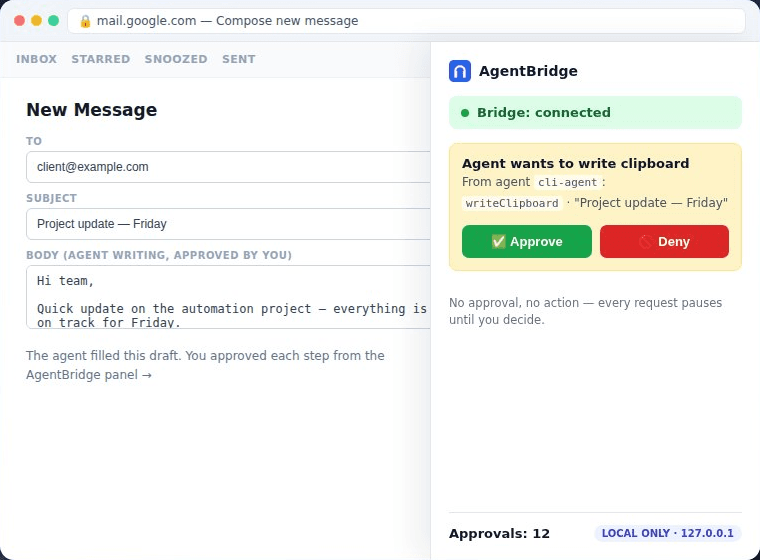
A pause before every action.
Letting an agent operate your browser unattended is a bad idea - it can click, paste, fill forms, or copy sensitive data faster than you can react.
Approval prompts
A clear dialog before every agent action, showing exactly what it wants to do.
Activity log
A full history of every action the agent requested and what you decided.
Clipboard control
The agent can read and write the clipboard, but only with your permission each time.
Page interaction
The agent can type into a page - form filling, autocomplete - only after you approve.
Every request waits for you.
Four steps, and you are the third one.
Connect
Your agent connects to the bridge running on your machine.
Request
It asks to read the tab, use the clipboard, or fill a field.
Decide
You see exactly what it wants to do, and approve or deny.
Log
Every request and decision is written to the activity log.
Focused permissions.
A small extension with a short permission list - and nothing beyond it.
Read the active tab
So the agent can see the page you are looking at.
Clipboard read & write
For copy and paste workflows.
Scripting
To type into pages you approve.
No broad “read all websites” permission, no data collection, no third-party servers.
Nothing leaves your machine.
The bridge listens on 127.0.0.1 - your machine only. No cloud, no accounts, no telemetry. There is nothing to sign up for.
Running in four steps.
- InstallAdd AgentBridge from the Chrome Web Store.
- Run the bridgeStart the small local process on your machine.
- Point your agentConnect it to ws://127.0.0.1:<port>.
- ApproveAccept the first prompt and you’re running.
Ready to try it?
AgentBridge is free, open source (MIT) - audit the code, run your own bridge, or contribute on GitHub.
Add to Chrome