
OpenClaw handles the operational layer around each consulting engagement — research, document drafts, meeting prep, and invoice follow-up — so billable hours go toward the thinking, not the assembly around it. OpenClaw drafts from your notes and context, stores knowledge across engagements, and requires your approval before anything leaves your account.
The operational overhead around consulting work is not random — it follows predictable patterns. Research has to be gathered and structured before it is useful. Deliverables have to be assembled from source material. Invoices have to be tracked and followed up. Meetings need context before they start and notes after they end. All of it is necessary. None of it requires the expertise you were hired for. Knowledge workers spend an average of 28% of their workweek managing email alone — before any of the research or deliverable work begins.[¹] This is the layer OpenClaw is built to take on.
| Task | What OpenClaw handles |
|---|---|
| Research | Structured web and document research, delivered as a summary |
| Deliverables | First draft from your notes and context, ready for your review |
| Meeting prep | Threads, docs, and calendar notes pulled before each call |
| Invoice follow-up | Monitors outstanding invoices, surfaces draft reminders |
| Knowledge base | Stores and retrieves context semantically across engagements |
| Recurring admin | Reports and summaries on a configured schedule |
How OpenClaw handles research without tab sprawl
OpenClaw runs structured research across the web, synthesizes what it finds, and delivers a summary — without you opening a browser. The agent searches across multiple sources, fetches full page content, reads PDFs up to twenty pages at a time, and pulls from Google Drive documents you already have. Drop a client brief or an industry report into the conversation and ask it to extract the key points. OpenClaw does.
The research output is structured to match the question you asked. Ask for a competitive landscape and you get an organized breakdown by player, with strengths, known weaknesses, and public signals. Ask for regulatory context and you get a summary of the relevant frameworks with source references. Ask it to find what is publicly known about a specific company before a meeting and it returns the relevant facts without you building a search session.
For ongoing research needs, set the agent to monitor a topic, a competitor, or an industry trend and deliver a weekly briefing on a fixed day. You stop looking. OpenClaw surfaces what changed.
This matters most when research is a recurring cost rather than a project-specific one. If you regularly need to stay current on a sector — technology, regulation, or a particular category of client business — having a structured briefing delivered on schedule is more efficient than running the same searches manually every week. The briefing is consistent in format so you can read it quickly and see what is different from last time.
How OpenClaw turns notes into deliverable drafts
Most consulting deliverables start from the same place: a set of notes, a conversation, or a rough outline. OpenClaw takes that input and drafts the document — a proposal, a report structure, a slide outline — using gathered research and prior client context.
The time you save is in the initial draft — which for a longer deliverable can be several hours.
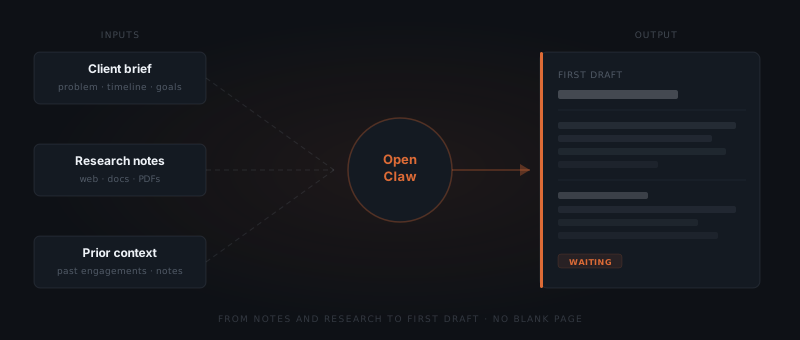
The drafting process stays under your control. Each version comes back for review before anything leaves. You refine, it applies the changes, you approve the final version.
What this removes is the blank-page problem for structured work. A proposal has a shape: executive summary, problem statement, proposed approach, timeline, commercial terms. OpenClaw fills that shape from your brief and the conversation history. The intellectual content — the diagnosis, the recommendations, the framing — is yours. The structure and the initial prose are not yours to produce from nothing.
For longer deliverables, the draft serves as a working document. You add to it, reorganize sections, sharpen the language. Each round of edits is applied cleanly. The final version is the one you send. The time saving is real regardless of how much you edit — because you are editing something rather than producing everything.
The same pattern applies to slide outlines. OpenClaw does not build the slides — it produces the outline: the flow of ideas, the supporting points, the suggested data references. You build the presentation from the outline, not from scratch.
How OpenClaw delivers full meeting context
Before a client call, OpenClaw pulls together: prior session notes, outstanding items, the client's last message, and today's calendar. It delivers a summary before the meeting starts — sourced from your Gmail threads, Google Drive documents, and calendar notes.
After the meeting, paste in the notes or a transcript and ask it to structure them. It extracts action items, formats the summary, and stores it against the client so the context is there next time. The archaeology of finding what happened last quarter takes seconds instead of fifteen minutes.
The pre-meeting summary follows a consistent structure: what was the last agreed next step, what has happened since (based on email and document activity), what open questions remain, and what is on the agenda for today. You review it in Slack in under a minute and walk into the call with the full picture.
The after-meeting notes are equally important. Most consultants write some version of meeting notes — but inconsistently. Some meetings get detailed notes; others get a quick summary; a few get nothing because the next thing started immediately. OpenClaw makes the post-meeting processing reliable. You paste the raw notes or a voice transcript, it structures them, and they are stored against the client before you have moved to the next task.
For multi-session engagements, this compounds. Six months into a mandate, you have a structured record of every session: what was discussed, what was decided, what was deferred. When a question comes up about something agreed in the third meeting, the answer is a query away.
How OpenClaw handles invoice follow-up
For most independent consultants, invoice follow-up is the task that gets quietly skipped when the week gets busy. It is awkward, it takes time, and by the time you remember, the invoice is sixty days old. OpenClaw monitors your inbox for payment-related emails and flags anything that needs attention.
Set it on a schedule. If an invoice is unpaid after a set number of days, it drafts the follow-up and surfaces it for approval. You review and send, or edit and send, or decide to wait. Nothing goes out without your sign-off. The writing and the remembering are handled.
The draft follows a professional tone — direct but not aggressive. The first follow-up is a polite reminder. If there is no response and the invoice remains unpaid after a second interval, a firmer note appears for review. The escalation cadence is configurable; the defaults are set to avoid straining the client relationship while still being effective.
OpenClaw also surfaces the outstanding invoice amount alongside the draft, so you are reviewing with full context. You can see which invoice, the original due date, the amount, and the number of days outstanding. If you want to negotiate or change the terms, you have the information in front of you before you make any decisions.
For consultants with several outstanding invoices at any given time, the visibility alone is valuable. Rather than doing a monthly reconciliation to discover what is outstanding, the information surfaces automatically when it crosses the threshold you set.
How OpenClaw builds a knowledge base across engagements
OpenClaw stores context persistently across conversations. Per-client agents keep each engagement's history separate, but the system can surface cross-client patterns when you ask.
Ask it what you found out about a topic six months ago and it retrieves the relevant notes. The search is semantic — you do not need to remember the exact wording. The knowledge you build doing the work accumulates in a form you can actually query.
Research from a prior engagement on a similar topic is findable. Context from an industry you have worked in before is not lost between projects.
In practice, this changes how you approach new mandates in familiar territory. Instead of starting your research from the beginning, you ask OpenClaw what you already know about the sector, the regulation, or the type of problem. It surfaces the relevant prior work. You assess what is still current and what needs updating, and you start the new engagement with a head start rather than a blank slate.
The knowledge base also captures your working methods over time. If you consistently structure proposals a certain way, OpenClaw learns from the approved drafts. If your meeting notes follow a particular format, that format recurs in the next set of notes. The way you work becomes embedded in the system — not as a rigid template, but as a reference point for each new draft.
How OpenClaw runs recurring admin on a schedule
Anything on a predictable cadence — status reports, weekly summaries, utilization tracking, billing reviews — runs on OpenClaw's built-in scheduler. Set it once. It runs at the time you specified, delivering output to Slack or email.
Running recurring admin on OpenClaw's scheduler is not about removing judgment from the work. OpenClaw removes the overhead of remembering to do routine things at the right time. The output still comes to you for review. You are reviewing it instead of producing it.
Utilization tracking is a good example. If you track your billable hours against a target, OpenClaw can pull the week's activity from your calendar and task list, compare it to your target, and deliver a summary every Friday. You see where the week went without building a time-tracking report manually.
For retainer clients, recurring admin includes checking that the retainer scope is being used. If a client has a twelve-hour monthly retainer and you are five weeks in without having logged the time, that surfaces as a flag. You decide whether to do the work, discuss scope with the client, or adjust the retainer. The information reaches you rather than getting discovered at month-end.
How OpenClaw reclaims billable hours
The operational layer around a consulting engagement typically runs to four to six hours per week for an active mandate: research compilation, deliverable drafting, meeting prep, post-meeting notes, invoice management, and reporting. At a day rate of £600–£1,000, that is £2,400–£6,000 per month in time that is either written off or spent doing work that does not move the engagement forward.
OpenClaw compresses that time. The research is already structured when you need it. The first draft is waiting rather than blank. The meeting prep arrives before the call. The invoice follow-up is drafted rather than remembered.
Not all of that time converts directly to additional billable work — some of it is structural overhead that needs to happen regardless. But the administrative drag on focus is significant, and reducing it has a secondary benefit beyond time: the work that remains gets done with more attention and less context-switching.
The benchmark that matters is not how many hours OpenClaw saves per week. It is how much of your week is spent doing the work you were hired for.
What OpenClaw does not handle
OpenClaw handles research, drafting, and structured admin. It does not handle judgment calls that require knowledge of the client relationship or the political context of the engagement.
Scope disputes, fee negotiations, difficult conversations about performance, and any communication where the outcome depends on reading the room accurately — these require you. OpenClaw can help you draft a follow-up after you have worked out your position, but the position itself is not something the agent can determine.
Similarly, OpenClaw does not generate the core intellectual content of your deliverables. A strategy recommendation, a diagnosis of what is wrong, a prioritized set of options — those require the expertise you are selling. OpenClaw structures the document and assembles the supporting material. The thinking is yours.
The practical test: if you can describe exactly what the output should look like before you produce it, OpenClaw can probably produce a first draft. If you need to think through the problem to know what the output should be, that part stays with you.
Frequently asked questions
How does OpenClaw help consultants with client research?
OpenClaw runs structured web research, reads PDFs up to 20 pages, and pulls from Google Drive documents — then delivers a summary without you opening a browser. For recurring topics, set it to monitor a competitor or trend and deliver a weekly briefing on a fixed day.
Can OpenClaw draft client deliverables?
OpenClaw drafts documents — proposals, report structures, slide outlines — from your notes and prior client context. Every version returns for your review before anything leaves. You refine, OpenClaw applies changes, you approve the final version.
How does OpenClaw handle invoice follow-up for independent consultants?
OpenClaw monitors your inbox for payment-related emails and flags what needs attention. When an invoice passes a configured number of days unpaid, it drafts a follow-up and surfaces it for your approval. Nothing sends without your sign-off.
What context does OpenClaw store across client engagements?
OpenClaw stores mandate-specific context persistently across conversations. Research from a previous engagement on a similar topic is searchable using semantic search — you do not need to remember the exact wording. Context built during one project remains accessible when a related topic comes up in another.
How does OpenClaw handle meeting notes and action items?
After a meeting, paste your notes or a transcript into the conversation and ask OpenClaw to structure them. It extracts action items, formats the summary, and stores it against the client. The structured notes are searchable for future sessions — if a question about something agreed in an earlier session comes up, the answer is a query away.
Can OpenClaw help with multiple simultaneous mandates?
Yes. Each client runs in its own separate context. The knowledge base is per-client by default, though you can query across clients for thematic patterns. Research done on one mandate does not bleed into another, and per-client invoice tracking keeps each relationship's financial state separate.
How does OpenClaw handle confidential client information?
OpenClaw processes information within a private, isolated environment. Client data stored in the knowledge base is accessible only through your OpenClaw installation. It is not used for training, shared with other users, or surfaced outside of your account. Sensitive information should be treated with the same judgment you would apply to any tool that processes client data.
How long does it take to set up OpenClaw for a consultancy, and what does it cost?
Initial setup takes one to two weeks, starting with research capture and the highest-volume deliverable type. OpenClaw is open-source with no licence fee — running costs include infrastructure ($20–60/month), AI model API usage ($30–200/month depending on volume), and initial setup ($2,000–6,000 one-time). Year 1 total typically runs $2,400–9,000 including setup; year 2 onwards runs $600–3,000/year in infrastructure and API costs alone.
Notes
- McKinsey Global Institute, The social economy: Unlocking value and productivity through social technologies, 2012. https://www.mckinsey.com/industries/technology-media-and-telecommunications/our-insights/the-social-economy