Architects spend more than half of every project timeline on documentation, tagging, clash coordination, and reporting — the work that has to happen but does not require a licensed architect to do it. AI agents handle that coordination layer: batch tagging across sheets, clash detection and flagging, schedule exports, view management. The design decisions, client relationships, and regulatory judgment stay with the team. The documentation layer stops consuming the hours it currently does.
A project enters documentation phase and the design team disappears into Revit for two weeks. Not designing — tagging rooms, updating sheet sets, fixing annotation overlaps, generating door schedules, running clash checks between disciplines. The work is necessary. None of it requires the creative judgment a licensed architect spent years developing.
Architecture firms do not have a staffing problem. They have a documentation-to-design ratio problem. More than half of every project timeline goes to coordination and documentation work — the kind of work an AI agent handles well.
Where architecture firms lose the most project time
Architects spend over 55% of project timelines on drafting and documentation tasks, leaving less than half the time for actual design work, according to analysis by ArchiLabs AI of architectural workflows in production.[¹] That figure reflects what most principals already know from watching where their team's hours go.
The documentation layer spans the full project lifecycle. In early design: generating and documenting massing options, building test-fit layouts, creating presentation views. In design development: maintaining room data, tagging elements, keeping naming conventions consistent across sheets and disciplines. In construction documents: running clash detection, generating door and window schedules, updating drawing sets when changes propagate across sheets. At every stage, the volume of coordination work grows with the complexity of the project.
A 10-person firm running four active projects has significant team hours tied up in tasks that the BIM model data could automate. Each licensed architect spending two hours per day on annotation, tagging, and report generation is not spending those hours on the work that differentiates the firm.
The economic implication is straightforward: licensed architect time costs $80–$150 per hour in a typical US firm. Deploying that time on batch tagging is not a staffing decision — it is a workflow decision.
| Task | Typical hours per week | Agent handles it |
|---|---|---|
| Room tagging and annotation | 3–5 hrs | Yes |
| Sheet set management | 2–4 hrs | Yes |
| Clash detection runs | 2–3 hrs | Yes (detection and report) |
| Schedule and report exports | 2–4 hrs | Yes |
| Design option generation | 4–6 hrs | Partial — agent generates, architect selects |
| Clash resolution decisions | 2–4 hrs | No |
| Client presentations | 3–5 hrs | No |
| Regulatory submissions | 3–6 hrs | No |
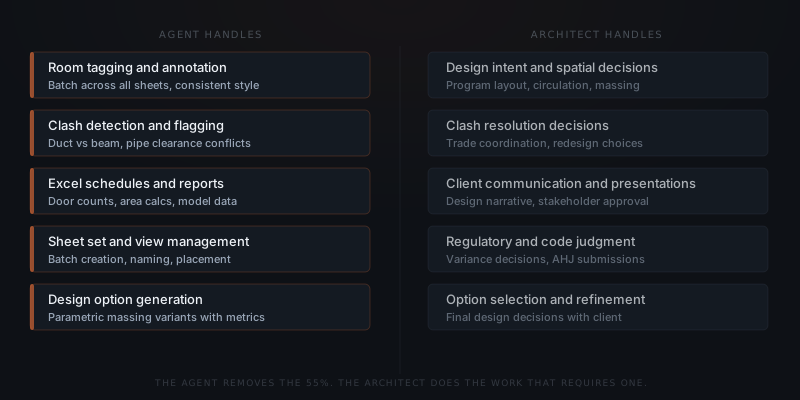
Firms that adopt agent workflows reclaim the first column. The second column stays with the team.
What AI agents handle in an architecture workflow
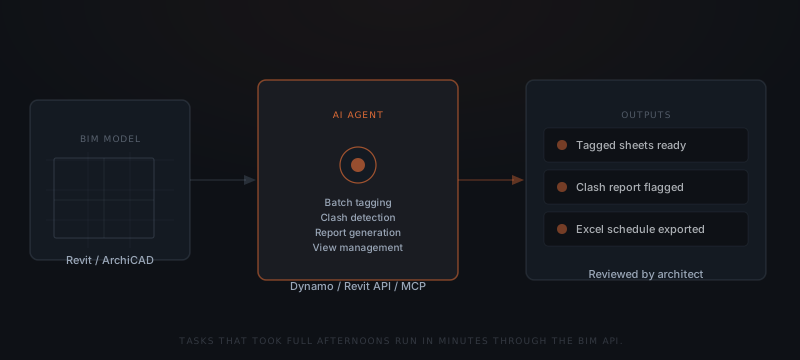
AI agents for architecture firms work through the BIM API — connecting to Revit, ArchiCAD, and related tools to execute batch operations across the model. The agent does not have a screen. It reads the model data and executes tasks the same way a Dynamo script does, but with more contextual reasoning and the ability to handle multi-step processes.
Batch tagging and annotation. The agent reads all elements in the model, identifies rooms, doors, windows, and other elements requiring tags, places tags according to the firm's annotation standards, and checks for overlaps. A full set of room tags across 20 sheets that takes an afternoon takes minutes. The agent applies the firm's naming conventions consistently without fatigue-driven exceptions.
Clash detection. The agent queries the BIM model for conflicts between systems — HVAC ducts and structural beams, plumbing and framing, clearance violations between systems. The agent flags each conflict with element IDs, conflict type, and location in the model, and exports the clash report for team review. The team resolves the conflicts — the agent found them.
Schedule and report generation. The agent reads model data and populates Excel schedules — door hardware schedules, window schedules, room data sheets, material take-offs — without the manual export-and-format process. When model data changes, the agent regenerates the schedule on demand. Real-time model interrogation produces accurate project metrics without the data entry.
View and sheet management. Generating a sheet set for each project level, placing floor plans on the correct sheets, applying view titles consistently across the drawing set, and updating sheets when changes propagate. Tasks that involve repetitive navigation through the model tree run automatically.
Design option generation. For sites or space planning problems with multiple constraint variables, the agent generates parametric variants — massing options with area, orientation, and cost metrics attached. ArchiLabs documented a process where a manual two-week process generating 12 options was replaced by an agent generating 120 overnight with sunlight analysis and cost scoring included.[¹] The architect selects from options. The agent generates them.
BIM and Revit — how agents integrate into the existing stack
Architecture firms already have a BIM stack. Agents connect to it rather than replace it.
The primary integration path runs through the Revit API, which exposes the full model data and element management functions as programmable endpoints. Dynamo scripts have long provided this access — agents extend the same access with the ability to handle conditional logic, multi-step processes, and contextual decision-making that static scripts cannot.
Newer integration approaches include MCP (Model Context Protocol) connectors built specifically for BIM workflows, such as ArchitectureAgent.ai's Revit integration, which allows the agent to interact with the live model through natural language commands. These integrations are production-ready for documentation tasks; design generation within Revit via agent commands is still emerging.
The practical setup for a firm looks like: the agent connects to the Revit model via API or plugin, the project team defines the tasks the agent should run (which tags, which schedules, which clash checks), and the agent runs those tasks on demand or on a schedule. Outputs route to the project folder, to Excel, or into the model directly. The team reviews and approves before anything goes to a client or consultant.
Firms adopting generative tools have documented 20–30% reductions in early design iteration time when the option generation layer runs through the agent.[²] The reduction reflects hours freed from manual option documentation — not from the design judgment itself.
What agents cannot do for an architecture firm
Agents do not make design decisions. An agent generates twelve massing options — the architect decides which one to build. An agent flags a code conflict — the architect interprets whether a variance is appropriate. The documentation and coordination layer runs on autopilot. The judgment layer does not.
The distinction matters because it defines where implementation value concentrates. Agents handle the coordination layer well. They handle the judgment layer not at all.
Design decisions. An agent can generate 120 massing variants with area and sunlight metrics. An agent cannot select which variant best serves the client's program, responds to the site's context, or reflects the firm's design position. That selection requires the architect's knowledge of the client, the brief, and the building tradition — none of which is in the model data.
Regulatory judgment. An agent can flag which elements conflict with code thresholds. An agent cannot determine whether a variance application is appropriate, how an AHJ is likely to interpret an ambiguous provision, or how to write a compelling variance narrative. Code compliance requires licensed judgment at every decision point.
Client relationships. A client presentation is not a schedule export. The agent can prepare the materials, generate the comparison diagrams, and assemble the meeting packet. The conversation with the client about which direction to take requires the account team's knowledge of the client's priorities, tolerance for change, and decision-making process.
Design intent across consultants. Coordinating with structural, mechanical, and electrical engineers involves more than clash detection. Resolving a clash requires understanding which system should move, which structural member can be shifted, and what the cost and schedule implications are. The agent finds the conflict. The principal architect leads the resolution.
For a framework on which tasks are ready for agent automation, see how to know if a business process is ready to hand to an AI agent.
The work blocking design isn't hard. It is relentlessly time-consuming.
How architecture firms start with AI agents
Identify two or three high-volume documentation tasks
Start with the tasks that consume the most licensed-architect hours and have the clearest completion criteria. Room tagging, door schedules, and clash detection reports are the most common starting points — high volume, rule-based, measurable output. Avoid starting with tasks that require contextual judgment or design decision-making.
Map the BIM API access for those tasks
Confirm that the target tasks are accessible via the Revit API or the BIM platform's automation layer. Most documentation and schedule tasks are fully exposed. Some visualization tasks (rendering, presentation sheets) require additional tools. The integration scope determines the build scope.
Connect the agent to the model
The implementation team connects the agent to the BIM environment through the API, Dynamo integration, or MCP connector. This step includes setting up the access credentials, defining the output formats (where schedules export, where clash reports route), and configuring the approval step before outputs leave the firm.
Run one project for three weeks before expanding
Deploy the agent on one active project for three full weeks. Review every output — the tagged sheets, the clash reports, the schedule exports — before the team acts on them. Note where the agent gets it right consistently and where edge cases appear. Adjust the configuration based on what the first three weeks reveal before adding more projects.
Define success metrics before scaling
Before expanding to additional projects, agree on what good looks like: how many hours per project should the documentation layer take, what error rate is acceptable in clash reports, how often does a human need to correct a schedule export. Without agreed metrics, "working" remains undefined and the agent's scope creeps or shrinks unpredictably.
A typical documentation automation build for an architecture firm goes from scoping to first live output in two to three weeks. See what a real AI agent implementation involves for the full timeline from scoping call to production deployment.
Frequently asked questions
How are architecture firms using AI agents? Architecture firms use AI agents for batch documentation tasks — room tagging, sheet management, door numbering — clash detection and quality control within BIM models, automated schedule and report generation from model data, and parametric design option generation. The agent handles the coordination and documentation layer. Design decisions, client communication, and regulatory submissions stay with the licensed team.
Can AI agents work with Revit and BIM software? Yes. AI agents connect to Revit through the Revit API, Dynamo integrations, and emerging MCP connectors built for BIM workflows. The agent reads model data, executes batch operations, runs clash detection queries, and exports schedule data. The agent does not generate architectural drawings — it automates the coordination and documentation work surrounding them.
How much time do AI agents save in an architecture workflow? Batch tasks that take full afternoons run in minutes through the BIM API. Automation benchmarks show over 90% time savings on repetitive tagging and annotation tasks.[¹] Firms adopting generative tools report 20–30% reductions in early design iteration time.[²] The time savings concentrate in the documentation layer — not in the design or client-facing work where human judgment is irreplaceable.
What can an AI agent not do for an architecture firm? Agents cannot make design decisions, exercise regulatory judgment, maintain client relationships, or navigate the creative dimensions of a project. An agent cannot determine which massing option best serves a client's program, interpret code intent in a variance application, or lead a design review. It can generate options, flag conflicts, and prepare materials. Every decision requiring a licensed professional stays with the licensed professional.
Notes
- ArchiLabs AI. (2025). "AI Agents for Architecture: Transforming Revit Workflows." ArchiLabs AI Blog. https://archilabs.ai/posts/ai-agents-for-architecture — source for: architects spend over 55% of project timelines on drafting and documentation tasks; before/after example of 2-week manual process generating 12 options replaced by agent generating 120 overnight; Dynamo scripts save over 90% of time on batch repetitive tasks.
- VirtualWorkforce.ai. (2025). "AI Agents for Architecture Firms: Design Options." VirtualWorkforce.ai. https://virtualworkforce.ai/ai-agents-for-architecture-firms/ — source for: 20–30% reduction in early design iteration time for firms adopting generative tools; ROI model example of saving 40 hours at $100/hour per project.