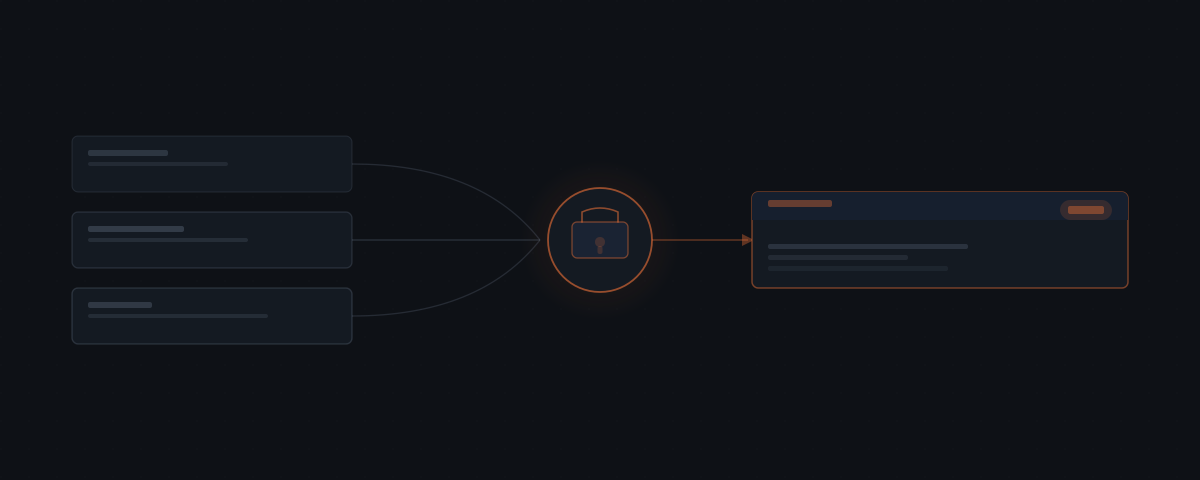
OpenClaw handles the operational layer for early-stage SaaS founders — support triage, feature request logging, changelog drafts, and feedback synthesis — so time goes toward the product instead of the process. OpenClaw monitors your Gmail inbox, GitHub, and Notion, and requires your approval before any response reaches a user.
Early-stage SaaS founders wear more hats than almost any other role. Support, product management, customer success, and internal operations all run through the same person — usually before there is budget for a second. Knowledge workers spend an average of 28% of their workweek managing email alone — for a solo founder, that inbox is also the support queue.[¹] The time that goes to managing inboxes, logging requests, drafting changelogs, and synthesizing feedback is time that does not go toward the product. That is the direct cost. The indirect cost is the context-switching that fragments the focus required to build well.
OpenClaw handles the operational layer so that cost shrinks — what OpenClaw is, at its core, is the layer that takes on that overhead. It monitors your support channels, logs feature requests wherever you track them, writes changelogs from your GitHub activity, and synthesizes the feedback signal your users are generating every week. Every response to a user waits for your approval before it sends.
| Task | What OpenClaw handles |
|---|---|
| Support triage | Classifies incoming tickets, drafts replies in your voice |
| Feature request logging | Extracts requests from any source and creates structured records |
| Changelog drafts | Reads merged PRs, synthesizes user-facing changes |
| Feedback synthesis | Reads Notion, GitHub, and support threads, surfaces patterns |
| User communications | Drafts proactive emails — onboarding, updates, re-engagement |
| Internal ops | Routes to a separate agent to keep support and ops contexts clean |
How OpenClaw handles support triage before it becomes a backlog
OpenClaw monitors your support inbox in real time via Gmail. When a support email comes in, the agent reads it, classifies the issue, and drafts a reply — in your voice, with context from prior conversations with that user. The draft surfaces in Slack for your review. You approve or edit, it sends.
For Slack-based support: the agent watches your channel, handles what it can, and flags the rest.
Nothing goes to the user without your sign-off. The effect is that your response time drops and your inbox stops being the place where requests go to pile up.
Support tickets from early users carry disproportionate weight. A user who emails once and does not hear back for three days is making a judgment about your product's reliability. The response time is part of the product experience at early stage, whether or not you have built a support infrastructure. OpenClaw makes the response time short without requiring you to monitor your inbox continuously.
The draft quality depends on context. OpenClaw pulls the full conversation history with that user — every prior email, classified ticket, and resolved issue. The draft it writes is informed by that history: it does not re-ask for information the user has already provided, does not suggest workarounds the user has already tried, and acknowledges prior context when relevant. You review a draft that already reflects what you know about that user, not a generic response template.
Classification also feeds into your product work. OpenClaw categorizes each ticket and stores the category against the user and the timestamp. Over time, you can see which ticket types are increasing, which are decreasing, and which are generating multiple tickets from the same user — a reliable signal that something in the product needs fixing.
How OpenClaw logs feature requests consistently
Feature requests arrive everywhere: support emails, Slack messages, user calls, sales conversations. Most never get written down in a useful place. OpenClaw extracts the request and creates a GitHub Issues entry or a Notion database record — whichever you use.
Tell it what happened in a call, or forward an email, or paste a Slack thread. It pulls out the request, formats it, and logs it. Over time you have a structured record — not a vague sense that several people mentioned the same thing.
The structured record matters for prioritization. A feature request logged once is a data point. The same request logged twelve times from different users over three months is a signal. If OpenClaw is logging every request consistently, you can query the record and see which requests are appearing most frequently — not from memory, but from data.
The format for each logged request includes: the user who made the request, the channel it came from, the date, a normalized description of the request, and any supporting context from the conversation. When you review it in GitHub or Notion, you have enough to understand what the user was asking for and why, not just a raw quote from the email.
For requests that arrive in calls or verbal conversations, OpenClaw relies on your description. Tell it "a user on the 11 AM call today said they need the ability to bulk-export their data as CSV" and it creates the structured log entry. You are not doing the formatting — you are providing the information.
How OpenClaw writes changelogs from merged pull requests
Changelogs are easy to skip when things are moving fast. OpenClaw reads recently merged pull requests on a nightly or weekly schedule via GitHub. It synthesizes what changed, groups it into user-facing categories, and drafts a changelog entry that you review before it goes anywhere.
The draft can go to a Notion page, a Slack channel, or an email to your users — wherever your update cadence lives. The writing time is close to zero. The judgment about what matters and how to frame it stays with you.
The grouping logic is configurable. By default, OpenClaw groups changes into standard changelog categories — features, fixes, improvements, deprecations — and writes descriptions in user-facing language rather than technical commit prose. A merged PR titled "fix null pointer exception in billing module" becomes "Fixed an issue causing billing errors for accounts with multiple payment methods." The technical detail is preserved in the linked PR; the changelog entry is written for users.
For products that ship frequently, the weekly changelog discipline compounds into something valuable: a clear, user-readable record of what improved. Users who subscribe to changelog updates get a consistent signal that the product is moving. Users who search for whether a specific issue was fixed have something to find. The operational cost of maintaining that record drops close to zero when OpenClaw is generating the draft.
You review the draft before it publishes. If the framing of a specific change needs adjustment, or if a PR should be excluded from the user-facing notes, you edit the draft in the approval step. The edit is applied; the changelog publishes.
How OpenClaw synthesizes what customers are asking for
Synthesizing product feedback is one of those tasks that matters a lot and gets done rarely. OpenClaw runs it on a schedule. Every week or month, it reads your Notion feedback database, open GitHub issues, and recent support threads. It produces a synthesized summary: repeating themes, friction points, what has gone quiet.
You are making product decisions with a current picture of what users are saying rather than relying on whatever you happened to remember.
The summary surfaces in Slack or email. You make the product decisions.
The synthesis is not just counting. OpenClaw identifies themes across different surface forms of the same request — a user who asks for "bulk operations," another who asks for "the ability to do things to multiple records at once," and a third who requests "batch processing" might all be expressing the same underlying need. The synthesis groups these rather than treating them as distinct requests.
It also surfaces what has changed between synthesis runs. If a theme that dominated last month's feedback has quieted down, that appears in the summary. If a new theme is emerging, it gets flagged as new rather than buried in the overall list. You are seeing movement in the feedback signal, not just a static snapshot.
For product planning, this changes how you enter the process. Instead of starting a planning cycle with a vague sense of what users want, you start with a structured summary of what they have said. The planning still requires judgment — which themes to address, in what order, with what approach — but that judgment is applied to accurate information rather than memory.
How OpenClaw keeps founders in touch with users
Proactive communication — onboarding check-ins, update announcements, re-engagement emails — is easy to deprioritize when you are heads-down building. OpenClaw drafts those emails and surfaces them for review on whatever cadence makes sense. You approve and they send, or you edit first. Either way you are not starting from a blank page.
For event-driven communication: your product sends a webhook when something happens — onboarding complete, usage milestone, two weeks quiet. The agent drafts the appropriate message and waits for your approval before the message goes out.
The onboarding check-in is typically the highest-value communication a SaaS founder sends at early stage — and the most commonly skipped. A user who activated three days ago and has not returned needs a different message than a user who has been using the product for two weeks but has not reached a key milestone. OpenClaw drafts both based on the event trigger and the user's activity history. You review and personalize where necessary; the draft handles the structure and initial wording.
Re-engagement emails follow the same pattern. A user who went quiet after two weeks of activity gets a different message than a user who never got past the first login. OpenClaw segments by activity pattern and drafts accordingly. You are not building an email automation sequence from scratch — you are reviewing and approving specific drafts for specific users before they go out.
How running two OpenClaw agents avoids context mixing
Support and internal operations are different enough that mixing them creates noise. OpenClaw lets you run separate agents on the same installation, each scoped to its job.
| Agent | Watches | Can do |
|---|---|---|
| Support agent | Gmail inbox, Slack support channel | Draft replies, log conversations, surface priority flags |
| Ops agent | GitHub, Notion, email digests | Create issues, draft changelogs, synthesize feedback |
Each has its own context and tool permissions. Neither bleeds into the other. As you add workflows, they go to the right agent — not into one large context that handles everything poorly.
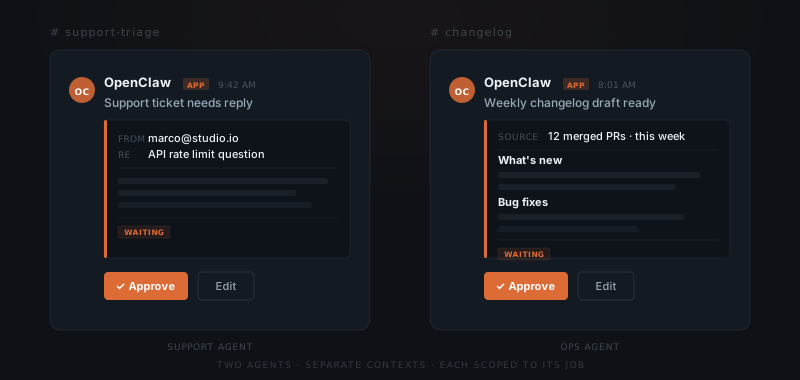
The practical benefit is that each agent's context stays clean. The support agent knows the support history for each user. The ops agent knows the product development history. Neither is contaminated by the other's signal. When you ask the support agent about a user's issue history, you get the support context. When you ask the ops agent about what has changed in the product, you get the development context.
As the product grows and the team grows, this separation makes it easier to hand off specific domains to new hires. The support agent context becomes the onboarding record for a support hire. The ops agent context supports a product manager joining the team. The knowledge accumulated in each agent is scoped and relevant rather than a single tangled record.
What OpenClaw does not handle for SaaS founders
OpenClaw handles the operational layer around your existing product and user base. It does not make product decisions, prioritize features, or assess whether a user's request should be built.
The synthesis it produces tells you what users are saying. What to do about it — whether to build the feature, fix the underlying friction, or communicate differently about what the product does — requires your judgment. OpenClaw surfaces the signal; you interpret it.
Pricing decisions, positioning changes, strategic pivots, and investor communications are not things OpenClaw handles. Neither is code review, architectural decisions, or any technical judgment about how to build something.
For support, OpenClaw handles tickets that fit known patterns well — common issues, standard feature questions, account management requests. Tickets that are genuinely novel, technically complex at the product level, or that require access to internal systems to diagnose get flagged for direct handling. The agent does not attempt to resolve what it cannot resolve.
How OpenClaw compares to other tools SaaS founders evaluate
SaaS founders evaluating OpenClaw typically consider three alternatives: a dedicated support platform like Intercom or Freshdesk, a VA, or a general AI assistant used manually. Intercom and Freshdesk provide ticket routing, shared inboxes, and macro-based response templates — they do not produce context-aware drafts or log feature requests without custom automation built on top. A VA handles the communication and logging work but at hourly cost that scales linearly with ticket volume. A general AI assistant drafts replies on demand but requires manual setup each session with no persistent user context. OpenClaw differs on the persistence layer: it maintains context across users and conversations, logs to the founder's existing tools (GitHub Issues, Notion, Linear) without manual extraction, and runs on all three channels (support email, Slack, changelog) from a single deployment — without requiring the founder to manage a support headcount.
Frequently asked questions
How does OpenClaw handle customer support for a SaaS product?
OpenClaw monitors Gmail and Slack for incoming support requests, classifies the issue, and drafts a reply in your voice with context from prior conversations with that user. The draft appears in Slack for your review — nothing reaches the user without your approval.
Can OpenClaw log feature requests from customer conversations?
OpenClaw extracts feature requests from support emails, Slack threads, or conversation summaries and logs them to a GitHub Issue or Notion database record. Forward an email, paste a thread, or describe what happened in a call — OpenClaw extracts, formats, and logs the request.
How does OpenClaw write changelogs for a software product?
OpenClaw reads recently merged pull requests from GitHub on a nightly or weekly schedule, synthesizes what changed, groups it by user-facing category, and drafts a changelog entry for your review. The draft can go to Notion, a Slack channel, or an email to users — wherever your update cadence lives.
What is the advantage of running two separate OpenClaw agents for a SaaS business?
Separate agents for support and internal operations prevent context mixing. A support agent handles Gmail and Slack support; an ops agent handles GitHub, Notion, and changelog work. Each has its own tool permissions and context history. Neither bleeds into the other as workflows grow.
How does OpenClaw classify support tickets, and what happens when it gets one wrong?
OpenClaw classifies tickets by type — bug reports, feature requests, account questions, billing issues — before drafting a reply. If the draft reflects a misclassification, you edit it in the approval step and approve the corrected version. The correction is used to improve future classification for similar tickets.
Can OpenClaw handle support across multiple channels simultaneously?
Yes. OpenClaw monitors Gmail and Slack simultaneously, treating each as a separate queue with its own context. If the same user contacts you through both channels, OpenClaw can surface the overlap so you are not responding to the same issue twice. The approval queue shows the source channel for each draft.
How does OpenClaw handle sensitive user information in support conversations?
Support conversations are processed within your private OpenClaw installation. User data is not shared with third parties or used for training. Access to conversation history is scoped to your account. For products handling sensitive data — health, financial, or legal — the implementation should be reviewed against your specific compliance requirements before enabling any automated drafting workflows.
How long does it take to set up OpenClaw for a SaaS business, and what does it cost?
Initial setup takes one to two weeks, starting with support ticket triage. OpenClaw is open-source with no licence fee — running costs include infrastructure ($20–60/month), AI model API usage ($30–200/month depending on volume), and initial setup ($2,000–6,000 one-time, higher if running both a support agent and a separate ops agent). Year 1 total typically runs $2,400–9,000 including setup; year 2 onwards runs $600–3,000/year in infrastructure and API costs alone.
Notes
- McKinsey Global Institute, The social economy: Unlocking value and productivity through social technologies, 2012. https://www.mckinsey.com/industries/technology-media-and-telecommunications/our-insights/the-social-economy