Most founders check email throughout the day without a clear system. Threads pile up, replies get delayed, and the follow-up that should have gone out on Friday goes out Monday — or not at all. The work isn't hard. It's just constant, and it competes directly with everything else that matters. An AI agent handles the reading, the drafting, and the routing. You handle the decisions and the approvals. The inbox doesn't get smaller. The time you spend composing does.
Most founders check email throughout the day without a clear system. Threads pile up, replies get delayed, and the follow-up that should have gone out on Friday goes out Monday — or not at all. The work isn't hard. It's just constant, and it competes directly with everything else that matters. An AI agent handles the reading, the drafting, and the routing. You handle the decisions and the approvals. The inbox doesn't get smaller. The time you spend composing does.
What email costs small business operators
Knowledge workers spend an average of 28% of their workweek managing email — roughly 11 hours per week for a standard workday.[¹] For a founder or practice owner managing their own inbox without an assistant, the figure is typically higher: email is the first thing opened in the morning and the last thing checked at night.
The cost is not just time. It's the interruption pattern. A 2023 study found that it takes an average of 23 minutes to regain full focus after an email interruption.[²] Email alerts that fragment an hour of focused work into six ten-minute windows aren't saving anyone eleven hours — they're inflating that cost by degrading the work done in between.
The email itself is only part of the problem. Behind each thread is a decision: Does this need a response? When? From whom? What goes into it? Do I need to log this somewhere? Is there a follow-up to send later? Most of those decisions don't require much thought — but each one takes attention. The volume of low-stakes decisions drains the capacity available for high-stakes ones.
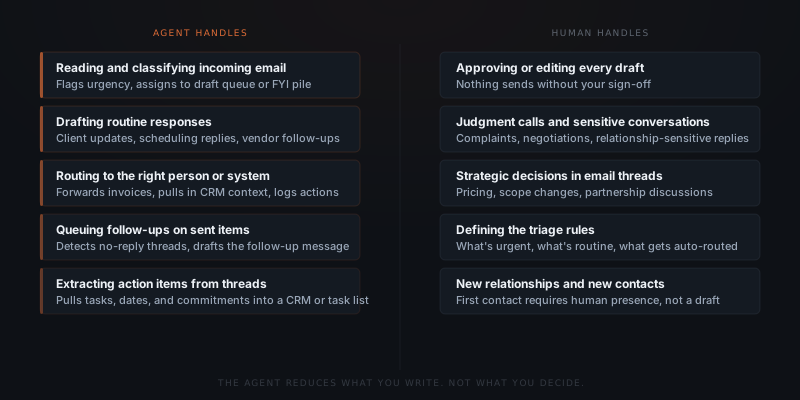
An AI agent addresses the volume and the drafting. The agent reads each incoming message, classifies it by urgency and type, drafts a response where one is needed, extracts any action items, and routes everything to the right queue. The owner reviews each draft and approves. The judgment calls — anything involving pricing, relationships, new contacts, or sensitivity — stay with the owner. The agent reduces what the owner writes, not what the owner decides.
| Email type | Agent handles | Human handles |
|---|---|---|
| Client update requests | Drafts the update reply | Reviews and approves |
| Meeting scheduling | Drafts confirmation or time options | Reviews and confirms |
| Vendor follow-ups | Drafts follow-up based on thread | Reviews before send |
| Invoice acknowledgments | Drafts receipt confirmation | Reviews and approves |
| Complaint or escalation | Flags immediately | Reads and responds directly |
| First contact from a new prospect | Flags for human attention | Responds without agent involvement |
| Negotiation threads | Flags as judgment call | Responds directly |
What an email agent does at each step
An email management agent operates in three stages: triage, draft, and route. Each stage has a specific job.
Triage. The agent reads each incoming message and classifies it: urgent, routine, or FYI. Urgent messages — complaints, time-sensitive requests, new leads — go to the top of the review queue with a flag. Routine messages — status requests, scheduling replies, vendor communications, invoice acknowledgments — get a draft queued. FYI messages — newsletters, notifications, internal updates that require no action — get archived or labelled without consuming review time.
The triage rules are set by the owner at implementation: which senders always get routed to urgent, which subject patterns are always routine, which email types never need a draft. The owner defines the categories. The agent applies them.
Draft. For every message classified as routine, the agent reads the full thread, pulls context from connected systems (the CRM contact record, any linked project or job), and drafts a response. The draft addresses the specific content of the message — not a template applied to every reply of that type, but a response written to this message, in this thread, with this context.
Route. The draft goes to a review queue. The owner sees the original email and the agent's draft side by side. Editing a draft takes seconds. Approving takes a single click. The approved message sends from the owner's address as though they wrote it. Any extracted action items — commitments made in the thread, a task to follow up on by Friday, an invoice to file — get routed to the connected CRM or task list.
Inbox triage and the priority problem
An email agent doesn't decide what gets a response and what gets ignored. Those rules are set by the owner at implementation. The agent applies them at scale — reading every thread, surfacing what needs attention, and drafting what needs a reply. Control over what sends stays with the human throughout.
The triage problem in small business email is specific: everything arrives in one inbox, priority is invisible, and the decision of what to address first gets made by whoever happens to catch the eye first — usually the most recent thread, not the most important one.
An email agent changes the structure of the inbox into a structured review queue. When the owner opens their review dashboard, messages are separated: urgent items at the top (flagged by sender, subject, or content), draft-ready items queued and pre-drafted, and FYI items archived without consuming attention.
For an agency founder managing communications across 8 active clients: the daily inbox might contain a client escalation about a deliverable, three scheduling replies, a vendor asking for a decision on a contract, a team member's internal update, and a newsletter. Without triage, all seven arrive in a flat inbox. The owner reads the newsletter before seeing the escalation because it was sent first. With an agent, the escalation surfaces first, the scheduling replies are pre-drafted, the vendor email is flagged as a judgment call, and the newsletter goes to the archive. The owner addresses each category in order of priority rather than in order of arrival.
The inbox doesn't get smaller. The time you spend composing does.
Drafting at scale — what the agent actually produces
Email drafting at scale means the agent produces a complete response to every incoming message that meets the "routine" classification. For a business receiving 40–80 emails per day, that's 25–60 draft responses queued for review. Each draft is specific to the thread — not a template, but a response that addresses the content of the message using the context the agent has access to.
What "context" means in practice: the agent reads the CRM contact record for the sender (company, stage in the relationship, any prior commitments logged), the content of the current thread, any linked project status, and the history of prior threads with that contact. A client asking for a project update gets a draft that references the current project phase. A vendor following up on a quote gets a draft that references the quote amount and the timeline.
Draft quality improves with each correction cycle. In the first two weeks, the owner edits a meaningful fraction of drafts — adjusting tone, adding specifics the agent doesn't have access to, flagging content types that should be escalated rather than drafted. Those corrections calibrate the agent's behavior. By week four, most owners are editing fewer than 20% of drafts and approving the rest as-is.
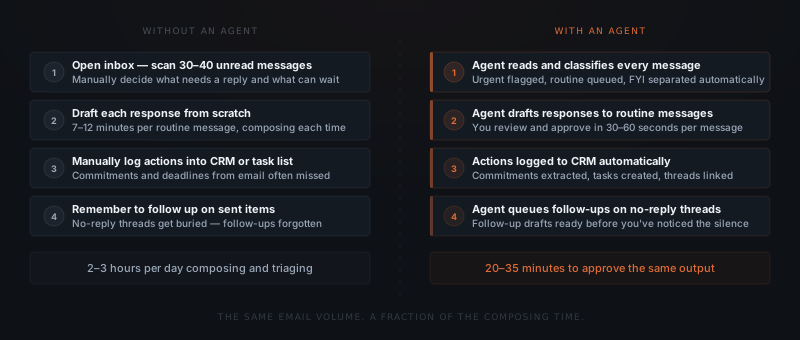
The time comparison is specific. A routine email response drafted from scratch takes 7–12 minutes for most knowledge workers, depending on the complexity of the reply.[³] Reviewing and approving a pre-drafted response takes 30–90 seconds. For 25 routine emails per day, the shift from 7-minute composing to 60-second reviewing saves 2–3 hours of composing time daily.
What the agent connects to
An email agent connects to the email inbox, the systems where context lives, and the systems where actions need to be logged. The connection scope determines what context the agent has when drafting and where action items go after approval.
| System | Common platforms | What the agent reads or writes |
|---|---|---|
| Email inbox | Gmail, Outlook | Reads all incoming mail, sends approved drafts from owner's address |
| CRM | HubSpot, Pipedrive, Airtable, Salesforce | Reads contact records and history, logs sent messages and actions |
| Project management | Notion, Asana, ClickUp, Linear | Reads project status for context, creates tasks from extracted actions |
| Calendar | Google Calendar, Outlook Calendar | Checks availability for scheduling, proposes time slots in drafts |
| Document storage | Google Drive, Dropbox | Links relevant documents in drafts, files received attachments |
A business using Gmail and HubSpot with a task manager can typically go live in two to three weeks. A business on Outlook with Salesforce and a project management tool takes slightly longer — Salesforce's API has more configuration options than HubSpot's, and the field mapping for action item logging requires more setup. The underlying implementation approach is the same.
For businesses where the email volume problem is primarily about follow-up sequences — new leads, proposal follow-up, client check-ins — see AI agent for follow-up, which covers the sequenced outreach side. Email management covers the full inbox: inbound triage, response drafting, and action extraction across all email categories.
Implementation: what goes live and when
Email agent implementations start with one email category — the type of message that arrives most frequently and takes the most drafting time. For most service businesses, that's client update requests or scheduling replies.
Email audit
Classify the past month of inbox by email type and frequency. Identify the 3–4 categories that represent 80% of composing time. These become the first draft categories for the agent.
Triage rules
Define the three categories for every incoming message: urgent (requires immediate human attention), routine (agent drafts), FYI (agent archives). The owner sets the rules. The agent applies them.
Inbox and CRM integration
Connect the agent to Gmail or Outlook and to the CRM. The agent reads the inbox, reads the CRM for sender context, and has write access to log approved sends and extracted actions.
Draft calibration
First week: the owner reviews every draft, edits what needs adjustment, and flags content types that should be reclassified. The agent calibrates. Most correction cycles complete by day ten.
Full workflow
After calibration: the agent handles triage and drafting across all defined categories. The owner's daily email review is a queue of drafts to approve and a list of flagged urgent items — not a scan of 40 unread messages.
A standard implementation covering triage, draft-to-review, CRM logging, and follow-up queuing goes from scoping call to first live drafts in two to three weeks. The setup time goes to defining triage rules and calibrating the first draft categories, not to technical configuration.
Implementation cost for an email management agent runs $1,200–$3,500 depending on the number of connected systems and the complexity of the CRM integration. Monthly API operating costs at typical email volumes run under $60.
The 28% of the workweek that knowledge workers spend managing email is not going to shrink because people decide to write shorter emails.[¹] The volume of email in small business grows proportionally with the business. The question is whether the drafting component of that 28% — composing responses, writing follow-ups, assembling status updates — still requires the founder's hands, or whether an agent that reviews rather than writes can reclaim those hours for the work that does.
See what AI agents are actually bad at for a clear picture of the boundaries — email categories the agent doesn't draft for and situations that always stay with the human.
Frequently asked questions
What does an AI agent do for email management? An AI agent for email management reads incoming messages, classifies them by urgency and type, drafts responses to routine messages, routes action items to a CRM or task list, and queues follow-ups on threads that haven't received a reply. Every draft goes to a review queue — nothing sends without the owner's explicit approval. The agent reduces composing time; it does not reduce the owner's control over what gets sent.
How is an AI agent different from email tools like Superhuman or Gmail Smart Reply? Email productivity tools like Superhuman and Gmail Smart Reply suggest completions and shortcuts within the compose interface. An AI agent reads the full thread, pulls context from the CRM or project management system, drafts a complete response, and routes the draft to a review queue. The difference is between typing faster and not having to type at all.
What types of emails work well for AI agent drafting? AI agents draft routine responses reliably: client update replies, meeting scheduling confirmations, vendor follow-ups, invoice acknowledgments, proposal status responses, and standard inquiry replies. Emails that require original judgment — sensitive client situations, negotiations, first contact with a new prospect — are flagged for human response. The agent handles the volume; the human handles the judgment calls.
How long does email management agent setup take? A standard implementation covering triage, draft-to-review, CRM logging, and follow-up queuing goes from scoping to first live drafts in two to three weeks. The primary setup work is defining the triage rules and the email categories the agent drafts for. See the AI agent implementation timeline for a full breakdown of what the two-to-three-week window covers.
Notes
- McKinsey Global Institute. "The social economy: Unlocking value and productivity through social technologies." July 2012. https://www.mckinsey.com/industries/technology-media-and-telecommunications/our-insights/the-social-economy
- Mark, Gloria, Daniela Gudith, and Ulrich Klocke. "The Cost of Interrupted Work: More Speed and Stress." CHI 2008. https://dl.acm.org/doi/10.1145/1357054.1357072
- McKinsey Global Institute. "The social economy," 2012. Worker-reported time estimates for email composition; 7–12 minutes per routine message is consistent with knowledge worker self-reporting in the underlying survey data.