The most common reason founders delay an AI agent implementation is a timeline estimate from someone else's project. Six months is the enterprise number — it accounts for legacy infrastructure, security reviews, IT procurement, and internal approval chains. A 15-person recruiting agency running HubSpot and Gmail faces none of those constraints. For a service business with a modern SaaS stack and one documented workflow, two to four weeks from scoping call to live agent is the standard outcome.
How long does a standard implementation take?
A service business workflow — candidate follow-up at a recruiting agency, client project status updates at a consultancy, invoice reminders at a fractional CFO firm — takes 2–4 weeks from scoping call to live agent.
The AI configuration is the fast part. A language model is ready to draft follow-up emails or extract project status from Notion in hours. What takes time is the surrounding work: confirming the trigger, mapping data sources, setting up integrations, testing against real data, and building the approval queue so drafts wait for review before anything sends.
The 2–4 week range reflects the difference between a well-prepared implementation and a typical one. A business that arrives at the scoping call with a documented workflow, confirmed API access, and 30 days of real test data will land at two weeks. A business that starts with an undocumented process and discovers mid-build that one system lacks a standard API will land at four. Both outcomes are standard — the difference is what was done before the first call.
Two conditions make the 2–4 week window realistic. First: the business runs on modern SaaS tools — a CRM like HubSpot or Pipedrive, project management in Notion or Asana, communication in Gmail or Slack. These have documented APIs, and integrations connect in hours. Second: the workflow is documented. A trigger, numbered steps, and the five most common exceptions on one page is enough.
| Phase | Duration | What is happening | What delays it |
|---|---|---|---|
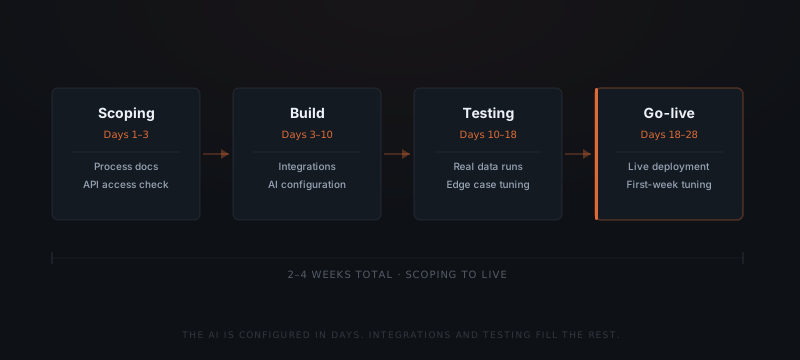
| Scoping | Days 1–3 | Workflow documentation, API access verification, trigger and exception mapping | Undocumented process requiring 1–2 weeks of reconstruction before build can start |
| Build | Days 3–10 | Integration connections, AI configuration, approval queue setup | No standard API; requires custom connector or data extraction workaround |
| Testing | Days 10–18 | Real-data runs, edge case identification, output and routing tuning | Edge cases surface requiring process re-documentation; resets testing window |
| Go-live | Days 18–28 | Live deployment, first-week monitoring, production edge case tuning | Scope added mid-project; second workflow included before first is stable |
What does each phase actually involve?
Scoping (Days 1–3)
Build (Days 3–10)
Testing (Days 10–18)
Go-live (Days 18–28)
The AI configuration sits inside the build phase and takes one to two days. Integration work — connecting the agent to the CRM, email system, or project tool — fills the remaining build time.
Testing is the phase founders most often underestimate. Running the agent against 30 days of real data surfaces exception paths that process documentation didn't capture. One extra week in testing prevents the first live failure from reaching a client.
Testing is not a pass-fail event. It is an iterative loop: run the agent against real inputs, observe the outputs, identify mismatches between the output and the expected result, update the prompt or routing logic, and run again. Each loop takes half a day. Most workflows require three to five loops to reach the quality threshold for go-live.
The most useful testing inputs are not the clean, well-structured records from the CRM — they are the exceptions: the emails with unusual formatting, the records with missing fields, the edge cases the team remembers handling differently. If those edge cases are not in the testing dataset, they appear in production during week one, and the loop runs after the agent has already sent the wrong output to a real contact.
Testing against invented inputs is one of the most common reasons implementations fail shortly after launch. The agent that looks production-ready in a demo environment meets real data in week one and the quality gap is immediate. Real data from the specific business — not generic examples — is what closes that gap before go-live.
What extends a timeline past 4 weeks?
Three things push a timeline beyond four weeks. All three are identifiable during scoping.
No API access. A system with no standard API or a proprietary export format requires custom parsing or manual extraction. A CRM built on a legacy platform from 2008 often has neither. Identifying this in scoping determines whether an integration is a two-hour connection or a two-week custom build.
Undocumented workflows. A process the founder runs from memory — where steps, decision points, and exceptions exist only in their head — adds one to two weeks of clarification before the build can start. The documentation work founders complete before the first call replaces this delay entirely.
Scope added mid-build. Adding a second workflow during the build of the first doubles the testing surface and resets the timeline. The fastest implementations fix scope at the scoping call and run the second workflow as a separate project after go-live.
The table below shows how integration type affects the build phase. Most service businesses on modern SaaS are in the first or second row.
| Integration type | Build time | Example | Timeline impact |
|---|---|---|---|
| Standard API with pre-built library | 2–4 hours | HubSpot, Gmail, Notion, Pipedrive, Slack | No impact — connects in hours |
| Standard API requiring custom setup | 1–3 days | Less common CRM, niche project tool with full REST API | Adds 1–2 days to build |
| API requiring authentication workaround | 3–5 days | OAuth flow not standard, scoped access limited | Adds 3–5 days; identifiable in scoping |
| No API — requires export or manual extraction | 1–2 weeks | Legacy CRM, proprietary tool, no documented API | Major extension; worth investigating alternatives |
Identifying the integration type during scoping determines whether the build phase takes five days or three weeks. This is the single question that separates a realistic timeline from a speculative one before any work starts.
The AI is configured in days. Integrations and process documentation decide the rest.
Why don't enterprise timelines apply to service businesses?
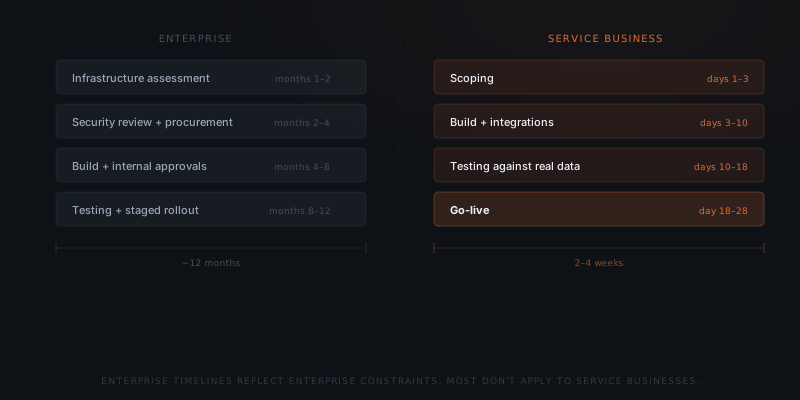
The "AI implementation takes six months" estimate comes from enterprise deployments. Enterprise projects carry constraints that service businesses don't: legacy infrastructure requiring custom connectors, internal security reviews, compliance sign-off, IT procurement cycles, and multiple internal stakeholders with approval authority over the build.
A 10-person recruiting agency running HubSpot, Gmail, and Notion faces none of these. HubSpot, Gmail, and Notion each have documented APIs with pre-built integration libraries. The agent connects with scoped OAuth credentials — no security review required. One founder makes the decision to start.
The constraints that lengthen enterprise timelines often appear as requirements in implementation quotes for service businesses. A vendor who quotes six months for a service business follow-up workflow is pricing an enterprise project and billing accordingly. The right question is: which of those constraints actually apply? For a 10-person business, the answer is almost always: none of them.
The relevant comparison is not an enterprise AI project. The relevant decision is which workflow to implement first and what documentation to prepare before the scoping call. That preparation determines whether the timeline lands at two weeks or four.
How do you prepare to reduce your timeline?
The two-week floor is available to any service business that completes four preparation steps before the scoping call. Teams that skip any of these add the corresponding time back into the build phase.
Document the workflow before the first call
Write out the trigger, numbered steps, and the five most common exceptions. A half-page is enough. Without this, scoping becomes a documentation session — adding one to two weeks before build can start.
Confirm API access for all target systems
Log in to the admin settings of each system the agent will connect to — CRM, email, project management tool. Verify API access is available and note whether it requires additional permissions or a paid plan tier. API access problems caught in scoping add hours. Caught mid-build, they add weeks.
Prepare 30 days of real examples
Pull 30 days of actual inputs the workflow has processed — real emails, real CRM records, real form submissions. Testing against real data surfaces production edge cases. Testing against invented examples produces an agent that works in the demo and fails in production.
Fix the scope to one workflow
Decide which workflow goes first and commit to it through go-live. Adding a second workflow mid-build doubles the testing surface and resets the timeline. The second workflow inherits the integrations built for the first — it moves faster. Sequencing is how the total timeline shrinks.
What does the second workflow cost?
The second workflow does not start from zero. Every integration built for the first workflow is already in place. The scoping work for the first workflow usually surfaces the second: "while we were documenting follow-up, we noticed the status update process could run the same way."
| Factor | First workflow | Second workflow |
|---|---|---|
| Integration setup | Full — connect all target systems | Minimal — existing connections reused |
| Scoping | Full — document trigger, steps, exceptions from scratch | Reduced — patterns from first workflow inform the second |
| Testing | Full — 30 days of real data, all edge cases | Reduced — edge case library from first workflow partially applies |
| Typical timeline | 2–4 weeks | 1–2.5 weeks |
The compounding benefit of building in sequence is the reason most service businesses that implement a second workflow implement a third within three months. Each implementation makes the next one faster, and the documentation work completed for each workflow becomes part of the reusable process library the business now has written down for the first time.
For platform-specific setup steps, see how to set up OpenClaw for your business or the Hermes setup guide — the same sequencing logic applies to both.
Frequently asked questions
How long does AI agent implementation take for a small business?
A standard service business workflow — candidate follow-up, client status updates, invoice reminders — takes 2–4 weeks from scoping to live. The AI configuration takes one to two days. Integration setup, testing against real data, and approval workflow configuration fill the remaining time. Timelines extend when the business uses systems without standard APIs or when the workflow hasn't been documented before the build starts.
What is the minimum time to go live with an AI agent?
A well-documented workflow on a modern SaaS stack — HubSpot, Gmail, Notion, Slack — can go live in 10–14 days. Scoping and build compress when process documentation is ready before the first call and all target systems have accessible APIs. Testing sets the practical floor: running against real data takes at least five to seven business days to surface production edge cases.
What slows an AI agent implementation down?
Three things extend timelines: systems without standard APIs, undocumented processes that require reconstruction before the build starts, and scope added mid-build. All three are identifiable during the scoping call. A thorough scoping session produces a realistic timeline before any build work begins.
Does the second workflow take as long as the first?
No. The second workflow inherits integrations built for the first. A recruiting agency whose first workflow connects HubSpot and Gmail starts the second workflow with those integrations already in place. Build time for the second workflow typically runs 30–50% shorter than the first.
What is the fastest way to prepare for an AI agent implementation?
Write the workflow procedure before the first call — trigger, numbered steps, the five most common exceptions. Confirm API access in each target system. Pull 30 days of real examples from the workflow. Fix the scope to one workflow and commit to that scope through go-live. Teams that arrive at the scoping call with a written procedure and confirmed API access routinely reach go-live in two weeks.
What if my process is not documented before we start?
The scoping phase extends to cover documentation work. The workflow can be discovered during scoping — typically by observing or interviewing the person who currently does it. That process takes one to two weeks and replaces the delay that comes from starting the build on an undocumented process. Starting with undocumented workflows does not prevent implementation — it moves the documentation work into the scoping phase rather than having it done before the first call.
Notes
Implementation timelines described in this post reflect observed patterns across service business agent deployments on modern SaaS stacks. Enterprise timelines cited refer to general AI deployment patterns documented in analyst research. No specific statistics cited.