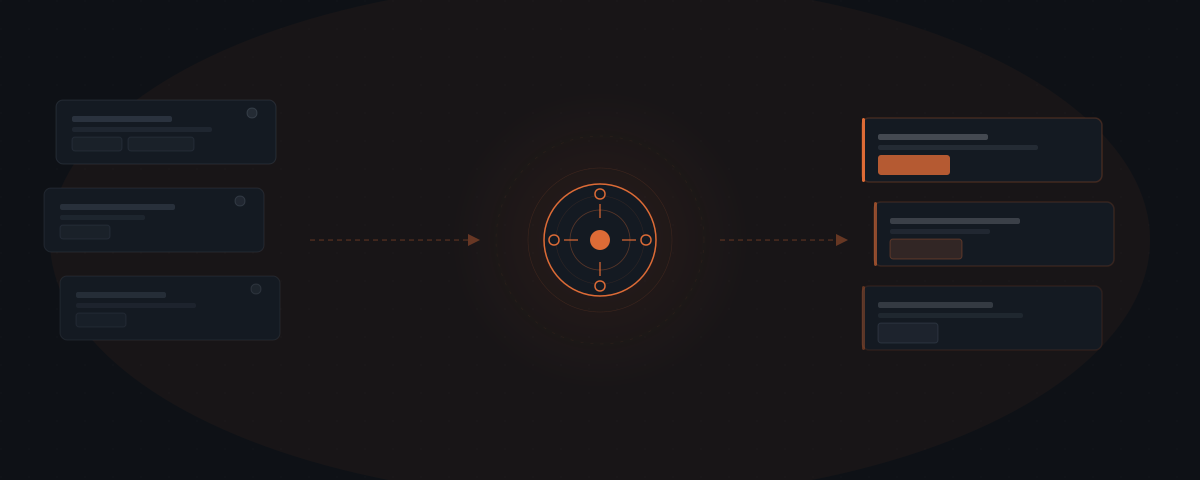
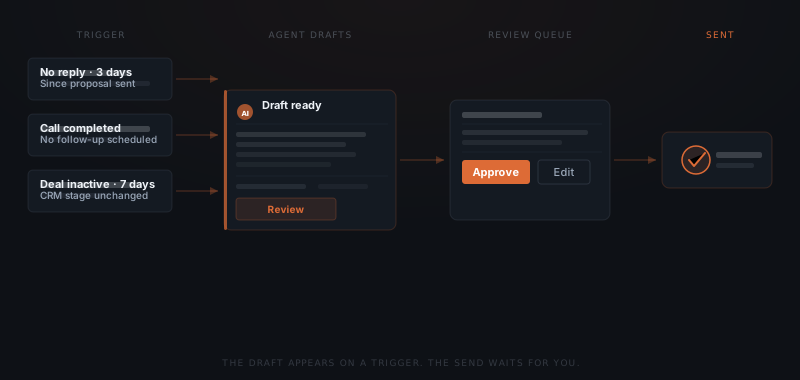
An AI agent for follow-up watches your pipeline for inactivity signals — a prospect who hasn't replied in three days, a call with no next step booked, a deal sitting in the same CRM stage for a week. When the trigger fires, the agent drafts the follow-up and routes it to your review queue. The founder approves or edits before anything sends. The change is not automation — it is initiation. The draft appears because of a signal, not because you found time to write it.
You had a good call with a prospect two weeks ago. They asked for time to discuss internally. You meant to check in last Wednesday. It's Tuesday now. The deal is not lost. The follow-up just did not happen. Most deals do not die from a bad pitch — they stall because the follow-up was deprioritized against real work that also needed doing. An AI agent closes this gap by watching the pipeline and drafting follow-ups on triggers, without waiting for the founder to remember.
The follow-up gap: why deals stall without anyone saying no
Brevet Group research found that 80% of sales require five or more follow-up contacts after the initial meeting. The same research found that 44% of salespeople give up after a single follow-up attempt.[¹] The gap between what follow-up requires and what actually happens is not a motivation problem — it is a capacity problem.
A founder managing 10–20 active prospects simultaneously, while also running client delivery and operations, cannot reliably initiate follow-up at the right moment for every deal. The ones that close are the ones that got follow-up. The ones that go quiet rarely announce their own stalling — they just stop being in the front of mind.
Yesware analysis of email response behavior found that 70% of email threads receive no follow-up after the first unreturned message.[²] The prospect did not say no. The sender stopped. Most of that stopping is not a decision — it is the default outcome of a full calendar.
InsideSales.com research found that leads contacted within five minutes of an inquiry convert at nine times the rate of leads contacted after five minutes.[³] Speed is a competitive advantage in follow-up, and speed requires initiation that does not depend on the founder noticing the right moment.
What triggers a follow-up in an agent system
An AI agent in a follow-up workflow — one specific implementation of what an AI agent is in general — does not watch the calendar. The agent watches the pipeline for events that signal inactivity or an opportunity for a timely message.
Proposal sent, no reply after a defined window. When a proposal has been out for 72 hours without a response, the agent drafts a short check-in. The message acknowledges the proposal, invites questions, and offers a call to walk through anything unclear. The founder reviews and sends — or adjusts the timing.
Call completed, no next step booked. When a call log appears in the CRM with no next meeting scheduled, the agent drafts a follow-up that recaps the conversation and proposes a specific next step. The founder confirms or modifies the recap before the message goes out.
Deal stage unchanged beyond a defined period. When a deal sits in the same CRM stage for longer than the configured window — seven days, ten days, two weeks — the agent treats this as a signal and drafts a re-engagement message. The founder decides whether to send, adjust, or deprioritize the deal.
The agent does not distinguish between a good silence (the prospect is considering) and a stalling silence (the deal is going cold). That distinction requires knowing the relationship. The agent drafts — the founder decides.
Follow-up cadence reference by trigger type:
| Trigger | Timing window | Message purpose | Stop condition |
|---|---|---|---|
| Proposal sent, no reply | 72 hours after send | Check-in — invite questions, offer a call to walk through anything unclear | Prospect replies, meeting booked, or founder dismisses |
| Call completed, no next step | 24 hours after call log created | Recap the conversation and propose a specific next step | Next meeting booked or prospect declines |
| Deal stage unchanged | 7 days (configurable per stage) | Re-engagement — surface a relevant question or update | Deal moves to next stage or founder marks as deprioritized |
| Quote or contract expired | Same day as expiry | Final outreach — reopen or formally close the deal | Prospect replies or founder closes deal in CRM |
| Lead inquiry, no second reply | 48 hours after first contact | Lower-commitment re-engagement — ask one specific question | Lead replies or third unanswered follow-up sent |
The approval layer: every draft waits for review
The agent does not send follow-ups autonomously. Every draft goes into the founder's review queue. The change is that the draft exists — created on a trigger — rather than waiting for the founder to find time to compose it.
What the founder reviews. The draft arrives in a designated channel — Slack, email, or a review interface — with the trigger context attached. The founder sees why the agent drafted this message, reads the draft, and either approves, edits, or dismisses. Approving sends the message. Dismissing removes it from the queue without sending.
What the founder decides. The agent cannot determine whether a deal is worth pursuing, whether this particular prospect needs space, or whether the relationship context means a different type of message would land better. The agent drafts on a signal. The founder applies relationship judgment before the message sends.
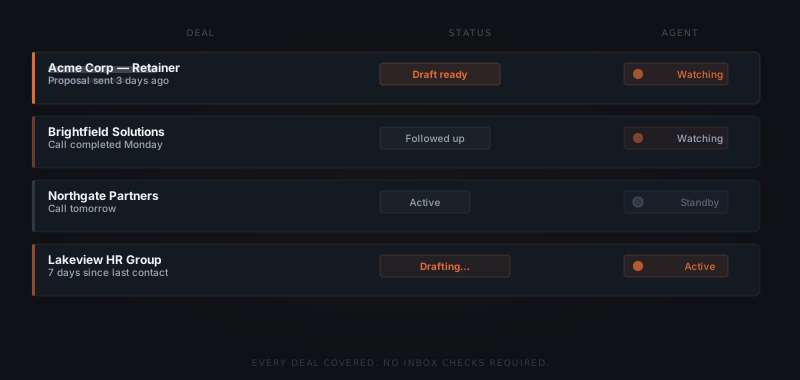
What happens when volume increases. A founder managing 20 active prospects does not need to initiate 20 follow-up checks. The agent identifies which deals have triggered, drafts the follow-ups, and presents them for review. The founder processes the queue — typically 5–10 minutes per session — rather than tracking each deal independently.
For the broader framework on how approval workflows fit into agent systems, see what approval workflows do in an AI agent system.
How to configure a follow-up agent for a B2B service pipeline
Setting up a follow-up agent starts with defining the events worth tracking — not with building message templates.
Map the follow-up triggers
List the specific events in your pipeline that should generate a follow-up draft: proposal sent with no reply, call completed with no next step, deal stage unchanged for a defined period, quote expired. Start with two or three triggers — not ten.
Set the timing thresholds
Define the window for each trigger. Proposals: 72 hours. Call follow-ups: 24 hours. Stage inactivity: seven days. These thresholds can be adjusted after the first month based on what actually converted.
Connect the CRM and inbox
The agent needs read access to deal records, call logs, and email threads. CRM write access allows the agent to log that a follow-up was drafted and when. Inbox access allows the agent to detect replies before drafting an unnecessary check-in.
Build the draft templates by type
Create one base template per trigger type: post-proposal check-in, post-call recap, re-engagement. The agent personalizes from the CRM data — company name, deal context, last conversation topic. Templates keep tone consistent; CRM data makes each message specific.
Most deals don't die. They just stop being followed up.
Integrations a follow-up agent connects to
The agent needs read access to the pipeline and inbox, and write access to the activity log. The specific platforms depend on the CRM and email system already in use.
| Platform | Role in the workflow | Notes |
|---|---|---|
| HubSpot | Deal records, call logs, stage monitoring, activity log | Native API — reads stage changes and last contact date; logs draft creation |
| Salesforce | Pipeline monitoring, opportunity stage tracking | API — reads opportunity stage duration and contact timeline |
| Pipedrive | Deal status and inactivity detection | API — reads last activity date and stage duration |
| Close.io | Lead and deal tracking for sales-focused teams | Native API — strong inactivity detection for high-velocity pipelines |
| Gmail / Outlook | Reply detection before drafting, outbound send from real address | OAuth — reads threads to detect existing replies; sends when approved |
| Notion / Airtable | Pipeline tracking for teams not using a dedicated CRM | Webhook or API — reads inactivity signals from custom pipeline views |
| Slack | Review queue delivery — drafts routed for founder approval | Webhook — delivers draft with approve and dismiss actions inline |
The minimum viable integration for a follow-up agent is CRM + email. The CRM provides the trigger signals (inactivity, stage changes, call logs). The email integration provides reply detection — preventing the agent from drafting a check-in for a deal where the founder already replied directly from their inbox. Without reply detection, the agent drafts against stale data and queues messages for conversations that are already active. Connecting both from the start avoids the most common source of duplicate outreach in the first month.
Where follow-up agent implementations fail
Five failure modes appear consistently across follow-up agent deployments.
Drafts sent before founder reviews. The agent is configured with an auto-send timer: if the founder does not act within 12 hours, the draft sends automatically. A draft goes out for a deal where the founder knew the prospect was on holiday. Three check-ins arrive during a two-week absence. The prospect does not respond warmly on return. Follow-up agents must be configured with no auto-send — drafts wait indefinitely until the founder reviews them.
Agent drafts for a deal already in active conversation. The founder replied to a prospect directly from their email inbox, without logging the reply in the CRM. The agent reads the CRM, sees no recent outbound activity, and drafts a follow-up. The prospect receives a generic check-in two days after a substantive exchange. CRM logging discipline — logging every reply, not only outbound sends — prevents this. Alternatively, the email integration's reply detection handles it if Gmail or Outlook is connected.
Generic draft misses the last conversation. The agent drafts from the base template using only the CRM fields it has: company name, deal stage, trigger type. The actual last call involved a specific objection the prospect raised. The draft does not acknowledge it. The founder approves without editing. The prospect reads a message that ignores the last conversation. Review is not just approving — it is reading the draft against the last known context and editing where needed.
Too many drafts in the queue. The founder sets timing windows too aggressively — 24-hour inactivity windows across 30 active deals. The queue produces 10–15 drafts daily. Review becomes a bottleneck. The founder starts approving without reading. Start with two or three trigger types on a defined subset of five to ten active deals. Expand after the review cadence is established and the draft quality is calibrated to your voice.
Agent fires on deprioritized deals. A deal the founder has mentally shelved is still technically "active" in the CRM. The agent drafts a re-engagement message every seven days. The founder dismisses it each time. Each dismissal is a friction cost and a queue item that crowds out deals worth attention. Define a CRM status — "on hold," "deprioritized," "parked" — that explicitly excludes deals from the agent's scope.
For the framework on which workflows to automate first, see which workflows to automate first. For how an agent handles the lead generation layer upstream of follow-up, see AI agents for lead generation.
Frequently asked questions
What does an AI agent do for sales follow-up? An AI agent for follow-up monitors a CRM or inbox for inactivity signals — unanswered proposals, calls without a next step, deals sitting in the same stage too long. When a trigger fires, the agent drafts a follow-up message and routes it to the founder's review queue. The founder approves or edits before anything sends.
Does the AI agent send follow-ups automatically? No. Every draft waits for founder review and approval before it sends. The agent initiates the draft on a trigger — removing the dependency on the founder remembering to compose the message — but the send decision stays with the founder.
What triggers a follow-up agent to draft a message? Common triggers include: a proposal sent with no reply after 48–72 hours, a call log recorded with no next meeting scheduled, a deal sitting in the same CRM stage for longer than a configured threshold, or a quote or contract that has expired without a response. Each trigger and its timing window is configurable.
How many follow-up messages does the agent handle at once? The agent monitors all active deals simultaneously. On any given day, it may identify one, three, or seven deals that have hit a trigger. Each generates one draft for review. The founder processes the review queue as a batch — typically a few minutes per session — rather than monitoring each deal independently.