Every week the same internal ops tasks come around: pull the pipeline status, write up the meeting notes, update the CRM from the call you took yesterday, draft the Friday summary for the team. None of it is hard. All of it takes time that isn't billable and can't be delegated easily because no one has made it a repeatable system yet. An AI agent runs the system. The weekly status report assembles itself from the data already in your tools. Meeting notes and action items get logged to the CRM automatically. The business owner reviews the output, not the assembly of it.
Every week the same internal ops tasks come around: pull the pipeline status, write up the meeting notes, update the CRM from the call you took yesterday, draft the Friday summary for the team. None of it is hard. All of it takes time that isn't billable and can't be delegated easily because no one has made it a repeatable system yet. An AI agent runs the system. The weekly status report assembles itself from the data already in your tools. Meeting notes and action items get logged to the CRM automatically. The business owner reviews the output, not the assembly of it.
What internal operations work actually costs
Knowledge workers spend 20% of their workweek gathering and sharing information internally — roughly 8 hours per week of coordinating, documenting, and assembling status that already exists somewhere in the business.[¹] For a founder or team lead at a 5–20 person service business, that number is often higher: the business doesn't have an operations manager, so the coordination falls on whoever runs things.
Internal ops work is invisible in a different way than client work. Client work has deadlines and deliverables. Internal ops has neither — it expands to fill whatever time doesn't get protected. The pipeline digest doesn't get done this week because three client things came up. The meeting notes from Thursday's call don't make it into the CRM. The onboarding checklist for the new team member gets managed informally because no one built the formal version.
The cost compounds. CRM data becomes incomplete because updates happen after memory, not after calls. Status reports happen when someone has time, not on a schedule. The team doesn't have a reliable picture of where things stand because the status assembly is manual and irregular.
An AI agent addresses the pattern problem. Internal ops tasks that repeat on a schedule — weekly, after every meeting, after every new hire — can be run by an agent that pulls from the same data sources, at the same time, in the same format, every time. The output still requires human review. The assembly doesn't.
| Internal ops task | Without an agent | With an agent |
|---|---|---|
| Weekly pipeline summary | 30–60 min assembling from CRM | Agent pulls and drafts; owner reviews in 5 min |
| Meeting notes to CRM | 15–20 min per meeting, often skipped | Agent transcribes and logs; owner reviews the record |
| New hire onboarding | Managed informally per hire | Agent runs the checklist, sends docs, tracks completion |
| Friday team digest | Drafted when time allows, often late | Agent assembles Friday morning; owner approves before noon |
| Overdue task flagging | Noticed when deadline already passed | Agent monitors and flags 48 hours before deadline |
What an internal ops agent handles
An internal operations agent handles three types of recurring work: data assembly, documentation, and monitoring.
Data assembly covers any report or digest that pulls information from existing systems and formats it for human review. The weekly pipeline report pulls deal stages, deal values, and stage change dates from the CRM. The Friday team digest pulls project completion percentages from the project management tool and any hours data from time tracking. The monthly KPI summary pulls billing data from the accounting tool. The agent reads the data, assembles the structure, and delivers a draft. The owner reviews it and distributes.
Documentation covers the capture and filing work that happens after meetings and calls. The agent reads a meeting transcript or calendar event notes, extracts the decisions made and action items assigned, writes a structured summary, and logs it to the relevant CRM record, project, or task list. CRM records that used to depend on someone's memory after a call now update within minutes of the meeting ending.
Monitoring covers the pattern detection that no one has time to do consistently. The agent watches for overdue tasks against their deadlines, pipeline stages that haven't moved in longer than the expected cycle, and onboarding steps that haven't been completed on schedule. When a threshold is crossed, the agent flags it to the owner — not a notification from the project management tool, but a summary of what's overdue and what it's blocking.
Status reports and the assembly problem
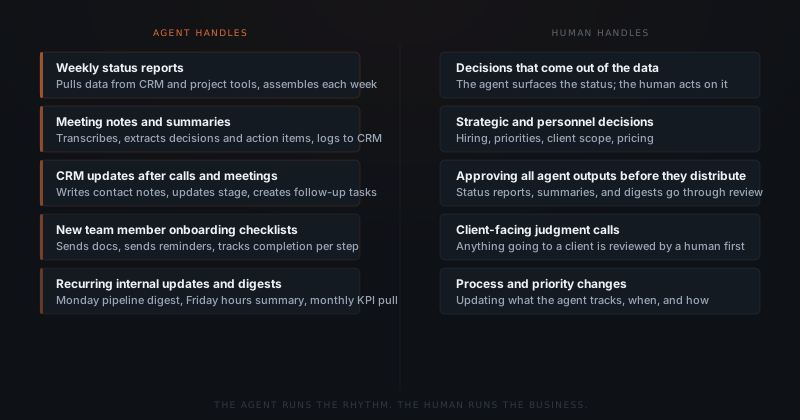
An internal ops agent doesn't know what the status means — it knows what the data says. The agent pulls the pipeline numbers, project percentages, and hours. The owner interprets whether those numbers are on track, ahead, or behind. The agent removes the assembly time. The interpretation stays with the human.
Status reports fail in most small businesses not because no one cares about them but because assembling them takes longer than the information is worth. Pulling pipeline data from the CRM, combining it with project status from Notion or Asana, and formatting it into something readable takes 30–60 minutes if done carefully. Most weeks, it doesn't get done carefully. Some weeks it doesn't get done at all.
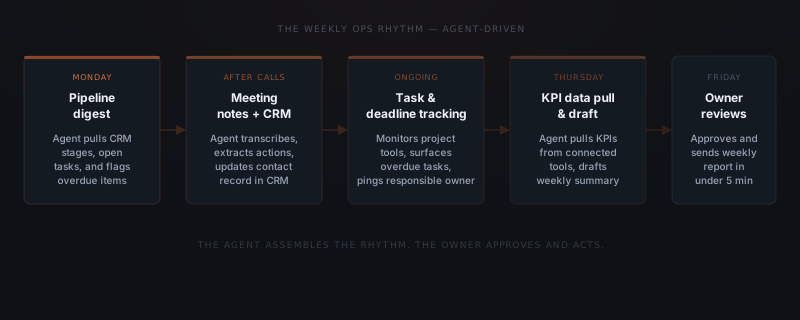
An agent assembles the status report from connected tools on a schedule. On Monday morning, the agent reads the CRM for deals by stage, open tasks with approaching deadlines, and any contacts that haven't been updated in more than two weeks. It formats that data into a structured report and routes it to the owner's review queue. The owner reviews the report in under five minutes, edits anything that needs context the agent doesn't have, and distributes it to the team.
The report is the same format every week. The data is current as of Monday morning. The assembly time is zero. The owner's 30–60 minutes of weekly status assembly becomes a five-minute review.
Research on knowledge work coordination consistently finds that incomplete information is a larger productivity tax than most managers estimate.[²] The pipeline report that didn't get done this week means every decision about priorities this week gets made on last week's data, or on memory, or on assumptions. The agent eliminates that gap by making the report something that happens automatically rather than something that depends on someone making time.
The internal ops that run on a schedule can run without you scheduling them.
Meeting documentation and CRM sync
The gap between what gets decided in a meeting and what gets recorded in a CRM is one of the most consistent productivity losses in small service businesses. Harvard Business Review found that executives spend an average of 23 hours per week in meetings.[³] The documentation that should follow each of those meetings — contact record updates, action item assignments, decision logs — happens for a fraction of them.
An agent handles meeting documentation by reading the transcript or meeting notes immediately after the call ends. The agent extracts: what was decided, what was committed to and by whom, what the next step is and when it's due. The agent formats the extraction into a structured summary and logs it to the relevant CRM contact record, project entry, or task list — depending on what's connected and what the meeting was about.
The CRM update that used to depend on the salesperson or founder remembering what was said now happens within minutes of the meeting ending, from the transcript, with the correct fields populated. Contact records stay current. Pipeline stages update when they should. Action items created in meetings appear in the task list rather than in someone's mental backlog.
For a consulting firm managing 8 active client relationships: a weekly call cycle of 8 client check-ins, 2 internal team meetings, and 3 new prospect conversations produces 13 meetings per week that each need documentation. At 15 minutes of documentation each, that's over 3 hours of note-taking and CRM updates per week. An agent handles the extraction and logging for all 13. The consultant reviews and approves each summary — verifying the action items are correct and the CRM fields reflect the actual conversation. Review takes 2–3 minutes per meeting. The three hours compresses to 30 minutes of review.
What the agent connects to
An internal ops agent connects to the tools where the business's operational data already lives. The agent reads from those tools on a schedule and writes documentation back to the relevant records.
| Tool category | Common platforms | What the agent reads or writes |
|---|---|---|
| CRM | HubSpot, Pipedrive, Salesforce, Airtable | Reads deal stages, contact records; writes meeting notes, updates stage |
| Project management | Notion, Asana, ClickUp, Linear | Reads project status and task completion; creates tasks from action items |
| Calendar | Google Calendar, Outlook Calendar | Reads meeting events and participant lists for documentation trigger |
| Meeting transcription | Otter.ai, Fireflies.ai, Zoom transcripts | Reads transcripts for meeting note extraction |
| Time tracking | Harvest, Toggl, Clockify | Reads hours data for billing and capacity digests |
| Accounting | QuickBooks, Xero | Reads billing and invoice data for financial digests |
A business using HubSpot, Notion, and Google Calendar can typically go live in two to three weeks. The integration work is connecting the agent to each tool's API and defining which data fields the agent reads for each workflow. The primary setup time goes to defining the report formats and the documentation templates — not to the technical connections.
See which workflows to automate first for a framework on sequencing internal ops workflows by implementation overlap — internal ops workflows often share data connections with client-facing workflows, which reduces the total build cost when implemented together.
Implementation: what goes live and in what order
Internal ops implementations start with the highest-frequency, lowest-complexity workflow — typically the weekly status report or meeting documentation. The first workflow establishes the data connections. Each subsequent workflow inherits those connections.
Workflow inventory
List every recurring internal ops task that happens weekly, after meetings, or on a predictable schedule. Group by data source — workflows that pull from the same tools share the most infrastructure and should be implemented together.
Data connection
Connect the agent to the primary data sources: CRM, project management tool, calendar. Define which fields the agent reads for each workflow and where it writes documentation back.
Report and template definition
Define the format for each output — the weekly status report structure, the meeting note template, the digest format. The owner approves the template before the agent runs it live.
Review workflow
Set the approval flow for each output type. Most internal ops outputs go to the owner for review before distributing to the team. Define who sees the review, through which channel, and how fast.
Go-live and calibration
First workflow goes live. The owner reviews every output for the first two weeks and flags anything that needs correction — fields that are wrong, data sources that need adjustment, report sections that need reordering. Most calibration completes within two weeks.
A standard implementation covering weekly status reports, meeting documentation, and CRM sync goes from scoping call to first live outputs in two to three weeks. Adding recurring digest workflows or onboarding checklists after go-live typically takes three to five days per workflow once the base connections are stable.
Implementation cost for an internal ops agent runs $1,500–$4,000 depending on the number of connected tools and the complexity of the report formats. Monthly API operating costs at typical internal volumes run under $80.
The 20% of the workweek spent on internal information gathering represents a real operational cost.[¹] At a 10-person service business paying an average fully-loaded salary of $75,000 per year, 20% of that salary pool is $150,000 annually — time that goes to coordination and documentation rather than to the client work that generates revenue. An internal ops agent doesn't eliminate all of that cost, but it removes the assembly and data-gathering component — the hours that don't require human judgment, only human attention.
For a broader view of which workflows are ready for agent automation at any stage, see how to know if a business process is ready to hand to an AI agent.
Frequently asked questions
What internal operations tasks can an AI agent handle? An AI agent handles internal operations tasks that follow a repeating pattern: weekly status reports assembled from CRM and project data, meeting notes and action item extraction logged to the CRM after calls, recurring internal digests, new team member onboarding checklists, and task deadline monitoring with escalation flagging. Tasks requiring strategic judgment — hiring decisions, scope changes, client decisions — remain with the business owner.
How does an AI agent create status reports? An AI agent creates status reports by pulling data from connected tools at a scheduled time — reading pipeline stages and deal values from the CRM, project completion percentages from a project management tool, and billing or hours data from time-tracking software — and assembling that data into a structured report. The report routes to the owner for review before it distributes. The owner approves or edits in under five minutes.
What is the difference between an AI agent and project management software for internal ops? Project management software stores and organizes information — it requires humans to update records, assign tasks, and generate reports. An AI agent reads that information and acts on it: pulling data on schedule, assembling the status report, logging meeting notes into the right records, and sending escalation flags when tasks are overdue. The agent runs the rhythm. The project management tool provides the data.
How long does an internal ops agent take to implement? A standard implementation covering weekly status reports, meeting documentation, and CRM sync goes from scoping call to first live outputs in two to three weeks. The primary setup work is mapping which data the agent reads from which tools and defining the report format. See the AI agent implementation timeline for a full breakdown.
Notes
- McKinsey Global Institute. "The social economy: Unlocking value and productivity through social technologies." July 2012. https://www.mckinsey.com/industries/technology-media-and-telecommunications/our-insights/the-social-economy
- Duhigg, Charles. "What Google Learned From Its Quest to Build the Perfect Team." New York Times Magazine, February 2016. References internal research on the cost of incomplete information in team coordination contexts. https://www.nytimes.com/2016/02/28/magazine/what-google-learned-from-its-quest-to-build-the-perfect-team.html
- Perlow, Leslie A., Constance Noonan Hadley, and Eunice Eun. "Stop the Meeting Madness." Harvard Business Review, July–August 2017. https://hbr.org/2017/07/stop-the-meeting-madness