The first agent ran reliably for sixty days. Five more workflows are on the list, and the instinct is to rank by business value — biggest impact first. That ranking produces independent agents: each built on its own integrations, each requiring its own maintenance. Sequencing by integration overlap produces a different outcome — the second and third agents inherit infrastructure the first already built, at a fraction of the original cost.
How do business priority and integration cost rank workflows differently?
Ranking by business value and ranking by integration overlap produce different sequences. When a founder lists workflows to automate, the natural ranking is by value: the highest-impact workflow goes first. That ranking produces a series of one-off agents — each built on its own integrations, its own trigger logic, its own output schema — with no compounding effect across the sequence.
A different ranking produces a different outcome. Workflows that share integrations with an existing agent inherit the authentication, the data mapping, and the error handling already established. A second workflow added to a CRM integration that already exists takes a fraction of the time that same workflow would have cost if the CRM had been new.
The asymmetry matters more as the workflow list grows. At two workflows, the cost difference between good and poor sequencing is moderate. At five workflows, poor sequencing can cost twice as much total as good sequencing — while producing a more fragile system that has five independent maintenance obligations rather than two or three interconnected ones that share infrastructure oversight.
The right question before selecting the next workflow is not "which workflow matters most?" It is "which workflow builds infrastructure the next three will use?"
Both questions can be answered simultaneously. Within a cluster, the most valuable workflow runs first. The sequencing framework does not prevent prioritizing high-impact workflows — it prevents selecting a high-impact workflow from a different cluster when an equally valuable workflow from the current cluster is available. The two rankings converge when the workflow list is mapped by cluster before it is ranked by impact.
What does integration overlap mean in practice?
Every agent implementation creates infrastructure: authentication credentials for each connected system, data mapping from source fields to agent inputs, error handling for when a connected system is unavailable, and output routing to wherever the result lands.
These components are not specific to the workflow that created them. A CRM integration built for a lead follow-up agent is available to a client status agent, a proposal tracking agent, and a renewal reminder agent — without being rebuilt. A Gmail connection built for one workflow is available to any other workflow that reads or writes email.
Integration overlap is the measure of how much of a new workflow's required infrastructure already exists from previous builds. A workflow with 80% overlap costs roughly 20–30% of the build time a zero-overlap workflow requires — a figure consistent with platform engineering research showing that reusable integration components reduce delivery time by 25–40% on subsequent builds within the same system.[1] The sequence that maximizes overlap minimizes total implementation cost across the roadmap.
| Stage in sequence | Build time relative to first workflow | What is reused |
|---|---|---|
| First workflow in a cluster | 100% (full baseline cost) | None — all infrastructure is new |
| Second workflow, same cluster | 60–70% of first | Auth credentials, data field mapping, trigger logic |
| Third workflow, same cluster | 50–60% of first | All of the above plus tested error handling |
| First workflow in a new cluster | 100% again | Some output routing if shared system exists |
| Second workflow, new cluster | 60–70% of that cluster's first | Same compounding applies within the new cluster |
The practical implication is that the total cost of five sequenced workflows within two clusters is considerably lower than five independent workflows built without regard to overlap. The first workflow in each cluster is the most expensive. Every subsequent one in the same cluster is cheaper than the previous.
Business priority and integration cost are different rankings. The workflow that would save the most time is rarely the cheapest to add next — it usually requires integrations the current system doesn't have.
How do common B2B service workflows cluster by integration?
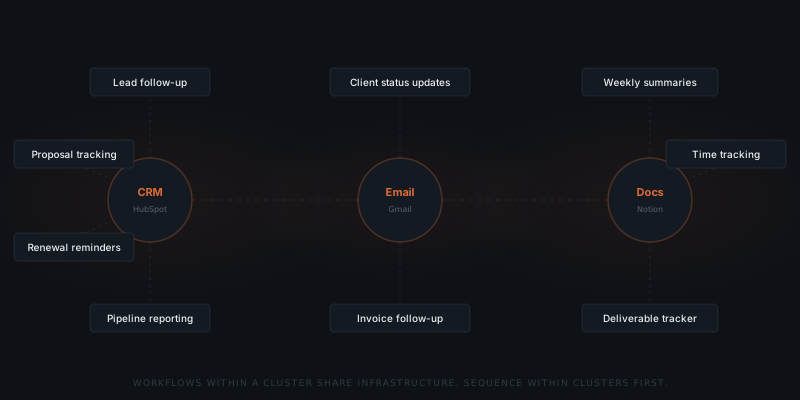
Most B2B service firm workflows fall into three integration clusters. Identifying which cluster a candidate workflow belongs to determines the right sequencing.
| Cluster | Core integration | Workflows that share it |
|---|---|---|
| CRM | Salesforce, HubSpot, Pipedrive | Lead follow-up, proposal tracking, renewal reminders, pipeline reporting |
| Gmail, Outlook | Client status updates, invoice follow-up, document request follow-ups, onboarding sequences | |
| Documents | Notion, Airtable, Google Sheets | Weekly activity summaries, time tracking reports, deliverable trackers |
Once a CRM integration exists, adding any CRM-cluster workflow reuses auth, field mapping, and trigger logic. The first CRM workflow is the most expensive. Each subsequent one in the cluster costs a fraction of it. The same is true for email and document clusters.
Workflows from different clusters can share infrastructure where tools overlap — an agent writing to a Notion database and one reading from it both use the same connection. Mapping these overlaps before sequencing reveals paths that cut across cluster boundaries at low cost.
Cross-cluster sequences that naturally compound include: CRM-to-email (a lead follow-up agent writing status back to the CRM shares CRM auth with proposal tracking, and email with client status updates); and CRM-to-documents (a pipeline reporting agent that reads HubSpot and writes to Notion shares both connections with any subsequent document cluster workflow). These intersections are worth mapping before the sequencing decision is made — not as optimisation for its own sake, but because they directly reduce what the next build costs.
What are the six workflows most firms start with?
The clusters above are categories. In practice, the same handful of workflows comes up first in almost every B2B service engagement. Each one is a defined trigger-to-outcome chain with an approval gate, and each belongs to a cluster you can sequence around.
| Workflow | Cluster | Trigger | What stays with a person |
|---|---|---|---|
| Follow-up | CRM | Proposal unanswered 72 hrs; call logged with no next step; deal stage unchanged 7 days | Whether the deal is worth pursuing, and whether this prospect needs space |
| Scheduling | Calendar + CRM | Positive reply to outreach; calendar interval since last review; deal stage change | Ambiguous replies ("maybe Thursday, let me check") and reschedules where the reason matters |
| Invoicing | Billing + Email | Project marked complete; payment window passes | Pricing decisions, disputes, and any escalation past the first reminder |
| Meeting prep | Calendar + CRM + Docs | Upcoming calendar event | Agenda setting, relationship judgment, and what to escalate on the call |
| Proposals | CRM + Docs | New pitch initiated after a sales conversation | Pricing, scope refinement, and the relationship read |
| Contract renewals | CRM | 90 / 60 / 30 days before expiry | The renewal conversation itself, and any negotiation |
Follow-up is the highest-volume of the six and usually the first build. Brevet Group research found 80% of sales require five or more follow-up contacts after the initial meeting, while 44% of salespeople give up after a single attempt.[2] Yesware's analysis found 70% of email threads receive no follow-up after the first unreturned message.[3] The gap is capacity, not motivation — which is exactly what an agent closes. The agent drafts on a trigger; the founder processes a queue in five to ten minutes rather than tracking twenty deals independently.
Scheduling covers the full loop: detect the signal, check calendar availability against configured rules (minimum buffer, no Friday afternoons), draft a message referencing the conversation context, and on confirmation create the event, send the confirmation, and log the meeting in the CRM. An account manager running thirty active prospects removes the scheduling overhead entirely.
Invoicing has the highest time-to-value ratio at the draft stage, because the data — project, client, amount, terms — already exists in the billing system. Thirty seconds of review replaces five to ten minutes of composing. The reminder sequence runs on a configured schedule (day 7–14, then day 21–30), and stops the moment a client replies or the owner escalates. The agent sends one reminder; whether to make a phone call or involve collections is the owner's decision.
Meeting prep assembles a brief before each call: last email thread, open action items from the project tool, recent CRM notes and deal stage, and outstanding invoice status. The brief arrives the evening before a morning call. It surfaces an unpaid invoice; it does not decide whether to raise it.
Proposals reuse the same components every time. Loopio's 2023 research found teams spend an average of 23 hours on each major proposal response, much of it locating and adapting content from past proposals.[4] The agent retrieves the closest matching scope language, deliverable descriptions, and pricing tier, then assembles a draft. Proposify data shows proposals sent within 24 hours of a sales conversation close at a 35% higher rate than those sent after 48 hours[5] — the assembly block is what makes same-day turnaround impractical for a founder who is also delivering the work.
Contract renewals run on a fixed escalation ladder: a renewal-intent draft at 90 days, a terms review at 60, an urgency-toned follow-up plus a pipeline alert at 30, and a daily alert past expiry until the owner records an outcome. Three fields on every contract record make this possible — client name, contract value, expiry date. If contracts live in PDFs and email threads, structuring them is a prerequisite rather than part of the build.
Note where these fall across clusters. Follow-up, proposals, and contract renewals are all CRM-cluster workflows, which is why a firm that starts with follow-up can add the other two at 50–70% of the first build's cost. Invoicing crosses into billing, and meeting prep pulls from three systems at once — both are more expensive first builds, which is the sequencing argument in concrete form.
How do you build a sequencing approach that compounds?
The cheapest next agent is the one that reuses what the first one already built.
The practical application of this framework has three steps.
Complete one cluster before starting another. A CRM cluster with three workflows — lead follow-up, proposal tracking, renewal reminders — is faster to complete as a sequence than interleaving it with email and document workflows. Infrastructure built for workflow one is active for workflows two and three.
Choose the next cluster based on overlap with the current one. If the CRM cluster uses email for output routing, the email cluster starts with that connection already established. Map what each cluster requires before selecting the order.
Build across clusters only when a cluster is complete or when business need is urgent enough to justify the higher cost. A zero-overlap workflow costs as much as the first agent in a new cluster. That cost is predictable — but it is the exception, not the default.
A useful heuristic for the prioritization decision: rank candidate workflows first by integration cluster, then by business value within each cluster. This produces a sequenced roadmap where the most impactful workflow in each cluster runs first, and the remaining workflows in that cluster run at reduced cost before crossing to the next cluster. It is not the ranking that maximizes short-term business value at each step — it is the ranking that minimizes total system cost over a 12-month roadmap.
For most small B2B service firms, the first two to three workflows fall within a single cluster — typically CRM or email. Completing that cluster reliably before expanding produces a more stable system than building wide early. A firm that runs three CRM-cluster agents reliably is ready to expand. A firm that has one agent in each of six clusters has six independent maintenance obligations — six separate instruction review cadences, six separate integration health checks, and six separate failure modes that cannot be diagnosed collectively because each agent was built in isolation. Depth within clusters before breadth across them is the sequence that produces a manageable system, not just an expanded one.
The first workflow selection determines which cluster the implementation starts in. The sequencing from that point forward determines how much the second, third, and fourth agents cost relative to the first.
What does a sequenced roadmap look like in practice?
A 15-person recruiting agency has five workflows on its automation list: candidate follow-up, proposal tracking, renewal reminders, client status updates, and invoice follow-up. The natural ranking by business value puts invoice follow-up first — it is directly linked to revenue recovery. But invoice follow-up requires a billing system integration the agency's CRM cluster does not have.
The sequencing approach looks different:
| Sequence | Workflow | Cluster | Infrastructure reused |
|---|---|---|---|
| 1 | Candidate follow-up | CRM | None — first build |
| 2 | Proposal tracking | CRM | HubSpot auth, contact field mapping, trigger logic |
| 3 | Renewal reminders | CRM | All of the above + output routing |
| 4 | Client status updates | Gmail connection (new) + CRM contact read (reused) | |
| 5 | Invoice follow-up | Email + Billing | Gmail reused; billing integration is new |
By the time invoice follow-up is built in position 5, the Gmail connection and CRM read established in position 4 are already in place. The billing integration is the only new component. If invoice follow-up had been first, none of the CRM or Gmail infrastructure would have been available for positions 2–4.
The revenue gain from invoice follow-up is real. The sequencing question is whether that gain is worth the cost of building out of order — and for a 15-person agency where all five workflows will be built eventually, it usually isn't.
When should you break the sequencing rule?
Business urgency sometimes justifies building a workflow out of integration sequence. Three situations warrant it:
A workflow is actively losing revenue. Invoice reminders not being sent, time-sensitive follow-ups missed at volume, proposals expiring without follow-up — when the cost of not automating is measurable and ongoing, building out of sequence is the right call.
A workflow removes a direct founder bottleneck. If the founder is personally handling a workflow that prevents other delegation decisions from being made, automating it — even at full standalone cost — creates leverage that more than pays for itself.
A system migration forces the decision. A new CRM replacing an old one, or a new project management tool being adopted, creates integration opportunities. Building agents that connect to the new system during the migration window is cost-effective even if it breaks the cluster sequence — because the integration will be needed regardless, and the migration is when access to both old and new system data is most available for testing.
In each case, the out-of-sequence build becomes the new starting point for a cluster. The integration it creates is now the infrastructure baseline, and subsequent workflows should prioritize overlap with it rather than the original cluster.
The compounding benefit still applies after an out-of-sequence build — it just restarts from the new cluster. A billing integration built for invoice follow-up is available for payment reminder agents, cash flow reporting agents, and any other workflow that reads or writes billing data. The cost was front-loaded on the exception; the returns compound from there.
How much of a workflow is actually automatable?
Sequencing assumes you know how much of each candidate workflow an agent can take. That number is calculable, and it is usually lower than the headline figures suggest.
The McKinsey Global Institute's November 2025 report put the ceiling at 57% of US work hours.[6] Two scope points matter for reading that correctly: it measures activities rather than jobs, and it is a technical-feasibility ceiling — what current technology could handle — not a measurement of what businesses have actually automated. It is also US-only. Service businesses sit above that average, because service work is information-dense and repetitive at the task level even when the overall workflow looks complex.
The figure that matters for your roadmap is not the national ceiling but your own. Walk each candidate workflow step by step:
Map every step
Mark each step
Count the hours
Sum the agent-eligible steps
A typical service business running this across its three highest-volume workflows finds 12–20 hours per person per week in agent-eligible steps. The exercise requires documented processes, not sophisticated tooling — an agent cannot replace a step nobody has written down, which is why firms with written processes both deploy faster and capture more of the available potential.
Run this before sequencing, not after. A workflow with a high automation ceiling in a cluster you have already built is the obvious next agent. A workflow with a low ceiling in a new cluster is the one to defer regardless of how much it appears to matter.
Frequently asked questions
Why does workflow sequencing matter for AI agent implementations?
Each agent implementation creates infrastructure — integrations, auth credentials, data mapping, error handling. Workflows sequenced within the same integration cluster inherit that infrastructure and cost a fraction of the first build. Workflows sequenced without regard to overlap require new infrastructure each time, multiplying total implementation cost.
What is integration overlap in an AI agent context?
Integration overlap is the percentage of a new workflow's required infrastructure that already exists from a previous build. A second workflow sharing a CRM integration with the first agent reuses auth, field mapping, and trigger logic without rebuilding them. High overlap reduces build time by 20–30% compared to a zero-overlap workflow.
How do you identify which workflow to build next?
Map the integrations each candidate workflow requires. Group candidates by the integrations they share — CRM workflows together, email workflows together, document workflows together. Select the next workflow from the same cluster as the current one. Cross to a new cluster only when the current cluster is complete or when business urgency justifies the higher cost.
What are the three main workflow clusters for B2B service firms?
CRM cluster: lead follow-up, proposal tracking, renewal reminders, pipeline reporting — built on Salesforce, HubSpot, or Pipedrive. Email cluster: client status updates, invoice follow-up, onboarding sequences — built on Gmail or Outlook. Document cluster: weekly summaries, time tracking, deliverable tracking — built on Notion, Airtable, or Google Sheets.
Notes
- DORA (DevOps Research and Assessment). "Accelerate State of DevOps Report 2023." Google Cloud, 2023. https://dora.dev/research/2023/dora-report/ — Research on platform engineering teams found that reusable internal platforms reduce developer time on repeated infrastructure setup by 25–40% on average across teams surveyed.
- Brevet Group, "21 Mind-Blowing Sales Stats." https://blog.thebrevetgroup.com/21-mind-blowing-sales-stats — source for the findings that 80% of sales require five or more follow-up contacts and 44% of salespeople give up after one attempt. Brevet does not publish underlying methodology; treat as a directional industry benchmark.
- Yesware, "Email Follow-Up Statistics." https://www.yesware.com/blog/follow-up-email/ — analysis of email response behavior finding 70% of threads receive no follow-up after the first unreturned message.
- Loopio, "RFP and Proposal Trends Report 2023." https://loopio.com/rfp-trends-and-benchmarks-report/ — source for the 23-hour average per major proposal response.
- Proposify, "Proposal Metrics That Matter." https://www.proposify.com/blog/proposal-metrics — source for the finding that proposals sent within 24 hours close at a 35% higher rate. Vendor-reported data from Proposify's own customer base.
- McKinsey Global Institute, "Agents, robots, and us: Skill partnerships in the age of AI," November 2025. https://www.mckinsey.com/mgi/our-research/agents-robots-and-us-skill-partnerships-in-the-age-of-ai — US-only estimate of technical automation feasibility (what current technology can handle), not a measurement of actual deployment.