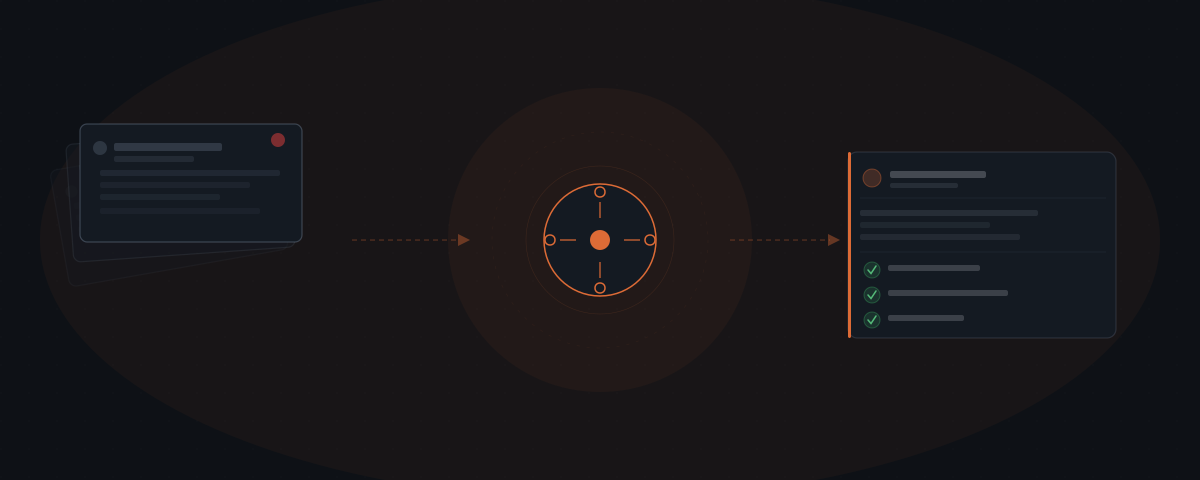
AI agents for customer support handle tier-1 service operations — ticket routing, first-response drafting, and follow-up on open issues. Zendesk CX Trends research found 90% of CX leaders expect AI to resolve 8 in 10 issues without a human. The agent drafts and routes; every response waits for review before it reaches the customer.
The same questions arrive every week. Where is my order? Can I change my appointment? How do I get a refund? A small support team answers them in the order they arrive, and the backlog grows faster than it empties. An AI agent handles those questions — the routing, the first draft, the follow-up — so the human team focuses on the ones that actually require judgment.
What customer support costs a lean service team
Tier-1 support — the same questions asked again and again — consumes most of the hours in a small support team without adding the judgment or relationship value that requires a human.
A service business with 5 to 15 staff members handling customer support typically runs with two or three people covering incoming requests. Those people spend the majority of their time on inquiries that follow the same pattern every time: order status updates, appointment reschedule requests, refund acknowledgments, password resets, and standard "how do I use this" questions. None of it requires expertise. All of it takes time.
The Zendesk CX Trends 2026 report found that nearly 8 in 10 consumers say AI bots are helpful for simple issues.[¹] The same research found that 90% of CX leaders — the executives overseeing customer service — expect AI to resolve 8 in 10 support issues without human involvement within the next few years.[¹]
Two-thirds of business leaders say that AI investments in customer service produce significant performance improvements.[¹] The performance improvement is not speed for its own sake — it is redirecting human judgment to the work that actually requires it.
| Support inquiry type | Requires human judgment | Repeats daily |
|---|---|---|
| Order status and tracking | No | Yes |
| Appointment reschedule | No | Yes |
| Standard refund request | No | Yes |
| Account password reset | No | Yes |
| Common product questions | No | Yes |
| Billing dispute | Yes | No |
| Escalated complaint | Yes | No |
| Policy exception request | Yes | Occasionally |
| Enterprise account issue | Yes | No |
Everything in the top five rows is addressable by a well-configured agent. Everything below the line stays with the human team.
What an AI agent handles in a support workflow
An AI agent for customer support — see what an AI agent is for the broader mechanics behind it — handles four categories of work: ticket routing, first-response drafting, immediate acknowledgment, and follow-up on open tickets.
Ticket routing. When a new ticket arrives — via email, a support form, a chat widget, or Intercom — the agent reads the content, classifies the inquiry type, and routes it to the right queue. A refund request routes to billing. A feature question routes to product support. A missed delivery complaint routes to fulfillment. The agent routes in real time. A human would triage the next morning and work through what the overnight queue generated.
First-response drafting. For the most common inquiry types — the ones that show up daily — the agent drafts the response. The agent pulls relevant details from the CRM or order management system (Shopify, HubSpot, Pipedrive), drafts a response matched to the inquiry, and places it in the review queue. The human reviews the draft, adjusts if needed, and approves. Response time drops from hours to minutes. Human time spent drops from 8 minutes of composing to 30 seconds of reviewing.
Immediate acknowledgment. For tickets that require more time to resolve, the agent sends an immediate acknowledgment: the ticket has been received, here is the ticket number, here is the expected response window. This alone reduces the follow-up "did anyone see this?" messages that fill support inboxes.
Follow-up on open tickets. When a ticket has been open for 24 or 48 hours without resolution or response, the agent flags it for review or sends a follow-up to the customer. No ticket ages silently.
How the approval layer works in a support context
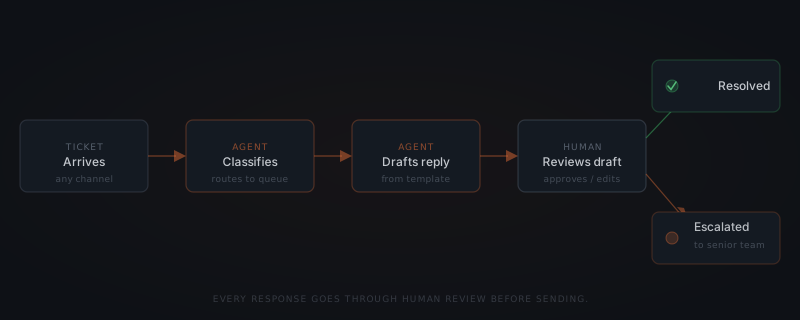
The agent drafts the response and routes the ticket. It does not send anything autonomously. Every response waits in a review queue until a human approves it. That is not a setting that can be turned off — it is how the workflow is built.
Approval happens inside the support tool the team already uses. If the business runs on Intercom, Help Scout, Zendesk, or Freshdesk, the agent's draft appears as a pending response in that same interface. The support agent sees the incoming ticket, the agent's draft, and the approve/edit/reject options. Approving sends the message. Editing opens the draft for revision. Rejecting routes the ticket to a different handler or back to the general queue.
For businesses handling higher-volume support, the approval step can be scoped by inquiry type. Routine, low-risk inquiry types — order status responses, appointment confirmation replies — can be set to auto-approve after the first several weeks of reviewed output show consistent quality. That threshold is set by the operator, not the agent. Auto-approve scope does not expand without a human decision.
Early AI adopters in customer service are 128% more likely to report high ROI from their tools than non-early adopters.[¹] The businesses reporting that ROI are not the ones that removed human oversight — they are the ones that configured the approval layer to match their specific risk tolerance and inquiry types.
What the agent cannot handle
AI agents in customer support are strong on structured, repeatable work. They perform poorly on unstructured judgment calls.
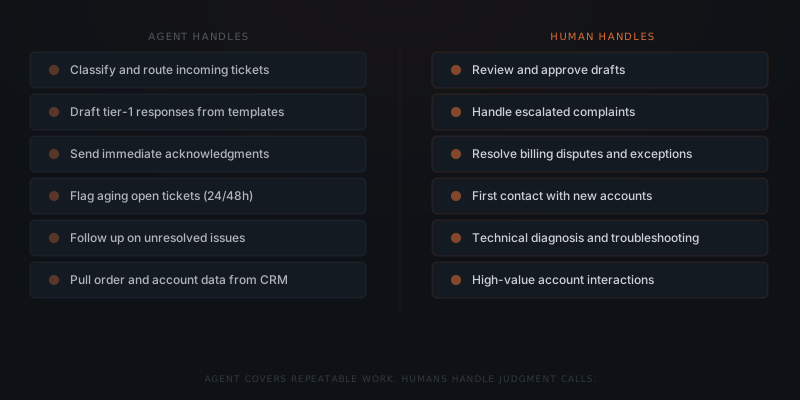
Escalated complaints. When a customer is genuinely frustrated — escalating, threatening to leave, disputing a charge they believe was unfair — the response requires reading emotional context, choosing language carefully, and making a judgment call about what the right outcome is in this specific situation. Template drafts make this worse, not better. The agent flags these tickets for direct handling by the most experienced available person.
Billing disputes requiring account decisions. A customer disputing a charge may be right, may be mistaken, or may be attempting fraud. Deciding which it is, and what to do about it, requires account history access and policy judgment. The agent drafts an acknowledgment and routes the ticket to the billing team. The agent does not make the decision.
First contact with high-value accounts. When a new enterprise client submits their first support request, the response sets a relationship tone. That interaction benefits from a human who understands the account context. The agent acknowledges receipt and flags the ticket as priority — but a senior person should own the response.
Technical issues requiring diagnosis. Complex product issues — software bugs, integration failures, data discrepancies — require back-and-forth diagnosis. The agent gathers initial information (version numbers, error messages, steps to reproduce) and routes to a technical team. The agent does not diagnose root causes.
The boundary is consistent: repeatable inquiries with predictable responses go to the agent; judgment-dependent, emotionally charged, or account-sensitive interactions stay with the human team. For a structured way to apply this test to your own support context, see how to know if a business process is ready to hand to an AI agent.
How to deploy a customer support agent
Map ticket volume by type
Pull the last 30 days of support tickets and classify by inquiry type. The top three to five types typically represent 60–70% of total volume. These are the first workflows the agent handles. Everything else stays with the human team until the initial configuration is stable.
Connect your support tool
The agent integrates with the support system already in use — Intercom, Help Scout, Zendesk, Freshdesk, or a shared Gmail inbox. Most integrations are live within a day. The agent reads incoming tickets and writes back to the same interface the team already uses.
Build response templates
For each high-volume ticket type, build a response template: the standard information to include, where the agent pulls dynamic data (order number, appointment time, account status), and what the standard response says. The agent uses templates to draft — it does not generate responses from scratch.
Configure routing rules
Define which inquiry types route to which queue or team member. A routing rule looks like: if the ticket contains content matching a refund request and the account is in good standing, route to the billing queue and draft from the refund template. Edge cases route to a general human review queue.
Run the first week with full approval
Start with every draft requiring human approval. After one week, review which inquiry types produced accurate, consistent drafts. Expand auto-approval only to those types, only after the team agrees the output quality is consistent. Do not expand scope before that review.
Setup for a typical small service business — connecting the support inbox, building templates for the top five inquiry types, and configuring routing rules — takes two to three weeks from scoping to the first live ticket. For the broader framework on implementation timelines, see AI agent implementation timeline.
What changes for the support team
The queue doesn't shrink because the team gets faster. It shrinks because the agent handles what doesn't need a human.
When the agent is running on tier-1 support, the team's job changes in a specific way. The repetitive work — the order status emails, the refund acknowledgments, the appointment change confirmations — stops appearing in the compose queue. The team processes drafts for those instead of writing them.
What remains is the work that requires the team: the billing disputes, the escalated complaints, the technical support tickets, the account management conversations. These are the interactions where a person who knows the product, the customer, and the company's policies makes a real difference in the outcome.
Zendesk research found that support agents who use AI assistance are 20% more likely to feel empowered to do their job well.[¹] That finding aligns with what happens structurally: when the agent handles the repetitive load, the team works on harder problems that their skills actually address.
Two-thirds of business leaders report significant performance improvements from AI in customer service.[¹] The businesses reporting those improvements are not running smaller support teams — they are running teams that handle more complex problems with the same headcount. The same number of people, working on the work that genuinely requires them.
For a wider view on how agent systems change team structure over time, see AI agent team structure.
Frequently asked questions
Can an AI agent replace a customer support team? An AI agent does not replace a customer support team. The agent handles tier-1 inquiries — the repeatable, predictable requests that make up 60–70% of daily ticket volume. Escalated complaints, billing disputes, technical diagnosis, and high-value account interactions stay with the human team. The team handles fewer repeat questions and more situations that require judgment and relationship.
How long does it take to set up a customer support AI agent? Setup for a small service business — connecting the support inbox, building response templates for the top five inquiry types, and configuring routing rules — takes two to three weeks from scoping to first live ticket. The first week runs with full human approval on every draft. Selective auto-approval for consistent, low-risk inquiry types can be enabled after the first week of reviewed output.
What does AI agent implementation cost for customer support? A standard implementation covering support tool integration, response templates for the top five inquiry types, and routing rules typically runs $1,200–$3,500 for the initial build, depending on the support platform and the number of connected systems. Monthly API costs run under $60 at typical ticket volumes. A team handling 200+ tickets per month that shifts 60–70% of volume off manual drafting recovers implementation cost within the first month or two.
Notes
- Zendesk. (2026). "Customer service statistics you need to know in 2026." Zendesk Blog. https://www.zendesk.de/blog/customer-service-statistics/ — source for: 90% of CX leaders expecting AI to resolve 8/10 issues; 8 in 10 consumers finding AI helpful for simple issues; 2/3 of business leaders reporting significant performance improvements; early adopters 128% more likely to report high ROI; agents 20% more likely to feel empowered when using AI assistance.