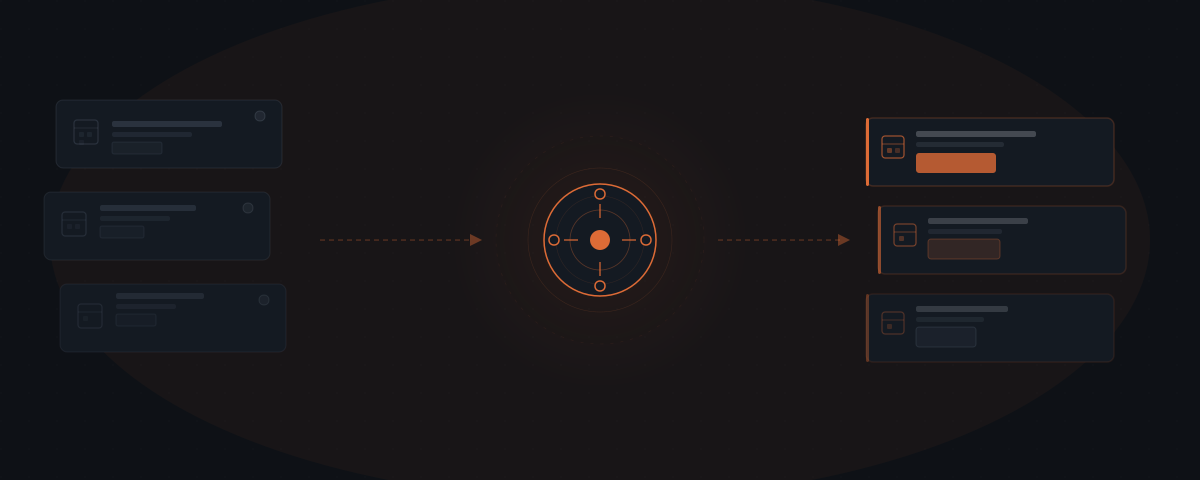
AI agents for coaches handle discovery call booking, client onboarding, session prep reminders, post-session follow-up, and invoice management — the full communication layer around every coaching engagement. The International Coaching Federation's 2023 Global Coaching Study found that independent coaches cite administrative overhead as the primary constraint on practice growth. The coach delivers the sessions; the agent coordinates everything before and between them.
A potential client fills out the discovery call form on Wednesday afternoon. By Friday, no one has followed up. They found another coach on Thursday who replied within an hour. Independent coaches lose clients not to better coaching but to faster response and smoother processes. Coaching practices that rely on the coach to handle every touchpoint — booking response, welcome emails, onboarding documents, session reminders, invoice follow-up — hit a capacity ceiling that has nothing to do with coaching ability. An AI agent handles the full communication layer around coaching engagements. The coach shows up to deliver sessions. Everything before and between the sessions runs on its own.
Why coaches hit a revenue ceiling that isn't about demand
The International Coaching Federation's 2023 ICF Global Coaching Study found that independent coaching practitioners cite administrative overhead as the primary non-coaching constraint on practice growth — ahead of lead generation, pricing, and program design.[¹] Coaches are not short of coaching ability or client interest. They run short of hours, and the hours consumed by admin are the same hours that could be delivering sessions or resting between them.
Asana's Anatomy of Work Index 2024 found that knowledge workers spend an average of 60% of their working day on coordination, communication, and status updates — activities that produce no direct output — and only 33% on the skilled work they were hired to do.[²] Independent coaches face a concentrated version of this problem: the same person who delivers coaching also handles sales follow-up, onboarding logistics, session prep, and billing. There is no admin layer to absorb it.
A coach charging $250 per hour who spends three hours a week on discovery call follow-up, onboarding coordination, and invoice chasing is spending $750 per week — $39,000 per year — in coaching time on admin work. At that rate, the economics of hiring a virtual assistant become compelling within months. An AI agent achieves the same outcome at a fraction of the cost, without adding a person to manage.
For the framework on when to automate a process versus hire for it, see agent vs. hire.
What an AI agent manages in a coaching practice
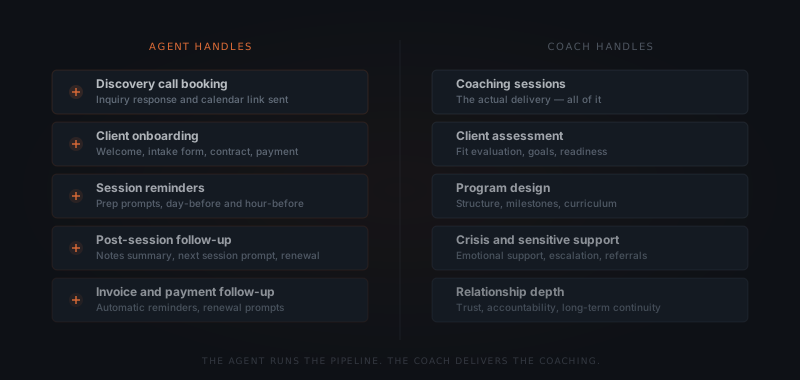
The agent handles client communication and coordination before and between sessions. Coaching sessions, personalized advice, client assessment, program design, and any interaction that requires professional judgment stays with the coach. The agent does not provide coaching guidance or interpret client situations.
Discovery call booking. A potential client submits an inquiry or clicks a booking link. The agent sends an immediate confirmation, delivers the pre-discovery intake form, and manages the scheduling flow — proposing available times, confirming the booking, and sending a reminder 24 hours before the call. Coaches using an agent respond to discovery inquiries within minutes. A Harvard Business Review analysis of 15,000 leads found that follow-up within 5 minutes is 9x more likely to result in a conversion than follow-up after 30 minutes.[³]
Client onboarding. When a new client signs a coaching agreement, the agent triggers the full onboarding sequence: welcome message, intake questionnaire, coaching agreement or terms link, and payment setup confirmation. The agent tracks which steps are complete, sends reminders for outstanding items, and notifies the coach when the client is fully onboarded. The coach's first session starts with a fully prepared client — not a half-complete intake form.
Session preparation. Before each session, the agent sends the client a prep prompt: a short reflection question or a reminder of the focus area for the session. The message arrives 24 hours before the session and includes the session link or dial-in. The coach receives a brief summary of where the client is in the program. Both arrive to the session ready.
Post-session follow-up. After each session, the agent sends the agreed action items or a session summary to the client, schedules the next session if not already booked, and sets a check-in reminder for the midpoint between sessions. Clients who receive a consistent follow-up cadence between sessions report higher progress between coaching engagements — a pattern consistent with findings from ICF research on between-session accountability structures.[¹]
Invoice and billing management. The agent sends invoices after sessions, sends reminders at day 7 and day 14 if unpaid, and sends renewal prompts when a coaching package is approaching its final session. The coach is notified when payment is received. Billing conversations that coaches typically avoid become systematized and impersonal — which makes them easier to manage and more consistent.
| Task | Agent | Coach |
|---|---|---|
| Discovery call response and booking | ✓ | |
| Pre-discovery intake form | ✓ | |
| Client onboarding sequence | ✓ | |
| Session prep reminders | ✓ | |
| Post-session follow-up and action items | ✓ | |
| Invoice and payment follow-up | ✓ | |
| Coaching sessions | ✓ | |
| Client assessment and program fit | ✓ | |
| Program design and curriculum | ✓ | |
| Crisis support and referrals | ✓ |
Discovery calls, onboarding, invoices, follow-up: none of it is coaching.
For the broader framework on which workflows to automate first, see which workflows to automate first.
What the coach handles
Coaching sessions. The delivery of coaching — listening, questioning, reflecting, challenging — cannot be automated. This is the work that requires the coach's presence, judgment, and relationship with the client. The agent frees the time around sessions. The coach fills that time with more sessions or with rest.
Client assessment and fit. Before a coaching engagement begins, the coach evaluates whether the client is a fit: for the program, for the coach's methodology, for the stage the client is at. An AI agent collects intake information. The coach reads it and makes the assessment.
Program design. The structure of a coaching engagement — the number of sessions, the focus areas, the milestones, the accountability structures — reflects the coach's professional judgment about what the client needs. The agent delivers the program. The coach designs it.
Crisis and sensitive situations. A client disclosing a mental health crisis, a significant life disruption, or a situation requiring professional referral needs a human response. The agent monitors structured communications. Any message outside the norm triggers an escalation notification to the coach — not an automated response.
Relationship depth. The quality of a coaching engagement depends on the trust and continuity of the relationship between coach and client. The agent maintains the logistics layer. The coach maintains the relationship.
How to configure a coaching agent workflow
Map the client journey
Walk through the full sequence from discovery inquiry to final session: what communications happen, who sends them, what triggers each one. Every manual touchpoint in that sequence is a candidate for the agent. Focus the first implementation on the three highest-volume touchpoints — typically discovery booking, onboarding, and post-session follow-up.
Write the intake questions
Define what the agent collects before the discovery call: the client's current situation, their primary challenge, what they've already tried, and their timeline. These become the intake form the agent sends with the booking confirmation. The coach arrives at the discovery call with structured context rather than a blank start.
Design the onboarding sequence
Write the welcome message, the intake questionnaire prompt, the coaching agreement link, and the payment setup instructions. The agent sends these in sequence after a client confirms. Each step has a completion trigger — the next step sends when the previous one is done, not on a timer.
Set the session prep and follow-up templates
Write the 24-hour prep prompt for clients and the post-session follow-up template. The post-session message should include the agreed action items, the date of the next session, and a midpoint check-in prompt. Write these in your voice — the agent sends from your name and email address.
Connect your booking and billing tools
The agent needs access to the scheduling platform (Calendly, Acuity) to read confirmed sessions and to the billing platform (Stripe, PayPal) to trigger invoices and monitor payment status. Both connections are read-and-trigger, not write-heavy — the agent monitors events and sends communications based on them.
Tools and integrations a coaching agent workflow connects to
The specific platforms the agent uses depend on what the coach already has in place. The table below covers the standard connections for a discovery-to-renewal coaching workflow.
| Platform | Role in the workflow | Notes |
|---|---|---|
| Calendly | Discovery booking, session scheduling, availability management | Webhook — agent triggered on new booking event |
| Acuity Scheduling | Alternative to Calendly — booking and intake form collection | API and webhook |
| Gmail / Outlook | All client communication from the coach's address | OAuth — agent drafts and sends from the real address |
| Stripe | Invoice creation, payment status monitoring, renewal prompts | Webhook — confirms payment received, triggers next step |
| PayPal | Alternative payment processing | Webhook — same trigger model as Stripe |
| Notion | Client intake documents, session notes storage | API — agent reads intake fields, writes session summaries |
| Google Drive | Shared program resources, intake documents | API — file access for onboarding document delivery |
| Slack / Teams | Coach escalation notifications for urgent client signals | Webhook — no write access to client channels |
Platforms outside this list require custom connectors. A standard first implementation connects the scheduling tool, email, and billing platform. Adding Notion or Google Drive integration extends the onboarding and session documentation workflows but is not required for the core pipeline.
What a coaching agent workflow costs
Setup cost. A complete discovery-to-renewal workflow — covering booking response, intake, onboarding sequence, session prep, post-session follow-up, and billing — runs $2,500–$5,000 when implemented by a service. The range reflects complexity: a solo coach with one program type on Calendly and Stripe sits at the lower end; a coach with multiple program types, tiered pricing, and group coaching sequences sits at the upper end. Internal builds require 20–40 hours and working knowledge of the webhook and API systems for the tools already in use.
Operating costs. At typical independent coaching volumes — 10–30 active clients, 40–100 session cycles per month — annual API costs run $50–$150. Billing communication adds minimal additional cost. Operating costs are essentially negligible relative to setup.
Year 1 total (implementation + first year API): $2,550–$5,150.
ROI frame. The ICF 2023 Global Coaching Study found the median annual revenue for an independent coaching practitioner is $52,800, at a median individual session rate of $214 per hour.[¹] A coach working 30 client hours per week spends roughly 15–20 hours on non-coaching work — discovery, admin, billing, marketing. Recapturing 3–5 of those hours through agent automation represents 3–5 additional billable hours per week — $32,100–$53,560 in annual revenue at the median rate. The setup cost recovers within the first month of recovered billing capacity.
Where coaching agent implementations fail
Four failure modes appear consistently across coaching practice agent deployments.
Agent sends onboarding to someone who hasn't committed. A potential client submits a discovery interest form — not a booking, not a signed agreement. The agent triggers the full onboarding sequence: welcome email, intake questionnaire, coaching agreement. The potential client is confused about the relationship status and disengages. The onboarding trigger must be a confirmed booking or a signed agreement — not an inquiry. Inquiry responses lead into a separate pre-commitment sequence.
Post-session messages feel generic. The post-session follow-up includes placeholder copy like "great session today — here are your action items" without the actual action items from the session. The template structure is correct but the content is not. The agent must either pull action items from a structured note the coach enters after each session, or the post-session message must be a draft the coach reviews and sends — not a fully automated send based on a session template.
Billing reminders sent during a difficult client period. A client in the middle of a challenging coaching moment — processing a difficult disclosure, working through a major decision — receives a day-7 payment reminder. The message is timed correctly by the billing system but landed badly in the relationship context. Billing reminders cannot be fully automated without a way for the coach to flag a hold on a specific client's billing sequence. A simple coach override mechanism — a tag or a status field — prevents the sequence from running when the coach has signaled a hold.
Discovery call intake form too long. The intake form the agent sends with the booking confirmation contains 12 questions — what the client's goals are, their work history, their values, their previous coaching experience. The completion rate drops to 30%. Discovery call intake forms that exceed 4–5 questions see significant abandonment. Three targeted questions deliver more useful context than ten broad ones — and a client who completes all three arrives at the call far more prepared than one who abandoned at question 6.
Frequently asked questions
What does an AI agent do for a coaching practice? An AI agent for coaches handles discovery call booking and follow-up, client onboarding documents and contracts, session prep reminders, post-session follow-up sequences, and invoice management. The agent coordinates the full client communication pipeline before and between sessions. Coaching sessions, client assessment, program design, and any interaction requiring professional judgment stays with the coach.
How does an AI agent handle coaching client onboarding? When a new client books a first session or signs a coaching agreement, the agent triggers the onboarding sequence: welcome message, intake form, contract or terms link, and payment setup. The agent tracks which steps are complete and follows up on outstanding items before the first session. The coach receives a notification when the client is fully onboarded.
What tools does a coaching agent workflow connect to? Coaching agent workflows connect to Calendly or Acuity Scheduling for booking, Gmail or Outlook for client communication, Stripe or PayPal for payment, Notion or Google Drive for client intake documents, and Slack for coach notifications. The specific setup depends on which tools the coach already uses.
How much does an AI agent cost for a coaching practice? A complete discovery booking, onboarding, session prep, and follow-up workflow costs $2,500–$5,000 when implemented by a service. Operating costs at typical coaching volumes run $50–$150 per year in API costs. At a coaching rate of $200 per hour, recovering 2 hours of admin per week recoups the full setup cost within the first 3–6 weeks.