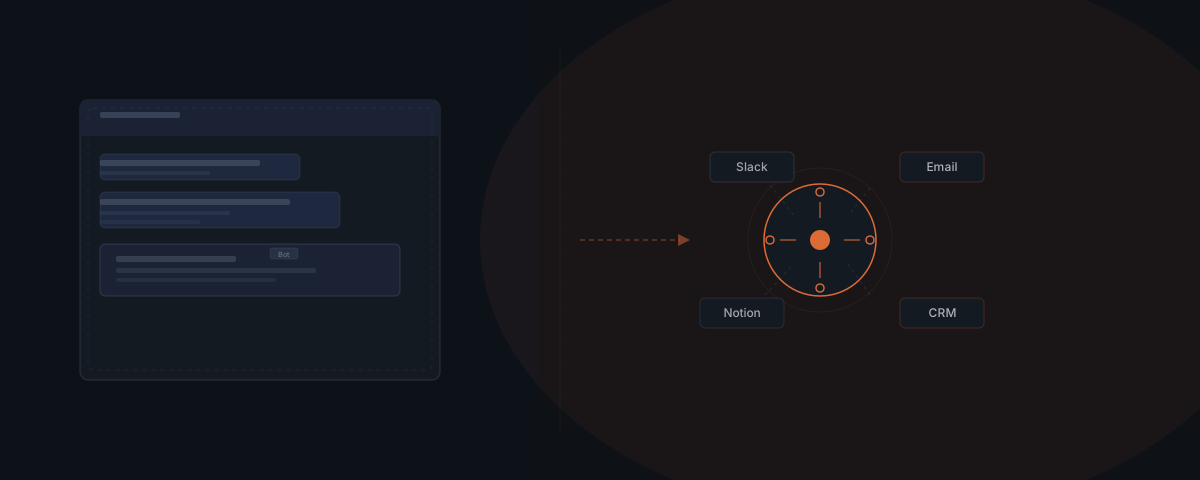
Slack's native AI processes context that lives inside Slack — it searches conversation history, summarizes threads, and drafts messages without leaving the platform. An external AI agent uses Slack as one input and one output channel in a workflow that spans your CRM, email system, Notion workspace, and project management tool. When your team types 'client approved' in a project channel, an external agent is what turns that message into a CRM update, a client email, and a closed task — without anyone opening a second application. The two systems serve different layers of the same stack.
Your team uses Slack to coordinate everything. Status updates, approvals, project completions, client notes — it all flows through channels. Slackbot in 2026 can search your conversation history, summarize last week's discussion in a channel, draft a reply in your style, and, via MCP, call connected tools on request. That is a meaningful capability. And it still doesn't close the gap: the gap between a message in Slack and the three systems that need to be updated because of that message. Closing that gap is what an external agent does — for the broader definition, see what an AI agent is and how it differs from a platform-native assistant.
What Slack's native AI does in 2026
Slack AI — including the Claude-powered Slackbot launched in early 2026 — handles the intelligence layer inside Slack. The capabilities fall into three categories.
Search and retrieval. Slack stores every message, thread, and file your team has ever sent. Slackbot can query that history in natural language: "What did we decide about the Anderson contract?" produces an answer from the relevant thread, not a list of results to browse. Salesforce reports that daily AI usage in Slack has increased 233% in the six months following Slackbot's launch, with daily AI users reporting 64% higher productivity than colleagues not using AI tools.[¹]
Summarization. Slackbot summarizes channels and threads. A channel that ran 140 messages while you were in meetings condenses to a two-paragraph brief on request. This works well and saves measurable time for teams communicating primarily through Slack.
Drafting and tool calls via MCP. Slackbot drafts replies, composes messages in a specified tone, and — via the MCP client Slack launched in March 2026 — calls connected external tools when prompted in a conversation. Slack's MCP tool calls grew 25x in the six months after the server launched in October 2025.[²] The capability is real: Slackbot can reach outward into MCP-compatible tools from inside a Slack conversation.
The meaningful constraint is the interaction model. Slackbot acts when a team member prompts it inside Slack. An external agent acts when a defined trigger occurs — regardless of whether anyone opens Slack to request it.
External agents treat Slack as one channel, not a home base
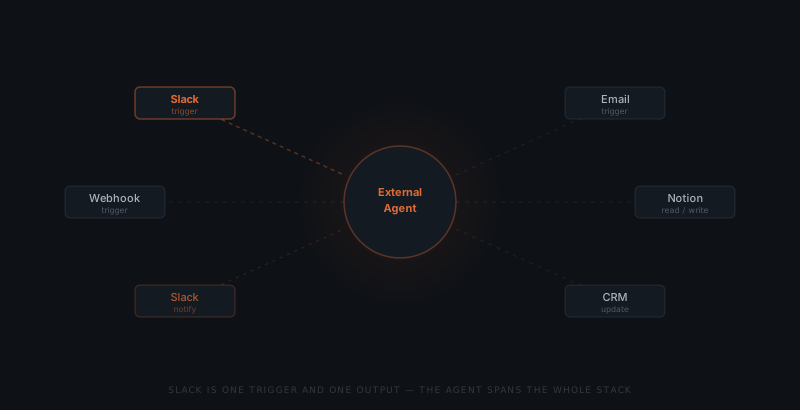
An external AI agent is not installed inside Slack. The agent is a workflow system that uses Slack as one input channel and one output channel — alongside email, webhooks, scheduled events, and API-based triggers. Workflows configured to run on a Slack trigger run the same way whether the team member checks Slack immediately after or not.
The distinction is architectural. Slack AI is anchored to Slack — its input and output both live in Slack conversations. An external agent is anchored to a workflow — Slack is one node in that workflow, not the environment the workflow lives in.
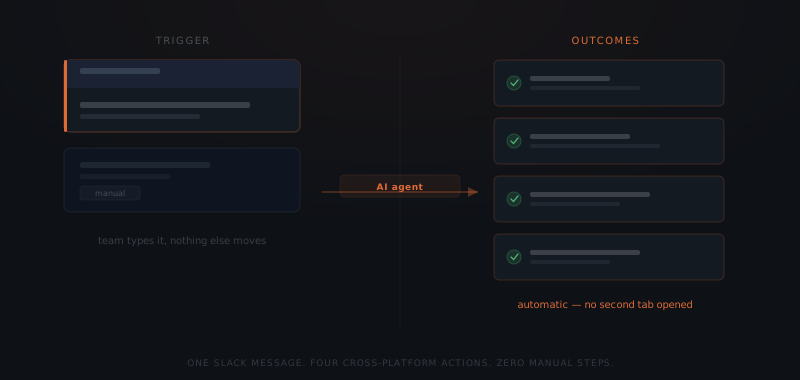
Consider a project completion workflow. A project manager types "Phase 1 complete — client approved the deliverable" in a project channel. What needs to happen next:
- The project record in the CRM needs to be updated to reflect Phase 1 completion
- The client needs a confirmation email
- The task in the project management tool needs to be closed
- The team lead needs a notification with the next milestone highlighted
Slackbot can draft the confirmation email if asked. An external agent completes all four steps automatically — without anyone asking, without anyone opening four applications, and without the message being left unacted on until someone remembers.
Slackbot answers questions about Slack. Your agent answers your whole stack.
The same logic applies when the trigger is not a Slack message. A lead form submitted on your website, a calendar event reaching T-minus 24 hours, a payment received in Stripe — an external agent handles all of these triggers in the same workflow that also handles Slack triggers. The workflow does not require Slack. It includes Slack.
How an external agent connects to Slack
Connecting an external agent to Slack uses the Slack API with OAuth-based authentication. The setup involves three components: an incoming event listener, an outgoing message handler, and a scoped permission set.
Incoming triggers. The agent subscribes to specific Slack events: a message posted in a designated channel, an @mention, a reaction added to a message, or a slash command. The subscription is scoped — the agent does not read all of Slack, only the channels and events relevant to the configured workflows.
Outgoing notifications. When the agent completes an action (CRM updated, email sent, task closed), it posts a confirmation back to the originating channel or sends a direct message to the user who triggered the workflow. The team sees what happened without having to check another tool.
Permission scope. The agent requests only the OAuth scopes it needs: typically channels:read, chat:write, and reactions:read for a standard trigger-and-notify setup. Worker identity is maintained at the integration level — the agent posts as a named bot user, not as any individual team member.
Most Slack integrations for external agents go live within two to three days. The integration setup is the shortest step in the process. The longer work is defining which workflows should be triggered from Slack and what the full action sequence should be.
The workflows that need both
Slack AI and external agents are not alternatives. The workflows that work well with each are distinct.
| Workflow type | Slack AI (Slackbot) | External agent |
|---|---|---|
| Find what was decided in a thread | ✓ | |
| Summarize a channel since last week | ✓ | |
| Draft a reply in a specific tone | ✓ | |
| Call a connected tool when prompted | ✓ | |
| Update CRM when a message signals state change | ✓ | |
| Send client email triggered by team message | ✓ | |
| Close task in project tool, log in Notion | ✓ | |
| Run on email or webhook trigger (no Slack input) | ✓ | |
| Multi-step workflow spanning 3+ tools | ✓ |
The teams that get the most from both systems use Slackbot for in-conversation intelligence (search, summarize, draft, look things up) and external agents for cross-platform workflows triggered by conversation signals. The two systems complement each other because they operate at different layers.
For teams evaluating whether a workflow belongs in Slackbot or an external agent, the test is straightforward: does this workflow start and end inside Slack? If yes — Slackbot. If the workflow needs to touch tools outside Slack — an external agent. For the broader framework on workflow sequencing, see which workflows to automate first.
Setting up Slack as part of your agent system
Connecting Slack to an external agent system is a scoped, one-time integration. The setup process at a typical 10–30 person service business runs as follows.
Identify the trigger channels
Decide which Slack channels and message patterns should trigger agent workflows. Most businesses start with one or two channels — typically the project status channel and the client communication channel.
Define the action sequence
Map what needs to happen when each trigger fires: which systems get updated, in what order, and what the notification back to Slack should contain. The action sequence is the workflow logic — this step takes most of the scoping time.
Create the bot user
Set up a Slack app with the required OAuth scopes. The agent posts as a named bot user (e.g., "Workflow Bot") so the team can see when agent actions are confirmed in the channel.
Connect the downstream tools
Authenticate the CRM, email client, project management tool, and any other systems in the action sequence. Each connection uses API credentials scoped to the actions the agent needs to perform.
Test on a single trigger
Run the full workflow on a test message. Verify the CRM update, the outgoing email, the task closure, and the Slack confirmation before enabling the workflow for the full team.
IDC research found that knowledge workers spend approximately 2.5 hours per day on information retrieval — searching for status, waiting for responses, and verifying that found information is current.[³] For teams using Slack as their coordination layer, a significant portion of that retrieval time goes to finding out whether something was done. An agent that confirms completion automatically — in the same Slack channel where the trigger appeared — eliminates the need to check.
The case for connecting Slack to an external agent is not about replacing what Slackbot does. Slackbot handles the intelligence layer inside Slack well. The case is about the gap between a message in Slack and the downstream systems that need to act on it. Bridging that gap is what a purpose-built external agent does.
For a complete picture of implementation scope and timeline, see what a real AI agent implementation involves. If Notion rather than Slack is the system holding your source-of-truth data, see AI agent and Notion for the equivalent setup.
Frequently asked questions
What is the difference between Slack AI and an external AI agent? Slack AI (including the Claude-powered Slackbot) operates inside Slack — it searches conversation history, summarizes threads, drafts messages, and can reach external tools via MCP when prompted. An external AI agent is a workflow system that treats Slack as one channel among many — it can be triggered by a Slack message, an email, a form submission, or a scheduled event, and its actions span your CRM, email, Notion, and project management tools. Slack AI answers questions about Slack. An external agent executes workflows across your whole stack.
Can Slackbot replace an external AI agent? Slackbot handles tasks that live inside Slack: searching conversation history, summarizing threads, drafting replies, and calling specific connected tools when prompted in a Slack conversation. An external AI agent handles structured, multi-step workflows that span platforms and run on triggers beyond Slack — including email triggers, form submissions, scheduled events, and webhook-based inputs. The two systems are not alternatives. Slackbot is a teammate inside Slack. An external agent is a workflow engine that happens to use Slack as one channel.
How does an AI agent connect to Slack? An external AI agent connects to Slack via the Slack API using OAuth-based authentication. The agent listens for message events, @mentions, channel events, or reactions — depending on which workflow triggers are configured. When the agent completes an action (updating a CRM record, sending an email, creating a task), it posts a confirmation back to the relevant Slack channel or sends a direct message to the triggering user.
What workflows are best triggered from Slack? The highest-value Slack-triggered workflows are those where a team member's message signals a state change that needs to propagate across tools: a project marked complete, a client approval received, a lead qualified, a deal moved to a new stage. When the team uses Slack as the primary coordination layer and the signal for completion or status change already appears there naturally, connecting that signal to an agent eliminates the manual data-entry step that follows every message.
Notes
- Salesforce / Slack. (2026). "New Slack Workforce Index Reveals Higher Daily AI Use." https://www.salesforce.com/news/stories/daily-ai-workforce-use-growth/
- Slack. (2026). "Slack Becomes an Agentic OS: MCP and Agent Integrations." Referenced via AI Automation Global: https://aiautomationglobal.com/blog/slack-ai-agentic-os-mcp-30-features-2026
- IDC. Knowledge worker productivity research. Referenced via Cottrill Research: https://cottrillresearch.com/various-survey-statistics-workers-spend-too-much-time-searching-for-information/