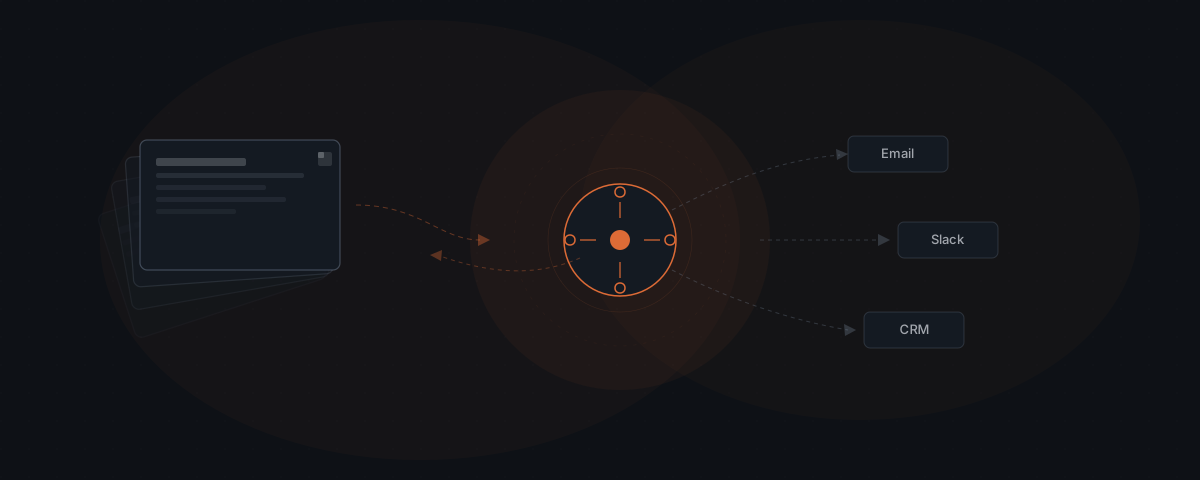
Notion's built-in AI assists your team inside Notion — answering questions about workspace content, helping write and edit pages, and running custom agents scoped to your Notion data. An external AI agent treats Notion as a live database in a workflow that spans Notion, email, Slack, and your CRM. The agent reads Notion project pages to inform what emails to send, writes call notes back to Notion after completing them, and updates CRM records — without anyone searching through Notion for the relevant data. McKinsey research found that workers spend 1.8 hours per day searching for information. For project-based businesses, most of that time goes to finding what's already in Notion.
Your team keeps everything in Notion. Client project pages, meeting notes, status trackers, contact records — it's all there. Notion's built-in AI lets you ask questions about it, summarize it, and write new pages faster. That is useful. It does not solve the gap: the gap between the project status sitting in a Notion database and the three other tools that need to reflect that status. Closing that gap is what an external AI agent does — and it does it by treating Notion not as a workspace to assist with, but as a database to query and write to. For the broader definition of what an AI agent is and how that differs from a workspace assistant, the distinction below builds on that foundation.
What Notion's built-in AI does inside the workspace
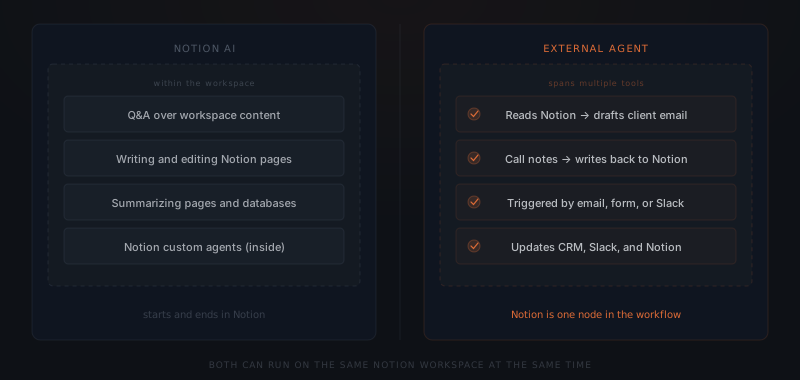
Notion AI — including the custom agents launched in Notion 3.3 in February 2026 — operates within your Notion workspace. The capabilities fall into four categories.
Q&A over workspace content. Notion AI answers questions about your workspace in natural language: "What's the status of the Henderson project?" or "What action items came out of last Thursday's meeting?" The answer comes from your Notion pages, not a web search. This works well for teams that centralize notes and project information in Notion and want faster retrieval.
Writing and editing. Notion AI writes first drafts, rewrites sections, fixes grammar, changes tone, and generates structured content from a brief description. These capabilities run inside Notion pages and require no external trigger.
Summarization. Long pages and large databases condense on request. A project page with 40 sub-tasks and 12 comments summarizes to a paragraph. A database of 200 client records summarizes its key patterns. Both capabilities stay inside Notion.
Custom agents (Notion 3.3 and later). More than 1 million custom agents were created in Notion's workspace after the February 2026 launch.[¹] These agents run inside Notion — they can browse the web, run automations within Notion, and perform research tasks. They are scoped to the Notion environment. When an action requires updating Salesforce, sending an email via Gmail, or posting to Slack, a Notion custom agent does not handle it.
The constraint is scope. Notion AI and Notion custom agents are excellent at tasks that start and end inside Notion. When the work requires an action in a system outside Notion, a different architecture is needed.
External agents treat Notion as a live data layer
Notion's built-in agents and an external AI agent are not alternatives — they serve different layers. Notion AI assists your team with tasks inside Notion. An external agent uses Notion as data infrastructure for workflows that span your CRM, email, Slack, and other tools. Both can run on the same workspace at the same time.
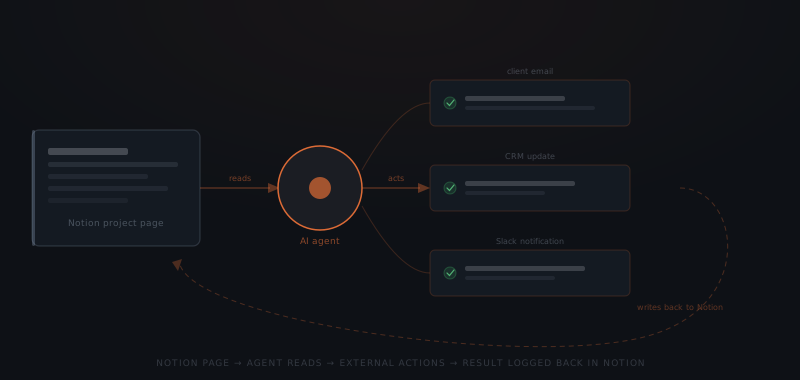
An external AI agent reads from Notion via the Notion API to answer a question: "What is the current status of each client project, and which ones are in 'Review Pending'?" Armed with that data, the agent drafts and sends a status email to each client on the relevant list — without anyone exporting a spreadsheet, opening a new tab, or writing a single line.
The same architecture works in reverse. An agent completes a client call, processes the call notes through a transcription service, and writes a structured summary back to the client's Notion page — updating the Last Contact date, logging action items, and flagging the next milestone. The team opens Notion later and finds it already updated.
McKinsey Global Institute research found that knowledge workers spend an average of 1.8 hours per day searching for information.[²] For project-based businesses — agencies, consultancies, recruiting firms — a significant portion of that time goes to finding status information that already exists in Notion but requires someone to look it up before acting on it. An agent that reads from Notion on demand eliminates the lookup step.
Notion AI finds what's in Notion. Your agent decides what to do about it.
IDC research estimates that businesses lose 21.3% of productivity to document-related challenges — including finding, retrieving, and verifying that information is current.[³] For teams whose information lives in Notion, the solution is not a better Notion interface. It is an agent that queries Notion at the right moment and acts without requiring a human to bridge the gap.
The workflows where Notion is the source layer
Three workflow patterns represent the highest-leverage use of Notion as an agent data source for service businesses.
Status-to-communication workflows. The agent reads a Notion project database filtered by a status property — "Awaiting Review", "Invoice Pending", "Contract Sent" — and sends the appropriate outbound communication for each matching record. A weekly status report workflow reads every active client project in Notion, generates a personalized update email per client from the project data, and sends it. No one assembles these manually.
Call-to-record workflows. After a sales call or client meeting, the agent receives the call transcript, extracts structured information (next steps, decision points, contact details), and writes it back to the relevant Notion contact or project page. The Notion record is updated before the team member opens their laptop again. The same structured data simultaneously updates the CRM contact record and sets a follow-up reminder.
Research-to-delivery workflows. The agent gathers external data — competitor pricing, news about a client's industry, regulatory updates — and writes a structured summary to a designated Notion page. The team opens Notion and finds the research already structured and waiting. This works for any workflow where the research step currently means opening a browser, reading several sources, and writing a Notion page.
For a comparison of what kinds of workflows benefit from structured Notion data versus unstructured notes, see how to know if a business process is ready to hand to an AI agent.
What breaks without consistent Notion structure
An external AI agent reads from Notion via the API. The API returns structured data — database properties, page content, property values — in a predictable format. What the agent can reliably act on depends entirely on how consistently that data is structured.
Database properties are reliable. Prose is not. A Notion database with a Status property set to one of five defined values ("Active", "Review Pending", "Invoiced", "Complete", "On Hold") gives the agent a field it can filter by. A page where project status is mentioned somewhere in a long paragraph requires the agent to parse natural language — and natural language varies. The agent misses entries where status is described differently.
Consistent naming matters. If client names appear as "Acme Corp", "Acme", "ACME Corporation" and "Acme Corp." across different Notion pages, the agent cannot reliably match records across databases. A single canonical format for names, dates, and status values makes agent-readable Notion data reliable.
Empty fields produce silent failures. A workflow that reads the "Last Contact" date from a Notion contact record and sends a follow-up if the date is more than 30 days old does nothing for records where "Last Contact" is empty. This is not an agent limitation — it is a data quality issue. The agent acts on the data it finds. If the data is inconsistent or missing, the workflow produces incomplete results.
The practical implication: before connecting Notion to an agent workflow, audit the relevant database for field consistency. Fix the naming variations and empty required fields. The agent setup is usually faster than the database cleanup.
For the broader question of data readiness for AI agents, see the clean data myth — most businesses are closer to ready than they think.
Connecting Notion to your agent system
Connecting an external agent to Notion uses the Notion API with OAuth integration. The setup requires three things: API access with appropriate scopes, identification of the specific databases and pages the agent will read and write, and a mapping of which properties the agent will query or update.
Create a Notion integration
In Notion's developer settings, create an integration with the required capabilities: Read content, Update content, and Insert content. The integration generates an API token used for agent authentication.
Connect pages and databases
Share the specific Notion pages and databases with the integration. The agent can only access content explicitly shared with it — not the entire workspace. Start with the databases the first workflow needs.
Map the data structure
Identify the property names, types, and values the agent will query. Document which fields are required for the workflow to function — these are the fields that must be consistently populated. Fix any data quality issues in the relevant databases before configuring the workflow.
Build the workflow logic
Define what triggers the agent to read from Notion (a schedule, an incoming email, a Slack message, a webhook), what it reads, what external actions it takes, and what it writes back. The workflow logic determines what the agent does — the Notion connection is the data layer it operates on.
Test on a subset
Run the workflow against a small set of Notion records — five to ten entries — before enabling it for the full database. Verify that the agent reads the correct fields, takes the right actions, and writes back to the right place. Fix any property mapping issues before expanding scope.
Most Notion integrations for external agent workflows go live within two to four days. The data structure audit in Step 3 is frequently the longest step — not because it is technically complex, but because it surfaces the field inconsistencies that need fixing before the workflow runs reliably.
The business case for treating Notion as an agent data layer is straightforward for any team that already centralizes project and client information there. The information exists. The workflows that need to act on it already exist. The agent is the bridge that connects the two — eliminating the manual step that currently sits between a status in Notion and the action it should trigger.
If Slack rather than Notion is where your team's coordination happens, see AI agent and Slack for the equivalent setup.
Frequently asked questions
What is the difference between Notion AI and an external AI agent? Notion AI (including Notion's built-in custom agents) operates inside Notion — it answers questions about workspace content, writes and edits pages, summarizes databases, and runs automations scoped to Notion. An external AI agent uses Notion as a data source in a workflow that spans multiple tools: it reads Notion pages to inform decisions, takes actions in your CRM and email, and writes outcomes back to Notion. Notion AI finds what's in Notion. An external agent decides what to do about it across your whole stack.
How does an AI agent read from Notion? An external AI agent reads from Notion via the Notion API using OAuth-based authentication. The agent can read database records, retrieve page content, query filtered views, and check property values. Read access is scoped to the specific databases and pages the agent needs — not the entire workspace.
What Notion structures work best for agent workflows? Agent workflows read from Notion most reliably when data is stored in databases with consistent property types rather than in free-form pages. A client database with Name, Status, Last Contact, and Owner properties gives an agent structured data it can filter and act on. A freeform page with the same information written in prose requires the agent to parse natural language, which introduces ambiguity. The more structured the Notion database, the more reliably an agent can act on it.
Can Notion's built-in agents and an external AI agent run at the same time? Yes. Notion's built-in agents and an external AI agent operate at different layers and do not conflict. Notion agents help your team interact with content inside Notion. An external agent uses Notion as one data source in a broader workflow. Both can read from and write to the same Notion workspace simultaneously, as long as both have appropriate API access.
Notes
- Notion. (2026). "February 24, 2026 — Notion 3.3: Custom Agents." https://www.notion.com/releases/2026-02-24
- McKinsey Global Institute. Knowledge worker productivity research. Referenced via Cottrill Research and ProProfs: https://cottrillresearch.com/various-survey-statistics-workers-spend-too-much-time-searching-for-information/
- IDC. Document productivity and information retrieval research. Referenced via AgilityPortal: https://agilityportal.io/blog/time-wasted-searching-information