OpenClaw for recruiting firms automates the candidate communication sequence that repeats for every placement: initial outreach, follow-ups, interview confirmations, post-interview notes, and status updates to the client. OpenClaw drafts each message and queues it for recruiter approval before sending — from the recruiter's own email address, with no change to the team's existing workflow.
A recruiter managing eight open roles sends roughly 40 candidate messages on a Monday morning. First-touch outreach to new candidates on four roles. Follow-ups to second-day non-respondents on two more. Interview confirmations going out for three candidates booked last Friday. Post-interview check-ins for two candidates who completed interviews last week. Every message follows the same structure. Every message still has to be written and sent one at a time. OpenClaw runs the sequence — drafting each message from the recruiter's established templates and queuing every draft for review before it goes out.
Recruiting generates the highest communication-to-decision ratio of any professional service
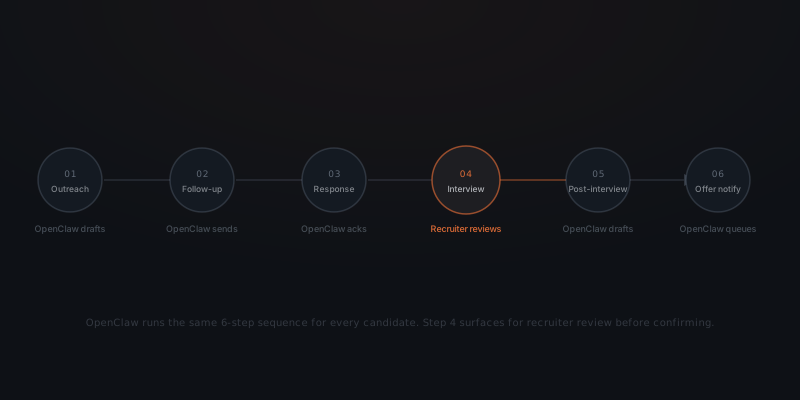
Every placement involves the same sequence of candidate-facing messages. Outreach. Follow-up for non-respondents. Acknowledgment when a candidate replies. Interview scheduling and confirmation. Pre-interview reminder. Post-interview follow-up. Offer notification. Post-placement check-in.
A recruiter working five active roles simultaneously runs this eight-step sequence for every candidate who enters the pipeline. At ten to twenty candidates per role at any stage, the daily communication volume reaches forty to eighty messages that require drafting and sending — before any candidate has been evaluated, interviewed, or placed.
67% of hiring decision-makers cite time savings as the primary reason to adopt AI in recruitment workflows.[¹] The tasks producing that time cost are not strategic. They are structural. The sequence repeats identically for every placement regardless of the role type, the client, or the candidate's background.
| Touchpoint | When it triggers | OpenClaw handles |
|---|---|---|
| Initial outreach | New candidate identified | Drafts from role-specific template |
| First follow-up | 3 days, no response | Sends automatically on cadence |
| Second follow-up | 6 days, no response | Sends on cadence |
| Response acknowledgment | Candidate replies | Drafts reply, queues for review |
| Interview confirmation | Interview booked | Sends confirmation to all parties |
| Pre-interview reminder | 24 hours before | Sends reminder with prep notes |
| Post-interview follow-up | Day after interview | Drafts note, queues for review |
| Offer notification | Offer extended | Drafts candidate notification |
The first six rows run automatically once the recruiter reviews and approves the initial draft. The acknowledgment and post-interview messages queue for explicit review because they respond to something a candidate said — they carry context that needs the recruiter's eye before sending.
OpenClaw runs the same sequence for every candidate without requiring setup for each one
OpenClaw does not evaluate candidates or generate placement decisions. OpenClaw handles the communication layer — the messages that need to go out on a defined schedule based on defined triggers. Every message queues for recruiter approval before sending, from the recruiter's own email address or LinkedIn InMail, as if written manually.
Once OpenClaw is configured for a role type, every candidate entering that role's pipeline moves through the same sequence automatically. The recruiter defines the message templates, the sending cadence, and the review requirements for each touchpoint. OpenClaw reads the trigger (new candidate added, interview confirmed, interview completed) and drafts the appropriate message.
The recruiter's approval interface is a Slack notification or email with the draft, a review link, and a one-click approve. The recruiter reads the draft — twenty to thirty seconds — and approves. The message sends from the recruiter's own address. No copy-pasting. No composing from scratch.
For touchpoints that do not require contextual judgment (follow-up messages, interview reminders), the recruiter can set automatic approval after a review window. If the recruiter does not flag the message within four hours, it sends. For touchpoints that require context — acknowledgment after a candidate reply, post-interview follow-up — the recruiter reviews explicitly before each message sends.
Which tools OpenClaw connects to in a recruiting stack
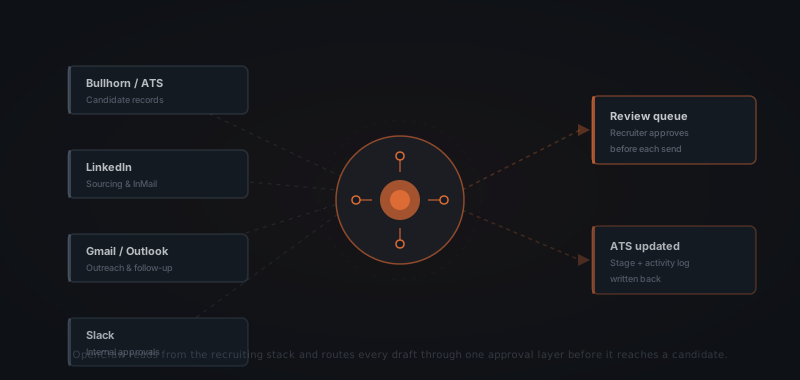
Recruiting firms are not short on tools. OpenClaw connects to the systems already in use — it does not require migrating to new platforms or replacing existing workflows.
Applicant tracking systems. Bullhorn, Greenhouse, Lever, Workday, and Jobvite connect through standard APIs. OpenClaw reads candidate stage and contact data from the ATS to trigger the appropriate sequence touchpoint. After each approved message, OpenClaw writes the activity back to the candidate's record — last contact date, message sent, next scheduled touchpoint. The ATS stays current without the recruiter entering data between messages.
LinkedIn. OpenClaw drafts InMail messages for new candidates identified on LinkedIn. The recruiter reviews the draft in LinkedIn's message interface or in the Slack approval notification. Approved InMails send through the recruiter's LinkedIn Recruiter account.
Email. Gmail and Outlook connect via OAuth. OpenClaw drafts messages in the recruiter's email account and holds them in a review queue. Approved messages send from the recruiter's address. The candidate sees no difference from a manually written email.
Calendar. Google Calendar and Outlook Calendar connect for interview scheduling. When a candidate confirms availability, OpenClaw reads the recruiter's and client's open slots, proposes times, and sends the confirmation and calendar invite once the recruiter approves the slot selection.
Slack. Internal approval routing happens through Slack. The recruiter receives a Slack notification with the draft and a review link for each message requiring explicit approval. The team lead can also review and approve messages for any recruiter on the team.
What the recruiter retains
OpenClaw handles the sequence. The recruiter handles everything that requires judgment.
| Task | OpenClaw | Recruiter |
|---|---|---|
| Initial outreach messages on new candidates | ✓ | |
| Follow-up cadence for non-respondents | ✓ | |
| Interview confirmation and reminders | ✓ | |
| Post-interview follow-up drafts | ✓ | |
| ATS stage updates and activity logging | ✓ | |
| Client pipeline report drafts | ✓ | |
| All message review and approval | ✓ | |
| Candidate qualification and assessment | ✓ | |
| Screening and qualification calls | ✓ | |
| Client briefing and relationship management | ✓ | |
| Offer negotiation and close | ✓ |
The sequence repeats for every candidate. OpenClaw runs the sequence. The recruiter reads the replies.
The time OpenClaw returns is not just drafting time. It is the cognitive load of tracking which candidates need a follow-up, which interviews need a confirmation sent, and which post-interview notes are overdue. OpenClaw handles the tracking and the drafting. The recruiter handles the assessment and the relationships.
86.1% of recruiters say AI makes the hiring process faster.[¹] The speed gain does not come from AI making placement decisions — it comes from removing the coordination and drafting overhead that surrounds every decision the recruiter does make.
Setting up OpenClaw for a recruiting firm
Define your role types and their sequence templates
Not every role type has the same outreach message, follow-up cadence, or post-interview note. Map the role types your firm places most frequently. For each type, write the message templates for each touchpoint: the initial outreach tone, the follow-up phrasing, the interview confirmation details to include. These templates become the inputs OpenClaw uses when drafting for any candidate in that role type.
Connect the ATS and define trigger events
Link OpenClaw to your ATS (Bullhorn, Greenhouse, Lever, or Workday). Define which ATS stage changes trigger which sequence touchpoint. Candidate added to sourcing stage → outreach draft. Interview booked → confirmation draft. Interview completed → post-interview draft. Each trigger is a stage or status change in the ATS — no manual instruction required once the mapping is defined.
Connect email, LinkedIn, and calendar
Grant OpenClaw access to the email inbox, LinkedIn Recruiter account, and calendar for each recruiter using the system. Scope access to outbound drafting and approval routing only. OpenClaw reads available calendar slots to propose interview times and writes messages to the outbox. No access to inbound email reading beyond the notification that a candidate has replied.
Define approval rules for each touchpoint
For each touchpoint, decide the approval mode: explicit review (recruiter must approve before the message sends) or auto-approve after a time window (message sends unless the recruiter flags it within four hours). Set explicit review for acknowledgment messages and post-interview follow-ups. Set auto-approve for follow-up cadence messages and interview reminders, where the content does not depend on what the candidate said.
Run one role type live for three weeks before expanding
Configure and activate the sequence for one role type your firm places frequently. Review every approved and auto-approved message for three full weeks. Note where the template generates the right tone consistently and where edge cases require manual adjustment. Refine the templates before activating additional role types.
A standard implementation covering the full outreach-to-placement sequence for two to three role types goes from scoping call to first live candidate message in three to five weeks. For the full timeline from scoping to production deployment, see what a real AI agent implementation involves.
For context on how recruiting firms use AI agents more broadly — beyond the communication sequence — see AI agents for recruiting agencies.
Frequently asked questions
What does OpenClaw do for a recruiting firm? OpenClaw runs the candidate communication sequence that repeats for every placement: initial outreach, follow-up messages for non-respondents, interview confirmation and reminder emails, post-interview follow-up notes, and client pipeline update drafts. OpenClaw drafts each message from the firm's established templates and queues every draft for recruiter review before sending. OpenClaw does not evaluate candidates, conduct screening assessments, or make placement decisions.
Does OpenClaw replace the recruiter? OpenClaw handles the repeating sequence of candidate-facing messages that has the same structure for every placement. The recruiter handles candidate qualification, screening calls, client briefings, offer negotiation, and all judgment-dependent work. Every OpenClaw message requires recruiter approval — either explicit review or auto-approve after a defined window — before it sends.
Which recruiting tools does OpenClaw connect to? OpenClaw connects to Bullhorn, Greenhouse, Lever, or Workday for candidate records and ATS stage updates; LinkedIn Recruiter for InMail outreach; Gmail or Outlook for email communication; Google Calendar or Outlook Calendar for interview scheduling; and Slack for internal approval routing. OpenClaw works inside the existing stack — no migration to new tools required.
How long does it take to implement OpenClaw for a recruiting firm? A focused implementation covering outreach sequence, follow-up cadence, interview confirmation, and ATS logging typically runs three to five weeks. The first two weeks define message templates and trigger logic for each role type. The final weeks cover channel connections, ATS write-back configuration, and testing against live roles before full activation.
Notes
- DemandSage. (2026). "AI Recruitment Statistics 2026." DemandSage, citing LinkedIn Talent Solutions and Statista. https://www.demandsage.com/ai-recruitment-statistics/ — source for: 67% of hiring decision-makers cite time savings as AI's primary advantage; 86.1% of recruiters say AI makes hiring faster; 58% of AI-using recruiters find AI most valuable for candidate sourcing.
- Eightfold AI. (2026). "AI Agents for Recruiting." Eightfold AI Blog, citing PwC 2025 Global AI Jobs Barometer. https://eightfold.ai/blog/ai-agents-recruiting/ — source for: recruiting teams have shrunk from an average of 31 to 24 between 2022 and 2024, increasing per-recruiter workload and the case for sequence automation.
- Aqore. (2026). "Staffing Industry Trends 2026: AI Agents, Full Automation, and the Strategic Reset." Aqore. https://www.aqore.com/staffing-industry-trends-2026/ — source for: 75% reduction in interview coordination time with AI-driven scheduling; recruiters using agent automation shift from 80% admin to roughly 20% admin as a proportion of total work hours.