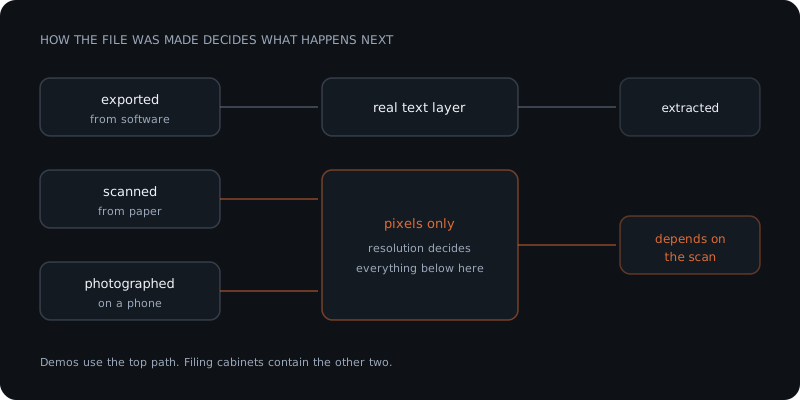
Every demo uses a clean PDF. Your filing cabinet does not contain clean PDFs — it contains scans at whatever DPI the office copier defaults to, invoices photographed on a phone, contracts with a signature across the bottom, and spreadsheets someone pasted into Word. Whether AI can read those is not a question about the model. It is a question about the file, and the answer is published in the providers' own documentation as hard numbers.
The useful question is not "can AI read documents." It is which of your documents, and that is answerable before you spend anything.
Document processing has hard published floors. Text below a certain pixel height is not extracted. Handwriting is supported in far fewer languages than print. Vertical text is not supported at all by one major provider. A password-protected PDF is rejected everywhere. These are not edge cases or model weaknesses — they are documented limits, and most of them come down to how the file was produced rather than what it says.
The floor nobody mentions: text has a minimum height
Two providers publish the same practical threshold, and it is the single most useful number in this article.
Amazon Textract: "The minimum height for text to be detected is 15 pixels. At 150 DPI, this would be the same as 8 point font."
Azure Document Intelligence: "The minimum height of the text to be extracted is 12 pixels for a 1024 x 768-pixel image. This dimension corresponds to about 8-point text at 150 dots per inch."
Both land on roughly 8pt text at 150 DPI. Below that, extraction does not degrade gracefully — the text is simply not detected.
This matters because office scanners commonly default to 150 DPI, and a great deal of business paperwork sets terms, footnotes and reference numbers in 7 or 8pt. The body of your invoice scans fine and the payment reference underneath it does not. If you have ever wondered why extraction gets most of a document right, this is usually why.
The fix is a scanner setting, not a different model. Rescanning at 300 DPI moves 8pt text well clear of the floor.
What each provider actually accepts
Read from each provider's own documentation on 20 August 2026.
| Provider | Max size | Max pages | Notable hard limit |
|---|---|---|---|
| Amazon Textract | 10 MB sync / 500 MB async | 1 page sync, 3,000 async | No vertical text; no XFA PDFs |
| Azure Document Intelligence | 4 MB free / 500 MB paid | 2 pages free, 2,000 paid | Images must be 50×50 to 10,000×10,000 px |
| Anthropic Claude | 32 MB per request | 600 (100 under a 1M context) | Dense PDFs exhaust context before the page limit |
| OpenAI | 50 MB per file | — | Text and page images both enter context |
| Mistral OCR | — | — | 40+ languages; table formatting version-gated |
Two rows there are traps rather than limits.
Textract's synchronous API accepts one page. Not one document — one page. Multipage PDFs require the asynchronous path, which is a different integration. Teams routinely build against the simpler endpoint and discover the constraint on the first real invoice.
Azure's free tier processes the first two pages. Not an error, not a warning — it analyses two pages and returns. A ten-page contract tested on the free tier looks like it worked.
Your PDF quietly becomes images, and that is where cost hides
How a PDF is processed decides the bill, and it is the least understood part of document processing.
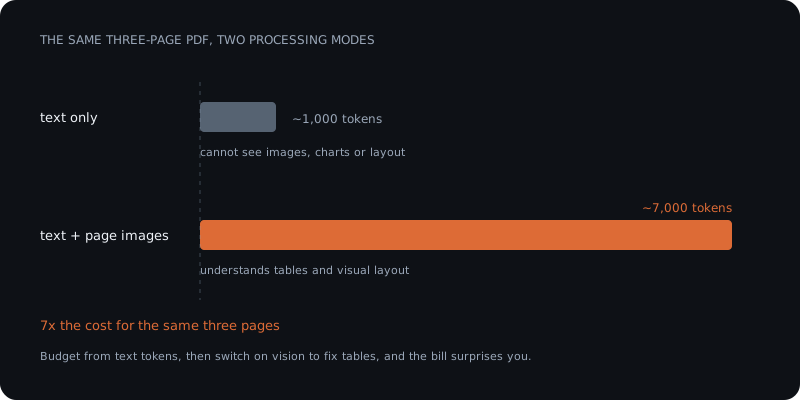
Anthropic documents both paths explicitly. Text-only extraction "cannot analyze images, charts, or visual layouts within PDFs" and "uses approximately 1,000 tokens for a 3-page PDF." Full visual processing "processes each page as both text and image" and "uses approximately 7,000 tokens for a 3-page PDF."
Seven times the tokens for the same three pages. OpenAI describes the same behaviour: for vision-capable models "the API extracts both text and page images and sends both to the model," which "can increase token usage."
So the version that understands your invoice layout costs several times the version that only reads its text. Anyone budgeting from a text-token estimate and then enabling visual processing to fix table extraction will be surprised by the invoice.
There is a related failure worth knowing: Anthropic notes that "dense PDFs (many small-font pages, complex tables, or heavy graphics) can fill the context window before reaching the page limit." Your 400-page document fails at page 90, well inside the documented 600. The published page limit is a ceiling, not a promise.
Below roughly 8 point at 150 DPI, extraction does not degrade gracefully. The text is simply not detected.
Language and handwriting are narrower than print
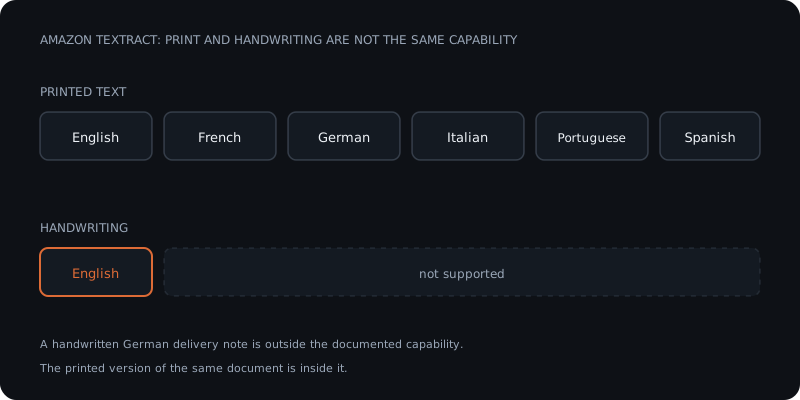
Print and handwriting are not the same capability, and the gap is large.
Amazon Textract supports print in English, French, German, Italian, Portuguese and Spanish. Handwriting recognition is "only supported in English." For a European business, that means a handwritten delivery note in German is outside the documented capability while the printed version of the same document is inside it.
Textract also states it "does not support vertical text (text written vertically, as is common in languages like Japanese and Chinese)."
Azure takes a different approach: its Read model classifies each line as handwritten or not and returns an isHandwritten flag with a confidence score. That is more useful operationally — you can route low-confidence handwritten lines to a human instead of trusting them silently.
Mistral OCR reports strong performance across 40+ languages, though its table formatting and block extraction are gated behind specific model versions.
Four traps that are not about quality at all
Password-protected PDFs are rejected. Textract: "PDFs cannot be password protected." Azure: "If your PDFs are password-locked, you must remove the lock before submission." Anthropic requires standard PDFs with no passwords or encryption. Bank statements and payroll documents frequently arrive locked.
Embedded images inside Office files are invisible. Azure states that for Word, Excel, PowerPoint and HTML, "embedded or linked images aren't supported." An invoice pasted as a picture into a Word document contains nothing extractable. The file processes successfully and returns the surrounding text.
Office files are counted in characters, not pages. Azure counts "up to 3,000 characters = 1 page unit" for Word and HTML, and each Excel worksheet or PowerPoint slide as one page. A cost model built on page counts will be wrong for Office documents.
Rotation is fine; orientation is not. Textract "supports all in-plane document rotations, for example 45-degree in-plane rotation" — a crooked scan is not a problem. Vertical text still is. Skew and orientation are different failures.
The cheapest fix in this article is a scanner setting. Moving from 150 to 300 DPI clears the published text-height floor and costs nothing in software.
Classify your own pile before you spend anything
Twenty minutes with a representative sample answers most of this.
1. How was the file produced? Exported from software, scanned from paper, or photographed. Native exports carry a real text layer. Scans and photos do not, and everything above applies to them.
2. Measure the smallest text you need. Not the body — the reference numbers, the terms, the totals. If your scans run at 150 DPI and that text is under 8pt, fix the scanner before evaluating any model.
3. Check for the four traps. Any password locks? Any invoices living inside Word documents as images? Any handwriting in a language other than English? Any vertical text?
4. Count pages per document and match the API path. More than one page rules out Textract's synchronous endpoint. More than two pages makes an Azure free-tier test meaningless.
When the documents will not work
Sometimes the honest answer is that this workflow is not ready, and there are three real responses.
Fix the source. A scanner setting is the cheapest intervention in this entire article. Moving from 150 to 300 DPI resolves a large share of extraction failures at no software cost.
Change where the document enters. If a supplier can send a native PDF or a structured file instead of a scan, the problem disappears rather than being solved. This is usually an email, not a project.
Automate the readable half. Native PDFs go through the automated path; scans and handwriting route to a person. A workflow that handles 70% reliably and flags the rest beats one that handles 100% unreliably — and it is honest about which is which.
What this does not tell you
Every figure above is a published limit retrieved on 20 August 2026, not a benchmark result, and limits move. Providers ship model updates that change document handling without changing the documented limits.
Deliberately not included: accuracy percentages. Vendor accuracy figures are quoted without stating the document conditions they were measured under, which makes them unusable for predicting your own results — and reproducing that omission would defeat the purpose of this page. The limits above are hard numbers from the providers themselves. An accuracy claim is not.
Also absent: Google Document AI's published limits, which could not be retrieved at the time of writing.
Frequently asked questions
Can AI read a scanned document? Often, but it depends on the scan rather than the model. Amazon Textract states that the minimum height for text to be detected is 15 pixels, which it describes as equivalent to 8 point font at 150 DPI. Azure Document Intelligence gives 12 pixels for a 1024 by 768 image and describes the same practical threshold. Office scanners commonly default to 150 DPI and business paperwork commonly sets terms and reference numbers in 7 or 8 point, which is why extraction often captures most of a document but not the small print. Rescanning at 300 DPI resolves a large share of these failures.
Can ChatGPT read a PDF? Yes, and how it does so affects cost. OpenAI documents that for vision-capable models the API extracts both text and page images and sends both to the model, which increases token usage. Anthropic publishes the difference concretely: text-only extraction uses roughly 1,000 tokens for a three-page PDF and cannot analyse images, charts or visual layouts, while full visual processing uses roughly 7,000 tokens for the same three pages. The version that understands your invoice layout costs several times the version that only reads its text.
Why does AI extract the wrong data from my invoices? The most common causes are physical rather than intelligence-related. Text below roughly 8 point at 150 DPI is not detected at all. Tables spanning multiple pages and merged cells break structural extraction. Password-protected PDFs are rejected outright by every major provider. And an invoice pasted as an image into a Word document contains nothing extractable, because Azure documents that embedded or linked images in Office files are not supported — the file processes successfully and returns only the surrounding text.
Can AI read handwriting? Far less widely than printed text. Amazon Textract supports printed text in English, French, German, Italian, Portuguese and Spanish, but states that handwritten character recognition is only supported in English. For a European business that means a handwritten delivery note in German falls outside the documented capability while the printed version of the same document falls inside it. Azure takes a different approach and returns an isHandwritten flag with a confidence score per line, which lets you route uncertain lines to a person rather than trusting them silently.
Sources
- Amazon Textract, Set Quotas,
docs.aws.amazon.com/textract/latest/dg/limits-document.html— retrieved 20 Aug 2026 - Microsoft, Read model OCR data extraction,
learn.microsoft.com/.../document-intelligence/prebuilt/read, updated 14 Aug 2026 — retrieved 20 Aug 2026 - Microsoft, Service quotas and limits,
learn.microsoft.com/.../document-intelligence/service-limits, updated 10 Jul 2026 — retrieved 20 Aug 2026 - Anthropic, PDF support,
platform.claude.com/docs/en/build-with-claude/pdf-support— retrieved 20 Aug 2026 - OpenAI, PDF files,
developers.openai.com/api/docs/guides/pdf-files— retrieved 20 Aug 2026 - Mistral, Basic OCR,
docs.mistral.ai/capabilities/OCR/basic_ocr/— retrieved 20 Aug 2026