An AI agent sees only what its approved permission scopes allow. Gmail's send-only scope cannot read a message; Drive's readonly scope can read every file you own. The difference often sits on one consent-screen line. This guide names the actual scopes and shows you how to check yours.
Permission scopes decide your exposure. Not the model, not the vendor's security page — the specific strings you approved when you clicked Allow.
That decision is usually made in a second and never revisited. Two scopes can sit one line apart on a consent screen, read almost the same, and differ by everything: one document against every file in the account.
The worry behind this is common and measured. Among EU enterprises with 10 or more employees that had ever considered using AI, 52.72% cite concerns about violation of data protection and privacy as a reason they do not use it. It is also answerable, and the answer is legible in your own account settings — usually in under five minutes.
For the underlying distinction between a model, an agent, and a workflow, start with what an AI agent is.
What can an agent actually see?
Three boundaries set an agent's reach:
- Scope — which permissions you granted.
- Identity — which account the agent acts as.
- Membership — which files, channels, or spaces it was explicitly added to.
Gmail: reading and sending are separate
Here are the real Gmail scopes, as Google documents them.
| Gmail scope | What it grants | Can read mail | Can send |
|---|---|---|---|
gmail.metadata | Labels and headers, not message bodies | Partial | No |
gmail.readonly | View messages and settings | Yes | No |
gmail.labels | See and edit labels | No | No |
gmail.send | Send email on your behalf | No | Yes |
gmail.compose | Manage drafts and send | Yes | Yes |
gmail.modify | Read, compose, send; no permanent delete | Yes | Yes |
https://mail.google.com/ | Full access including permanent delete | Yes | Yes |
The read-and-send split is the useful part. An outreach workflow that reads with gmail.readonly and sends with gmail.send has two narrow permissions instead of one broad one. An agent holding gmail.modify instead has both capabilities plus the ability to modify anything in the mailbox.
Google Drive: one file or the whole account
Google Drive works the same way, and the gap between two of its scopes is the widest in common use.
| Drive scope | What it grants |
|---|---|
drive.file | Only files the app created, or that you explicitly opened with it |
drive.metadata.readonly | File metadata only, no content |
drive.readonly | View and download every file in the Drive |
drive | Full read and write across the entire Drive |
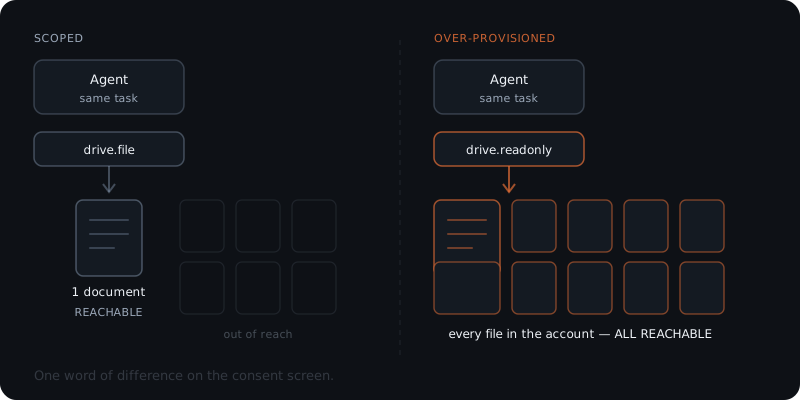
An agent that needs one spreadsheet should hold drive.file. With drive.readonly the same agent can read your contracts, your payroll folder, and every document anyone ever shared with you.
Narrow access
drive.fileThe agent can reach only files it created or that you explicitly opened with it.
Account-wide access
drive.readonlyThe agent can view and download every file in the connected Drive.
The task is identical.
The exposure is not.
Slack: scope and channel membership both matter
Slack adds a second boundary that most explainers miss. Its history scopes are limited by channel membership as well as by scope: channels:history grants messages in public channels "that your Slack app has been added to." The scope sets the ceiling; being added to a channel sets the actual reach.
| Slack scope | Grants | Class |
|---|---|---|
channels:read | Basic public-channel information | Read |
channels:history | Messages in channels the app was added to | Read |
im:history | Direct messages the app was added to | Read |
files:read | Files in conversations the app was added to | Read |
users:read | People in the workspace | Read |
chat:write | Post messages as the app | Write |
Why do permissions matter more than the model?
The risk in an agent deployment is the access, not the intelligence. An over-provisioned agent running a weak model can leak more than a well-scoped agent running the best model available.
The agent is not the risk. The permissions you gave it are.
The common failure is related access, but too much of it
The failure pattern is rarely dramatic.
An audit of 2,890 public OAuth app listings across the Google Workspace and GitHub marketplaces found 918 — about 32% — carrying at least one structural exposure signal. Another 677 requested at least one permission beyond their stated function.
Philip Shteyn, CTO of Offroad, which runs the OhAuth research project behind the June 2026 audit, described the pattern:
most of the issue is not apps asking for completely random access. It is apps asking for access that is related to what they do, but much broader than they need.
In Google Workspace, around 90% of flagged cases fell into that right category, too much access group.
The audit covers marketplace apps rather than AI agents, and its publisher sells identity security. Treat the numbers as directional.
The pattern is what matters here. Nobody grants an email tool access to Drive out of malice. They grant drive.readonly when drive.file would have done, because the broader scope is easier to ship and the consent screen does not make the difference obvious.
Agent systems can inherit privileges they do not need
OWASP ranks this third among agentic risks. In the peer-reviewed OWASP Top 10 for Agentic Applications 2026, entry ASI03 is Identity and Privilege Abuse. The report was published on 9 December 2025 with more than 100 contributors.
Its diagnosis is precise:
Without a distinct, governed identity of its own, an agent operates in an attribution gap that makes enforcing true least privilege impossible.
OWASP also names the mechanism that produces over-provisioning in multi-step systems: un-scoped privilege inheritance, where a high-privilege component delegates a task "passing its full access context," so "a narrow worker then receives excessive rights."
Older guides still use the previous name, Excessive Agency. OWASP says ASI03 "is the agentic evolution of Excessive Agency (LLM06:2025)."
If a page still tells you to guard against excessive agency, it predates the current taxonomy.
Read-only is narrower, not automatically safe
Restricting an agent to read scopes removes its ability to act. It does not remove its ability to be manipulated by what it reads.
Google Cloud's Office of the CISO describes the route directly. Agents are "vulnerable to 'jailbreaks,' which are clever prompts that are designed to bypass their safety features and expose confidential information."
Its worked example is an agent tasked with summarising email, then "fed a jailbreak prompt that causes it to leak confidential information to an unauthorized recipient."
Read access still accepts untrusted input
The content an agent reads is untrusted input. An email, a shared document, or a calendar invite can carry instructions aimed at the agent rather than at you. Read scope determines what the attacker's instruction can reach; it does not stop the instruction arriving.
This is why scoping and gating are two controls, not one. Narrow scopes limit the blast radius. A gate on outbound actions limits what an influenced agent can do with what it found.
Least privilege applies to agents the same way it applies to people: the agent gets the bare minimum access to do its job, and nothing more. A tool connection without a revocable, logged permission scope is an open door — and read-only access is a smaller door, not a closed one.
What three controls decide exposure?
Google Cloud's Office of the CISO frames agent security on three traditional controls. Anton Chuvakin, Security Advisor in that office, sets them out as authentication, authorization, and auditability.
| Control | What it means for an agent | What it looks like in practice |
|---|---|---|
| Authentication | "every agent has a unique identity, allowing you to verify that it is what it claims to be" | A dedicated account for the agent, not a person's login |
| Authorization | "only give an agent the bare minimum access it needs to perform its job and nothing more" | drive.file over drive.readonly; gmail.send over gmail.modify |
| Auditability | "logging every action the agent takes… a clear record, or audit trail" | A per-action log naming the tool, the data, and the outcome |
Authentication is the control most small deployments get wrong. An agent acting through a person's OAuth grant inherits everything that person can see.
It also becomes hard to trace because every action in the log belongs to the human. A dedicated account makes both scope and attribution possible.
Where the gate sits
Where the gate sits is a separate decision from what the agent may reach. In Yardwork implementations, read access is the default. Sends and other high-impact actions sit behind an approval enforced in code rather than in a prompt.
The agent holds the send capability, but nothing leaves until a person reviews and approves it. That describes implementation practice scoped per engagement. It is not a security guarantee, an audit, or a certification.
Prompt versus code
Prompt versus code is the distinction that matters. An instruction telling a model not to send is a preference it may fail to honour. A gate in the execution path is a condition it cannot route around.
The approval workflow owner covers how those gates behave in practice. AI agent governance covers the wider control design.
What stays behind after the task ends?
An agent's permissions describe what it can reach. They say nothing about what it keeps.
Spain's data protection authority, the AEPD, addressed this directly in Agentic Artificial Intelligence from the Perspective of Data Protection (V1.1, February 2026). The agent's memory stores personal data. Its logs can reach further:
The logs will store information about both the users of the agentic AI and the people subject to the processing, it could even store data on people who should not be data subject.
Three places hold data after a run finishes:
- Working context — the material the agent pulled in to do the task.
- Long-term memory — summaries, profiles, and embeddings that persist so the agent need not be re-briefed.
- Logs — the audit trail, which is itself a store of personal data.
The AEPD recommends separate retention periods for each category rather than one global rule. It also recommends allowing persistent memory to be disabled when the processing does not need it.
The practical question: which of the three exists in your deployment, and how long is each kept?
"We do not delete anything" is a common and honest answer. It is also a decision, whether or not anyone made it deliberately.
Data also leaves. Model providers, enrichment APIs, translation and summarisation services each receive whatever the agent sends them. If your business falls under the GDPR, those recipients and any transfers outside the EU carry their own obligations — the GDPR and AI agents guide maps which article each action engages.
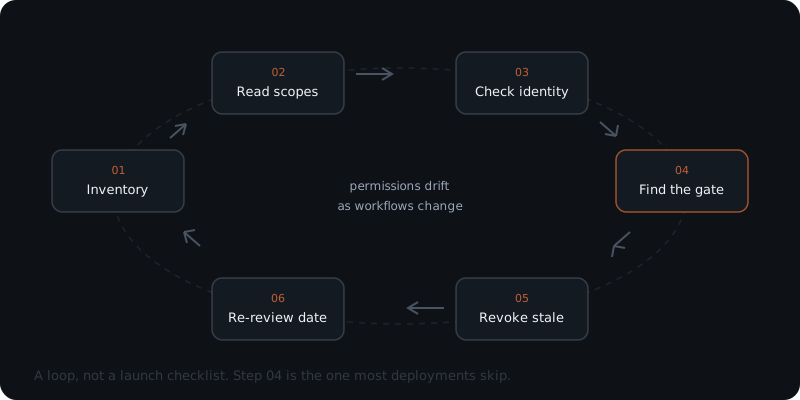
How do you review and revoke access?
Reviewing and revoking agent access is the part you can do today, without asking anyone.
Inventory the connections
Read the scopes, not the app name
Ask which account it acts as
Find the gate
Revoke what is stale
Set a re-review date
What questions should you ask before connecting a tool?
The useful questions have answers you can check afterwards.
- Which exact scopes does this integration request? Ask for the scope string, not whether it "accesses Drive." If the vendor cannot tell you, that is itself an answer.
- Can it work with a narrower scope?
drive.fileis often enough for a tool that needs only the documents you hand it. - What identity does it act as? Look for a dedicated account rather than someone's personal login.
- What is logged, and can I read it? A log you cannot inspect does not give you auditability.
- Which third parties receive the data? Include model providers, enrichment services, and anything the agent calls mid-task.
- What is retained, and for how long? Working context, long-term memory, and logs are three separate answers.
- How do I revoke it, and what happens to data already held? Revocation and deletion are different operations.
Frequently asked questions
Can an AI agent see everything in my email?
Only if you granted a scope that allows it. Gmail's gmail.readonly scope permits viewing messages and settings. The gmail.metadata scope permits labels and headers but not message bodies. The gmail.send scope permits sending and cannot read the mailbox at all. What the agent sees is set by which of these you approved, not by what the agent is capable of.
What is the difference between read and write access for an AI agent?
Read access lets the agent retrieve information. Write access lets it change or create things, and send access lets it act outside your organisation. These are separate permissions in most tools. Gmail treats sending as its own scope, so an agent can be permitted to send without being permitted to read, or the reverse.
How do I check what permissions I gave an AI tool?
Open your account's third-party access settings — in Google this is the third-party apps section of your Google Account, and in Slack it is the installed apps list for the workspace. Each connected app lists the scopes it was granted. Compare that list against what the tool needs to do its job.
What is least privilege for an AI agent?
Least privilege means the agent holds the narrowest permission that still lets it finish the task, and nothing beyond it. Google Cloud's Office of the CISO defines it as giving an agent the bare minimum access it needs and nothing more. In practice it means choosing drive.file over drive.readonly when the agent only needs one document.
Is this page a security guarantee?
No. This page explains how permission scopes work and how to inspect your own. It is not an audit, a certification, or a guarantee about any product or deployment, including Yardwork's. Scope definitions also change over time, so verify current documentation before relying on any specific scope behaviour.
Notes
- Gmail API — Choose Auth Scopes, Google Workspace developer documentation, retrieved August 11, 2026. Source for all Gmail scope strings and their stated grants.
- Google Drive API — API-specific authorization, retrieved August 11, 2026. Source for all Drive scope strings and their stated grants.
- Slack — Scopes reference, retrieved August 11, 2026. Source for Slack bot token scopes and the channel-membership qualifier.
- OWASP Top 10 for Agentic Applications 2026, published December 9, 2025, peer-reviewed with more than 100 contributors; full PDF retrieved August 11, 2026. Source for ASI03 Identity and Privilege Abuse, un-scoped privilege inheritance, and the relationship to Excessive Agency (LLM06:2025).
- Google Cloud Office of the CISO, "AI agent security: How to protect digital sidekicks (and your business)", Anton Chuvakin, September 13, 2025, retrieved August 11, 2026. Source for authentication, authorization, and auditability, and the email-jailbreak example. Vendor publication, attributed.
- AEPD, Agentic Artificial Intelligence from the Perspective of Data Protection, V1.1, February 2026, retrieved August 11, 2026. Source for the memory-and-logs passage and the retention recommendations. AEPD guidance is authoritative in Spain and persuasive, not binding, elsewhere in the EU.
- OAuth marketplace audit by OhAuth, the research project of identity-security company Offroad, led by CTO Philip Shteyn, as reported by Help Net Security, June 4, 2026. A point-in-time scan of 2,890 public marketplace listings. The primary report could not be independently opened at the time of writing, and the publisher sells identity-security products; the figures are cited as directional industry evidence, not primary research, and they concern marketplace apps rather than AI agents.
- Eurostat, dataset
isoc_eb_ai, retrieved via the Eurostat dissemination API on August 11, 2026; dataset last updated June 15, 2026. IndicatorE_AI_BCDP, unitPC_ENT_AI_EC,geo=EU27_2020,size_emp=GE10,nace_r2=C10-S951_X_K,time=2025: 52.72%. The denominator is enterprises that had ever considered using any measured AI technology, and the dataset measures a range of AI technologies rather than agents. - The access-review loop, the scope comparisons, and the provider question set in this guide are Yardwork work-product. Scope definitions change; verify current provider documentation before relying on any specific behaviour. This guide is not a security assessment, audit, or certification.