An AI agent for knowledge management answers employee questions using Slack history, email threads, and Notion pages that already exist. It retrieves the answer and cites the source, replacing a person's manual search across tools. Unlike a company wiki, the agent needs no new documentation — it works from conversations and decisions already on record.
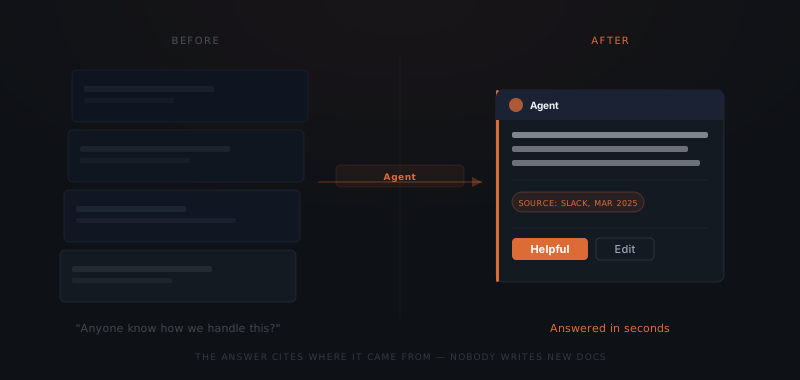
A new hire messages the team Slack: "How do we handle a client who wants to pause their retainer mid-contract?" Three people start typing. None of them finish, because none of them remember the exact answer — it was decided on a call six months ago and never written down anywhere searchable. The question gets answered eventually, in a reply that pulls someone away from their own work for ten minutes to reconstruct it. An AI agent for knowledge management answers that question from the Slack thread, email, or Notion page where it was already decided — no new documentation, no interrupted colleague, just the answer with its source attached.
Institutional knowledge in a lean firm lives in one person's head, not a wiki
Knowledge workers spend 1.8 hours a day — 9.3 hours a week — searching for information, according to McKinsey Global Institute's research on workplace productivity.[¹] Glean's survey with The Harris Poll found employees spend at least two hours a day, 25% of the workweek, looking for documents, information, or the colleague who has it.[³] Neither number describes a lack of documentation. Both describe knowledge that exists somewhere in the organization but isn't retrievable on demand.
For a founder-led firm with 10 to 40 employees, retrieval friction shows up as a specific, repeating pattern. A new hire asks a question in Slack and waits for a reply — the one person who knows the answer is in back-to-back client calls. Panopto and YouGov's Workplace Knowledge and Productivity Report found 42% of institutional knowledge is unique to a single individual — not written down anywhere a colleague could find it.[²] The same report found U.S. knowledge workers waste 5.3 hours a week waiting for information from colleagues or recreating knowledge that already exists somewhere in the company.[²]
Lean operations feel this harder than large enterprises do. A 200-person company can absorb one senior person being unreachable for an afternoon. A 15-person agency cannot — the founder, the ops lead, or whoever closed the last similar deal is often the only source for a recurring question. Every hour spent re-explaining something already explained once is an hour not spent on client work.
The instinct is to fix this with a nicer wiki or a new documentation tool. That rarely works. The wiki only helps if someone remembers to update it. The person with the answer is usually too busy giving it in a Slack DM to also write it down somewhere else.
A 20-person recruiting firm often has three people who know how a specific client wants candidates screened, none of it written down. A 12-person marketing agency often has one account lead who remembers why a client's brand guidelines changed last year, buried in an email thread from that project. The pattern repeats across founder-led service businesses: the knowledge exists, but it lives in a person's memory instead of a place a colleague can search.
A knowledge agent answers from what already exists — not from new documentation
A knowledge management agent is not a new company wiki that someone has to keep updated. The agent answers from the Slack history, email threads, and Notion pages a firm already has. Nobody writes new documentation for it to work — the knowledge was already there, just not searchable.
An AI agent for knowledge management retrieves answers from communication and documents a firm already has — Slack history, email threads, Notion pages, shared drives — instead of requiring anyone to write new content. The agent indexes what already exists and answers the question directly, citing where the information came from.
Most knowledge management failures aren't failures of content. They are failures of retrieval. A firm's answer to a client-onboarding question sits in a six-month-old email thread; a pricing decision sits in a Slack channel from last quarter; a step-by-step process sits in a Notion page nobody remembers exists. The information is there. Finding it costs more time than most people are willing to spend, so they ask a colleague instead — and the cycle behind that 5.3 wasted hours a week repeats.
An agent built for this reads across those sources continuously and treats every past conversation and document as part of one searchable index. Asked "how do we handle a client who wants to pause their retainer," the agent pulls the answer from the last three times the question came up. The agent cites an email exchange, a Slack thread, and a Notion policy page, and returns one answer with the source attached. Nobody had to write a new policy document. The policy already existed. It just wasn't in one place.
What a knowledge agent handles and what stays with a person
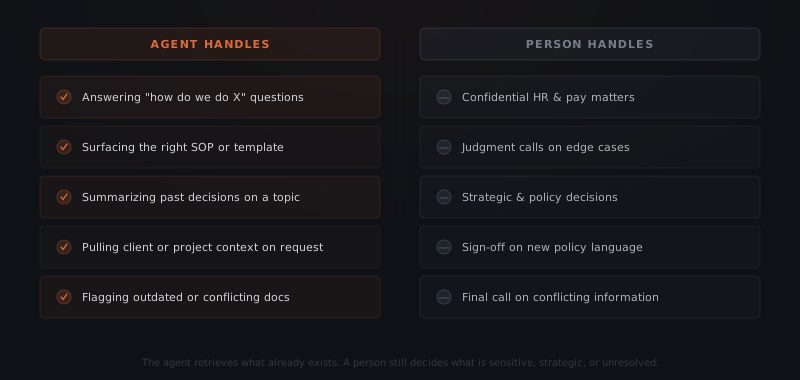
A knowledge management agent handles five categories of recurring questions in a lean service firm.
Onboarding questions. New hires ask the same questions in their first month that every previous hire asked: how do we bill for scope changes, which template applies to a specific client type, who approves an exception. The agent answers from the same sources a tenured employee would reference, without waiting for that person's availability.
SOP and template retrieval. When someone needs the correct proposal template, contract clause, or process checklist, the agent surfaces the current version and flags it if a newer one exists elsewhere.
Decision history. When a recurring question comes up — how did we price a similar engagement, why did we choose one vendor over another — the agent pulls the relevant thread or document and summarizes what was decided and why.
Client and project context. Before a call or a handoff, the agent assembles the relevant history for a specific client or project from past emails, Slack mentions, and shared documents.
Policy clarification. Questions about internal process — expense approval limits, time-off procedures, who signs off on what — get answered from the policy documents and past clarifications already on record.
The knowledge was never missing. It was just unsearchable.
| Question type | Requires judgment | Agent answers directly |
|---|---|---|
| Onboarding process questions | No | Yes |
| SOP or template retrieval | No | Yes |
| Past decision context | No | Yes |
| Client or project history | No | Yes |
| Policy clarification | No | Yes |
| Compensation or performance questions | Yes | No |
| Strategic or pricing decisions | Yes | No |
| Conflicting or outdated information | Yes | No |
| New policy creation | Yes | No |
The agent answers what is already decided. It routes what is still being decided — or what touches compensation, performance, or anything confidential — to a named person instead of guessing. If two sources disagree, the agent surfaces both and flags the conflict rather than picking one.
Where a knowledge agent pulls information from
A knowledge management agent needs four types of source access to answer questions accurately, plus one output channel.
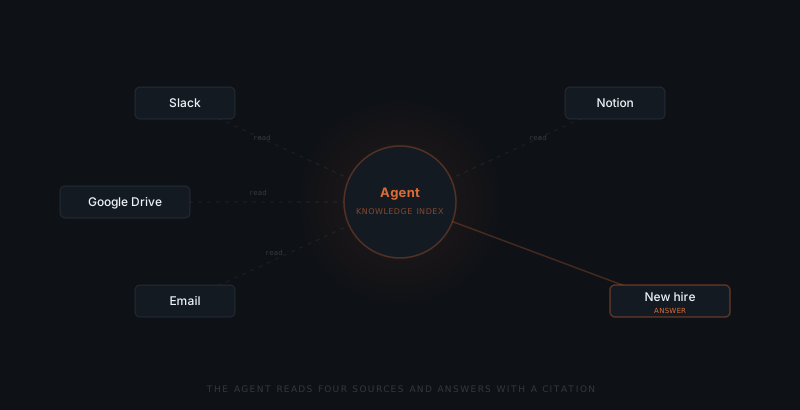
Slack or Teams. The agent reads channel history and threads — not just recent messages, but the full searchable archive, since institutional knowledge accumulates over years, not weeks.
Email. The agent reads shared or delegated mailboxes and any threads a firm designates as searchable, capturing decisions and client context that never made it into a formal document.
Notion, Confluence, or a shared drive. The agent indexes existing documentation — SOPs, templates, policy pages — and treats it as a primary source, prioritizing whichever version was edited most recently when duplicates exist.
Google Drive or SharePoint. The agent reads shared files: contracts, proposal templates, client records, internal memos.
A chat interface for output. The agent answers where people already ask questions — Slack, Teams, or a dedicated channel — rather than a separate portal people have to remember to open.
| Integration | Role in the knowledge workflow | Access required |
|---|---|---|
| Slack / Teams | Channel and thread history, question intake | Read + post to a channel |
| Gmail / Outlook | Email threads with decisions and client context | Read-only, scoped mailboxes |
| Notion / Confluence | SOPs, templates, policy documentation | Read-only |
| Google Drive / SharePoint | Contracts, proposals, internal files | Read-only |
| CRM (HubSpot, Pipedrive) | Client and deal history for context | Read-only |
Write access is unnecessary for most of this workflow. The agent's job is retrieval and synthesis, not editing the underlying sources — which keeps the risk profile lower than a workflow agent that updates records directly.
What needs to be defined before a knowledge agent goes live
A knowledge management agent requires three things defined before it answers its first question.
Source boundaries. Decide which channels, mailboxes, and drives the agent can read. Sensitive channels — HR discussions, compensation conversations, board communications — should be excluded from the index entirely, not filtered at answer time. Excluding a source at the index level is the only way to guarantee the agent never surfaces it, even indirectly.
Authority order for conflicting information. When two sources disagree — an old Slack message and a newer Notion page — the agent needs a defined hierarchy: which source wins, or when to flag the conflict instead of picking a side. Most firms set documentation as the default authority over chat history, since chat reflects a moment in time and documentation is meant to reflect current state. Documentation goes stale too, so the agent also needs a rule for flagging pages that haven't been touched in a defined window.
Escalation rules for ambiguous or sensitive questions. Define what happens when a question falls outside what the agent can answer confidently — anything touching compensation, performance, legal exposure, or a topic without a clear source. The agent should route these to a named person rather than attempt an answer from incomplete information.
A fourth item worth deciding early: how the team verifies the agent is working. A simple check is a weekly spot review of a sample of answers against their cited source — five or ten questions is enough to catch a pattern before it compounds. Teams that skip this step only find out an answer was wrong when a client or colleague acts on it.
How to deploy a knowledge management agent
Audit and scope your sources
List every Slack channel, mailbox, Notion space, and shared drive that holds recurring institutional knowledge. Flag anything sensitive — HR, compensation, legal — for exclusion before connecting anything.
Connect read-only access
Grant the agent read access to the approved sources with OAuth scoped to those specific channels, mailboxes, and folders. No write access is required for this workflow.
Set the authority order
Define which source wins when information conflicts, and set a staleness window after which a document gets flagged for review instead of trusted automatically.
Define escalation rules
Write down which question types route to a named person instead of an agent answer — compensation, legal, unresolved strategic questions, and anything the agent can't source confidently.
Launch in one channel with full visibility
Start with a single Slack channel or a specific team, with every answer visible to that team so someone can flag a wrong or outdated answer. Expand once the agent's answers hold up under real questions.
Where knowledge management agent implementations go wrong
Six failure modes appear consistently across knowledge management agent deployments.
Sensitive channels get indexed by accident. If the source audit misses a channel that occasionally contains compensation or HR discussion, the agent can surface that content in an unrelated answer. Exclude sensitive sources at setup — do not rely on the agent to filter them out after the fact.
No authority order means the agent guesses. Without a defined hierarchy for conflicting sources, the agent defaults to the most recent or most confident-sounding answer, which is not the same as the most accurate one. Set the hierarchy before launch, not after the first wrong answer.
Stale documentation gets treated as current. A Notion page from two years ago can outrank a more accurate recent Slack thread if the agent has no staleness rule. Define a review window so old documents get flagged, not trusted by default.
Nobody owns the source list. Sources get added and removed from company tools constantly — a new Notion workspace, an archived Slack channel, a migrated shared drive. If no one owns keeping the agent's source list current, the index drifts out of date within a few months.
Launch scope is too broad. Rolling the agent out to the entire company on day one, across every channel, makes it hard to catch a wrong answer before it spreads. Start with one team and a visible answer trail, then expand.
Nobody checks whether the answers are correct. An agent that answers confidently but wrong erodes trust faster than a wiki that is simply out of date, because people stop verifying once an answer arrives quickly. A weekly spot check against cited sources catches drift before it becomes the team's default habit.
None of these failure modes are inherent to the approach — they are scoping mistakes, the same kind that show up in any agent implementation. A knowledge management agent that starts with a clear source boundary, a defined authority order, and a narrow launch scope answers reliably from day one. The firms that skip that scoping end up with an agent as unreliable as the tribal knowledge it was supposed to replace.
Frequently asked questions
What does an AI agent do for knowledge management? An AI agent for knowledge management reads a firm's existing Slack history, email threads, and Notion or Confluence pages, and answers employee questions directly from that content, citing the source. The agent does not create new documentation — it retrieves and synthesizes information a firm already has, and routes questions about compensation, strategy, or unresolved topics to a named person instead of answering them.
Does a knowledge management agent replace a company wiki? A knowledge management agent does not replace a company wiki — it works alongside one, or in its place if a firm doesn't have one. A wiki depends on someone remembering to write and update it. The agent answers from communication and documents that already exist, so it keeps working even when documentation is incomplete or out of date.
What tools does a knowledge management agent connect to? A knowledge management agent connects to Slack or Teams, email (Gmail or Outlook), Notion or Confluence, and Google Drive or SharePoint. Access is read-only across all of these sources. The agent answers questions through the chat tool employees already use, rather than a separate portal people have to remember to open.
How does the agent handle sensitive or confidential information? Sensitive channels and mailboxes — HR discussions, compensation conversations, board communications — get excluded from the agent's index at setup, not filtered after the fact. Excluding a source at the index level is the only way to guarantee the agent never surfaces it, even indirectly, in an answer to an unrelated question.
How long does it take to set up a knowledge management agent? A focused knowledge management agent implementation — covering source audit, read-only integration for two to four systems, authority rules, and escalation paths — takes two to three weeks. The first week covers the source audit and access setup. The following week covers authority ordering, escalation rules, and a scoped launch with one team before wider rollout.
Notes
- McKinsey & Company / McKinsey Global Institute. "The social economy: Unlocking value and productivity through social technologies." https://www.mckinsey.com/industries/technology-media-and-telecommunications/our-insights/the-social-economy — source for the finding that the average worker spends 1.8 hours a day, 9.3 hours a week, searching and gathering information.
- Panopto and YouGov. "Workplace Knowledge and Productivity Report," 2018. https://www.panopto.com/company/news/inefficient-knowledge-sharing-costs-large-businesses-47-million-per-year/ — source for the findings that 42% of institutional knowledge is unique to a single individual, and that U.S. knowledge workers waste 5.3 hours a week waiting for information from colleagues or recreating knowledge that already exists.
- Glean and The Harris Poll. "Hybrid Workplace Habits & Hangups Report." https://www.glean.com/press/hybrid-workplace-habits-hangups-report-frustrated-employees-spend-a-quarter-of-workweek-searching-for-information-needed-to-do-their-jobs — source for the finding that employees spend at least two hours a day, 25% of the workweek, searching for documents, information, or the person who has it, and that 43% would consider leaving a job without efficient access to information.