An AI agent for operations is a defined set of task-level automations — not a single workflow — covering scheduling, invoicing, vendor follow-up, reporting, and documentation for lean service businesses without a dedicated ops hire. Unlike an all-in-one ops platform, each task connects to its own tools and stays in a review queue until a named person approves it.
Monday starts with three things that aren't client work: a vendor invoice needs approval, Thursday's meeting has a scheduling conflict, and the monthly status report is two days late. None of it appears on anyone's job description. The work lands on the founder because no one else owns it. That is the pattern in most lean service businesses — operations isn't a department, it's the leftover work that accumulates between the tasks that generate revenue. An AI agent for operations takes over the specific, recurring pieces of that leftover work — the scheduling, the invoicing, the reporting, the documentation — while every action still waits for a named person to approve it.
Operations absorbs whatever isn't client work in a lean team
In a service business without a dedicated ops hire, operations work has no fixed owner. The work defaults to whoever has a spare hour. Knowledge workers spend more than 58% of their working time on coordination and administrative overhead rather than the skilled work they were hired for, according to Asana's Anatomy of Work Index.[¹] In a business without an operations role, that overhead does not disappear — it moves to the founder, the managing partner, or whoever is closest to the task when it surfaces.
The U.S. Small Business Administration's 2023 Small Business Profile found that businesses with fewer than 100 employees make up 89.8% of all US employer firms.[²] Most businesses operate at a size where there is no operations department to absorb scheduling conflicts, vendor invoices, status reports, and document requests. Those tasks still happen. The tasks land inside whatever time is left after client calls, delivery work, and sales conversations.
The failure mode is rarely dramatic. A vendor payment gets approved three days after the due date. A status report goes out Thursday instead of Monday because Monday had a client fire. A scheduling conflict surfaces the day before the meeting instead of the week before. None of these cost a deal on their own. Compounded across a year, they cost more founder time than the tasks would take if they ran on a defined system instead of a spare hour.
An AI agent replaces the spare-hour model with a defined system. Each operations task runs on a schedule or a trigger — a call ends, a due date approaches, a week begins — and produces a draft or an update. A named person reviews it. The task stops depending on someone remembering to do it.
An operations agent is a list of tasks, not one workflow
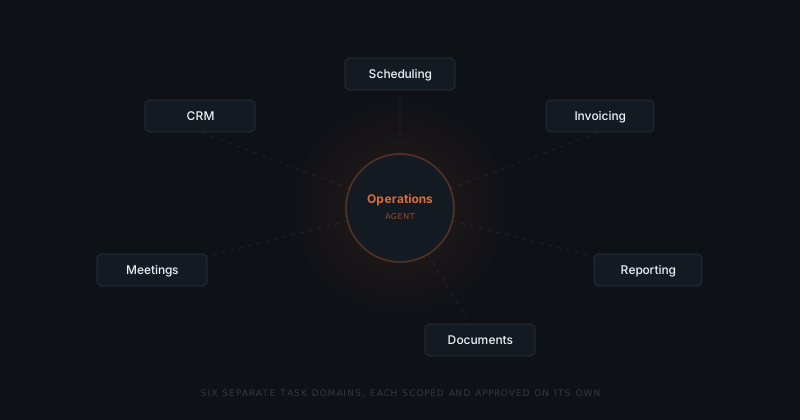
There is no single "operations agent" that runs a business's entire back office. Each operational task — scheduling, invoicing, reporting, document handling — connects to a different tool and needs its own approval rule. The agent's scope is the specific list of tasks a business defines, not a category.
"Operations" as a search term covers six recurring categories of work in a typical lean service business: calendar and scheduling coordination, vendor and invoice handling, status reporting, document intake and filing, CRM data hygiene, and meeting documentation. Each category is a separate, scoped task with its own trigger, its own data source, and its own output. This is broader than an agent scoped to one recurring cycle, like an internal ops agent built around the weekly status rhythm. The operations layer covers the full list of back-office tasks a lean team owns — not one cadence within it.
Scheduling and calendar coordination. The agent checks incoming meeting requests against existing commitments, flags conflicts, and proposes alternative times based on defined availability rules, following the same conflict-detection pattern covered in AI agents for scheduling. The agent does not decide which meetings matter more — it surfaces the conflict and waits for a decision.
Vendor and invoice handling. The agent drafts outgoing invoices from project or billing data, routes late payment reminders at a configured interval, and logs vendor invoices that need approval before payment. 55% of B2B invoices in North America are paid late, and the gap is usually a follow-up problem, not a billing-software problem.[³] The agent runs the follow-up, using the same reminder cadence detailed in AI agents for invoicing.
Status reporting. The agent pulls deal stages, project completion, and billing status from connected tools on a schedule and assembles a structured report. The owner reviews it in minutes instead of pulling the data together each week.
Document intake and filing. The agent reads incoming contracts, receipts, and forms, extracts the relevant fields, and files them to the correct record or folder. The agent does not interpret contract terms — it only extracts and routes.
CRM data hygiene. The agent updates contact records, deal stages, and interaction logs from email threads and call notes. The agent uses the same read-then-write pattern covered in AI agents for CRM updates, so the CRM reflects what happened on the call — not what someone remembered to type in later.
Meeting documentation. The agent reads a call transcript or calendar note, extracts decisions and action items, and logs them to the relevant record.
| Operations task | Requires judgment | Runs on a defined trigger |
|---|---|---|
| Calendar conflict detection | No | Yes |
| Invoice draft and payment reminders | No | Yes |
| Weekly status report assembly | No | Yes |
| Document intake and filing | No | Yes |
| CRM record updates | No | Yes |
| Meeting note extraction | No | Yes |
| Vendor contract negotiation | Yes | No |
| Budget and hiring decisions | Yes | No |
| Client relationship strategy | Yes | No |
Every row in the top section is addressable by a scoped agent. Every row in the bottom section stays with the owner. The agent does not compress the categories into one system — it takes over each task on its own terms.
The approval layer keeps judgment with the owner
A missing ops department isn't a gap. It's a clean slate.
Founder-led businesses without a dedicated ops hire are often easier to configure an agent for, not harder. In a business with a scattered ops team, defining who approves what requires untangling overlapping responsibilities across several people. In a business where every operations task already lands on one person by default, the reviewer is already defined — the agent has one approval queue to route to, not five.
That single point of ownership is also the control mechanism. Every draft the agent produces — an invoice, a status report, a filed document, a CRM update — sits in a review queue until the named owner approves it. The agent does not have send or write permissions beyond what the review queue releases. Approving confirms the action. Editing opens the draft for changes first. Rejecting closes it and logs the decision.
This is where an operations agent differs from a general automation tool. A fixed automation rule fires the same way regardless of context. An operations agent reads the current state — a deal stage, an invoice due date, a calendar conflict — and produces a draft calibrated to that state, but the decision to act still belongs to a person. The judgment calls that matter most to founders — whether to waive a late fee, which vendor to renegotiate with, how to prioritize a scheduling conflict — never leave the owner's hands.
What tools an operations agent connects to
An operations agent connects to the specific tools each task category already touches — not a unified ops platform that replaces them.
| Task category | Common tools | What the agent reads or writes |
|---|---|---|
| Scheduling | Google Calendar, Outlook Calendar | Reads availability and requests; proposes times, flags conflicts |
| Invoicing and vendors | QuickBooks, Xero, Bill.com | Reads billing data; drafts invoices and reminders for approval |
| Reporting | HubSpot, Pipedrive, GoHighLevel | Reads deal and pipeline data; assembles status reports |
| Documents | Google Drive, Dropbox, Notion | Reads incoming files; extracts fields, files to the correct record |
| CRM hygiene | HubSpot, Pipedrive, Salesforce | Reads email and call data; writes contact and deal updates |
| Approvals | Slack, Gmail | Delivers review notifications; no write access beyond notifications |
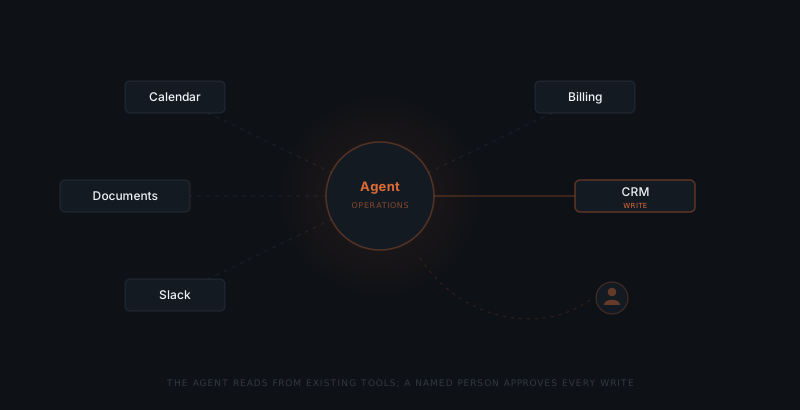
A business already using a calendar tool, a CRM, and a billing tool for these tasks does not add new software to run an operations agent. The agent connects through existing APIs and adds an approval layer on top of the data that already lives in each tool.
The number of tools involved is not the same as the number of tasks. Two tasks can share one tool — a CRM update task and a status reporting task both read from the same HubSpot pipeline, for example — which reduces the connection work for the second task once the first is live. A tool that only one task touches, like a document storage service used solely for filing, adds connection work that no other task in the sequence reuses. Ranking tasks by shared tools, not just by frequency, often shortens the total build.
How to deploy an operations agent
Inventory the recurring tasks
List every operations task that repeats weekly, on a schedule, or after a specific trigger — a call ending, an invoice due date, a new document arriving. Note which tool each task already lives in. This list becomes the deployment order, not a single project scope.
Rank by frequency and simplicity
Start with the task that happens most often and requires the least judgment to draft — usually scheduling or status reporting. The first workflow establishes the review pattern that later tasks reuse.
Connect the specific tools that task touches
Grant the agent read access to the data it needs and write access only to the fields it updates. A scheduling agent needs calendar access. An invoicing agent needs billing data. Neither needs the other's permissions.
Define the approval queue
Set who reviews each task's output, through which channel, and how fast. Most lean teams route every draft to one person at first — the founder or managing partner already receiving the work by default.
Go live on the first task, then add the next
Run the first task with full review for two weeks. Once outputs consistently need no edits, add the next task from the inventory. Each addition reuses the review pattern already in place.
Where operations agent implementations go wrong
Three failure modes appear consistently when businesses deploy an operations agent as one project instead of a sequenced list of tasks.
Trying to launch every task at once. An operations agent covering scheduling, invoicing, reporting, and documentation simultaneously multiplies the number of tool connections, approval rules, and edge cases that need defining before anything goes live. Sequencing one task at a time — see which workflows to automate first for a framework on the order — gets a working system into production in weeks instead of months.
No default reviewer defined. If drafts route to a shared inbox or a rotating reviewer, they sit unreviewed. The agent needs one named person per task type, at least at launch. Shared ownership can come later, once the task has a track record.
Treating the agent as a replacement for undocumented process. An agent that drafts a status report needs a defined report format. An agent that files documents needs defined filing rules. If the process was never written down because one person did it from memory, that process has to be defined before the agent can run it — the agent formalizes an existing process, it does not invent one.
McKinsey's research on professional services automation found that routine data processing and communication tasks carry a 64% average automation potential — among the highest of any knowledge-work category.[⁴] Operations work sits squarely in that category: repeatable, data-driven, and low on strategic judgment. A single scheduling or reporting workflow runs $1,200–$3,500 to implement, with additional tasks added at $600–$1,800 each once the core tool connections exist.
The cost scales with the number of task categories added, not with business size. A 10-person firm and a 35-person firm covering the same four operations tasks pay roughly the same implementation cost — the work being automated is the task, not the headcount around it.
Frequently asked questions
What does an AI agent for operations actually handle? An AI agent for operations handles the recurring, repeatable tasks that keep a business running but don't require strategic judgment: scheduling and calendar coordination, vendor invoice approval routing, status reporting, document intake and filing, CRM data hygiene, and meeting documentation. Each task is scoped separately, connects to the specific tool it touches, and produces a draft or update that a named person reviews before it takes effect.
Do I need an operations manager before I can use an AI agent for operations? No. A business without a dedicated operations hire is not a harder case for an operations agent — it's often a simpler one. Every operations task already funnels to one person by default, usually the founder or managing partner. That default ownership is the exact condition an agent needs to slot into: one reviewer, one approval queue, no handoffs to untangle first.
What is the difference between an operations agent and a single workflow agent like a CRM update agent? A workflow agent like a CRM update agent handles one task end to end. An operations agent is the umbrella covering several of those task-specific agents at once — scheduling, invoicing, reporting, documentation — each configured and approved separately. There is no single operations agent that runs a business's entire back office as one system; there is a defined list of tasks, each with its own scope.
How long does it take to implement an AI agent for operations? A first operations workflow — usually scheduling or status reporting — goes from scoping call to live outputs in two to three weeks. Each additional task added afterward, once the core tool connections and approval pattern are established, takes three to seven days depending on how many new integrations it requires. See the AI agent implementation timeline for a full breakdown of how that scales across more tasks.
Notes
- Asana, "Anatomy of Work Index 2023," Asana, 2023. https://asana.com/resources/anatomy-of-work — source for the finding that knowledge workers spend more than 58% of their working time on coordination and administrative overhead.
- U.S. Small Business Administration Office of Advocacy, "2023 Small Business Profile," SBA, March 2023. https://advocacy.sba.gov/2023/03/28/2023-small-business-profiles-for-the-states-and-territories/ — source for the finding that businesses with fewer than 100 employees make up 89.8% of US employer firms.
- Atradius, "Payment Practices Barometer North America 2024," Atradius Trade Credit Insurance, 2024. https://atradius.us/publications/payment-practices-barometer-north-america-2024.html — source for the finding that 55% of B2B invoices in North America are paid late.
- McKinsey Global Institute, "A future that works: Automation, employment, and productivity," McKinsey & Company, 2017. https://www.mckinsey.com/featured-insights/digital-disruption/harnessing-automation-for-a-future-that-works — source for the finding that routine data processing and communication tasks carry a 64% average automation potential.