
Every professional services firm runs on documents. Invoices, contracts, intake forms, proposals, reports — arriving as email attachments, PDF uploads, and forwarded scans. Someone reads each one, pulls the relevant fields, types them into a CRM or spreadsheet, and files the document. That someone is usually the person who should be doing billable work. An AI agent handles the extraction, routing, and filing — reading each incoming document, pulling the defined fields, writing them to the relevant system, and queuing the result for review before anything is permanently filed.
Every professional services firm runs on documents. Invoices, contracts, intake forms, proposals, reports — arriving as email attachments, PDF uploads, and forwarded scans. Someone reads each one, pulls the relevant fields, types them into a CRM or spreadsheet, and files the document. That someone is usually the person who should be doing billable work. An AI agent handles the extraction, routing, and filing — reading each incoming document, pulling the defined fields, writing them to the relevant system, and queuing the result for review before anything is permanently filed.
The document processing problem in professional services firms
Professional services firms are document-intensive by definition. Law firms process contracts, briefs, and court filings. Accounting firms handle invoices, tax documents, and financial statements. Recruiting agencies manage resumes, job descriptions, offer letters, and placement agreements. CRE firms process leases, letters of intent, and deal memos. In each case, the document arrives and a person has to do something with it — read it, extract the relevant information, record it somewhere, and file it.
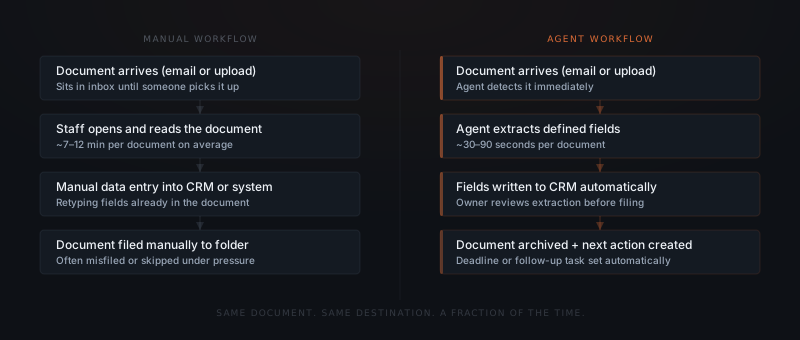
The cost of manual document processing is specific. Organizations using document automation reduce invoice processing cycle time from 12 days to under 3 days on average.[¹] A logistics company tracked in a case study reduced its document processing time from over 7 minutes per document to under 30 seconds — a reduction of more than 90%.[¹] For a professional services firm processing 50–200 documents per week, the math on that time difference is not abstract.
The broader enterprise market has taken note: 78% of enterprise executives listed document automation as a top priority in their digital transformation initiatives for 2025.[²] Among businesses that have already implemented document automation, the typical ROI runs 30–200% in the first year, with most of the gain coming from labor cost savings on extraction and data entry tasks.[¹]
The pattern holds for firms of any size. The workflows are the same whether a firm processes 20 documents per week or 2,000.
| Document type | Manual processing time | With AI agent | Annual hours saved (100 docs/week) |
|---|---|---|---|
| Invoice / bill | 8–12 min | under 1 min | 580–880 hours |
| Contract | 15–20 min | 2–3 min | 780–1,040 hours |
| Intake form | 5–8 min | under 1 min | 415–735 hours |
| Report extraction | 20–30 min | 3–5 min | 1,300–2,080 hours |
What an AI document processing agent actually does
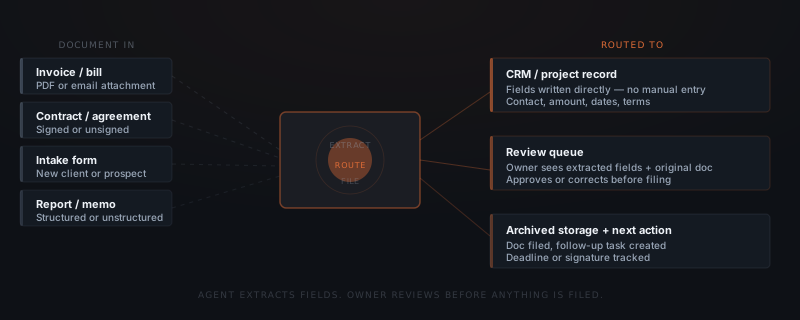
An AI document processing agent — one narrow application of what an AI agent is in general — operates in three stages: extraction, routing, and review. Each stage has a specific job.
Extraction. The agent reads the incoming document — whether it arrives as a PDF attachment, a scanned image, or a structured upload — and identifies the predefined field set. For an invoice, those fields might be: vendor name, invoice number, date, due date, line items, and total. For a contract: party names, effective date, term length, key obligations, and signature status. The agent extracts those fields and only those fields. It doesn't summarize, analyze, or make decisions — it pulls what was defined.
Routing. The extracted fields go to the defined destination: a CRM contact record, a project tracker entry, an invoice register, a deal database. The agent writes the fields in the format the target system expects. A date field goes in as a date. A currency field goes in as a number. The routing rules are set at implementation and can be updated as the firm's systems evolve.
Review. Before anything is permanently filed, the agent queues the extraction for owner review. The owner sees the extracted fields alongside the original document. Misreads are corrected in seconds. The owner approves, the record is written, and the document is archived. Nothing goes into the system of record without a human check.
This sequence is what separates a document agent from a document automation tool that files documents automatically and introduces errors silently.
Why field definition is the critical step
The quality of a document processing agent is determined before the first document runs through it. Agents extract what they're told to extract. Poorly defined fields produce consistently wrong output — and wrong output that files automatically is worse than manual processing.
Document processing agents fail in one specific way: the fields weren't defined precisely enough at the start. A field called "amount" on an invoice might mean the subtotal, the tax, the total, or the amount due. If the implementation doesn't specify which, the agent extracts whichever interpretation it applies consistently — and that might be correct 70% of the time and incorrect 30% of the time, with no obvious signal of which is which.
Defining fields correctly requires looking at 10–20 sample documents of each type and specifying: the field name, where on the document it appears, what format it takes, and what to do when it's missing. For a professional services firm, this exercise typically takes two to three hours per document type. It's the step that separates a well-implemented document agent from one that creates faster versions of the same data quality problems.
The implementation for a firm processing invoices, contracts, and intake forms typically covers:
Document type inventory
List every document type the firm processes regularly. Group by structure (invoices are similar across vendors; contracts vary widely). Start with the highest-volume, most-structured type.
Field mapping
For each document type, define the exact fields to extract — name, format, destination field in the target system, and what the agent should do when a field is absent or unclear.
Integration
Connect the agent to the email inbox or upload folder where documents arrive, the CRM or system where fields are written, and the document storage where files are archived.
Review workflow
Set the approval flow for each document type. Define who reviews, how they're notified, and how corrections are submitted.
Go-live and calibration
First document type goes live. Owner reviews the first 20–30 extractions carefully, correcting any systematic misreads. The agent's accuracy on well-defined fields typically reaches 90%+ within the first two weeks of calibration.
What document types work well and what doesn't
AI document processing works well for documents that arrive in consistent formats with predictable field locations. It produces reliable results for invoices, contracts, intake forms, HR documents, and structured reports. Each of these has the same general structure across instances — the fields are in roughly the same place, labeled in roughly the same way, formatted in roughly the same pattern.
Document types that produce lower extraction accuracy: handwritten notes and forms, free-form email correspondence, highly variable or multi-page contracts with non-standard structures, and scanned images with low resolution. These categories aren't impossible to process, but they require more exception handling, more human review, and more calibration passes before the agent produces reliable output.
The practical approach for most firms: start with invoices. Invoices are the most structurally consistent document type across vendors — the fields are always the same (vendor, date, amount, due date), and the cost of a misread (a wrong number in an invoice register) is visible immediately. After the invoice workflow is calibrated, add the next document type.
The fastest path to accurate document automation is starting with the most structured document type the firm processes, calibrating it fully, then expanding.
How a document processing agent connects to existing tools
Document processing agents connect to three types of existing systems: document sources (where documents arrive), target systems (where extracted data goes), and storage (where documents are archived).
| Tool category | Common platforms | What the agent reads or writes |
|---|---|---|
| Document source | Gmail, Outlook, Google Drive, Dropbox, upload form | Detects incoming documents, reads attachments |
| CRM / project system | HubSpot, Pipedrive, Airtable, Notion, Salesforce | Writes extracted fields to the correct record |
| Accounting | QuickBooks, Xero, FreshBooks | Logs invoices, syncs bill records |
| Document storage | Google Drive, Dropbox, SharePoint | Archives filed documents in the correct folder |
| E-signature | DocuSign, HelloSign | Tracks signature status on routed contracts |
A firm using Gmail, HubSpot, and Google Drive for document flow can typically go live in two to three weeks. The integration work is straightforward — the primary time investment is the field mapping exercise for each document type, not the technical connection.
For professional services firms handling client contracts and engagements, the custom agent post covers when a standard document processing agent covers the use case and when a custom-built extraction model is worth the additional cost.
Frequently asked questions
What is AI document processing for small businesses? AI document processing for small businesses uses an AI agent to read incoming documents — invoices, contracts, intake forms, proposals — extract defined fields, write those fields to a CRM or project system, and queue the result for owner review before filing. The agent processes documents in 30–90 seconds that would take a staff member 7–12 minutes to handle manually. Businesses using document automation reduce invoice processing time from 12 days to under 3 days on average.[¹]
What types of documents can an AI agent process? An AI agent processes any document with consistently structured content: invoices and bills, contracts and agreements, intake forms, proposals and quotes, and structured reports or memos. Documents with highly variable or unstructured content — handwritten notes, free-form correspondence — produce lower extraction accuracy and require more human review passes.
How does an AI agent handle document review and approval? After extracting fields from a document, the AI agent queues the extraction for owner review before anything is permanently filed. The owner sees the extracted fields alongside the original document, makes corrections where needed, approves, and the fields are written to the target system. Nothing is filed without a human review step.
How long does document processing automation take to implement? A standard implementation covering 2–3 document types goes from scoping call to first live extraction in two to three weeks. The primary work is defining the field map for each document type. Adding more document types after go-live typically takes one to two days each once the base integration is in place. See what AI agent implementation actually costs for a small business for a full breakdown.
Notes
- Docsumo, "50 Key Statistics and Trends in Intelligent Document Processing (IDP) for 2025." https://www.docsumo.com/blogs/intelligent-document-processing/intelligent-document-processing-market-report-2025
- Sensetask, "75 Document Processing Statistics for 2025: Market Size, Trends & Automation ROI." https://sensetask.com/blog/document-processing-statistics-2025/