An AI agent for recruiting handles three specific jobs: parsing applications into the ATS, scheduling screening calls, and managing candidate communications. Evaluation, interviewing, and offer decisions stay with the recruiter. Most recruiting teams implementing an AI agent find the gain is more time spent on judgment — not better judgment — because the coordination overhead before each decision is eliminated.
Tuesday afternoon. Eleven unread emails from candidates waiting for screening call times. Three intake forms sitting in an inbox, not yet logged to the ATS. A scheduling thread with a hiring manager that has been going back and forth for two days. None of this requires a recruiter's judgment — but all of it takes a recruiter's time. An AI agent for recruiting handles that coordination layer, so the recruiter spends time on the 30-minute screening call that determines whether a candidate moves forward.
What does an AI agent handle in a recruiting workflow?
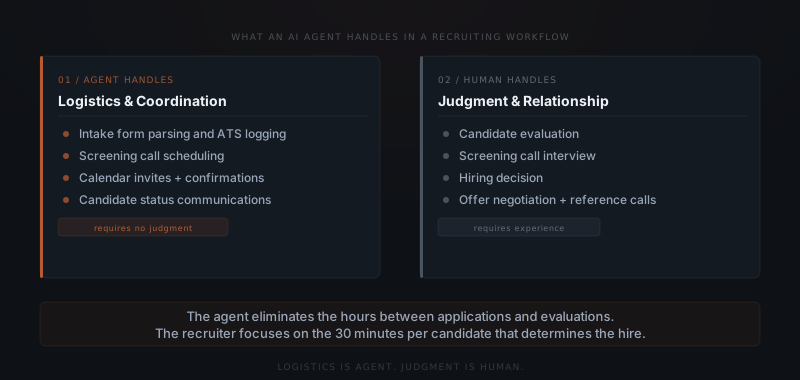
An AI agent for recruiting handles the coordination layer between receiving an application and making a hiring decision. Three specific workflows account for most of what that means in practice.
Intake parsing is the first job. When a candidate applies, the agent reads the application, extracts the relevant fields — name, contact information, role, experience summary — and creates or updates the candidate record in the ATS. The recruiter does not touch the application until it is already logged and organised. In a pipeline with 30–50 applicants per open role, the time saving across a full search is material.
Screening call scheduling is the second job. Once an intake is processed, the agent proposes screening call times based on the hiring manager's calendar availability, sends the invitation, and confirms the appointment. When a candidate reschedules, the agent handles the back-and-forth without involving the recruiter. The recruiter sees the confirmed call on the calendar.
Candidate communications is the third job. Status updates, rejection emails, next-round invitations, and document requests are drafted by the agent and held in an approval queue before sending. OpenClaw handles this approval layer — every outbound message to a candidate waits for recruiter sign-off before it reaches anyone. Nothing goes to a candidate without explicit release.
What does the coordination layer cost without an agent?
SHRM research puts the average time-to-fill for a knowledge worker role at 36 days.[¹] A significant portion of that timeline is coordination overhead — scheduling, intake logging, and candidate communication — rather than actual evaluation time. Recruiting coordinators at firms with ten or more open roles at any given time typically spend 40–60% of their week on the logistics surrounding candidate evaluation, not the evaluation itself.
That overhead compounds. When intake forms take a day to log, screening calls take three days to schedule, and status emails go out late, candidates withdraw. LinkedIn's 2024 Future of Recruiting Report identifies slow communication as one of the top reasons qualified candidates drop out of a process before a hiring decision is made.[²]
An AI agent for recruiting does not speed up the evaluation — the screening call takes the same 30 minutes it always did. The agent compresses the coordination surrounding it. Intake gets logged the same day. Scheduling takes hours, not days. Candidate communications go out within the approval window rather than sitting in a backlog.
The coordination overhead by stage, with and without an agent:
| Pipeline stage | Without agent | With agent | Time recovered |
|---|---|---|---|
| Application intake | Recruiter logs manually (10–15 min per application) | Agent parses and creates ATS record automatically | 10–15 min per application |
| Screening call scheduling | 2–5 emails over 1–3 days per candidate | Agent proposes times, sends invite, confirms | 1–3 days per candidate |
| Candidate status updates | Recruiter writes and sends each update | Agent drafts, recruiter approves in under 30 seconds | 5–10 min per message |
| Document requests | Recruiter writes and follows up manually | Agent sends and follows up at defined intervals | 5–10 min per request |
| Rejection emails | Written manually or skipped under time pressure | Agent drafts, recruiter approves before send | Previously skipped or 5 min each |
| Second-round coordination | Recruiter schedules with hiring manager and candidate separately | Agent handles both-party coordination in one loop | 30–60 min per search |
What does AI agent-assisted recruiting look like in practice?
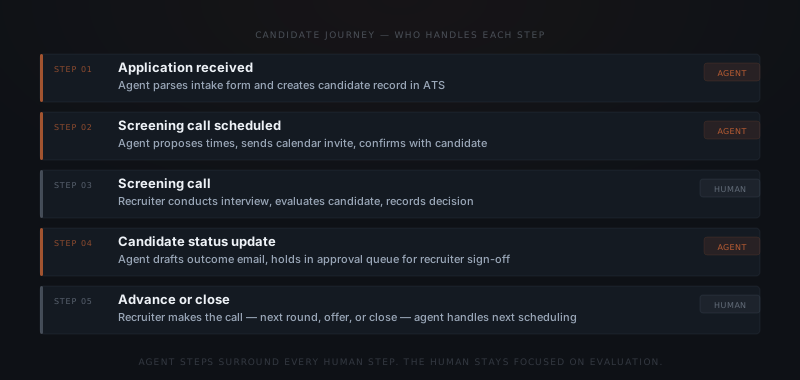
A candidate applies for an open role. The agent parses the intake form, extracts the relevant fields, and creates the candidate record in the ATS — no recruiter action required. The agent checks the hiring manager's calendar, proposes three screening call times, and sends the invitation. The candidate confirms. The agent logs the confirmed appointment and sends a preparation email.
The recruiter sees one item on the calendar for the week: the confirmed screening call. All the coordination that used to precede it — the emails back and forth, the ATS entry, the calendar coordination — happened without recruiter involvement.
Hermes handles the workflow coordination layer: parsing the intake, checking the calendar, sequencing the scheduling and confirmation steps. OpenClaw handles the outbound communication layer: holding every email to the candidate in a review queue until the recruiter releases it. Together, they cover the full coordination cycle from application to confirmed call.
Where does the agent stop and the recruiter begin?
An AI agent for recruiting is not built to evaluate candidates. The coordination layer — intake, scheduling, and candidate communication — is where an AI agent delivers value because none of those tasks require the judgment that makes a recruiter worth having.
Evaluation is human. Whether a candidate has the right experience for this specific role, whether their working style fits the team, whether their salary expectations are realistic given the client's budget — those are judgment calls. An agent does not make them. An agent does not have access to the hiring manager's gut feeling about a candidate, the context of three previous failed hires in this role, or the nuance in how someone describes their last job.
The agent makes the recruiter more available for evaluation. When a recruiter previously spent Tuesday morning on intake forms and scheduling emails, Tuesday morning is now the first round of actual evaluation work. The same 40-hour week produces more hiring decisions — not because the decisions are faster, but because the time before each decision has been cleared.
The agent handles the logistics. You make the call on the candidate.
What a recruiting agent implementation costs
A standard recruiting agent covering intake parsing, scheduling coordination, and candidate communications — connected to one ATS, one calendar system, and one email address — runs $4,000–$8,000 to implement. The range reflects ATS integration complexity: Greenhouse and Lever have well-documented APIs; older or niche systems may require additional custom integration work. Year 2 operating costs are low — API usage at typical recruiting volumes (30–50 candidates per role, five to ten active roles) runs $200–$500 per year.
The ROI frame: SHRM's 2022 benchmarking data puts the average cost-per-hire for a knowledge worker role at $4,700.[¹] Recovering enough coordination time to prevent one qualified candidate per search from dropping out — which LinkedIn's 2024 research identifies as a direct result of slow communication[²] — justifies the implementation cost within the first search cycle.
How to configure a recruiting agent
Map which pipeline stages the agent will cover
List the stages the agent will touch: intake only, intake plus scheduling, full communications through rejection. Start with two or three stages. Trying to automate the full pipeline in the first implementation splits calibration effort and delays results from both ends.
Connect the ATS
Grant the agent write access to candidate records and stage fields in Greenhouse, Lever, Bullhorn, or whichever ATS the team uses. The agent creates records and updates stages — it does not override manual changes. Confirm the field mapping between the intake form and the ATS record fields before go-live.
Define intake parsing logic
Specify which fields to extract from applications: name, contact, role applied for, experience summary, any disqualifying conditions. Define what the agent does with incomplete applications — flag to recruiter or create a partial record with a review tag.
Set the scheduling configuration
Define whose calendar the agent checks, what buffers to maintain between calls, and any time-window restrictions (no Fridays after 4pm, minimum 48-hour lead time for candidates). The agent applies these rules to every scheduling request.
Write communication templates by stage
Create one base template for each outbound message type: screening call invitation, status update, rejection, document request, next-round invitation. Templates maintain tone consistency. The agent personalises using the candidate's name and role from the ATS record.
Configure the approval queue
Every outbound message to a candidate routes through an approval queue before sending. Name who reviews each message type, set the response window (typically 2–4 hours for time-sensitive candidate comms), and define the non-response default: draft expires and logs as unactioned — never auto-sends.
Integrations a recruiting agent connects to
| Platform | Role in the workflow | Access required |
|---|---|---|
| Greenhouse | ATS — candidate records, stage tracking, pipeline | Write candidate records and stage updates via API |
| Lever | ATS — candidate records and hiring pipeline | Native API — write candidates, update stages |
| Bullhorn | ATS and CRM for staffing agencies | REST API — write candidates, update pipeline stages |
| Workable | ATS — candidate management | API — read job postings, write candidate records |
| Google Calendar / Outlook | Screening call scheduling | Read availability, write confirmed events |
| Gmail / Outlook Mail | Candidate communication and document requests | OAuth — sends on approval, reads replies |
| Slack | Recruiter notifications for draft approvals | Webhook — notification only |
| OpenClaw | Approval layer — every outbound message held until recruiter releases | Platform integration — nothing reaches candidate without explicit release |
Where recruiting agent implementations fail
Five failure modes appear consistently across recruiting agent deployments.
Intake parsed incorrectly. The agent extracts the wrong experience level from an application with an unusual format — a combined education/experience section, a non-standard CV layout, or a lengthy cover letter preceding the CV. The ATS record is created with incorrect data. The recruiter reviews based on wrong fields. Define fallback parsing logic: when extraction confidence is below a threshold, flag the application for manual review rather than creating a partial record.
Agent proposes slots already informally blocked. The hiring manager has a standing informal hold on Thursday afternoons that is not in the calendar. The agent proposes those slots. The candidate confirms. The hiring manager declines. The candidate receives a reschedule request. Keep informal holds in the calendar system, not in verbal agreements.
Rejection email sent to the wrong candidate. Two candidates have similar names in the ATS. The agent drafts the rejection for Candidate A, but the CRM context is pulled from Candidate B's record. The recruiter approves without noticing the mismatch. The wrong candidate receives the rejection. Review candidate name and role on every outbound message before approving — the approval step exists for this reason.
Approval queue not reviewed promptly. A candidate who applied on Monday has heard nothing by Friday because the approval queue built up and nobody reviewed it mid-week. LinkedIn's data on candidate dropout confirms that silence at key pipeline moments is a top reason qualified candidates disengage. Set a daily review schedule — not ad hoc — for the approval queue.
Agent sends communications to archived candidates. A candidate was archived after declining an offer last month. The same person applies again through the website. The agent creates a new record but the old archived record triggers a status update from the previous pipeline stage. Ensure archive status filters out candidates from active follow-up sequences before the agent accesses the ATS.
For recruiting agencies specifically — handling client status reports, pipeline tracking, and ATS-integrated admin work — the implementation scope is broader. See custom agents for recruiting agencies for the full breakdown.
Frequently asked questions
What does an AI agent for recruiting actually handle? An AI agent for recruiting handles the coordination layer: parsing intake forms into the ATS, scheduling screening calls, managing calendar coordination, and drafting candidate communications for recruiter approval. Candidate evaluation, screening calls, hiring decisions, and offer negotiations stay with the recruiter.
Will an AI agent replace the ATS? No — an AI agent integrates with the ATS rather than replacing it. Common integrations include Greenhouse, Lever, and Bullhorn. The agent writes to the ATS through the integration, so candidate records, stage updates, and notes land in the same system the recruiting team already uses.
How long does it take to implement a recruiting AI agent? A focused implementation covering intake parsing, scheduling coordination, and candidate communications typically takes four to six weeks. The first two weeks cover workflow mapping and ATS integration setup. The following weeks cover prompt configuration, testing, and calibration. For a full picture of what implementation involves, see what a real AI agent implementation involves.
How do you keep the agent from sending the wrong thing to a candidate? Every outbound message to a candidate goes through an approval queue before it sends. OpenClaw enforces this at the infrastructure level — the message is blocked until a named person releases it. The recruiter reviews and approves each outbound email before it reaches a candidate. Nothing sends automatically.
Notes
- SHRM, Talent Acquisition Benchmarking Report, 2022. Average time-to-fill data for knowledge worker roles. https://www.shrm.org/topics-tools/research/talent-acquisition-benchmarking-report
- LinkedIn Talent Solutions, Future of Recruiting Report 2024, LinkedIn. https://business.linkedin.com/talent-solutions/recruiting-tips/future-of-recruiting