Deploying OpenClaw takes under a day: provision a server, connect a channel, connect a tool. The step that determines whether the system is safe six months from now is not deployment — it is defining exactly what each workflow can touch and who signs off on it. Skip that step and the approval gate still exists, but it protects far less than it could. Get it right and OpenClaw only ever does what a specific workflow needs, reviewed by a specific named person.
Getting OpenClaw running is the fast part: a server goes up, a channel connects, a tool connects, all inside a day. Six months later, the businesses that regret their setup rarely regret the server. They regret giving one workflow access to three tools it didn't need, or routing every approval to a single person who now can't keep up, or skipping the test period and finding out what "uncertain" looks like in front of a client. The deployment step is fast because it is mechanical. The approval design step is slower because it requires deciding, workflow by workflow, exactly what OpenClaw can touch and who signs off before it does.
Deploy the server
Connect channels and tools
Scope permissions per workflow
Define approval rules
Test, then go live
What determines whether OpenClaw survives past the pilot stage?
Approval design determines whether OpenClaw survives past the pilot stage; getting the framework running is rarely where implementations fail. McKinsey's 2024 State of AI survey found that scaling AI and embedding it sustainably into day-to-day operations — not building the initial capability — is the primary AI barrier organizations report.[2] Deployment builds the capability. Approval design is what determines whether the capability survives contact with daily operations.
Gartner projects that 40% of agentic AI projects will be canceled by the end of 2027, citing project complexity and a lack of post-launch support infrastructure as primary drivers.[3] A workflow with permissions scoped too broadly or an approval queue with no clear owner is exactly the kind of complexity that turns into a cancellation six months in — not because the underlying framework failed, but because nobody treated setup as more than a technical checklist.
How do you deploy the OpenClaw server?
OpenClaw runs on any standard Linux VPS. A small team running a handful of workflows is comfortably served by a low-cost instance — infrastructure cost typically runs $20–60 per month, and that figure does not change as more channels get connected, since a single deployment handles all of them. Three things are needed before starting the instance: a provisioned server with standard dependencies installed, API credentials for the channels the business plans to use, and API access to a compatible language model provider.
OpenClaw is open-source and self-hosted. Nothing about the deployment sends business data to a vendor — message history, credentials, and connected-tool data stay on the server the business controls. The model API call goes to whichever provider is configured; the gateway and everything that passes through it stays local.
For a team comfortable with basic server administration, deployment takes under an hour. The most common first-run issues are credential formatting errors and firewall rules blocking the inbound webhook traffic OpenClaw needs to receive channel messages — both resolve quickly once identified. Teams without in-house server experience typically use an implementation service for this stage; the deployment itself is rarely where setup time goes.
How do you connect channels and tools?
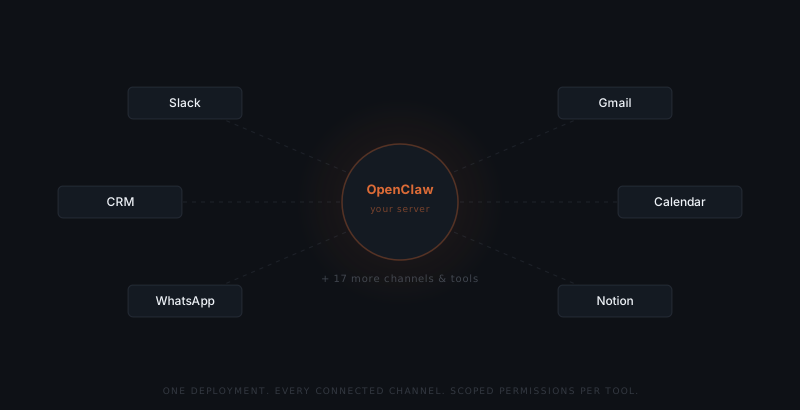
A single OpenClaw deployment connects to every channel and tool a business uses simultaneously — there is no separate instance per channel. Each connection requires its own credential: OAuth for Slack, Gmail, or a CRM; a bot token for Telegram or Discord; a Business API credential for WhatsApp.
| Connection | Setup time | Common use |
|---|---|---|
| Slack | 15–20 min | Internal approval routing, team notifications |
| Gmail or Outlook | 20–30 min | Client email drafting and follow-up |
| CRM (HubSpot, Salesforce, Pipedrive) | 20–40 min | Reading contact and deal data, logging activity |
| Calendar | 15–20 min | Scheduling and availability checks |
| WhatsApp Business | 30–60 min | Client messaging where WhatsApp is the norm |
| Project management (Notion, Asana) | 20–30 min | Reading task status for report drafting |
Most small business implementations connect two to four tools in the first pass — the channel where approvals get reviewed, the channel or two where the workflow communicates externally, and the system it reads data from. Adding a connection later follows the same credential flow and does not require redeploying the server.
The connection step establishes that OpenClaw can reach a tool. It does not yet define what OpenClaw is allowed to do with it — that is a separate, and more important, decision.
How do you scope permissions per workflow?
OpenClaw ships with approval prompts switched off — ask: "off", security: "full" on gateway and node hosts.[4] Nothing about the framework makes a workflow safe by default; turning on approval gating and scoping access are both setup decisions. A workflow with broad access to email, CRM, and calendar that's left unconfigured can act on all three without review. A workflow scoped to exactly what its task requires, with approval turned on, puts a narrow, reviewable set of actions in front of the person responsible for that workflow.
A security report on deployed AI agents found that 90% are over-permissioned relative to their actual task scope, and only 29% of organizations restrict agent tool access to read-only where read-only would suffice.[1] The pattern is not unique to any one product — it is what happens when a connection gets granted at the tool level ("give the agent access to Gmail") instead of the workflow level ("give the status-update workflow permission to draft and send from this address, and nothing else").
Scoping permissions per workflow means answering, for each workflow: which specific tools does this task touch, what actions does it need on each (read, draft, send, write, delete), and does it need access to anything else the business runs. A workflow that drafts client status updates needs email draft-and-send and CRM read access. It does not need calendar write access, file storage access, or the ability to delete records — granting those anyway is what creates the exposure the security research describes.
| Workflow | Tools needed | Access level | What to withhold |
|---|---|---|---|
| Client status update email | Gmail, CRM | Draft + send (email); read (CRM) | CRM write, delete access on either tool |
| CRM record update from meeting notes | CRM, calendar | Write (CRM); read (calendar) | Email send, file storage access |
| Weekly report compilation | Project management tool, CRM | Read only on both | Any write or send permission |
| Follow-up sequence | Gmail | Draft + send | CRM write, calendar access |
How do you define approval rules?
Setup doesn't stall at deployment. It stalls at who's allowed to approve what.
Once permissions are scoped, each workflow needs three things defined before it runs: a named approver, a review mode, and an escalation path.
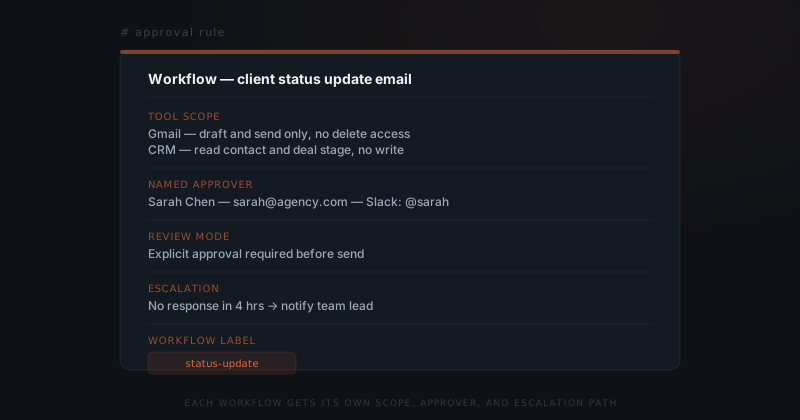
Named approver. Not "the team" — one person, with a specific contact method. A workflow whose approvals route to an unspecified group produces exactly the outcome a group chat produces: everyone assumes someone else will check it.
Review mode. Some workflows need explicit review before every send — client-facing communication, anything touching money, anything irreversible. Others can auto-approve after a short window if no one flags them — internal notifications, low-stakes scheduling drafts. The review mode should match the consequence of the action being wrong, not a single setting applied to every workflow.
Escalation path. What happens if the named approver doesn't respond. A workflow with no escalation path either blocks indefinitely or, worse, gets configured to auto-send past the reviewer out of frustration. Defining "no response in four hours, notify the team lead" up front avoids both failure modes.
Routing every workflow to a single named approver is the most common bottleneck this stage creates. A five-person team running eight workflows through one reviewer produces a queue that reviewer cannot keep up with — and a queue nobody can keep up with gets skimmed, not read. Assign the approver by who owns that workflow's outcome, not by convenience.
How do you test before going live?
Before enabling any live action, turn on review-only mode and run every configured workflow through it: OpenClaw produces the draft and routes it to the named approver, and nothing sends, writes, or executes until approved. This is not the out-of-the-box behavior — OpenClaw ships with approval prompts off, so review-only mode is a deliberate configuration step, not a free grace period.[4] It still costs nothing but time to run, and it is the most consequential step in this setup because it is the one the defaults do not do for you.
Run 20–50 real tasks per workflow through review-only mode. Approve, edit, or reject each draft, and note any pattern in what gets corrected — the corrections usually point to a permission that's scoped wrong, an approver who isn't the right person, or a review mode that's too strict or too loose for that action's actual risk. Adjust the workflow's configuration based on what the test period reveals, not what seemed reasonable when it was defined on paper.
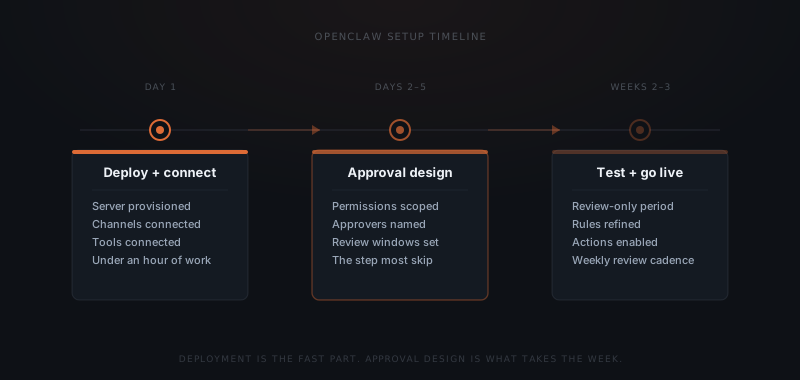
A workflow is ready to go live once it produces 15–20 consecutive drafts requiring no correction. That is the signal, not a fixed number of days. Once live, keep a weekly review cadence for the first month per workflow — spot-check a sample of approved actions, confirm the permission scope still matches what the workflow needs, and adjust the named approver if the volume has outgrown one person.
What common setup mistakes create risk or bottlenecks?
Four mistakes account for most of the problems that surface after an OpenClaw deployment goes live.
| Mistake | What it produces | How to prevent it |
|---|---|---|
| Broad tool access granted at connection time | One workflow can touch systems it never needs to; a single compromised or misconfigured workflow has wide blast radius | Scope access per workflow, not per tool connection — grant only the specific actions that workflow requires |
| Every workflow routed to one approver | Reviewer can't keep up; queue gets skimmed instead of read; approvals become a rubber stamp | Assign the approver by who owns that workflow's outcome; split volume across the team as workflows scale |
| Blanket auto-approval instead of per-action review mode | High-risk actions (client-facing sends, financial or irreversible changes) go out with no human check | Set review mode per action type based on consequence, not a single setting for every workflow |
| Skipping the review-only test period | The first real mistakes happen in production, in front of clients, instead of in review | Always run 20–50 tasks per workflow in review-only mode before enabling live actions |
The security research on over-permissioned agents is not a hypothetical risk — 90% of deployed agents carry more access than their task requires, and that gap is exactly what a deliberate, per-workflow setup process closes.[1] Deployment speed was never the constraint. The constraint is whether someone sat down and decided, workflow by workflow, what OpenClaw is allowed to do.
For the broader implementation timeline beyond OpenClaw specifically, see what a real AI agent implementation involves. For the underlying architecture that makes approval scoping possible, see what is OpenClaw and what approval workflows do in an AI agent system.
Frequently asked questions
What server does OpenClaw run on and what are the requirements? OpenClaw runs on any standard Linux VPS. A small team handling a few workflows is comfortably served by a low-cost instance — infrastructure cost typically runs $20–60 per month regardless of how many channels are connected. Three things are needed before starting: a provisioned server with standard dependencies, API credentials for the channels the business will use, and API access to the language model OpenClaw will call.
How long does a full OpenClaw setup take? Server deployment and channel connections take under a day for a team on modern infrastructure. Approval rule design — scoping permissions and naming an approver per workflow — takes two to five days depending on how many workflows are in scope. The review-only testing period adds another week before full go-live. Total time from start to production typically runs one to three weeks.
Why does permission scoping matter more than the approval queue itself? OpenClaw's shipped default is ask: "off" with security: "full" on gateway and node hosts — the framework runs configured actions without prompting unless you turn approval gating on.[4] Permission scoping matters even more once that's clear: a workflow granted broad tool access and left on defaults doesn't just put everything in front of one reviewer — it puts everything through with no reviewer at all. A security report on deployed AI agents found 90% are over-permissioned relative to their actual task scope, and only 29% of organizations restrict agent tool access to read-only.[1] Scoping each workflow's access to exactly what it needs, and turning on explicit approval for it, is what makes the approval step meaningful instead of decorative.
What is the most common reason OpenClaw setups create problems after go-live? Most problems trace to one of four mistakes made during setup: granting broad tool access instead of scoping it per workflow, routing every workflow's approvals to one person who becomes a bottleneck, setting blanket auto-approval instead of defining explicit review for high-risk actions, or skipping the review-only testing period before enabling live sends. All four are fixable before go-live by treating approval design as its own step.
Notes
- Gravitee, "State of AI Agent Security 2026 Report," Gravitee, 2026. https://www.gravitee.io/state-of-ai-agent-security — source for: 90% of deployed AI agents are over-permissioned relative to their actual task scope; only 29% of organizations restrict agent tool access to read-only.
- McKinsey & Company, "The State of AI in 2024," McKinsey Global Survey, May 2024. https://www.mckinsey.com/capabilities/quantumblack/our-insights/the-state-of-ai — source for: scaling AI and embedding it sustainably into operations, rather than building initial capability, is the primary barrier organizations report.
- Gartner, cited in "39 Agentic AI Statistics Every GTM Leader Should Know in 2026," Landbase, 2026. https://www.landbase.com/blog/agentic-ai-statistics — source for: 40% of agentic AI projects are projected to be canceled by end of 2027, citing complexity and lack of post-launch support infrastructure.
- OpenClaw, Exec Approvals. Documents the
asksetting values, thesecurity: "full"/ask: "off"default for gateway and node hosts, the sandboxdenydefault, allowlist glob andargPatternmatching, and the allow once / allow always / deny resolutions. https://docs.openclaw.ai/tools/exec-approvals — retrieved 1 Sep 2026.