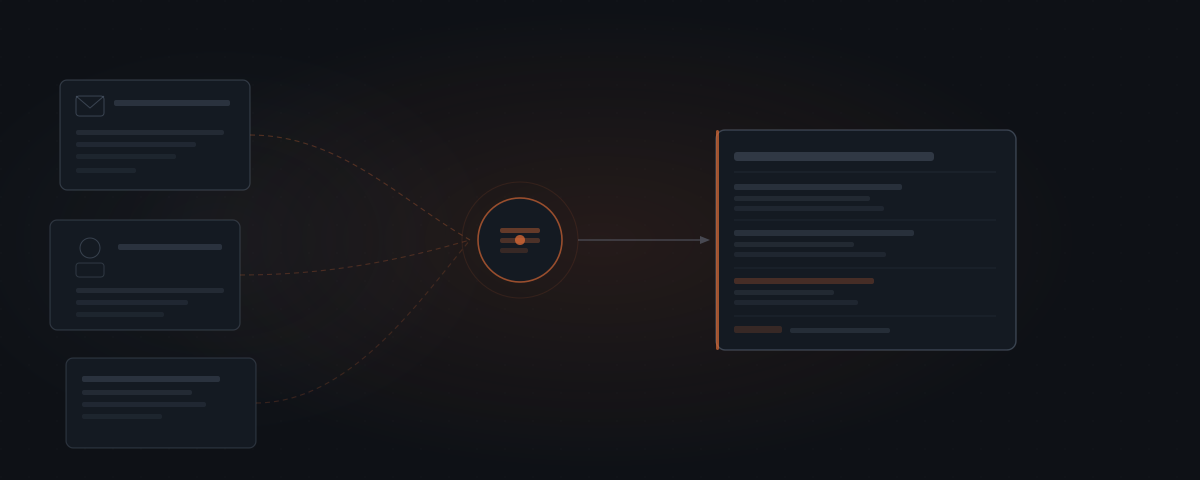
Consultants and service firm founders running 8 or more client calls per week spend 20–25 minutes before each call hunting through email threads, CRM records, and project notes to assemble the context they need. A McKinsey Global Institute report found that knowledge workers spend nearly 20% of the workweek searching for internal information or tracking down colleagues — an average of 7.6 hours per week on information retrieval alone. An AI agent eliminates the hunting. The agent reads the connected tools, assembles the last email thread, open action items, invoice status, and CRM notes, and delivers a single brief before each call. The judgment about what matters stays with the person running the call.
Fifteen minutes before the call. You know the client, but you cannot remember what you covered last time. The last email is buried under 40 messages from this week. You open the CRM, and the notes from three weeks ago are the most recent entry. You find the project board — the action items from the previous call are sitting there, unchecked. The invoice from last month: unpaid. You write down a few notes on a sticky, join the call two minutes late, and spend the first four minutes reconstructing context you had before. For consultants and service firm founders running eight or more calls per week, this process repeats every single time.
A McKinsey Global Institute report found that knowledge workers spend an average of 19.8% of their workweek searching for internal information — that is 7.6 hours per week at a standard 38-hour week, consumed by retrieval, not by work.[¹] An AI agent — see what an AI agent is for the fuller picture of how these systems work — handles the retrieval entirely. The agent reads the connected tools before each call, assembles the relevant context into a single brief, and delivers it before the call starts.
Why meeting prep time is invisible but compounding
The 20 minutes of prep before each client call does not show up anywhere. It is not in the calendar. It is not tracked. It does not appear in the timesheet. It exists in the gap between the previous meeting's end and the next meeting's start — scattered across inbox tabs, CRM windows, and project boards.
Employees spend an average of 4 hours per week preparing for status update meetings, according to a 2025 workplace collaboration survey of 1,200 knowledge workers.[²] For a consultant with a client-heavy practice, "prep" means a different activity than a corporate meeting participant: it means reconstructing the full context of a relationship from fragmented records across four or five tools.
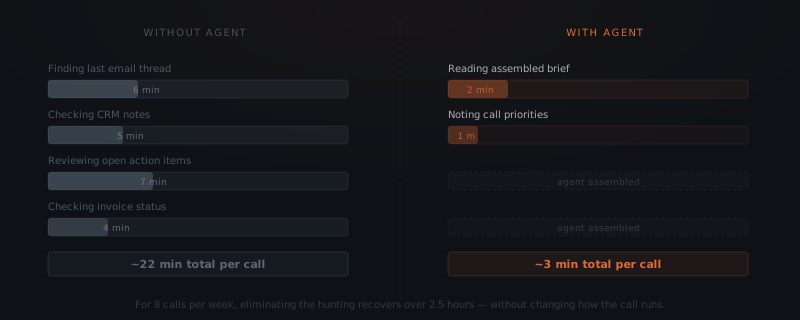
At eight calls per week and 22 minutes of hunting per call, a consultant spends 2 hours and 56 minutes per week on pre-call information retrieval. At a consulting rate of $250 per hour, that is $3,770 per month in time spent on a task that produces no deliverable — and that every client expects to be invisible. The client assumes the consultant knows where things stand. The consultant does know — they just spent 22 minutes reconstructing it.
What the agent assembles
The agent pulls existing information from connected tools. The agent does not interpret the information, determine what to discuss, draft an agenda, or make judgments about the client relationship. Those decisions belong to the person running the call.
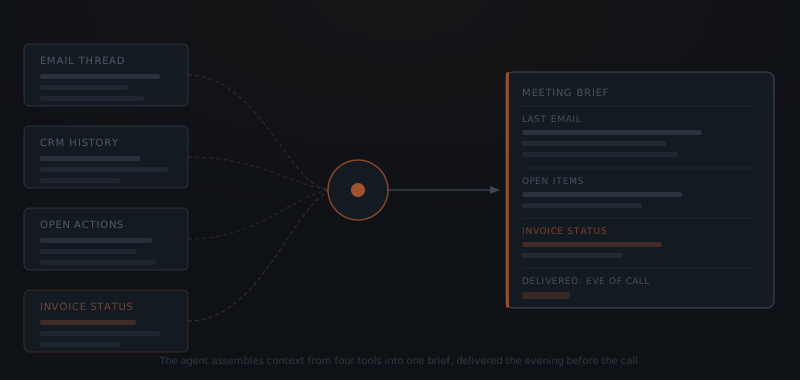
Last email thread. The agent retrieves the most recent email thread with the client from Gmail or Outlook, ordered by date. The brief includes the sender, date, and a summary of the exchange: what was asked, what was answered, and what, if anything, was left open. The consultant reads the summary rather than opening the inbox.
Open action items. The agent reads the project management tool — Notion, Asana, Linear, or ClickUp — and pulls any open tasks tagged to this client. The brief lists each open item, its status, and the date it was created or last updated. A consultant who ran a call three weeks ago and assigned four action items sees, at a glance, which three are closed and which one is still open. The prep takes 30 seconds instead of four minutes of board navigation.
CRM context. The agent reads the CRM — HubSpot, Pipedrive, Salesforce — and retrieves the most recent notes, the deal stage, and any open follow-up tasks logged by the account holder. For consultants using the CRM as a relationship record rather than a sales pipeline, the brief surfaces the last logged note and any flagged context. For those using it as a pipeline, it adds the deal value and stage to the brief automatically.
Invoice status. The agent reads the billing tool — Stripe, QuickBooks, FreshBooks — and reports whether any invoice to this client is outstanding, its value, and the number of days since it was sent. The brief flags outstanding invoices automatically. The consultant decides whether to raise it on the call. The agent does not send reminders to the client — it informs the consultant. For the full invoice follow-up workflow, see AI agent for invoicing.
Calendar context. The agent reads the meeting title, duration, and any notes attached to the calendar event. If the consultant added an agenda note to the invite, it appears in the brief. The brief arrives at a set time before the call — typically the evening before for morning calls, or two hours before for afternoon calls.
What the consultant always controls
Meeting prep agents eliminate retrieval. The work that follows retrieval stays with the consultant.
Agenda setting. The brief surfaces what exists in the connected tools. The consultant reads it and decides what to cover on the call. An open action item does not automatically become an agenda item. A flagged invoice does not automatically become a conversation. The consultant reads the context and decides.
Relationship judgment. The brief includes notes from the last CRM entry. The consultant interprets those notes in the context of the full relationship history — including the parts that were never written down. A client who was frustrated three weeks ago but recovered by last week is a different conversation than the notes alone suggest.
The call itself. The agent delivers context. The consultant runs the call. The brief is a preparation tool, not a script. Nothing in the brief constrains how the call unfolds.
What to escalate. An outstanding invoice appears in the brief. Whether to raise it on the call, address it afterward by email, or let it run another week is a judgment the consultant makes. The agent surfaces it. The consultant decides.
How to set up a meeting prep agent workflow
Define what a client call looks like in your calendar
The agent needs to distinguish client calls from internal meetings, team syncs, and blocked time. Define the pattern: external email domains in the attendee list, a specific tag or prefix in the event title, or a specific calendar. The agent triggers prep for events that match — and ignores the rest.
Connect the tools
The agent needs read access to Google Calendar or Outlook Calendar for scheduling, Gmail or Outlook for email, the CRM for account history, the project management tool for open tasks, and the billing tool for invoice status. Each connection is read-only — the agent retrieves information and does not write to any connected system during prep assembly.
Define the brief structure
Decide what appears in each section of the brief and in what order. A standard structure: last email exchange summary, open action items by status, CRM notes from the last 30 days, invoice status. Add or remove sections based on what you actually check before calls today — the brief replaces your existing prep process, not an idealized one.
Set the delivery time
Decide when you want the brief: the evening before at 6 PM for morning calls, or two hours before for same-day calls. Delivery via Slack message, email, or a notification to the tool you already check works equally well. The channel matters less than the timing — brief arrives when you have a moment to read it before the call.
Run a two-week review
After two weeks, check whether the brief is missing anything you still look up manually. Add those sources to the connection list. Remove any section you consistently ignore. The brief should match your actual pre-call decision-making — not include everything that is tangentially related.
Tools and integrations for meeting prep workflows
| Platform | Role in the workflow | Notes |
|---|---|---|
| Google Calendar | Call scheduling trigger | Webhook — agent triggered on new or upcoming events |
| Outlook Calendar | Alternative calendar trigger | Microsoft Graph API |
| Gmail | Email thread retrieval | OAuth read-only — most recent thread per client email domain |
| Outlook Mail | Alternative email source | Microsoft Graph API read |
| HubSpot | CRM notes, deal stage, last activity | API — read last 30 days of activity per contact |
| Pipedrive | CRM notes and pipeline stage | API — contact and deal read |
| Salesforce | CRM account history, tasks | API — account and task read |
| Notion | Open action items, meeting notes | API — filtered by client tag or page |
| Asana / Linear | Open tasks by project or assignee | API — task read, filtered by client |
| Stripe | Invoice status, outstanding amounts | API — filtered by customer email |
| QuickBooks | Invoice and payment status | API — outstanding invoices by customer |
| Slack | Brief delivery | Webhook — DM or dedicated channel |
Twenty minutes of hunting before every call. Multiplied across eight calls a week.
Costs and ROI for meeting prep agent implementations
Setup cost. A complete meeting prep workflow — calendar trigger, email retrieval, CRM lookup, task summary, invoice check, brief delivery — costs $1,500–$3,000 when implemented by a service. The range reflects the number of tools connected: a consultant using Gmail, HubSpot, Notion, and Stripe sits at the lower end; a team with Salesforce, Asana, QuickBooks, and a custom delivery format sits at the upper end.
Operating costs. At 8 client calls per week (416 per year), annual API costs run $30–$80. Each brief generation is a small number of read operations across connected tools. Operating costs are minimal.
Year 1 total (implementation + first year API): $1,530–$3,080.
ROI frame. At 8 client calls per week and 22 minutes of hunting per call, the current prep cost is 2.93 hours per week. With the agent brief, prep drops to 3 minutes per call — 24 minutes per week. The agent recovers 2.5 hours per week. At $250 per consulting hour, that is $625 per week, $32,500 per year. The setup cost returns in the first 3–5 weeks.
The secondary benefit is consistency. A consultant who preps with a structured brief arrives at every call with the same quality of context — whether it is the first call of the day or the eighth, and whether the previous call ran long. The brief eliminates the variance in preparation quality that comes from doing it manually under time pressure.
Where meeting prep agent implementations fail
Brief arrives too late to read. The brief is delivered 30 minutes before the call. The consultant is already in the previous call. The brief sits unread until after the meeting it was meant to prepare. Delivery timing must account for back-to-back scheduling — brief delivered the evening before for morning calls, or 2–3 hours before for afternoon calls. Ask where and when you actually have 3–5 minutes before a call. That is the delivery target.
Brief includes too many sections. The initial brief configuration pulls email, CRM notes, project tasks, invoice status, calendar notes, Slack messages, and the last three meeting agendas. The brief is 800 words. The consultant scans it and stops reading after the first two sections. Start with three sections maximum — the ones you check every time today. Expand only after the two-week review confirms the core is working.
CRM notes are not current. The agent pulls the most recent CRM notes. The most recent note is from six weeks ago. The consultant logs calls inconsistently. The brief is only as current as the data in the connected tools. A meeting prep agent reveals data quality gaps immediately — which is useful, but requires addressing before the brief becomes reliable. Establish a minimum CRM update standard (one note per client interaction) before automating the retrieval.
Client name or domain matching fails. The agent identifies the client by email domain in the calendar invite. Two attendees from the same company and one consultant whose personal Gmail is in the event creates an ambiguous match. Define the matching logic precisely — primary domain, not all attendees — before the first prep run.
Frequently asked questions
What does an AI agent do for meeting preparation? A meeting prep agent reads connected tools — CRM, email, project management, billing — before each scheduled call and assembles the relevant context into a single brief. The brief typically includes the last email thread with the client, open action items from the previous meeting, any outstanding invoices, and recent CRM notes. The brief is delivered to the consultant before the call starts.
How does a meeting prep agent know which call to prepare for? The agent connects to the calendar (Google Calendar or Outlook Calendar) and reads scheduled events. For each event matching the client meeting pattern — typically events with an external email address or a specific tag — the agent triggers the prep workflow. Prep is assembled and delivered a set number of hours before the call, typically the evening before.
What tools does a meeting prep agent connect to? A meeting prep agent connects to Google Calendar or Outlook Calendar for scheduling, Gmail or Outlook for email thread retrieval, a CRM such as HubSpot, Pipedrive, or Salesforce for account history, a project management tool such as Notion, Asana, or Linear for open action items, and a billing tool such as Stripe or QuickBooks for invoice status. The brief is delivered to Slack, email, or the tool the consultant checks before calls.
How much does a meeting prep agent cost to implement? A complete meeting prep workflow costs $1,500–$3,000 when implemented by a service. At 8 client calls per week, recovering 19 minutes of prep time per call returns 2.5 hours per week in working time. At a consulting rate of $200 per hour, that is $500 per week recovered — the setup cost returns in the first 3–6 weeks.
Notes
- McKinsey Global Institute, "The Social Economy: Unlocking Value and Productivity Through Social Technologies," McKinsey & Company, July 2012.
- Speakwise, "Workplace Collaboration Statistics 2026: Tool Fragmentation, Cross-Team Friction, and Coordination Costs," Speakwise Research, 2026.
- Microsoft, "New Future of Work Report 2025," Microsoft Research, December 2025.