Workflow automation potential measures the share of current work activities that AI agents and software can handle without human execution. McKinsey's latest Global Institute analysis puts that ceiling at 57% of US work hours — up from roughly 30% in 2023, and the standing benchmark heading into 2026. Most service businesses are capturing 10–15% of that potential. The gap is not a technology gap. It is a process design gap.
In November 2025, McKinsey's Global Institute updated its automation potential estimates for the US economy. The revised figure: 57% of US work hours are already automatable using current, demonstrated technologies. That number describes what AI agents, software automation, and robotics can handle today — not in a projected future. It is the standing benchmark heading into 2026, and the tools that produce it have only grown more capable since.
Most service businesses are running at 10–15% of that ceiling. The gap is not explained by missing tools. The tools that could close it are commercially available. The gap is explained by process architecture — the way work is sequenced and assigned before any tool touches it.
What the 57% figure actually measures
The McKinsey Global Institute's November 2025 report measured activities, not jobs or roles. Researchers assessed activities within each occupation and evaluated what fraction current AI and automation could handle. The ceiling landed at 57% of US work hours.[¹]
That figure nearly doubled from the roughly 30% McKinsey estimated in 2023. The increase reflects two years of AI agent deployment across commercial software. These tools now handle sequential tasks, interpret unstructured data, and execute across connected systems without human direction at each step.
The 57% does not describe any single business. Service businesses — consulting, recruiting, marketing, professional services — sit above that average. Service work is information-dense and repetitive at the task level, even when the overall workflow appears complex. Scheduling, follow-up, data entry, report generation, client status updates, invoice processing: these are the activities that AI agents handle today.
McKinsey's broader projection: AI-powered agents and robots could generate $2.9 trillion in annual US economic value by 2030.[¹] They could put 40% of jobs into highly automatable categories — if organizations redesign their workflows around automated systems. That qualifier — "redesign their workflows" — is the difference between the 57% ceiling and the 10–15% most businesses are actually capturing.
| Metric | Figure | Source |
|---|---|---|
| US work hours automatable today | 57% | McKinsey Global Institute, Nov 2025 |
| 2023 automation potential estimate | ~30% | McKinsey, 2023 |
| Jobs at high automation risk by 2030 | 40% | McKinsey Global Institute, Nov 2025 |
| Projected annual US value from AI agents and robots by 2030 | $2.9 trillion | McKinsey Global Institute, Nov 2025 |
| Organizations that scaled automation across multiple business areas | fewer than 20% | McKinsey, 2025 |
| Average weekly hours managers spend on manual data tasks | 8+ hours | McKinsey, 2025 |
Which tasks carry the highest automation potential in a service business
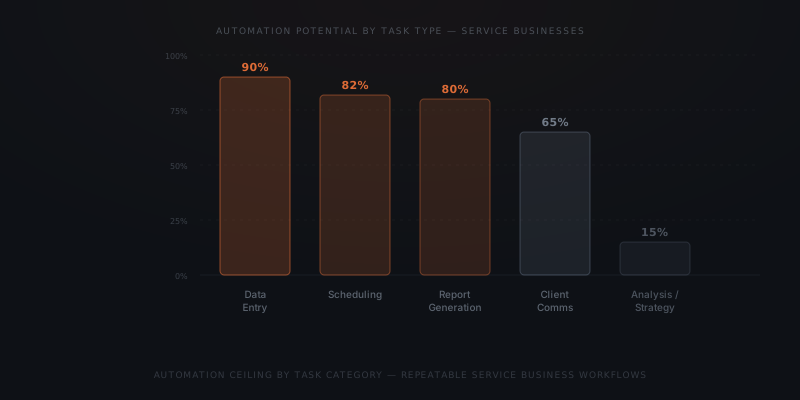
Automation potential concentrates in five task categories. Each has a distinct ceiling based on how much human judgment the task actually requires.
Data collection and entry carries the highest ceiling — above 90% in most service contexts. These tasks require no judgment: pulling data between systems, logging records, updating contact fields. Each one is information retrieval and execution. An AI agent completes them faster and with fewer errors than a human working at volume.
Scheduling and coordination runs at 80% automation potential for most service businesses. An agent reads calendar availability, identifies conflicts, drafts coordination messages, and sends confirmations. Edge cases — client preference changes, double-booking resolution, complex time zone dependencies — require human judgment roughly 20% of the time.
Report generation and compilation runs at 75–80% automation potential. A weekly client status report drawing on project management software, time tracking, and communication logs can be assembled by an agent. The remaining fraction — interpreting anomalies, framing the narrative, deciding what requires escalation — stays with the human reviewer.
Client communication — status updates, follow-up sequences, routine inquiry responses — runs at 60–70% automation potential. The agent drafts from context; the human reviews and approves before anything sends. For high-volume, low-variation communication types (intake confirmations, document request follow-ups, payment reminders), the fraction runs higher. For sensitive relationship conversations, the human writes.
Analysis, judgment, and strategy carries the lowest automation potential — below 15–20% in most service firms. Current technology cannot automate this work. Evaluating which client to deprioritize, reading the subtext of a difficult email, assessing whether a candidate fits — these require human judgment.
Why most businesses stop at 10–15% of the potential
McKinsey's research found that fewer than 20% of organizations have scaled automation across multiple parts of their business.[¹] Virtually all of them had access to the tools that would allow it. The explanation is process architecture, not tool availability.
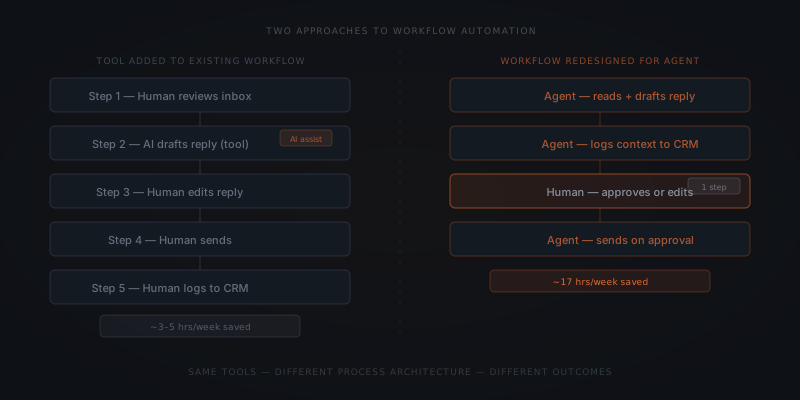
Automation tools get added to workflows designed for human execution. A recruiter who already does manual outreach gets an AI assistant that drafts emails. The recruiter still reviews, edits, and sends each email in the same sequence. The tool changes. The process does not. The gain is typically 3–5 hours per week per person — because the process structure was not redesigned, only assisted.
Formstack's research found that teams save an average of 17 hours per week when automation replaces process steps — rather than assisting humans doing the same steps.[²] The 14-hour gap between the overlay approach (3–5 hours saved) and the redesign approach (17 hours saved) comes entirely from process architecture. Not tool selection.
Automation layered onto a human-designed process returns 10–15% of the available ceiling. The same tools deployed inside a process built for agent execution return 55–70% of the ceiling. The technology is identical. The process architecture is not.
McKinsey calls it "pilot purgatory" — fewer than one in three adopters have scaled beyond a single pilot. This reflects the same pattern. The pilot works. The team then plugs the capability into the existing workflow rather than rebuilding the workflow around it. The pilot's gains do not compound. The ceiling stays far away.
What workflow redesign means in a service firm
Workflow redesign is a process documentation and sequencing project. The technology runs against the resulting process — it does not replace the project itself.
For a recruiting firm, redesigning around automation starts with the trigger events that initiate work. A new job requirement arrives. A candidate application is received. A status update is due. From each trigger, every step to the outcome gets listed. Each step gets a binary question: does this require human judgment, or does it require information retrieval, formatting, and transmission? Steps in the second category go to the agent. Steps in the first stay with the recruiter.
The result is a workflow where the agent holds the coordination thread. A new candidate application triggers the agent to collect required information and run an initial screen against the job requirements. It pulls comparison data from the CRM and surfaces a structured brief for the recruiter. The recruiter evaluates the candidate. The agent handled the logistics of getting that brief ready.
For a professional services firm, the equivalent redesign applies to client reporting. Instead of a consultant assembling a status report from four systems every Friday, the agent collects and formats data throughout the week. It surfaces open items and anomalies, then delivers a draft Thursday evening. The consultant reviews and adds judgment in fifteen minutes. The agent handled the other three hours.
The ceiling is 22 hours per person per week. Most businesses are capturing fewer than four.
The organizations that Formstack measured at 17 hours saved per week had done this redesign work first. They mapped the workflows, identified the agent-eligible steps, and built the automation against the redesigned process. The tools were the same tools available to every other business. The process architecture was different.
How to calculate your automation ceiling
The ceiling for any specific business is calculable by walking through the actual workflows step by step.
Start with the three to five highest-volume, most repeatable workflows — typically client communication, data collection and entry, scheduling, and status reporting. For each workflow:
Map every step
List each step from trigger to outcome. A client follow-up sequence might have eight distinct steps: detect no response, pull contact and deal data, draft message, select timing, log the attempt, submit for approval, send on approval, record outcome and trigger next step.
Mark each step
Label each step: judgment required (human) or information retrieval and execution (agent). Be precise — "drafting an email" can be either, depending on whether it requires relationship context or just template filling.
Count the hours
Estimate weekly hours spent on each step across the team. Multiply single-instance time by weekly volume. This produces the actual hour load per step.
Sum the agent-eligible steps
Add up all hours on steps marked as information retrieval and execution. That total is your automation ceiling for those workflows.
A typical service business running this exercise across its three highest-volume workflows finds 12–20 hours per person per week in agent-eligible steps. That range is consistent with the 17-hour Formstack benchmark. McKinsey estimates that 60% of employees could save 30% or more of their time with automation applied at the process level.[¹][²]
The calculation requires documented processes, not sophisticated tooling. An agent cannot replace a step that has not been written down. That documentation work is the prerequisite for any implementation. Businesses with written processes deploy faster and capture more of the potential than those starting from undocumented workflows.
For related context on scoping your first implementation, see which workflows to automate first and what AI agent implementation costs for a small business.
Frequently asked questions
What percentage of business tasks can be automated? McKinsey's November 2025 analysis found that 57% of US work hours are automatable using current, demonstrated technologies. That is up from approximately 30% in 2023. For service businesses, tasks in scheduling, data entry, report generation, and routine client communication carry the highest automation potential. Typically above 70–80% within those task categories.
Why do most businesses only capture a small fraction of automation potential? Most businesses add automation tools to workflows designed for human execution. Layering a tool onto an existing process returns 10–15% of the automation ceiling. Organizations capturing 40–57% of potential restructured their workflows so agents own entire steps. They don't just assist humans doing the same steps. McKinsey found fewer than 20% of organizations have scaled automation across multiple parts of the business.
How do I calculate the automation potential for my business workflows? Map your highest-volume repeatable workflows step by step. For each step, determine whether it requires human judgment or information retrieval and execution. Steps in the second category are agent-eligible. Count weekly hours on agent-eligible steps across the team — that total is your ceiling. A typical service business finds 12–20 hours per person per week. That is across three to five key workflows.
What is the difference between adding automation tools and redesigning for automation? Adding tools to an existing workflow means the human still performs the same steps. The tool aids at certain points. Savings are typically 3–5 hours per week per person. Redesigning the workflow means agents own entire steps. The human enters only at judgment points. Formstack's 17-hour figure comes from this second approach — workflows where automation replaced steps, not assisted humans doing the same steps.
Notes
- McKinsey Global Institute, "Agents, robots, and us: Skill partnerships in the age of AI," November 2025. https://www.mckinsey.com/mgi/our-research/agents-robots-and-us-skill-partnerships-in-the-age-of-ai
- Formstack, "Workflow Automation Statistics You Need to Know." https://www.formstack.com/blog/workflow-automation-statistics