Accounting and bookkeeping firms that implement AI agents for document collection, client onboarding, and status communication recover 6–10 hours of partner time per week — before tax season, not during it. The 2025 Workflow & Automation Report for accounting firms found that document collection alone averages 18 days per client engagement without structured automation. An AI agent handles the coordination layer: the requests, the reminders, the status updates, and the invoice follow-up. The compliance work, the calculations, and the advisory judgments stay with the accountant.
The tax return takes four hours. Getting the documents to start it takes three weeks. Small accounting and bookkeeping firms run into the same constraint every engagement cycle: the compliance work is billable and finite, but the document chasing, the status emails, the onboarding coordination, and the invoice follow-up are unbounded. They expand to fill whatever time is available — and then some. An AI agent handles the coordination layer around each engagement. The accountant shows up to do the work that requires professional judgment. Everything before that point runs on its own — that division of labor is what an AI agent is built to do, in accounting or any other workflow.
Why small accounting firms can't grow past a certain point
The constraint on accounting firm growth is not accounting capacity — it's the admin layer that surrounds each engagement before the billable work can begin.
A 2025 survey by Financial Cents of 132 accounting firm owners found that chasing clients for additional documents was the second most challenging part of running an accounting team, behind only managing staff workload.[¹] The document collection problem is not a client problem — it is a systems problem. Firms relying on email alone achieve a 38–44% collection completion rate by their internal deadline. Firms that add structured reminders and portal-based collection achieve 67–74%.[²]
The Karbon 2025 Accounting Practice Management Report found that accountants and bookkeepers spend an average of 31% of their working week on non-billable client communication — status updates, document chasing, follow-up emails, and onboarding coordination.[³] For a firm billing at $200 per hour with two partners working 45 hours per week, that represents $11,340 in partner time per week consumed by coordination that cannot be billed.
Early adopters of agentic AI systems in finance and accounting reported 22.6% productivity improvements and 15.2% cost reductions within the first year of deployment, per Gartner's 2025 analysis.[⁴] The gains concentrate in exactly this layer: structured document collection, automated follow-up, and client communication sequencing.
What an AI agent manages in an accounting practice
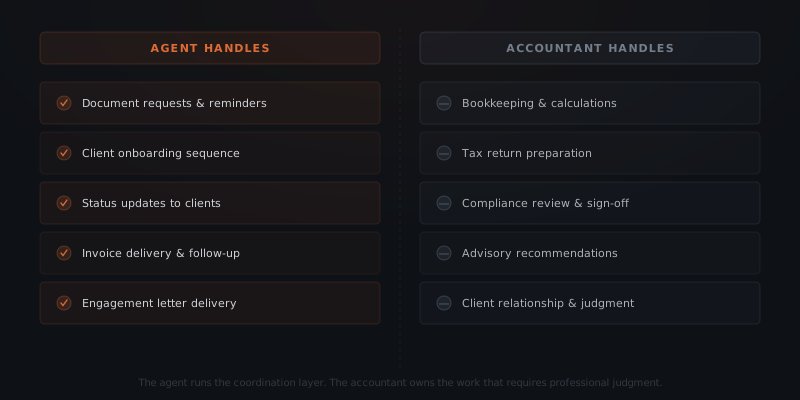
The agent handles document requests, reminders, onboarding sequences, status updates, and invoice follow-up. Bookkeeping calculations, tax return preparation, compliance judgments, and any output requiring professional sign-off stays with the accountant. The agent does not access financial data except through the specific fields it is configured to read.
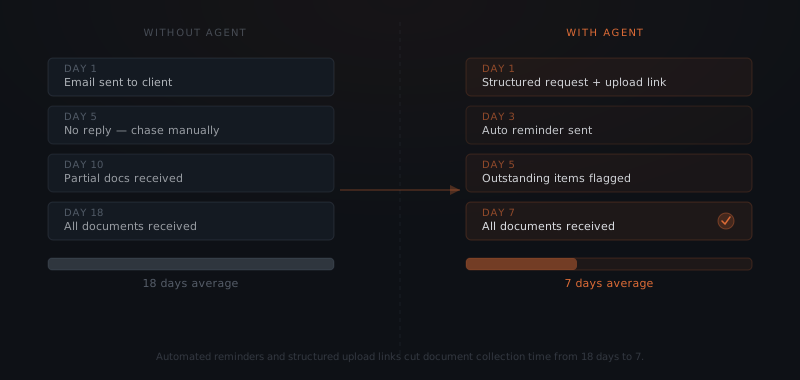
Document collection. When a new engagement is opened, the agent sends a structured document request to the client: a checklist of required items, a secure upload link or portal link, and a submission deadline. The agent tracks which items have been received and sends reminders at day 3, day 7, and day 14 for any outstanding items. The accountant receives a notification when all documents are in — not a daily check on what's arrived. The 2025 Workflow & Automation Report for accounting firms found that portal-based collection with automated reminders cuts average document collection time from 18 days to 7 days.[²]
Client onboarding. When a new client signs an engagement letter, the agent triggers the onboarding sequence: welcome message, introductory information about the process, a checklist of what the client needs to prepare, and links to any intake forms or authorization documents. The agent tracks completion and follows up on outstanding steps. The first accountant interaction with the new client begins with a fully prepared client, not an incomplete intake.
Status updates. Clients ask for progress updates. In firms without a systematic answer, those questions go to the partner — who interrupts the work in progress to write an email summarizing where things stand. An agent configured with engagement milestones sends automatic updates when each milestone is reached: documents received, review in progress, return filed, documents available for download. Clients know where their engagement stands without asking.
Invoice follow-up. The agent sends invoices when an engagement closes, sends a first reminder at day 7 for unpaid invoices, and sends a second reminder at day 14. For annual-cycle clients — tax return preparation, annual accounts — the agent sends a renewal prompt 60 days before the prior year's service date. The partner is notified when payment is received or when a payment remains outstanding past day 21.
Engagement letter delivery. The agent routes the engagement letter to the client when opened by the accountant, tracks whether it has been signed, sends a reminder if unsigned after 48 hours, and notifies the accountant when countersigned. Engagement letter turnaround drops from 5–8 days to 1–2 days in firms using this structure.
What accountants always control
All compliance work. Bookkeeping, tax return preparation, payroll calculations, audit procedures, and any work producing a professional output requiring sign-off stays with the accountant. The agent handles the communication surrounding these tasks. The agent does not produce financial statements, calculate tax liabilities, or make advisory recommendations.
Client assessment and fit. Before an engagement begins, the accountant evaluates whether the scope, pricing, and timeline are realistic for this client. The agent collects intake information. The accountant reads it and makes the assessment.
Advisory relationships. For clients receiving CFO advisory services, tax planning guidance, or strategic business advice, the accountant delivers those conversations. The agent handles the scheduling and the post-meeting follow-up. The substance of the advice stays with the professional.
Exception handling. When a client's situation changes mid-engagement — an unexpected business transaction, a regulatory question, a scope change — the accountant evaluates the impact and decides how to respond. The agent flags the exception. The accountant resolves it.
Escalation triggers. Any client message indicating dissatisfaction, confusion, or a request outside the normal workflow triggers an escalation notification to the accountant — not an automated response. The agent routes the message and notifies. The partner replies.
How to configure the first accounting agent workflow
Map the engagement cycle
Walk through the full sequence from signed engagement letter to delivered output for your most common engagement type — individual tax returns, annual accounts, or monthly bookkeeping. List every communication and coordination step. Every manual touchpoint in that sequence is a candidate for the agent. Start with the three highest-volume touchpoints: document collection, status updates, and invoice follow-up.
Define the document checklist
For each engagement type, write a complete list of required documents. Be specific: "2025 W-2 from all employers" rather than "income documents." The agent sends this list on engagement open. Clients who receive a specific checklist return complete document sets 2.4x faster than clients who receive a general request, per the 2025 Workflow & Automation Report.[²]
Write the milestone definitions
Define what constitutes completion for each engagement stage: documents received, review started, draft ready for client review, return filed, documents available. The agent sends a status update when each milestone is marked complete in the practice management system. The accountant marks milestones — the agent handles the client notification.
Set the reminder schedule
Define the reminder intervals for document collection (typically day 3, day 7, day 14) and for unpaid invoices (typically day 7, day 14, day 21). Build in an exception mechanism — a tag or status field in the practice management system — that pauses the reminder sequence when the accountant has a reason to hold.
Connect the tools
The agent needs read access to the practice management system (Karbon, TaxDome) to detect engagement status changes, read-and-send access to the email system (Gmail, Outlook) to send client communications from the firm's address, and read access to the billing system (Stripe, QuickBooks) to monitor payment status. Each connection is read-and-trigger — the agent monitors events and sends communications based on them.
Tools and integrations for accounting agent workflows
The table below covers standard connections for a full document-to-delivery accounting workflow. The specific platforms depend on what the firm already uses.
| Platform | Role in the workflow | Notes |
|---|---|---|
| Karbon | Engagement status, milestone tracking, work item management | Webhook — agent triggered on status change events |
| TaxDome | Client portal, document upload, engagement management | API and webhook — alternative to Karbon |
| Gmail / Outlook | All client communication from the firm's address | OAuth — agent drafts and sends from the real address |
| Stripe | Invoice creation, payment status monitoring, renewal prompts | Webhook — confirms payment, triggers next step |
| QuickBooks / Xero | Invoice and payment status for firms using accounting software as billing source | API read access |
| Slack / Teams | Internal notifications to partners for exceptions and completions | Webhook — receive-only for the agent |
| Notion / Google Drive | Client intake documents, signed engagement letter storage | API — file delivery and status tracking |
Connections outside this list require custom connectors. A standard first implementation connects the practice management system, the email client, and the billing platform. Adding document storage integration extends the onboarding and engagement tracking workflows but is not required for the core sequence.
Costs and ROI for accounting firm agent implementations
Setup cost. A complete document collection, onboarding, status update, and invoice follow-up workflow costs $2,500–$5,000 when implemented by a service. The range reflects complexity: a solo bookkeeper with one engagement type on TaxDome and Stripe sits at the lower end; a firm with multiple engagement types, a partner approval workflow, and split billing sits at the upper end. Internal builds require 25–45 hours and working knowledge of the APIs for the practice management and billing tools already in use.
Operating costs. At typical accounting firm volumes — 50–200 active engagements, monthly billing cycles — annual API costs run $80–$200. Document reminder sequences and status update messages add minimal additional cost. Operating costs are negligible relative to setup cost and time saved.
Year 1 total (implementation + first year API): $2,580–$5,200.
ROI frame. A firm billing at $200 per hour where two partners each recover 3 hours per week from document chasing and status email elimination gains 6 partner hours per week — $1,200 per week in billable capacity, $62,400 per year. The setup cost recovers in the first 3–4 weeks. The ongoing benefit is compounding: each new engagement cycle produces less coordination overhead, and partner time redeployed to advisory work typically commands higher rates than compliance work.
For a broader framework on how to calculate agent ROI across return categories, see how to measure AI agent ROI.
Where accounting agent implementations fail
Four failure modes appear consistently across accounting practice implementations.
Agent sends reminders during a client hardship. A client dealing with a business closure, bereavement, or health issue receives a day-7 document reminder on schedule. The timing is correct by the system. It lands badly in the relationship. Every reminder sequence needs an exception mechanism: a status flag or tag that pauses all automated communications for a specific client when the partner signals a hold. Partners should be able to set this exception in under 30 seconds — if the process is cumbersome, it won't be used.
Document checklist is too long for the first request. The agent sends a 22-item document request in the first onboarding message. The client reads the list, feels overwhelmed, and doesn't start. Document requests that exceed 8–10 items see significant abandonment before completion. Split long checklists into two phases: required items to begin the engagement (4–6 items) followed by secondary items requested once the primary review is underway. Completion rates improve substantially.
Status updates use generic language. The agent sends "Your engagement is in progress" when the review milestone is reached. The client reads this and still emails the partner to ask what "in progress" means. Status update messages must describe the specific next step and the expected timeline: "Your 2025 tax return is under review. We expect to send a draft for your approval by [date]." Generic status language produces the same volume of follow-up questions that prompted the automation in the first place.
Invoice reminders conflict with the billing relationship. Some clients have informal payment arrangements, multi-year relationships with seasonal billing patterns, or balances being resolved through a payment plan. An automated day-14 invoice reminder sent to one of these clients creates confusion or damages the relationship. The billing exception mechanism must allow the accountant to flag specific invoices as outside the automated sequence — not just pause all billing for a client, but pause a specific invoice.
This post covers the engagement and document cycle specific to accounting practices. For the adjacent monthly-close workflow, see AI agents for bookkeeping firms.
Frequently asked questions
What does an AI agent do for an accounting or bookkeeping firm? An AI agent for accounting firms handles document collection requests and reminders, client onboarding sequences, engagement letter delivery, status updates to clients, and invoice follow-up. The agent manages the communication and coordination layer around each client engagement. Bookkeeping calculations, tax return preparation, compliance judgments, and advisory recommendations stay with the accountant.
How does an AI agent handle document collection for accounting clients? The agent sends a structured document request to the client with a checklist of required items, a secure upload link, and a deadline. It tracks which items have been received and sends reminders at set intervals — typically day 3, day 7, and day 14 — until the request is complete or the accountant flags an exception. Average collection time drops from 18 days to 7 days with this structure.
What tools does an accounting agent workflow connect to? Accounting agent workflows connect to Gmail or Outlook for client communication, practice management tools such as Karbon or TaxDome for engagement tracking, Stripe or payment processors for invoice follow-up, and Slack or Teams for internal notifications. The specific connections depend on which platforms the firm already uses.
How much does an AI agent cost for an accounting firm? A complete document collection, onboarding, status update, and invoice follow-up workflow costs $2,500–$5,000 when implemented by a service. At a billing rate of $200 per hour, recovering 3 hours of partner time per week recoups the setup cost within the first 4–6 weeks. Annual operating costs at typical firm volumes run $80–$200 in API costs.
Notes
- Financial Cents, "2025 State of Accounting Firms Survey," Financial Cents Research, 2025.
- US Tech Automations / Workflow & Automation Report, "Accounting Document Collection Automation Benchmarks 2025," 2025.
- Karbon, "2025 Accounting Practice Management Report," Karbon Research, 2025.
- Gartner, "Agentic AI in Finance and Accounting: Early Adopter Performance Data," Gartner Research, 2025.