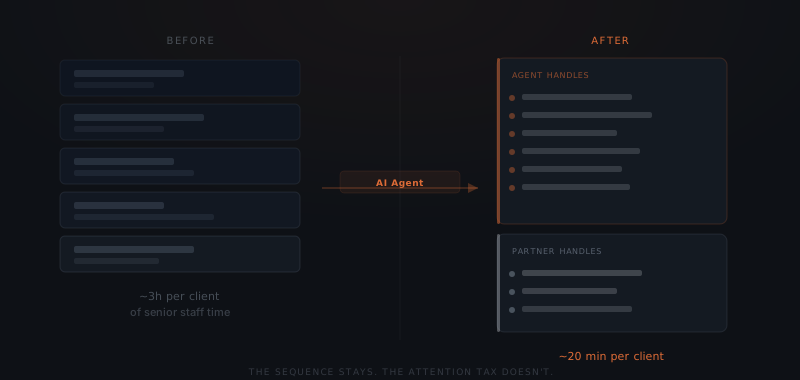
A new client signs. Now someone on your team needs to send the intake form, chase the completed version, schedule the kickoff, update the CRM, and send the welcome email. None of it is difficult. But all of it lands on the same person — usually a senior staff member whose time costs the most. An AI agent handles the document requests, scheduling follow-ups, CRM updates, and reminder sequences. Senior staff re-enter when there is a real decision to make.
Consider an illustrative six-person HR consulting firm: a new client signs a contract. The partner who closed the deal now spends the next three days chasing an intake questionnaire, booking a kickoff call across three time zones, updating the CRM, sending a welcome email with the wrong attachment (resent the next morning), and following up on the prep work the client was supposed to complete. The client relationship is good. The client experience is not. None of it required a partner's judgment. All of it got one anyway.
Which onboarding tasks do agents handle, and which do people?
Every client onboarding contains two categories of work. The first category — administrative tasks with defined triggers and outputs — is where an agent operates. The second — judgment, strategy, and relationship — stays with a person.
| Task | Agent | Person |
|---|---|---|
| Send intake form at contract signature | ✓ | |
| Chase incomplete document submissions | ✓ | |
| Propose and confirm kickoff scheduling | ✓ | |
| Update CRM at each onboarding stage | ✓ | |
| Send welcome email with correct document set | ✓ | |
| Deliver prep materials at right sequence stage | ✓ | |
| Send day-before kickoff reminder | ✓ | |
| Flag exceptions requiring judgment | ✓ (flags) | ✓ (decides) |
| Run kickoff call | ✓ | |
| Set engagement strategy and scope | ✓ | |
| Handle client relationship moments | ✓ | |
| Resolve misalignment or conflict | ✓ |
The agent’s column covers repeated coordination tasks. The person’s column covers decisions about this client. Measure the time your team currently spends on each before estimating what could be recovered.
Why does every new client start with the same administrative sequence?
Many service businesses have a repeatable sequence: request information, schedule a kickoff, update the record, and send preparation materials. The order and duration depend on the engagement. Repeated administration can be delegated without treating a regulated bank’s onboarding timetable as a benchmark for a small service firm or proof of an AI improvement.
The difference is not speed — it is ownership. Manual onboarding relies on senior staff to track and execute every step. An AI agent handles the tracking and execution layer while senior staff handle the relationship layer.
Delegate the repeated document chase and keep relationship decisions with the team. Agree reminder limits and the point where a person takes over; automation should not continue chasing a client who has asked it to stop.
Before estimating savings, record staff time spent on requests, reminders, scheduling, corrections, and exceptions across recent clients. Compare that baseline with the supported workflow after launch, including review and maintenance time. General productivity claims do not establish the hours your particular onboarding process will recover.
What does an AI agent handle in client onboarding?
An AI agent in a client onboarding workflow — for the broader definition of what an AI agent is, see that explainer — handles the tasks that repeat on every engagement without requiring context about the specific client relationship.
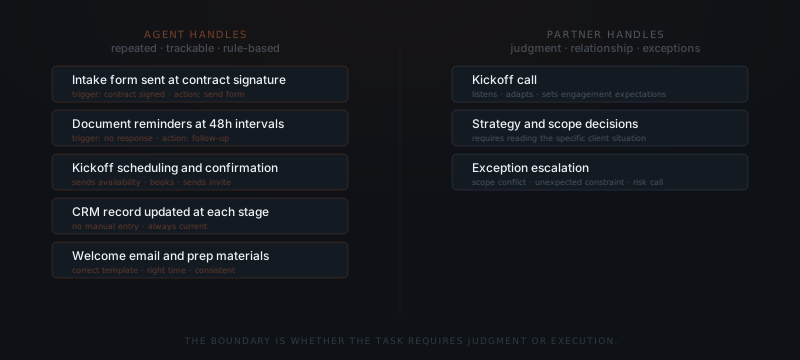
Document collection. The agent sends the intake questionnaire immediately after contract signature, tracks whether the client has completed it, and sends reminder messages at configured intervals. The agent does not wait for a team member to remember. If the client submits incomplete information, the agent flags the gaps and requests the specific missing fields.
Scheduling coordination. The agent sends available times for the kickoff call, confirms the booking, and sends a calendar invite with the correct meeting link and prep materials. If the client proposes a time outside business hours, the agent surfaces the conflict. Scheduling follow-ups — confirming the call the day before — are handled automatically.
CRM and system updates. The agent updates the CRM record at each stage: intake received, kickoff scheduled, prep materials shared, kickoff completed. The record stays current without a team member opening the CRM between client tasks.
Welcome and onboarding communications. The agent sends the welcome email with the correct document set for that client type, shares the prep materials at the right stage in the sequence, and sends the pre-kickoff check the day before the call. Each message uses the correct template for the engagement type.
What can the agent not replace in client onboarding?
An AI agent handles the administrative layer — the tasks that are repeated, trackable, and rule-based. Client onboarding also contains a layer that requires judgment.
The kickoff call itself. The agent can schedule the kickoff and send the prep materials. The agent cannot run the first strategic conversation. The kickoff requires listening, adapting to what the client actually says, and setting expectations that shape the entire engagement. This belongs to a person.
Exception escalation. When a client provides information that cannot be resolved with a clarifying request — a misalignment on scope, an unexpected constraint, a conflict with an agreed timeline — the agent flags the exception and hands it to a team member. The agent does not resolve judgment calls.
Relationship-building moments. The first week of an engagement establishes the working relationship. A partner who checks in personally at key moments signals investment. The agent handles the logistics. The partner supplies the signal.
For the broader framework on which workflows are ready to hand to an agent, see how to know if a business process is ready to hand to an AI agent.
Which tools does a client onboarding agent connect to?
Begin with the tools already in use. Confirm that the available access supports the agreed onboarding sequence before assuming a new system is unnecessary.
| Tool category | What the agent does | Common tools |
|---|---|---|
| CRM | Updates record at each stage, reads contact history | HubSpot, Salesforce, Pipedrive |
| Project management | Creates onboarding project, tracks task completion | Notion, Asana, ClickUp |
| Calendar | Proposes available times, confirms booking, sends invite | Google Calendar, Outlook |
| Sends sequences, reminders, and welcome communications | Gmail, Outlook | |
| Document storage | Shares prep materials and correct document sets | Google Drive, Dropbox |
| Form tool | Delivers and tracks intake form completion | Typeform, JotForm, Google Forms |
| e-Signature | Monitors contract signature trigger | DocuSign, HelloSign |
The contract signature is typically the trigger. Once the CRM records a signed contract, the agent initiates the onboarding sequence automatically — no human trigger required.
How do you configure client onboarding for an agent?
Setting up an agent for client onboarding starts with mapping the current sequence, not with configuring tools.
Document the sequence
Separate agent tasks from human tasks
Build the trigger-action pairs
Set the handoff criteria
Where does the agent stop and a person take over?
Every task in this workflow runs on a defined trigger and a predictable action, which is why it can operate without approval on each individual step. But automatic is not the same as unsupervised. The agent is scoped to stop and hand off the moment something falls outside what a standard sequence can cover.
| Workflow | Runs automatically | Escalates to staff |
|---|---|---|
| Document collection | Sends the intake form after signature, tracks completion, and sends reminders at set intervals | Client submits incomplete or inconsistent information that a reminder alone can't resolve |
| Scheduling coordination | Proposes times, confirms the kickoff booking, and sends the day-before reminder | Client proposes a time outside business hours or requests a reschedule that conflicts with the agreed timeline |
| CRM and system updates | Updates the record automatically at each onboarding stage | A data conflict appears — contract terms don't match what's in the CRM, for example — that needs verification before it's logged |
| Welcome and prep communications | Sends the welcome email and stage-appropriate prep materials using the standard template | Client's engagement type or scope doesn't match a standard template |
| Exception flags | Surfaces anything that doesn't fit the sequence for review | Scope misalignment, a missed deadline, or a client request that requires a strategy decision |
Decisions about scope, pricing changes, or the actual direction of the engagement are never the agent's own call — those route to whoever owns the client relationship, with the full history attached. The agent's job on every one of these paths is the same: run the standard sequence reliably, and stop the moment a situation requires judgment about this specific client.
What changes after go-live?
Measure administrative time, missed handoffs, exception volume, and the client’s completion time before and after launch. For illustration, recovering three hours per client across 25 clients would free 75 hours a year. That is arithmetic based on assumed inputs, not an observed result or a promise of higher retention.
Keep review, corrections, and ongoing support in the calculation. A faster reminder sequence does not shorten a delay caused by a client decision, a missing legal document, or an unresolved scope question.
The agent handles agreed coordination; the team keeps the client decisions.
For sequencing, see which workflows to automate first. A related workflow is AI agents for reporting. Both may use the same tools, but shared connections still need their own permission and field checks.
Choose the trigger that represents a genuine ready-to-start engagement: a signature may be suitable, but payment, approval, or completed intake may also be required. Define the steps the agent may take and test missing documents, duplicate signatures, client silence, and a cancelled engagement before sending live messages. See the implementation timeline.
The build and ongoing work are scoped to your workflow. See Yardwork pricing for the current offer before treating a generic cost estimate as a quote.
Frequently asked questions
What does an AI agent do in client onboarding?
It can handle agreed repeated tasks: intake requests, document reminders, scheduling, CRM updates, and welcome messages. Define the triggers and limits. Kickoff conversations, scope decisions, exceptions, and relationship moments stay with the team.
How long does client onboarding take with an AI agent?
It depends on the engagement, client response time, required documents, and review steps. Automation can reduce coordination delays; it cannot promise a universal completion time or make unresolved client decisions disappear.
How much time does an AI agent save on client onboarding?
Measure the current administrative work, then subtract review, corrections, and ongoing support from any time recovered after launch. Three hours saved across 25 clients would equal 75 hours annually, but those are illustrative assumptions, not a benchmark or guaranteed result.
What should the agent handle versus a person in onboarding?
Give the agent defined coordination tasks and agreed reminder limits. Keep strategic conversations, changed scope, disputed information, and client-specific decisions with a person. Stop and hand over when the standard sequence no longer fits.
Which service businesses are suited to onboarding automation?
Businesses with repeatable onboarding steps and accessible information are candidates, including recruiting firms, fractional CFO firms, HR consultancies, and marketing agencies. Suitability depends on repetition, exceptions, and review effort rather than a universal minimum number of clients.
What tools does a client onboarding agent connect to?
It can connect to the CRM, project tool, calendar, email, document store, forms, and signature tools the firm uses. Confirm available access, permissions, and the exact fields needed. A supported product name does not guarantee that every account or workflow is ready.
What does AI agent implementation cost for client onboarding?
The price depends on the workflow, connected systems, approval rules, volume, and agreed ongoing work. Yardwork scopes the build before quoting. Use the current pricing page rather than a generic implementation range or a promised payback period.