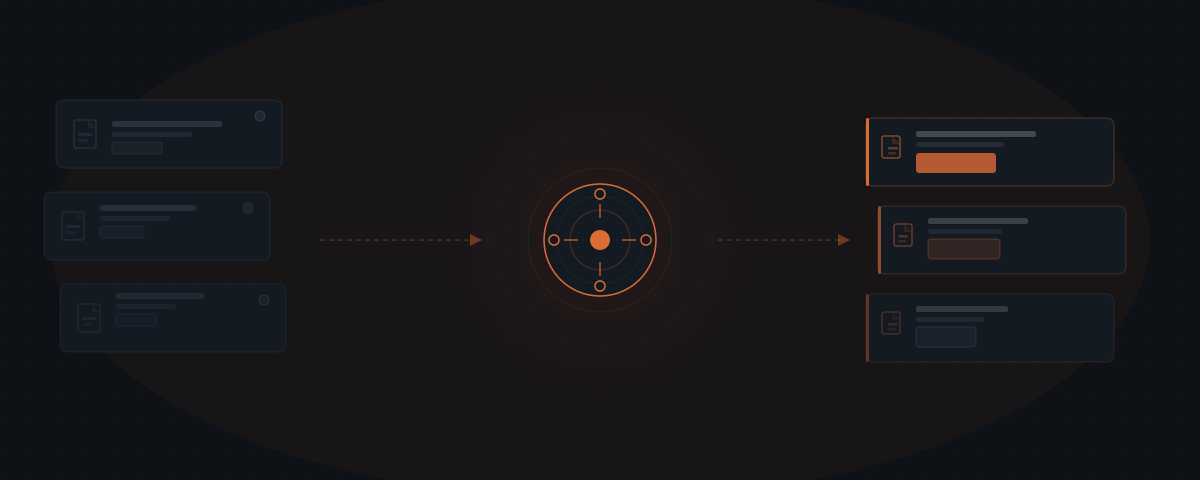
AI agents for law firms handle client intake response, matter status updates, document requests, and billing follow-up — the administrative layer that consumes the majority of non-billable hours at small practices. Clio's 2024 Legal Trends Report found attorneys bill an average of 2.9 hours per day out of 8 working hours. The attorney handles legal judgment; the agent handles the communication layer around it.
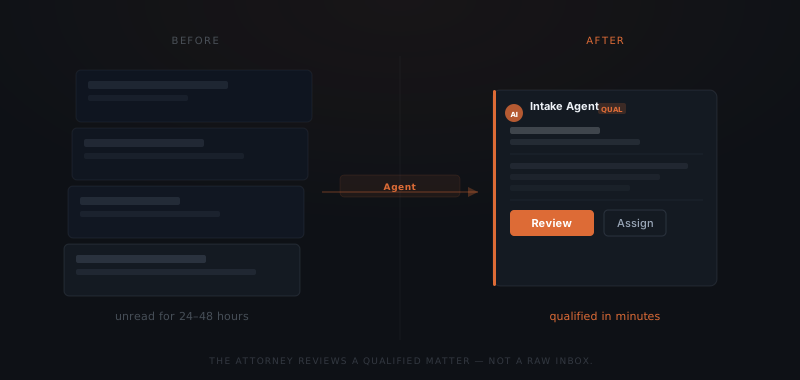
A potential client emails Friday afternoon about a contract dispute. By Monday morning, the matter is still unread — the attorney had a deposition, a brief deadline, and three client calls. The client hired the firm that replied Friday night. Small law firms lose potential clients not to better legal work but to faster follow-up. An AI agent monitors inbound inquiries, sends the intake response within minutes, qualifies the matter, and coordinates document collection. The attorney reviews the qualified inquiry and decides — nothing advances without attorney judgment, but the attorney stops being the bottleneck at the communication layer.
Why small law firms bill less than half their working hours
Clio's Legal Trends Report 2024 found that attorneys at small firms bill an average of 2.9 hours per day despite working 8 or more hours.[¹] The remaining five-plus hours goes to non-billable activities: client intake, status update requests, document coordination, billing follow-up, scheduling, and administrative work. At a median billing rate of $300 per hour, that represents $1,500 in unbilled potential per attorney per day — approximately $375,000 annually for a single attorney working 250 days.
The American Bar Association's 2023 Legal Technology Survey Report found that attorneys at firms with fewer than 10 lawyers spend an average of 28% of their working time on administrative tasks.[²] At firms with 50 or more attorneys, dedicated administrative and paralegal staff absorb that layer. At a 5-attorney firm, the attorneys absorb it themselves.
Enterprise AI tools built for law firms — Harvey AI, Thomson Reuters CoCounsel, Lexis+ AI — address the legal reasoning layer: research, drafting, case analysis. These tools require significant upfront investment and, at many enterprise vendors, dedicated legal operations teams to implement and manage. The productivity gap at a small firm is not in legal reasoning. It is in the communication and coordination work that surrounds the legal work and fills the five hours per day that never get billed.
An AI agent handles that layer: client intake response, matter status updates, document requests, billing follow-up. The attorney spends those recovered hours on the work that requires a license — the same division of labor covered in what an AI agent is, applied to a law practice.
What an AI agent manages in a law firm workflow
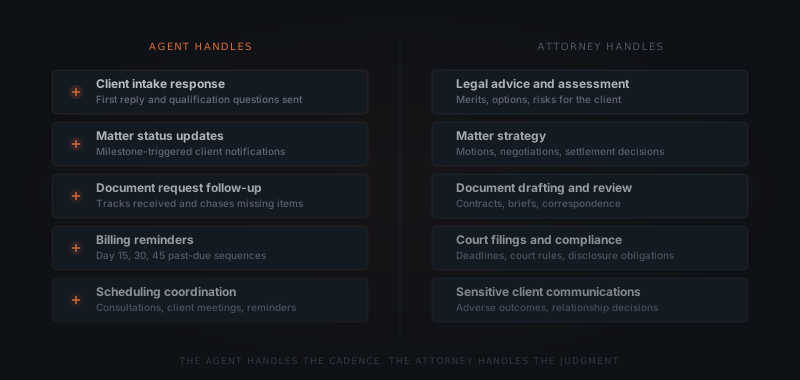
The agent handles client communications and document coordination. Legal advice, matter strategy, document drafting, and any communication involving substantive legal judgment stays with the attorney. The agent does not assess the merits of a matter or provide legal information of any kind.
Client intake response. A potential client submits an inquiry — on the firm's website, by email, or through a referral. The agent sends the first response within minutes, confirms the inquiry was received, collects the qualifying information the firm defines (matter type, urgency, jurisdiction, opposing party for conflict-check purposes), and routes the matter into the appropriate intake sequence. The attorney receives a qualified inquiry summary — not a raw email to parse.
Matter status updates. Clients at active matters regularly ask for updates. The agent monitors matter milestones and sends proactive notifications when defined events occur — filing confirmed, document received, hearing scheduled, settlement reached. Clients receive current information without the attorney drafting each update individually. Proactive communication reduces inbound status calls, which Clio's data identifies as one of the highest-volume interruptions at small firms.[¹]
Document request workflows. Matters require document collection. The agent sends collection requests, tracks which documents have arrived, follows up on missing items at defined intervals — day 3, day 7, day 14 — and notifies the attorney when the complete package is ready for review. A document collection cycle that typically extends 7–14 days through manual back-and-forth runs without attorney involvement until the attorney is needed.
Billing follow-up. Outstanding invoices are a consistent drain at small firms. The McKinsey Global Institute's analysis of professional services found that billing and collections coordination is among the top three time sinks for senior professionals at boutique firms.[³] Following up on unpaid balances takes time and creates friction in the client relationship when handled personally. The agent sends billing reminders at day 15, day 30, and day 45 past due — in the firm's voice, from the firm's email address. The attorney is notified when a client replies or a payment is received.
Scheduling coordination. New client consultations, client meetings, and deposition scheduling involve back-and-forth the agent handles. The agent checks availability, proposes times, sends confirmations, and sends reminders. The attorney receives a completed calendar entry, not a thread to manage.
| Task | Agent | Attorney |
|---|---|---|
| Inquiry response | ✓ | |
| Intake qualification questions | ✓ | |
| Matter status updates | ✓ | |
| Document request and follow-up | ✓ | |
| Billing reminders (day 15, 30, 45) | ✓ | |
| Scheduling coordination | ✓ | |
| Legal advice and assessment | ✓ | |
| Matter strategy and decisions | ✓ | |
| Document drafting and review | ✓ | |
| Court filings and compliance | ✓ |
At $300 an hour, five unbilled admin hours a day costs a firm $375,000 a year.
For the framework on which workflows to automate first across a service business, see which workflows to automate first.
What the attorney handles
Legal advice and assessment. A potential client asks whether they have a viable claim. An AI agent does not evaluate the merits of a legal matter. The intake sequence collects the facts. The attorney reviews them and makes the assessment. Any message involving the viability of a claim, applicable statutes, or legal risk must route directly to the attorney — not trigger an automated response.
Matter strategy. Which motions to file, how to position a negotiation, when to settle and on what terms — these are judgment calls that require legal knowledge, case context, and professional responsibility. The agent surfaces information and flags deadlines. The attorney makes every strategic decision.
Document drafting and review. Contracts, briefs, demand letters, pleadings, and client correspondence involving legal substance require attorney authorship and review. The agent may handle transmittal of completed documents — sending a signed agreement to the counterparty, for example. The attorney writes and approves the substantive content.
Compliance and court filings. Filing deadlines, court rules, disclosure obligations, and any interaction with a court, tribunal, or regulatory body are the attorney's domain. The agent does not make filings or represent the firm in any official capacity.
Sensitive client communications. When a client receives an adverse ruling, a failed settlement, or information about a serious setback — that conversation requires a human relationship the attorney holds. The agent handles the structured, repeatable communication layer. The attorney handles the relationship-sensitive layer.
How to configure a law firm agent workflow
Map the communication types
List every repeating communication category at the firm: intake inquiries, document requests, status update requests, billing follow-up, scheduling. Start with the category that consumes the most attorney time — that is the first workflow to implement. Adding all categories in the first implementation extends the timeline without proportionate benefit.
Write the intake qualification criteria
Define what the agent collects on first contact: matter type, urgency, opposing party name (required for conflict check), jurisdiction, and the client's timeline. These become the structured questions in the intake response. Any matter missing the conflict-check field must pause at the attorney before a consultation is confirmed.
Define matter status milestones
List the events that trigger a client update: matter opened, hearing scheduled, document received, filing submitted, settlement reached. Write a brief message template for each event. The agent sends these when the milestone is logged in the case management system — not on a time-based schedule that ignores matter state.
Connect the case management system
The agent reads matter data — open matters, milestones, document status — from the firm's case management system. Clio, MyCase, and Smokeball all support API connections. Without this connection, the agent cannot send milestone-triggered updates accurately or log interactions to client records. The CMS integration is not optional in a matter-aware workflow.
Set the escalation triggers
Define which incoming replies require attorney attention immediately: any mention of a statute of limitations within 30 days, a reply indicating a regulatory investigation, a coverage question, or a client expressing serious dissatisfaction. These route to the attorney rather than continuing the automated sequence. Escalation triggers must be reviewed and updated quarterly as edge cases surface.
For a broader framework on determining which business processes are ready to hand to an agent, see how to know if a business process is ready to hand to an AI agent.
Tools and integrations a law firm agent workflow connects to
The specific platforms the agent uses depend on which case management system the firm runs. The table below covers the standard connection points for an intake, status update, and billing follow-up workflow.
| Platform | Role in the workflow | Notes |
|---|---|---|
| Clio | Matter data, milestones, document storage, billing | API — most widely used CMS for SMB law firms |
| MyCase | Matter management, client portal, billing | REST API — strong for client-facing communication |
| Smokeball | Case management and document automation | API — common in litigation-focused practices |
| PracticePanther | Matter tracking and billing | API integration |
| Gmail / Outlook | Intake inquiries, client communications from the attorney's address | OAuth — agent sends from the attorney's real address |
| Google Calendar / Outlook Calendar | Consultation scheduling, meeting confirmations | Read availability, write confirmed appointments |
| LawPay / Stripe | Payment confirmation triggers for billing sequences | Webhook — agent notified when payment received |
| Slack | Escalation notifications when agent flags urgent matters | Webhook notification only — no write access needed |
Platforms outside this list require custom connectors. A standard first implementation connects the case management system, email, and calendar. Document management integration — iManage, NetDocuments — adds capability at larger practices but is not required for the core intake and follow-up workflow.
What a law firm agent workflow costs
The cost breaks into three components: setup, operating costs, and the platform subscriptions the agent connects to.
Setup cost. A complete intake, status update, and billing follow-up workflow — covering inquiry response, intake qualification, milestone-triggered status updates, document collection follow-up, and billing reminders — runs $3,500–$7,000 when implemented by a service. The range reflects integration complexity: a single-practice firm on Clio running one matter type sits at the lower end; a multi-practice firm with multiple matter types, document collection workflows, and conflict-check integration sits at the upper end. Internal builds require 40–80 hours and direct API knowledge for the specific case management system.
Operating costs. At typical small firm communication volumes — 20–50 active matters, 30–60 billing communications per month — annual API costs run $100–$250. Operating costs scale with matter volume and do not recur as a fixed expense.
Year 1 total (implementation + first year API): $3,600–$7,250.
ROI frame. At a median billing rate of $300 per hour, recovering one hour per day of attorney time from administrative reduction represents $75,000 in annual billed revenue per attorney. Recovering two hours represents $150,000. Clio's Legal Trends Report 2024 shows the opportunity is real — attorneys are already working the hours; the question is whether those hours generate billed work.[¹] The setup cost recovers within 2–3 weeks of additional billed time.
Where law firm agent implementations fail
Five failure modes appear consistently across legal agent deployments.
Agent responds to legal questions. A potential client asks: "Do I have a case?" The agent, pulling from general context, offers a qualified assessment. Any message involving the merits of a matter, applicable law, or legal strategy must be defined as out of scope in the agent's instructions. The agent's only response to legal questions is: "I'll have [attorney name] review your matter and follow up shortly." This instruction must be explicit and tested before go-live.
Conflict check not integrated into the intake workflow. The agent collects intake information — including the opposing party name — but does not trigger a conflict check before confirming a consultation. The attorney meets with a potential client only to discover an existing conflict. The intake sequence must include a workflow step that pauses the consultation confirmation until the conflict check is completed. Automating the confirmation before the conflict check is resolved introduces professional responsibility risk.
Status updates sent on a time schedule rather than matter state. A client whose matter has been inactive for six weeks receives the same week-three status update template as a client with a hearing the following week. Status updates sent without regard to matter state read as impersonal and generate follow-up calls from clients seeking actual information. Updates must be triggered by logged milestones in the case management system — not by a calendar.
Billing reminders sent during a contentious matter phase. A client disputing a fee receives a day-30 billing reminder while their complaint is being reviewed. Billing follow-up sequences must exclude matters flagged as disputed. Any matter with an open complaint, fee dispute, or settlement under negotiation routes to the attorney before any billing communication is sent.
Intake data does not flow to the case management system. The agent qualifies the intake and collects matter information, but that data is not written to the CMS. The attorney re-enters the information at matter opening. This negates a significant portion of the time savings and introduces transcription errors. CMS integration must write intake data directly to the new matter record — not create a summary that the attorney manually copies.
Frequently asked questions
What does an AI agent do for a law firm? An AI agent for a law firm handles client intake response, matter status updates, document request follow-up, billing reminders, and scheduling coordination. The agent sends the first response to new inquiries within minutes, qualifies the matter using defined criteria, and logs all interactions to the case management system. Legal advice, strategy, document drafting, and court filings stay with the attorney.
Can an AI agent provide legal advice? An AI agent used in a law firm workflow does not provide legal advice, assess the merits of a matter, or make any statement involving substantive legal judgment. The agent handles the communication and coordination layer. Any inquiry about legal options, applicable law, or case strategy is escalated to the attorney.
What case management systems work with a law firm agent? Law firm agent workflows connect to Clio, MyCase, Smokeball, and PracticePanther via their APIs. The agent reads matter data — open matters, milestones, document status — and logs communication activity back to client records. Clio is the most common integration for SMB law firms.
How much time does a law firm agent save per day? The time saved depends on inquiry volume, active matter count, and billing follow-up cycles. Clio's 2024 Legal Trends Report found attorneys at small firms bill an average of 2.9 hours per day despite working 8 or more. Eliminating 1–2 hours of administrative communication per day is a consistent outcome at practices managing 20–50 active matters.