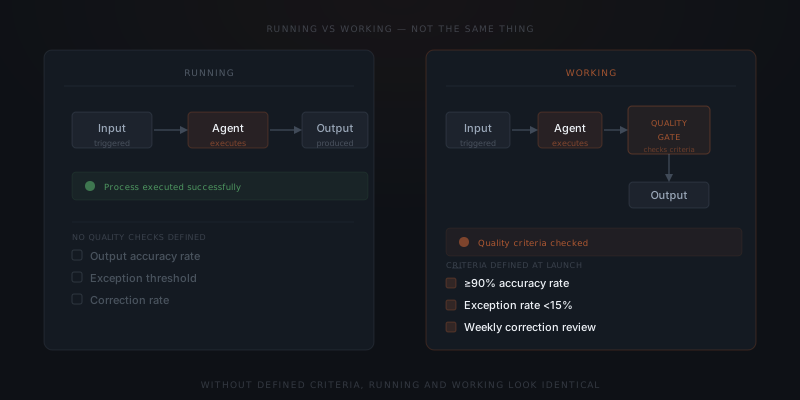
An AI agent that is running executes its process when triggered. An AI agent that is working produces outputs that match the business goal. Most teams define success at launch as 'the agent runs' — and never discover that the two things have quietly diverged. Without output quality criteria defined before go-live, a working agent and a degrading one look identical from the outside.
Three months after an AI agent goes live, a founder checks in on the workflow. The agent is still running. Inputs are being processed. Outputs are being produced. By every visible measure, the project is succeeding. Then someone on the team mentions they have been quietly correcting the agent's outputs before sending them — for the past six weeks. The agent was running. The agent was not working. Nobody had defined what working looked like.
What is the difference between an agent running and working?
A running agent executes its process when triggered. A working agent produces outputs that match the business goal at an acceptable rate. These two states are not equivalent. They diverge silently over time — and without a defined way to distinguish them, the divergence is invisible until it has been compounding for weeks.
A concrete version: an agent built to categorize incoming support emails is running if the agent reads each email and files it into a category. The agent is working if the agent files emails into the correct category at an acceptable rate, flags cases it cannot confidently categorize, and passes the right information downstream for each case type. A running agent satisfies the first test. A working agent satisfies both. A running agent can fail the second test for months before anyone notices.
The cost of this distinction is asymmetric. A team that monitors only process state — is the agent running? — absorbs the cost of poor output quality in the form of manual correction work, downstream data errors, and eventually the trust cost of outputs that have been wrong for long enough that the team stops relying on them. A team that monitors output quality catches the divergence when it is still a small correction, not a six-month backlog.
What do success criteria for an AI agent look like?
Most agent implementations define success as "the agent runs." That is a process criterion. Process criteria tell you whether the agent is executing — not whether the outputs are correct.
Useful success criteria define output quality, not process state. A quality criterion has three components. First: a measurable outcome — not "emails are handled" but "90% of incoming emails are categorized correctly on the first pass." Second: a defined exception threshold — not "the agent flags uncertain cases" but "cases flagged as uncertain stay below 15% of total weekly volume." Third: a review trigger — a threshold that, when crossed, initiates a prompt review rather than waiting for the next scheduled check.
Staying in control of an agent requires knowing what control looks like in practice. Without specific quality criteria, "in control" means the process is running — which tells you nothing about whether the outputs are correct.
Weak criteria describe activity. Strong criteria describe accuracy.
The table below shows what weak and strong criteria look like across common agent workflow types.
| Workflow type | Weak criterion (activity) | Strong criterion (accuracy) | Review trigger threshold |
|---|---|---|---|
| Email categorisation | Emails are being categorised | 90%+ categorised correctly; flagged rate under 15%/week | Flagged rate above 20% for two consecutive weeks |
| Client status update drafts | Updates are being generated | 85%+ approved without significant edits | Correction rate above 30% for two consecutive weeks |
| Lead follow-up sequences | Follow-ups are being sent | Follow-ups sent within the configured window; no contacts receiving duplicate sequences | Any duplicate detected; schedule miss rate above 5% |
| Invoice reminders | Reminders are going out | Correct invoice amount and client name in 98%+ of reminders | Any factual error in client name, amount, or account number |
| Pipeline stage updates | Stages are being updated | Stage updates match the agreed logic in 95%+ of records | 10+ records in unexpected stage in a weekly spot-check |
Running means the process executes. Working means the output is right.
Which three signals show a live agent is degrading?
Three observable patterns indicate that an agent is running but not working correctly. Each one is detectable before it becomes expensive — if someone is looking.
Exception rate rising. Most agents are built to flag inputs they cannot handle with confidence. When the exception rate climbs week over week without a corresponding increase in input volume, the agent's instructions have drifted from the current workflow. The agent is encountering inputs it was not designed for. The exception rate is the first metric that shows this — before the errors in the handled outputs become visible.
Manual correction increasing. When the team starts regularly editing agent outputs before sending, the agent is producing outputs that are structurally plausible but substantively wrong. This is prompt drift made visible. The team is working correctly — by fixing the agent's work before it goes out. The agent is not.
An agent that is running but not working costs more than no agent at all — because the team trusts the output and stops checking the work the agent replaced.
Downstream records inconsistent. When data written by the agent to a connected system shows missing fields, incorrect values, or inconsistent formatting across records of the same type, integration drift has occurred. The agent's write calls succeed — no error fires — but the field mapping no longer matches the current schema. These inconsistencies are only visible by checking the records directly, not by watching the agent run.
| Degradation signal | What it indicates | What to check | Action |
|---|---|---|---|
| Exception rate rising week-over-week | Agent encountering inputs outside its designed scope | Has input volume changed? Has a new input type been introduced? | Review exception logs for patterns; update brief to cover new cases |
| Team increasingly correcting outputs | Prompt drift — outputs are structurally correct but substantively wrong | Compare current prompt against how team describes the workflow today | Update prompt to match current process language and logic |
| Downstream records inconsistent | Integration drift — field mapping no longer matches current schema | Spot-check 10 records per connected tool; compare against expected schema | Update integration mapping; confirm write calls land in correct fields |
| Team using workarounds | Agent outputs no longer trusted; team working around them | Interview team members about what they routinely change before using | Full review: prompt, integration health, exception patterns |
How do you define success criteria for a live agent?
If the agent is already live and quality criteria were not defined before launch, define them now. Retrospective criteria are harder to set because data already exists to rationalize against — but operating without criteria is worse. The three-step method works for agents that have been live for any length of time.
Step one: establish the baseline. Pull the last 100 outputs and evaluate them manually against the business's current standard for that workflow. Record the accuracy rate, the exception rate, and the rate of outputs that needed manual correction before use. These numbers become the baseline.
Step two: define the thresholds. Set the minimum acceptable rate for accuracy, the maximum acceptable exception rate, and the correction rate that would trigger an immediate prompt review rather than waiting for the next scheduled check.
Step three: assign ownership. A named person — not "the team" — checks these metrics on a fixed schedule. Monthly works for stable, low-volume workflows. Weekly works for high-volume or rapidly changing ones. The schedule and the owner both need to be explicit before the criteria are useful.
The criteria do not grade the agent retroactively. The criteria tell you whether the agent is still working correctly the next time you check — which is the only thing that matters from that point forward.
A practical cadence for maintaining the criteria: review them quarterly alongside the review of the agent itself. As the business changes, the thresholds may need updating — a workflow that was new and had a 15% exception rate at launch might be expected to have under 5% by month six, as the brief has been refined. Criteria that do not change with the agent's maturity become too easy to meet and stop serving as a meaningful quality signal.
What do you do when an agent that was working stops working?
The signal that a previously stable agent has stopped working is not always dramatic. Most agents that degrade do so gradually — the correction rate rises by a few percentage points each month, the exception volume grows slowly, the workarounds accumulate one at a time. No single event marks the transition from working to not working.
The way to catch this gradual drift is to compare the agent's performance against its defined success criteria on a fixed schedule — not when something goes wrong, but on a routine basis. An agent checked monthly against its criteria will have its drift caught within 30 days. An agent checked only when someone notices a problem will have been degrading for however long it takes for the degradation to become visible to a team that has been assuming it is working.
The most reliable predictor of long-term agent success is not the quality of the initial build. It is whether the team maintains the discipline of checking whether the output quality still meets the criteria that were defined when the build was considered complete. For the maintenance routine that makes this check operationally sustainable, see what AI agent maintenance actually involves.
Frequently asked questions
What is the difference between a running AI agent and a working one?
A running agent executes its process when triggered — it is processing inputs, producing outputs, and not generating errors. A working agent produces outputs that match the business goal at an acceptable rate — the outputs are correct, current, and usable without significant correction. The two states diverge silently over time through prompt drift, integration drift, and edge-case accumulation, none of which stop the agent from running or trigger an error notification. The divergence is only visible through output quality checks.
What are success criteria for an AI agent?
Success criteria for a live agent define output quality, not process state. A useful criterion names a measurable outcome (such as 90% categorization accuracy), an exception threshold (such as under 15% flagged cases per week), and a review trigger (a threshold that initiates a prompt review rather than waiting for the next scheduled check).
How do you know if your AI agent is degrading?
Three observable signals indicate degradation: the exception rate climbing without a corresponding increase in input volume, the team increasingly correcting outputs before sending them, and downstream records showing inconsistent or missing fields in connected systems. All three are detectable before they become expensive — if someone checks for them on a regular schedule.
What should you do if you never defined success criteria for your live agent?
Pull the last 100 outputs and evaluate them against the business's current standard for that workflow. Record the accuracy rate, exception rate, and correction rate. Those numbers become the baseline. Then define the acceptable threshold for each metric and assign a named person to check them on a fixed schedule.
What does it mean when success criteria are met but the team still finds the agent unhelpful? This indicates the criteria are weak — they measure process activity rather than output quality. An agent that sends status updates on time but writes updates the team rewrites before sending is meeting a process criterion while failing a quality one. When this pattern appears, replace the process criteria with quality criteria: what rate of drafts can be sent without significant editing? That is the relevant measure.
How do you handle an agent that is working correctly on its core workflow but failing on edge cases? Edge case failure without core workflow failure is normal for newly launched agents and agents experiencing gradual scope expansion. The response depends on edge case volume: if under 10% of inputs are edge cases, handle them manually and document the pattern for the next brief update; if over 20%, the brief needs updating to cover the most common edge case types before the manual handling burden exceeds the value the agent creates on core cases.
How do you communicate to the team that an agent is working correctly? A brief update every four to six weeks — "the agent's correction rate this month was X%, exception rate was Y%, no significant integration issues" — creates shared understanding of what the agent is actually doing. Teams that receive no communication about agent quality tend to either over-trust or under-trust the outputs; neither is optimal. A simple report card normalizes the conversation about agent quality and makes it easier to escalate when the numbers start moving in the wrong direction.
Is there a way to track success criteria automatically rather than manually? For well-defined success criteria, yes. Correction rate can be tracked via approval workflow data — how often is a draft approved without edit versus edited before approval. Exception rate is typically available in the agent's log. Integration health checks for specific fields can be automated as a data validation query. The manual work is the log-reading and pattern recognition — identifying what the exceptions have in common and whether the corrections cluster around specific output types. That interpretation step is not automatable.