A live AI agent can run incorrectly for weeks without triggering a single error notification. The three ways agents degrade — prompt drift, integration drift, and edge-case accumulation — all produce outputs that look like normal outputs until someone checks whether those outputs are still correct. Most businesses model agent maintenance after software hosting, where something either runs or crashes. Agents are different. Agents drift.
An AI agent that is running is not necessarily working correctly. The distinction matters — and it is invisible without a defined maintenance routine. Most businesses treat a live agent the way they treat hosted software: set it up, watch for crashes, intervene when something breaks. Agents do not break that way. Agents degrade through three mechanisms that never produce an error notification. By the time the degradation is visible, weeks of bad outputs have already gone out.
What breaks in a live agent without triggering an error?
Three failure modes affect live AI agents, and none of them stop the agent from running. Each keeps generating outputs that look fine on the surface — the only way to tell is to check whether they are still accurate.
Prompt drift happens when the business changes but the agent's instructions do not. A sales team starts using different language for pipeline stages. A product line gets renamed. A new client category arrives that the agent was never briefed on. The agent keeps running against the original prompt. The outputs reflect a version of the business that no longer exists. No error fires. The outputs look plausible — which is the precise reason prompt drift is more dangerous than an outright agent failure: teams trust plausible outputs without checking them.
None of the three failure modes — prompt drift, integration drift, edge-case accumulation — trigger error notifications. Outputs keep flowing and keep looking normal. Correctness is the only thing that changes, and nothing alerts you to that.
Integration drift happens when a connected tool updates its API or changes its data structure. Connecting AI agents to real systems introduces a dependency on every tool in the chain. When any one of those tools updates, the agent's connection can degrade silently. Write calls succeed — the API accepts the request — but the field mapping no longer matches the updated schema. Records appear to be created. The data is written to deprecated fields nobody checks.
Edge-case accumulation happens when new inputs arrive that the agent was not built to handle. The agent processes those inputs as best it can. Usually incorrectly. Without regular log reviews, those misfires accumulate unnoticed.
The table below maps each failure mode to its detection signal and the maintenance action that resolves it.
| Failure mode | What it looks like | When it typically appears | Detection method | Fix |
|---|---|---|---|---|
| Prompt drift | Outputs reflect outdated process or terminology | Months 2–6, after process changes | Prompt comparison against current workflow language | Rewrite affected prompt sections; test against real recent inputs |
| Integration drift | Data lands in wrong fields or records appear correct but hold deprecated values | After tool API updates (usually months 4–12) | Spot-check 10 records per connected tool | Update field mapping; confirm with test write to new schema |
| Edge-case accumulation | Rising exception rate; specific input types consistently mishandled | Months 2–4, accelerating with volume | Log sampling — look for repeated patterns in flagged outputs | Add handling for identified edge cases; update brief |
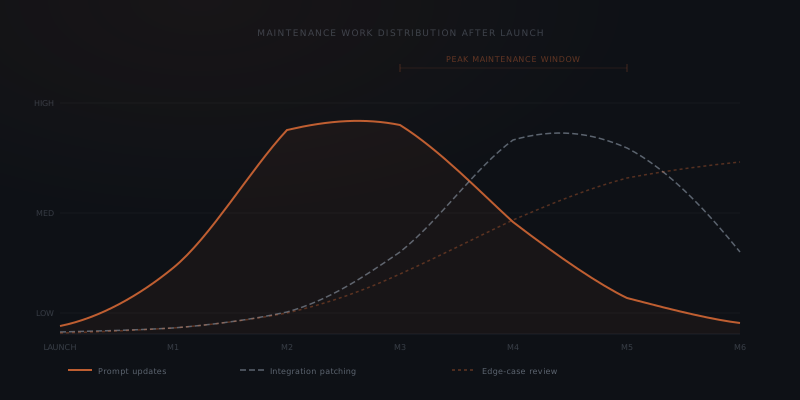
When does maintenance peak, and why is it month three?
The first weeks after launch look clean. The agent runs on inputs it was built for, against integrations that were current at build time, with a prompt that matched the business when the brief was written. Nothing triggers a review. Nothing looks wrong.
By month three, the first signs of drift are detectable — for anyone looking. A vendor has pushed an API update. The business has onboarded a new client type the agent was not designed for. The team uses slightly different language in their Notion pages than they did during the build. None of these changes are announced. None of them trigger a notification.
The maintenance work peaks somewhere between months three and six for most single-workflow implementations. Prompt drift has had time to compound. Integration drift has spread across multiple records. Edge cases have accumulated to a volume large enough to detect patterns. This is not a coincidence — it is the natural rhythm of how real systems change in the first six months of use.
The businesses that handle this peak well are the ones that define the review cadence before launch rather than in response to the first problem. A monthly review in month one and two, when the agent is running correctly, takes 60–90 minutes and establishes the baseline. The same review in month four, after two months of unchecked drift, takes four to six hours because the drift has to be diagnosed and corrected rather than just assessed. The economics of preventive maintenance are straightforward: regular reviews are cheaper than periodic reconstruction.
Two markers indicate a maintenance routine is working. First, prompt update frequency is proportional to business change rate — an agent at a growing business that has never needed a prompt update in six months is not being maintained, not running perfectly. Second, the correction rate on outputs is stable or declining — not rising, which would indicate unchecked drift.
What does a monthly agent review cover?
Running a monthly review does not require deep technical knowledge of the agent. It requires a defined set of checks, done on a fixed schedule by a named person.
Log sampling
Prompt comparison
Integration health
Exception review
For a single-workflow agent handling a well-defined, stable process, this review takes two to three hours per month.
The review does not need to be done by the person who built the agent. It needs to be done by the person who knows what correct outputs look like for that workflow — usually the business owner of the process. The technical checks (integration health, field mapping) can be done by anyone who can log into the connected systems. The quality checks (does this output match current standards?) require someone with process knowledge.
How do you size the maintenance commitment?
The right model for agent maintenance is not software hosting. Software either runs or crashes. An agent can run incorrectly for months — producing outputs that pass a superficial check but degrade in quality over time.
This matters for how maintenance is staffed. A software monitoring role — someone watching dashboards and responding to alerts — is the wrong model. The alerts will never fire. What is needed is someone who periodically reads outputs, compares instructions against current practice, and spot-checks the data records the agent has been writing. That work is closer to quality assurance than to system administration.
The closer model is managing a capable hire working from a brief written six months ago. The work does not need daily attention. The brief needs updating when the business changes. The outputs need reviewing on a schedule. The exceptions need a decision-maker.
For a single-workflow agent on a stable process: two to three hours per month. For agents covering more integrations, higher input volume, or a workflow that changes frequently: scale proportionally. The constraint is not time — it is ownership. Two hours of undefined responsibility produces the same outcome as zero hours, which is exactly why most agent projects stall after go-live.
Name the owner before launch. Define the review cadence before launch. Those two decisions prevent the maintenance gap from becoming invisible.
| Agent type | Monthly maintenance time | What drives the difference |
|---|---|---|
| Single workflow, stable process, 1–2 integrations | 2–3 hrs | Low change rate; minimal edge case volume |
| Single workflow, frequently changing process | 3–5 hrs | Prompt updates needed after each process change |
| Multi-workflow, 3–4 integrations | 4–8 hrs | More integration surface; more review scope |
| High-volume workflow (500+ inputs/week) | 3–6 hrs | More edge cases to review; larger log sample required |
The difference between a well-maintained and a neglected agent is not visible in the first month. By month three, the quality gap between a reviewed and unreviewed agent running the same workflow is measurable in the correction rate the team applies to the outputs.
Which signals indicate maintenance is overdue?
Three observable patterns indicate that maintenance is overdue regardless of when the last review was scheduled.
The team has developed workarounds. When team members have built informal habits around the agent's outputs — "always check if the deal stage is correct before sending," "ignore the summary for European clients" — the agent has drifted past the point where its outputs are trusted. The workarounds are proof of undetected drift.
Escalation handling has been bypassed. When the team starts handling exceptions the agent was supposed to route — because the escalation path has broken or the exception volume has gotten too high to keep up with — the exception mechanism is no longer functioning as designed. This is integration drift or edge-case accumulation made operationally visible.
The brief has never been updated. If the agent has been running for six months without a single prompt update and the business has had any process changes in that period, the brief has drifted. Not every process change requires a prompt update — but six months with zero updates almost always means drift has been accumulating unnoticed.
Frequently asked questions
What is prompt drift in an AI agent?
Prompt drift occurs when the business changes but the agent's instructions are not updated to match. New naming conventions, new client types, or renamed products cause the agent to produce outputs that reflect an outdated version of the workflow. Prompt drift does not trigger an error — the outputs continue to look plausible until reviewed against current standards.
What is integration drift in an AI agent?
Integration drift occurs when a connected tool updates its API or changes its data structure after the agent has launched. The agent's write calls succeed — the API accepts the request — but the field mapping no longer matches the current schema. Data lands in deprecated fields or is silently discarded, with no error notification produced. Salesforce releases three major platform updates every year — Spring, Summer, and Winter — each of which may deprecate API endpoints or alter field schemas that connected agents rely on.[1] Most major platforms (HubSpot, Notion, Shopify, Gmail) operate on comparable update cadences; monitoring their changelogs is part of the integration maintenance work for any agent that connects to them.
How often should you review a live AI agent?
Monthly works for most single-workflow implementations on a stable process. The review covers log sampling, prompt comparison against current business language, integration health checks on connected tools, and an exception review for inputs the agent could not handle. Each review takes two to three hours.
Who should own AI agent maintenance?
A named individual — not "the team" — whose responsibilities explicitly include monthly log reviews, prompt updates when the business changes, and integration checks after connected tools update. The failure mode is not too much maintenance work. The failure mode is undefined maintenance responsibility that nobody picks up.
What does a zero-maintenance approach look like, and why does it fail? A zero-maintenance approach means the agent is deployed, monitored for crashes, and never actively reviewed. The agent continues running. Over months, prompt drift accumulates as the business changes without corresponding prompt updates. One or two connected tools update their APIs, and the field mappings silently break. Edge cases that were never handled begin appearing regularly. The outputs degrade in quality — but the degradation is invisible without review, because the agent never triggers an error notification. By month six, the team is spending two to three hours per week correcting the agent's outputs — which is more time than a monthly maintenance routine would have cost.
How do you prevent maintenance gaps on a multi-agent system? Each agent in a multi-agent system requires its own owner and review cadence — not a shared ownership model where "the team" is responsible for all agents collectively. A shared model produces the same gap as no ownership: when something goes wrong, nobody was specifically responsible for catching it. For guidance on structuring multi-agent ownership from the start, see how to scale AI agents.
What does a maintenance-triggered prompt update actually involve? A prompt update triggered by a process change covers three steps: identifying which sections of the current prompt are affected by the change, rewriting those sections to reflect the updated process, and testing the updated prompt against five to ten real recent inputs before redeploying. Most prompt updates take 30–60 minutes for a single-workflow agent. The cost of a prompt update is substantially lower than the cost of six weeks of bad outputs produced by a prompt that was never updated.
Notes
- Salesforce. "Salesforce Releases." Salesforce Help & Training. https://help.salesforce.com/s/articleView?id=000386562&type=1 — Salesforce publishes three major platform releases annually: Spring, Summer, and Winter. Each release may include API version changes, field deprecations, and schema updates.