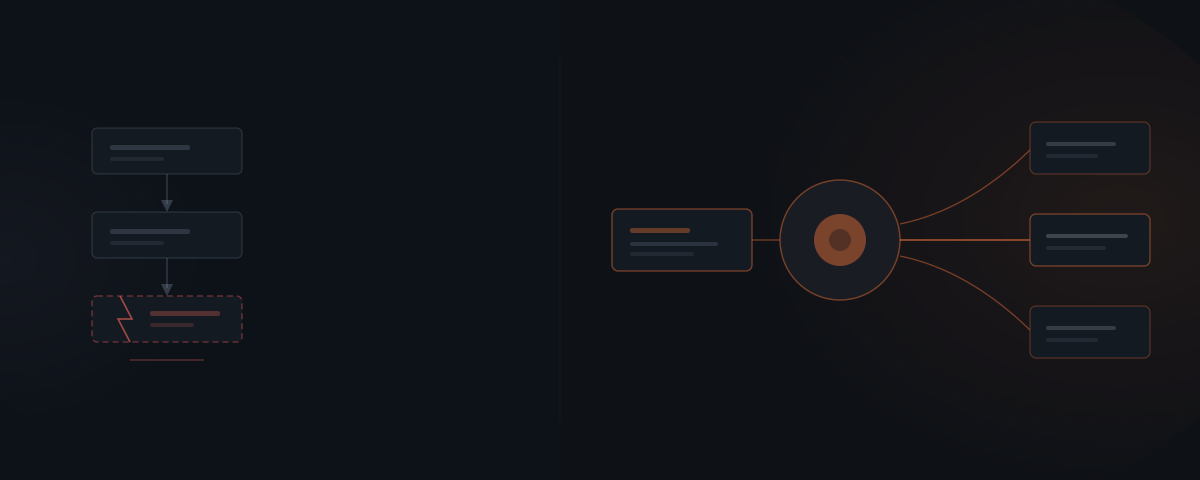
When automation is not enough describes the point where rule-based tools like Zapier, Make, and n8n stop working: the moment a task needs judgment on ambiguous input. Automation executes decisions already made; it cannot make one. An AI agent reads context and decides, then hands the deterministic steps back to the automation running underneath it.
The Zap has forty steps now. It broke twice last month — once when a client phrased a request slightly differently, once when a field came in blank. Every exception means another branch, and the branches are starting to outnumber the work they handle. That is the wall: rule-based automation runs the paths you defined, and reality keeps sending paths you didn't. An AI agent handles the judgment those rules can't — reading the exception, deciding what it needs, and passing the routine steps back to the automation that already works.
The wall every automation eventually hits
Automation breaks at the exact point a task starts needing judgment. Not because it was built badly — because rules can only cover the cases you thought of in advance. The forty-step workflow that handles every clean input falls over the first time an input arrives dirty, ambiguous, or shaped in a way no branch anticipated.
The numbers on this are stark. Ernst & Young estimates that 30–50% of initial robotic process automation projects fail.[¹] Deloitte's Global RPA Survey found only 3% of organizations have managed to scale their digital workforce, even though 78% plan to keep investing in it.[²] The pattern is not that automation doesn't work — it is that automation works right up to the edge of its rules and no further, and most real processes live past that edge.
Automation failing at scale is not an engineering failure. It is a category limit: a rule executes a decision made in advance, so it cannot respond to a situation no one encoded. Adding more rules extends the boundary; it never removes it.
The tell is maintenance. A workflow that needs a new branch for every edge case, and still misses some, has reached the limit of what rules can express. The team ends up maintaining the automation like a second job — Deloitte's own respondents cited process fragility and constant upkeep as the reason scaling stalls. Past a certain complexity, each new rule you add to catch an exception creates two more exceptions it doesn't catch.
Take a common case: lead routing. A rule sends inquiries containing "pricing" to sales and "support" to the help desk. It works until an email reads "we're comparing options and hitting a bug" — two intents, no clean keyword, and the rule routes it wrong. Multiply that by every real inquiry that doesn't announce its category, and the routing needs a person watching it. The automation didn't fail at routing. It failed at the judgment that routing actually requires.
This is the moment the search "when automation is not enough" gets typed. It is not a tooling problem to be solved by switching from Zapier to Make, or Make to n8n. Every rule-based tool hits the same wall, because the wall is the rule itself.
Automation executes a decision; it cannot make one
The difference between automation and an AI agent is a single distinction: automation executes a decision that was already made, and an agent makes the decision at the moment it's needed. A Zap encodes "if the subject contains 'invoice', file it here." That decision — what to do with an invoice email — was made by a human when they built the rule. The Zap just runs it.
Automation executes the decision. It cannot make one.
An agent works the other way. It reads the incoming email, interprets what it's actually asking, and chooses a response — even if the email is phrased in a way no rule covers. The decision happens at runtime, against the specific situation, not in advance against a category. That is why an agent handles the message that says "running late, still want the order?" and a rule does not: there was never a branch for that sentence, and there was never going to be.
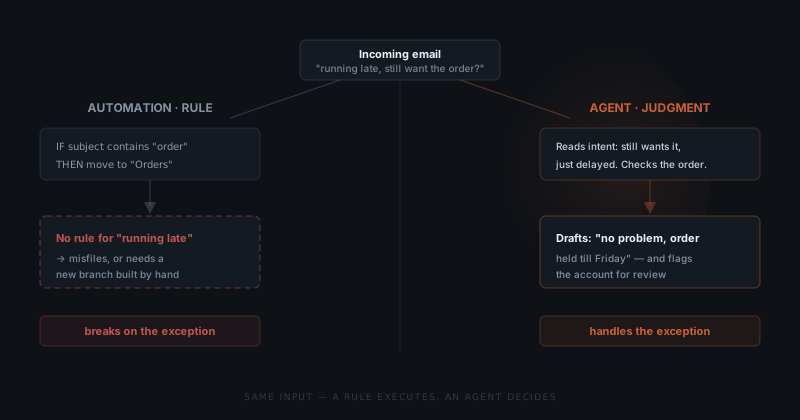
This maps to a distinction the comparison between agents and automation covers in depth, and it is the reason the two are not interchangeable. Automation is deterministic: the same input produces the same output, every time, which is exactly what you want for a task with stable rules. An agent is contextual: it weighs the specific input and can produce different, appropriate outputs for situations that look similar but aren't. Determinism is a strength for routine execution and a fatal weakness the moment the input stops being routine.
The practical consequence is where each one fails. Automation fails silently on the exception — it misfiles, skips, or stops, and no one notices until a customer does. An agent's failure mode is different: it produces a draft that a person reviews before it acts, so a wrong judgment gets caught at the approval step rather than in the customer's inbox.
When automation is still the right answer
Automation is the correct tool for any task that is deterministic and stable, and reaching for an agent there is a mistake. This is the credibility test for anyone claiming automation "isn't enough": if you can't say when it is enough, you're selling, not advising.
The rule is simple. If the same input should always produce the same output, and the rules don't change, use automation. Moving a file when it lands in a folder, sending a reminder three days before a due date, copying a form submission into a spreadsheet — these have no judgment in them. An agent adds cost, latency, and a review step to work that a rule does perfectly and instantly.
| Signal | Use automation | Use an agent |
|---|---|---|
| Input variability | Same shape every time | Variable, unstructured, or ambiguous |
| Decision | Made in advance, encoded as a rule | Made at runtime, against context |
| Exceptions | Rare and enumerable | Frequent and unpredictable |
| Correct output | One right answer per input | Depends on the situation |
| Failure mode | Acceptable to skip or stop | Needs a judgment call to resolve |
| Example | Move file, send reminder, sync field | Read intent, handle a complaint, draft a reply |
The mistake in both directions is real. Putting a rule where judgment is needed produces the forty-step Zap that breaks weekly. Putting an agent where a rule works produces slow, expensive, over-engineered automation that a if/then would have handled for free. Naming which task is which is the actual skill — and it is a per-workflow decision, not a product choice.
Most businesses that hit the wall don't need to replace their automation. They need to find the two or three tasks inside it that were never automatable in the first place, and handle those differently.
What an AI agent adds on top of automation
An agent adds the one thing automation structurally cannot: a response to situations no one defined in advance. It reads unstructured input — an email, a document, a chat message — extracts what matters, and decides. Where a rule needs the world to arrive in a known shape, an agent takes the world as it comes.
Three capabilities separate an agent from a rule, and each maps to a place automation stalls. Interpretation: the agent reads intent from messy input, so "can we push things a week?" and "need to delay" resolve to the same action without a rule for each phrasing. Context: the agent weighs the specific account, history, or document in front of it, so its response fits the situation rather than the category. Adaptation: the agent improves from feedback, so a correction today changes the behavior tomorrow.
That last capability is where the industry evidence points. MIT's NANDA initiative studied over 300 enterprise AI deployments and found only about 5% reached real financial impact — and the ones that failed shared a trait: the tools could not retain feedback, adapt to context, or improve over time.[³] A rule has none of those properties by definition. The agents that clear the 5% bar are precisely the ones doing what automation can't: adapting instead of repeating.
For customer-facing work, that adaptation compounds when the agent also remembers. An agent that knows your customers reads the exception and the history behind it — so "still want the order?" gets answered with the account's actual context, not a generic reply. Automation has no memory of the last interaction. That gap is why the same delayed-order email that stumps a Zap is trivial for an agent with context.
The hybrid that actually ships
The system that ships is not agent-instead-of-automation — it is an agent on top of the automation you already have. The deterministic steps stay where they belong, in the workflow engine that runs them reliably. The agent sits above, taking only the decisions the rules can't make, then handing execution back down.
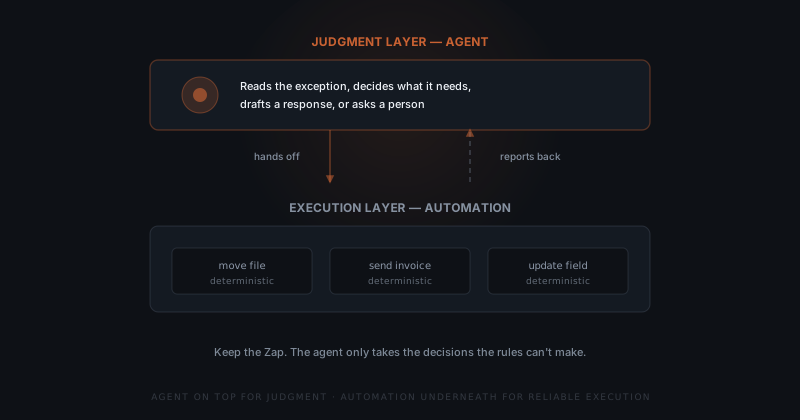
This is why "does an AI agent need a workflow engine?" has a yes underneath it. The agent is good at judgment and bad at doing the same rote step ten thousand times reliably. The workflow engine is the opposite. A well-built system uses each for what it's good at: the agent reads the delayed-order email and decides to hold the order, then triggers the existing automation that updates the record and sends the confirmation. Neither does the other's job.
The hybrid also protects the investment already sunk into automation. A team with a mature Zapier or Make setup does not throw it away — most of those steps are deterministic and working fine. Rebuilding them as agent actions would be slower, costlier, and less reliable. The agent slots in at the two or three points where a human currently has to intervene because the rules ran out. Everywhere else, the automation keeps running untouched.
The cost math favors the hybrid too. Rebuilding a working twenty-step automation as agent actions means re-testing every step for a task the rules already handled correctly. Adding an agent at the two intervention points leaves eighteen working steps in place and scopes the build to the part that was actually broken. The hybrid is not a compromise — it is the cheaper and more reliable design.
Getting the split right is the difference between a system that scales and the 97% of RPA deployments Deloitte found never did. Draw the line in the wrong place — agent doing rote work, or rules attempting judgment — and you inherit the worst of both. Draw it right, and each layer covers exactly what the other can't.
Where the line sits in your workflow
Finding the line is a scoping exercise, and it is specific to your process. The line sits wherever a person currently has to step in because the automation reached an input it had no rule for. Those intervention points are the map of what an agent should take over — and everything else stays automated.
The method is concrete. Walk the workflow and mark every place a human touches it: an exception that gets handled by hand, a message someone reads and routes, a case the Zap kicks out for review. Each of those is a judgment step. Then check the reverse: any place an agent is doing rote, deterministic work that a rule would do faster and cheaper belongs back in automation. The goal is a clean division — which workflows to hand off first follows the same logic of starting where the judgment load is highest.
This is why the fix is an implementation problem, not a purchase. No product knows where your automation runs out of rules — that lives in your specific process, your specific exceptions, the specific points where someone on your team is quietly compensating for what the Zap can't do. Mapping those points, wiring the agent to the tools the workflow already touches, and keeping the deterministic steps in place is the work. What comes out is not a rebuilt system. It is the automation you already have, with judgment added exactly where it was missing.
Frequently asked questions
What is the difference between automation and an AI agent? Automation executes a decision you already made, encoded as a rule: if this happens, do that. An AI agent makes a decision at runtime by reading context and choosing a response, including for inputs no one anticipated. Automation is deterministic and breaks on exceptions it has no rule for. An agent handles ambiguity and messy input, which is exactly where rule-based automation stalls.
Are AI agents and workflow automation the same thing? No. Workflow automation follows a fixed sequence of steps defined in advance, like a Zapier or Make flow. An AI agent decides what to do based on the situation, so it can handle inputs the workflow was never built for. In practice the two work together: the agent makes the judgment call, then hands deterministic steps to the automation underneath. They are layers, not competitors.
Does an AI agent replace my Zapier or Make automations? No. An AI agent usually sits on top of existing automation rather than replacing it. The deterministic steps a Zap already runs reliably — moving a file, sending an invoice, updating a field — stay in the automation. The agent takes only the decisions the rules cannot make, then passes routine execution back down. Keeping the working automation is cheaper and more reliable than rebuilding it as an agent.
When should I use an AI agent instead of automation? Use an AI agent when a task requires judgment on variable or unstructured input: reading an email's intent, deciding how to handle an exception, drafting a context-specific response. Use automation when the task is deterministic and the rules are stable — the same input always produces the same correct output. The clearest signal you have outgrown automation is building a new branch for every edge case and still missing some.
Notes
- Ernst & Young, "Get ready for robots: Why planning makes the difference between success and disappointment," EY, 2016. https://www.ey.com/ — source for the estimate that 30–50% of initial RPA projects fail.
- Deloitte, "Global RPA Survey," Deloitte, 2018. https://www2.deloitte.com/content/dam/Deloitte/us/Documents/process-and-operations/us-cons-global-rpa-survey.pdf — source for the findings that only 3% of organizations have scaled their digital workforce and 78% plan to increase RPA investment.
- MIT NANDA, "The GenAI Divide: State of AI in Business 2025," MIT Project NANDA, 2025. https://mlq.ai/media/quarterly_decks/v0.1_State_of_AI_in_Business_2025_Report.pdf — source for the finding that only ~5% of enterprise AI pilots reached meaningful financial impact and that failed tools could not retain feedback, adapt to context, or improve over time.