You do not need to fill every CRM column before building a narrow AI agent. A candidate follow-up workflow might need only contact name, last interaction date, and deal stage. Readiness depends on the quality of those fields, the access actually granted, and tested handling for missing or conflicting values — not on how tidy the entire database looks.
Which data does a narrowly scoped AI agent read?
A narrowly scoped AI agent can be connected only to the fields its workflow needs. That is a design and access decision, not a universal limitation of AI agents. An agent given broad search or database access may see much more.
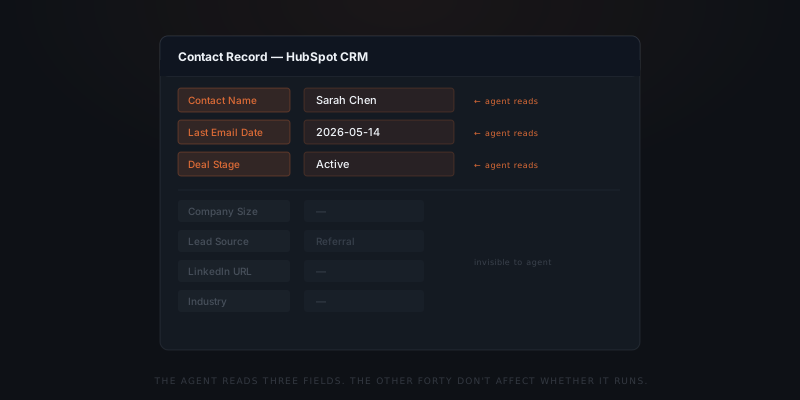
A candidate follow-up agent at a recruiting firm reads three HubSpot fields: contact name, last email date, and deal stage. The agent checks whether last email date is older than seven days and deal stage is still "Active." When both conditions are met, the agent drafts a follow-up email addressed to the contact name.
Other fields — company size, lead source, LinkedIn URL, or industry — can be excluded from this workflow. They are outside its reach only if the connection actually omits them or permissions prevent access. A sentence in a prompt is not an access boundary; test what the configured connection returns.
Why "clean data first" delays the wrong thing
The cleanup framing assumes the agent must examine the whole CRM. A field-limited follow-up workflow does not need that breadth. The team should establish which information changes the decision, rather than treating every empty column as a blocker.
An agent follows a defined read path. The integration specifies which object to query, which fields to pull, and what conditions to check. A contact with a blank LinkedIn URL and an empty company size field runs through the agent identically to a contact with every field populated — as long as the three fields the agent reads are present and consistent.
A CRM cleanup can improve information the chosen workflow never uses. First identify whether last email date and deal stage are reliable enough for the specific follow-up decision. Keep broader cleanup work separate unless it addresses an actual dependency.
Missing or misleading values matter when the workflow uses them. Fields genuinely excluded from the connection do not need to be filled in for this workflow. Check both the data and the actual access boundary before deciding what needs cleanup.
Useful preparation means identifying the required fields, checking representative records, and agreeing what happens when a value is missing. The time needed depends on how many sources, record types, and exceptions the workflow uses.
The real data requirement
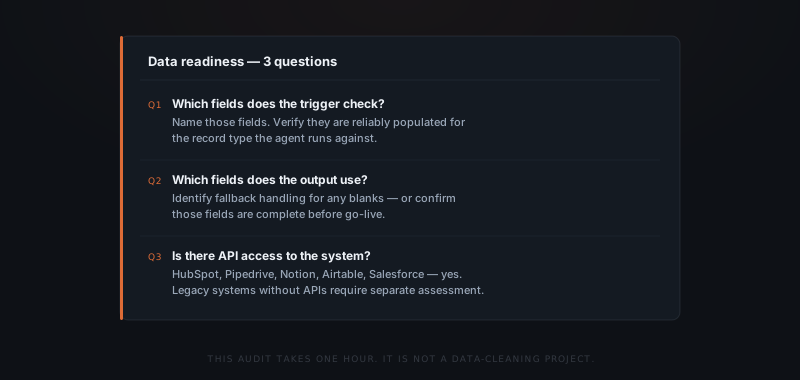
Three questions determine whether data is ready for an agent implementation.
Which fields does the trigger condition check? For a candidate follow-up agent: last email date and deal stage. Missing dates must not silently become permission to send. Define whether to skip the record, ask a person, or use an approved alternative, and enforce that rule before any message is sent.
Which fields does the output use? The agent addresses emails to the contact name field. If that field is blank for some records, the agent uses a fallback — "Hello," or a generic opener. Knowing this before the build determines whether the fallback is acceptable or whether that field needs to be populated before go-live.
Where is the data, and is there an API? If the field the workflow needs is in a spreadsheet rather than a CRM, the integration changes. If the system has no API, the implementation scope changes. Both are knowable in the scoping call before any build work starts.
Check the fields the workflow uses before cleaning every column.
What fields actually matter by workflow type
The fields an agent needs are determined by the workflow — not by the system. The table below shows which fields matter for five common small business workflows, and which fields in the same system are irrelevant to the agent.
| Workflow | System | Fields the agent needs | Fields the agent ignores |
|---|---|---|---|
| Candidate follow-up | HubSpot / Pipedrive | Contact name, last email date, deal stage | Company size, lead source, LinkedIn URL, industry |
| Invoice reminder | Xero / QuickBooks | Invoice amount, client name, due date, payment status | Account history, industry, billing address details |
| Client status update | Notion / Asana | Project name, last update date, status field | Task count, assignee history, file attachments |
| Lead qualification | HubSpot | Lead score or stage field, contact email, name | Deal value estimate, referral source, call log |
| Meeting follow-up | CRM + calendar integration | Meeting date, attendees, deal stage | Previous notes, custom tags, legacy fields |
These are illustrative field lists, not complete specifications for every business. Some workflows also need consent, ownership, currency, or other context. HubSpot documents many default contact properties; the right question is which properties your chosen workflow needs, not a fixed total.[1]
How to audit data readiness before the scoping call
The data readiness audit produces the answers an implementer needs before build work begins. It identifies the required fields, missing-value rules, available access, and records that should remain with a person.
The audit has three steps.
Step one: Map the workflow fields. Write down the workflow trigger, the input data the workflow uses, and the output format. For each piece of information used in the workflow, identify: what field contains it, what system it lives in, and whether that field is reliably populated for the records the agent will run against.
Step two: Check coverage and meaning. Filter for the records the agent will process. Count missing, stale, conflicting, and duplicate values in each required field. Record the coverage, but do not use a universal percentage as permission to launch: one missing consent field may matter more than many missing optional names. Agree acceptable handling for each condition.
Step three: Confirm usable access. Test the chosen connection with the actual account and permissions the workflow will use. A product offering an API does not establish that your account can read the needed fields or perform the required action. Where direct access is unavailable, assess a controlled export or another supported connection before considering migration.
The output is a short list of required fields, measured coverage, access restrictions, and handling rules. It gives the team a specific preparation task rather than an open-ended instruction to clean the entire CRM.
Download the data-readiness checklist (PDF)
When data genuinely blocks implementation
Two data situations genuinely block an implementation — neither is a "messy data" problem.
The required information has no reliable source. A consultancy wants project status updates, but the only status evidence is scattered across Slack threads. An agent can read messages if given access, but that does not make them an authoritative current status. Decide who owns that status, where it is maintained, and how conflicting information is resolved before relying on it.
There is no safe, workable way to access the required information. A legacy system without a supported connection or usable export may need custom work. Assess the options and permissions first. Migration is one possible response, not an automatic prerequisite for every system without an API.
Modern tools can provide workable connections, but availability, account permissions, and data quality still need checking. Use the process-readiness checklist to decide whether the specific workflow is ready.
How do you test missing fields safely?
Use representative records with a complete value, a blank value, a stale value, and a duplicate match. Write down the expected result for each before running the agent. Check that records needing review are held, that the right person receives the exception, and that no live message is sent during the test.
Then verify that the connection returns only the intended information. A correct draft does not prove limited access. Approve live sending only after both the decision rules and the access boundary pass their checks.
Frequently asked questions
Does an AI agent need clean data to work?
A narrow workflow needs reliable information in the fields it actually uses, not a perfectly completed CRM. This advice depends on limiting and testing the connection. Missing, stale, or conflicting values in required fields still need explicit handling.
What data preparation does an AI agent implementation actually require?
Identify the trigger, decision, and output fields; check representative records; confirm usable access; and define what happens when values are missing or contradictory. The work depends on the workflow and cannot be promised as a universal one-hour audit.
What data situation genuinely blocks an implementation?
The workflow cannot safely proceed when it has no reliable source for a required decision or no workable access to that information. Messages, exports, or a custom connection may be usable, but their reliability and permissions must be assessed before relying on them.
If our CRM data is inconsistent, can we still implement?
Often, if the relevant inconsistencies have tested handling rules. Configure the workflow to skip, hold for review, or use an approved alternative before it sends or changes anything. A prompt asking the agent to be careful is not enough.
How do you handle a required field that is blank for some records?
Choose the handling rule during scoping and test it with blank records. If the field controls consent, recipient selection, payment, or another consequential decision, hold the action for review rather than inventing a value.
Should you migrate to a new CRM before implementing AI agents?
Assess the current connection, usable exports, access restrictions, and the wider business reasons for migration first. A new CRM is not automatically required for a narrow workflow, and the absence of an API alone does not settle the decision.
What is the fastest way to verify whether data is ready for implementation?
List the required fields, check a representative sample for missing or misleading values, and test the intended fallback and access rules. There is no universal 80% readiness threshold: the consequence of each missing value matters.
Notes
- HubSpot, "HubSpot’s default contact properties," HubSpot Knowledge Base. The documented properties help identify candidate fields; this article does not claim a fixed property count.