An AI agent for lead generation handles three things: first-contact response, follow-up sequencing, and qualification routing. It does not find new leads, run outbound prospecting, or replace the sales conversation. The gain is not at the top of the funnel — it is in the gap between first contact and first qualified conversation, which is where most B2B service businesses lose leads they already paid to acquire.
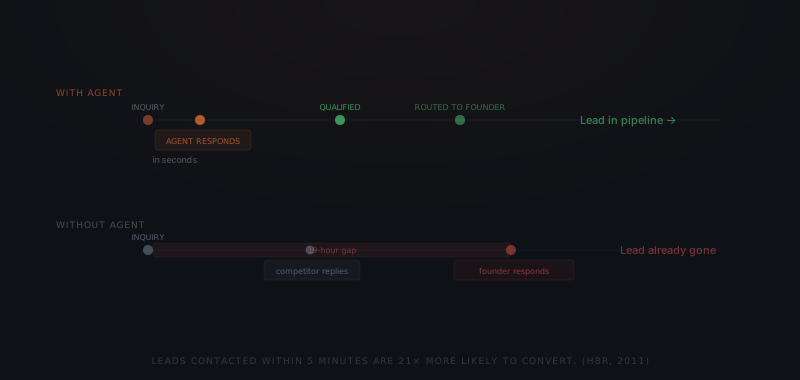
A prospect fills out the contact form on a Tuesday afternoon. The founder sees it Thursday morning — between client calls. By Thursday, the prospect has spoken to two competitors who replied within the hour. The lead was not lost to a better pitch. It was lost to a 19-hour gap. An AI agent for lead generation closes that gap — not by finding new prospects, but by eliminating the response delay that lets qualified leads go cold before a human reaches them.
What does an AI agent for lead generation actually handle?
An AI agent for lead generation — one application of what an AI agent is more broadly — handles the coordination layer between first contact and first conversation. Three jobs fall into that layer.
First-contact response is the first job. When a prospect submits a form, sends an email, or books time on a calendar, the agent responds within seconds — acknowledging the inquiry, confirming next steps, and delivering any qualifying questions defined during setup. The prospect gets a response before moving on. The founder gets a qualified inquiry instead of a cold trail.
Qualification routing is the second job. The agent reads the prospect's response against a defined set of criteria: company size, role, budget range, timeline, or use case. Prospects who meet the criteria get routed to the founder or sales lead for a live conversation. Prospects who do not meet the criteria enter a longer-term nurture sequence — or receive a defined response that closes the inquiry.
Follow-up sequencing is the third job. For prospects who do not respond to the first contact, the agent sends follow-up messages at defined intervals over a defined window. Every message goes through an approval queue before sending — OpenClaw handles this layer, so no message reaches a prospect without a named person releasing it.
Where do qualified leads actually go cold?
Research by Harvard Business School professor James Oldroyd found that leads contacted within five minutes of first inquiry are 21x more likely to enter a sales process than leads contacted after 30 minutes.[1] The same research found that most B2B companies take an average of 19 hours to respond to a new web lead.
The 19-hour gap is not laziness — it is a capacity problem. A founder-led service business with two ongoing client engagements and one sales day per week cannot monitor an inquiry inbox in real time. Leads sit until there is time. By then, most have moved.
The agent does not solve the capacity problem by increasing the founder's availability. The agent eliminates the wait by handling first contact immediately. By the time the founder reviews the inquiry, the prospect has already been acknowledged, qualified, and moved to the appropriate next step.
What does the agent do at each stage of the lead flow?
The agent doesn't fill the top of funnel. It stops the leak in the middle of it.
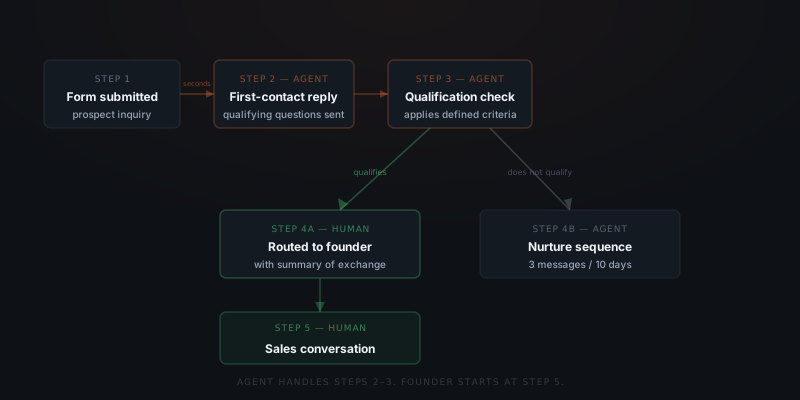
At the trigger stage — form submission, email inquiry, inbound message — the agent responds immediately with a defined first message. The message acknowledges the inquiry, asks one or two qualifying questions, and sets an expectation for next steps. The prospect receives a response that feels timely.
At the qualification stage, the agent reads the prospect's reply and applies the qualification logic defined during setup. If the prospect's company size is too small, the agent follows the defined path for that outcome — which might be a referral, a resource, or a clear decline. If the prospect qualifies, the agent routes the inquiry to the appropriate person with a summary of the exchange.
At the follow-up stage, the agent sends messages at defined intervals to prospects who have not responded. A standard setup runs three messages over ten days: immediate, day three, and day ten. After the window closes, non-responsive leads move to a low-frequency nurture list or are marked as closed.
Standard follow-up cadence for a B2B service business inbound flow:
| Message | Timing | Purpose | Sequence continues if |
|---|---|---|---|
| First contact | Within seconds of inquiry | Acknowledge, confirm next steps, deliver 1–2 qualifying questions | Prospect has not replied within 72 hours |
| Day 3 follow-up | 72 hours after first contact | Check-in — resurface the original question or add a relevant angle | Prospect still hasn't replied after 7 more days |
| Day 10 final | 10 days after first contact | Final outreach — leave the door open clearly | No reply means move to long-cycle nurture or close |
Hermes handles the workflow coordination at the trigger and qualification stages — parsing the inquiry, applying the qualification logic, routing the outcome. OpenClaw holds every outbound message in a review queue until a named person releases it.
What needs to be defined before deploying a lead generation agent?
A lead generation agent requires a written qualification definition before deployment. Without a rule for what counts as qualified, the agent follows up equally on every inquiry — including prospects who already disengaged or are clearly outside the target. Define the criteria before the agent goes live.
Three things need to be written down before an agent touches lead flow.
Qualification criteria. What makes a lead worth routing to a human conversation? Define specific conditions: company size, role, industry, urgency, budget range. The agent applies these criteria literally. Every ambiguous case — a prospect who meets three of four conditions — needs a defined path.
Routing rules. Where does a qualified lead go? Who receives the notification? What happens if that person is unavailable? Define a primary and a fallback. An agent that routes to an inbox nobody monitors has moved the capacity problem, not solved it.
Follow-up window and cadence. How many messages over how many days? When does a non-responsive prospect move to nurture or close? The agent executes whatever schedule is defined — it makes no editorial judgment about when to stop.
Common qualification models and how the agent applies each:
| Qualification model | Key criteria | How the agent applies it | Outcome paths |
|---|---|---|---|
| Company size and role | Employees 10–200, owner or director-level role | Reads form fields or asks directly in the first message | Qualified → route to founder; Too small → defined decline; Wrong role → refer elsewhere |
| BANT (Budget, Authority, Need, Timeline) | Budget above threshold, decision-making authority, clear stated problem, buying within 90 days | Delivers qualifying questions in sequence, evaluates replies | All four met → route; Partial match → extended nurture; No match → close |
| Industry and use case | Target industries defined during setup, specific workflow problem stated | Matches form data against target list | Matched → route; Outside target → long-cycle nurture |
| Engagement readiness | Replied to first message, answered qualifying questions, expressed urgency | Tracks reply count and content signals across the follow-up window | Active and engaged → route; Passive → 10-day sequence; Silent → close |
For guidance on writing agent instructions that produce consistent qualification logic, see how to brief an AI agent. For a framework on how lead response fits into a broader agent rollout sequence, see which workflows to automate first.
How do you configure a lead generation agent?
Write the qualification criteria before touching the tools
Define what "qualified" means in specific, measurable terms: company size range, role type, industry, stated problem, budget signal, timeline. Every ambiguous case needs a defined path. A qualification definition with exceptions left unresolved becomes an agent that routes everything to the founder.
Define routing rules and the fallback
Name who receives qualified lead notifications, through which channel (Slack, email, or a CRM task), and what happens if that person is unavailable. An agent that routes to an inbox nobody monitors has moved the capacity problem, not solved it.
Set the follow-up cadence and exit window
Define how many messages, at what intervals, and when the window closes. The default for B2B service businesses: three messages over ten days. After the window, define whether non-responsive leads move to a long-cycle nurture list or are marked closed in the CRM.
Map all lead sources
List every channel where new inquiries arrive: contact form, email, calendar booking, LinkedIn message, referral email. The agent only handles the sources it is connected to. Any channel outside the setup receives no coverage.
Connect CRM, inbox, and lead capture forms
Grant the agent read access to inbound lead form data and inbox threads. Grant write access only to CRM contact records and activity log fields. Connect form webhooks for immediate trigger detection on submission.
Configure the approval queue and message templates
Every outbound message routes through an approval queue — no message reaches a prospect without a named person releasing it. Write one template per message in the sequence. Templates provide tone consistency; the agent personalises using form data and CRM context.
What integrations does a lead generation agent connect to?
| Platform | Role in the workflow | Access required |
|---|---|---|
| HubSpot | Lead records, qualification logging, routing notifications | Read contacts, write qualification status and activity log |
| Salesforce | CRM lead tracking and interaction history | Read/write lead record and activity |
| Pipedrive | Deal and contact pipeline management | Read/write deal and contact |
| Typeform / Jotform / website form | First-contact inquiry capture | Webhook — form submission triggers agent response |
| Gmail / Outlook | Inbound inquiry detection, follow-up send from real address | OAuth — reads threads, sends on approval |
| Slack | Routing notification when a qualified lead needs founder review | Webhook — notification only |
| OpenClaw | Approval layer — every outbound message held until a named person releases it | Platform integration — agent sends to OpenClaw queue; nothing reaches prospect without approval |
Where do lead generation agent implementations fail?
Five failure modes appear consistently across lead generation agent deployments.
Qualification criteria too broad. Every inquiry gets routed as qualified because the criteria were written as "interested in working with us" rather than specific conditions. The founder receives notifications for every form submission. The agent has not filtered — it has just forwarded. Rewrite qualification criteria before go-live with at least three specific, binary conditions.
No exit criteria defined. The agent follows up indefinitely with prospects who clearly disengaged weeks ago. Without a defined window and a defined close action, the sequence has no end. Every prospect eventually receives another message. Define when to stop and what happens to a prospect when the window closes.
Routing to an unmonitored channel. The agent sends qualified lead notifications to a Slack channel or email inbox that the founder checks weekly. The lead is qualified and notified within minutes. The founder sees it three days later. Routing notification only solves the problem if the recipient is reachable within the required window.
First message tone too sales-heavy. The agent's first-contact message leads with pitch language rather than acknowledgement. The prospect, who submitted a general inquiry, receives a message that feels pushy before they have even had a conversation. The first message should acknowledge, confirm next steps, and ask one or two questions — not sell.
Agent follows up while founder is already in conversation. The prospect replied to a direct email from the founder, not to the agent's monitored thread. The agent does not detect the reply and sends the day-3 follow-up into the middle of an ongoing conversation. The prospect receives two simultaneous outreach threads from the same business. Ensure inbox read access covers all threads where the prospect might reply — not only the agent-initiated thread.
Where does the agent stop and a person take over?
Every message this agent sends starts from a defined qualification rule or a scheduled follow-up step, which is why the coordination work — reading an inquiry, applying the qualification criteria, drafting the next message in the sequence — runs without a person re-deciding each one. Every drafted message still clears the approval queue before it reaches a prospect. But there's a further category the agent is scoped to catch: situations where it doesn't just queue a draft, it stops the sequence and hands the inquiry to a person, because the reply falls outside what the qualification logic or the follow-up templates were built to handle.
| Workflow | Runs automatically | Escalates to staff |
|---|---|---|
| First-contact response | Acknowledgment and qualifying questions sent within seconds of the inquiry | Prospect's reply raises a question, objection, or urgent issue the acknowledgment template doesn't cover |
| Qualification routing | Reading the prospect's answers against defined criteria and routing clear matches to the founder or sales lead | Prospect is a partial or ambiguous match — meets some but not all of the stated criteria |
| Disqualification | Sending the defined decline or referral message to leads outside the target profile | Prospect disputes the disqualification or asks for an exception to the stated criteria |
| Follow-up sequencing | Day-3 and day-10 messages drafted and queued for approval on schedule | Prospect replies mid-sequence with a question, objection, or a request the templates don't cover |
| Nurture / close-out | Moving non-responsive leads to the long-cycle nurture list or marking them closed after the window | Prospect asks to be removed entirely or flags the outreach as unwanted |
| CRM logging | Updating lead status, activity log, and qualification outcome | The record conflicts with an existing open deal or a conversation the founder is already having directly |
Qualification overrides, custom pricing, contract terms, and any exception to the stated criteria are decisions the agent never makes on its own — those route to the founder or sales lead, with the inquiry and its full history attached. The agent's job on every one of these paths is the same: recognize when a reply doesn't match the defined logic, stop, and hand it to a person instead of guessing at the next step.
Frequently asked questions
What does an AI agent for lead generation actually do? A lead-generation agent owns the gap between first contact and a qualified conversation: replying to new inquiries right away, sending qualifying questions, routing prospects by the criteria you define, and following up with leads who go quiet. Sourcing brand-new leads, cold outbound, and the sales conversation itself are not on its plate — those stay with your team.
Does a lead generation agent replace a CRM? No — a lead generation agent works with the CRM, not instead of it. The agent reads from and writes to the CRM through an integration, updating lead status, logging contact records, and noting qualification outcomes. Common integrations include HubSpot, Pipedrive, and Salesforce.
How do you prevent the agent from following up with disqualified prospects? Write specific exit criteria before deployment. Define what a disqualified lead looks like — company size too small, role without buying authority, budget below threshold — and define the outcome for each disqualification type. Without written exit criteria, the agent follows up on every inquiry equally.
How long does it take to implement a lead generation agent? A focused implementation covering first-contact response, qualification routing, and a three-message follow-up sequence takes three to five weeks. The first two weeks cover qualification logic definition and CRM integration setup. The following weeks cover message drafting, approval queue configuration, and testing against real inquiries.
Notes
- James Oldroyd, Kristina McFarland, and Scott Tanner, "The Short Life of Online Sales Leads," Harvard Business Review, March 2011. https://hbr.org/2011/03/the-short-life-of-online-sales-leads